
1. پیژندنه
Thank you for choosing the FLEXISPOT L-Shaped Electric Standing Desk. This manual provides essential information for the safe assembly, operation, and maintenance of your new desk. Please read these instructions carefully before use and retain them for future reference. This desk is designed to provide a versatile and ergonomic workspace, allowing seamless transitions between sitting and standing positions.
2. د خوندیتوب لارښوونې
د خوندي عملیاتو ډاډ ترلاسه کولو او د ټپي کیدو یا زیان مخنیوي لپاره، مهرباني وکړئ لاندې خوندیتوب لارښوونې په پام کې ونیسئ:
- ډاډ ترلاسه کړئ چې ټولې برخې د کارونې دمخه په خوندي ډول تړل شوي.
- د کار پرمهال ماشومان او څاروي له میز څخه لرې وساتئ.
- Do not place hands or other body parts near moving parts of the desk frame.
- Avoid overloading the desk. The maximum load capacity is 80 kg.
- په میز مه کښېنئ یا مه ودریږئ.
- میز یوازې په وچ چاپیریال کې د کور دننه وکاروئ.
- د پاکولو یا ساتنې څخه دمخه بریښنا قطع کړئ.
- که چیرې کومې برخې زیانمنې یا ورکې وي، نو سمدلاسه د پیرودونکو ملاتړ سره اړیکه ونیسئ. د میز د ترمیم هڅه مه کوئ.
3. د بسته محتويات
Please verify that all parts are present and undamaged before beginning assembly. Refer to the assembly diagram for a complete list of components.
- L-Shaped Desktop (2 parts)
- 4-Leg Frame (Dual Motor Mechanism)
- هوښیار کنټرول پینل
- د بریښنا اډاپټر او کیبلونه
- د اسمبلۍ هارډویر (پیچونه، وسایل، او نور)
- د کارن لارښود
4. تنظیم او مجلس
د اسمبلۍ لپاره معمولا دوه کسانو ته اړتیا وي. دا ګامونه په دقت سره تعقیب کړئ:
- اجزا خلاص کړئ: په احتیاط سره د بسته بندۍ ټولې برخې لرې کړئ او په نرم، پاک سطح یې واچوئ ترڅو د سکریچونو مخه ونیول شي.
- Assemble the 4-Leg Frame: Connect the frame components according to the included diagram. Ensure all bolts are tightened securely. The 4-leg design provides enhanced stability.
- Install Dual Motor Mechanism: The dual motor system is integrated into the frame. Ensure all motor connections are secure. This mechanism allows for smooth and precise height adjustments.
- د ډیسټاپ پینلونه ضمیمه کړئ: Carefully place the two desktop panels onto the assembled frame. Align the pre-drilled holes and secure the desktop to the frame using the provided screws. The L-shaped design offers ampد کار ځای.
- د کنټرول پینل نصبول: Attach the intelligent control panel to the underside of the desktop in an easily accessible location. Connect the control panel cable to the main control box.
- بریښنا وصل کړئ: Plug the power adapter into the control box, then plug the power cord into a standard electrical outlet.
- لومړنی بیا تنظیم کول: After connecting power, perform an initial reset. Press and hold the 'Reset' button (usually marked with a circular arrow) until the desk reaches its lowest position and then slightly rises. This calibrates the desk.
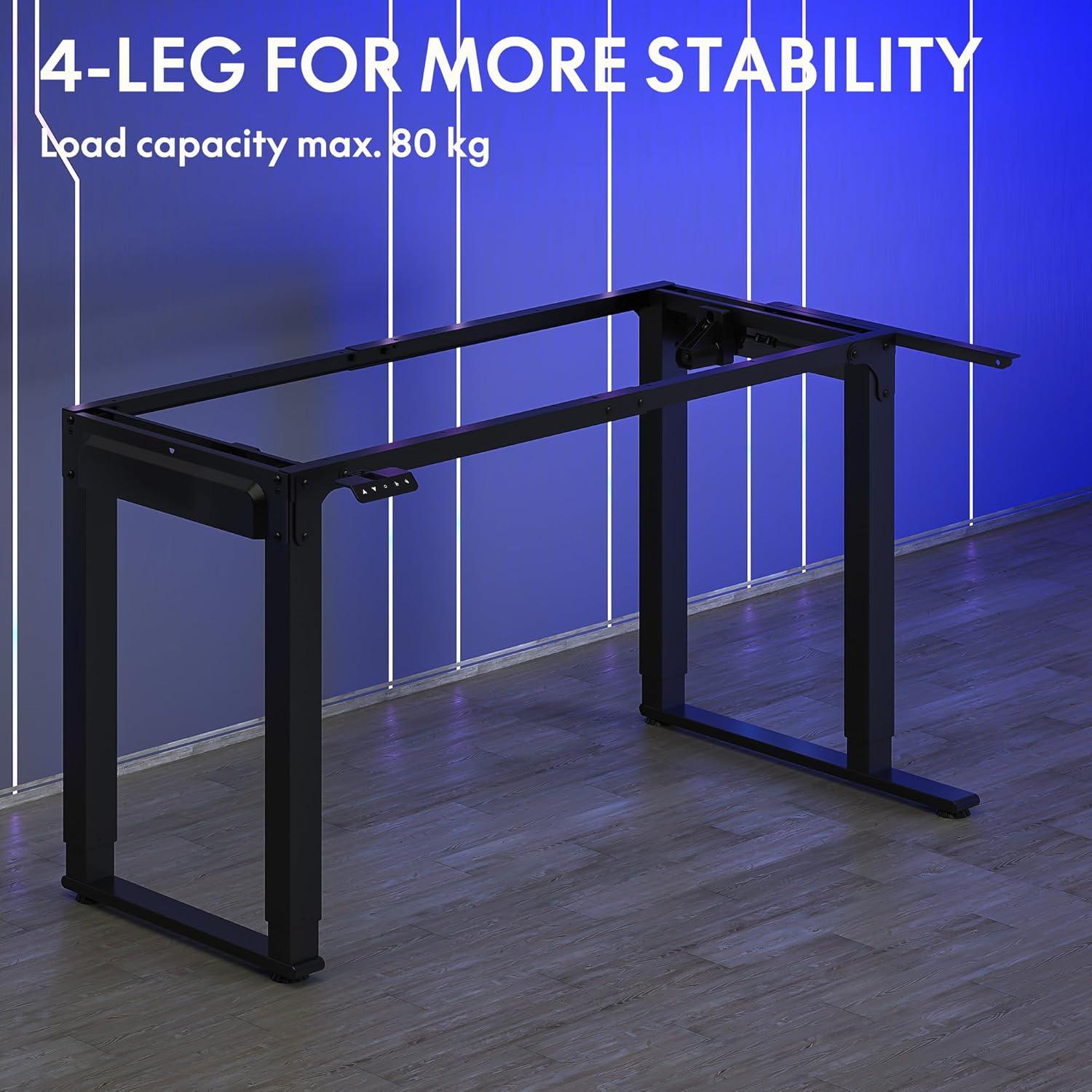
Image: The robust 4-leg frame provides superior stability for the L-shaped standing desk.

Image: Detail of the dual-motor mechanism, ensuring accurate and smooth height positioning.
5. عملیاتي لارښوونې
Your FLEXISPOT L-Shaped Electric Standing Desk features an intelligent control panel for easy height adjustment and memory presets.
5.1 د کنټرول پینل دندې

Image: The intelligent control panel with clearly labeled buttons for desk operation.
- پورته/ښکته تڼۍ (▲ / ▼): Press and hold to continuously adjust the desk height up or down. Release to stop at the desired height.
- Reset Button (↺): Used for initial calibration or to reset the desk if an error occurs. Press and hold until the desk moves to its lowest point and slightly rises.
- Sitting Preset Button (👭): Press to automatically move the desk to your programmed sitting height.
- Standing Preset Button (👭 with upward arrow): Press to automatically move the desk to your programmed standing height.
۴.۲ د حافظې پریسیټونه تنظیم کول
To save your preferred sitting or standing height:
- د پورته/ښکته تڼیو په کارولو سره میز د خپلې خوښې لوړوالي سره سم تنظیم کړئ.
- Press and hold the desired preset button (Sitting or Standing) for approximately 3-5 seconds until you hear a beep or see the display flash. This indicates the height has been saved.

Image: The desk can be adjusted from a minimum height of 72cm to a maximum of 117cm.

Image: The spacious L-shaped desktop (180cm x 110cm) provides ample room for multiple computers and accessories.
6. ساتنه
Regular maintenance ensures the longevity and optimal performance of your desk.
- پاکول: ډیسټاپ او چوکاټ د نرم، d سره پاک کړئamp ټوکر. د سختو کیمیاوي موادو یا د کثافاتو پاکوونکو څخه ډډه وکړئ.
- معاینه: ټول پیچونه او اړیکې په دوره یي ډول وګورئ ترڅو ډاډ ترلاسه شي چې دوی کلک دي. که اړتیا وي نو بیا یې ټینګ کړئ.
- د کیبل مدیریت: Ensure power cables and other device cables are properly managed to prevent entanglement or damage during height adjustments.
- د موټرو پاملرنه: The dual motors are designed for durability. Avoid obstructing the desk's movement or exceeding the weight limit to prevent strain on the motors.

Image: The desk features safe and stylish rounded corners.
7. ستونزه حل کول
که تاسو په خپل میز کې ستونزې سره مخ شئ، لاندې عامې ستونزې او حل لارې وګورئ:
| ستونزه | احتمالي لامل | د حل لاره |
|---|---|---|
| مېز نه حرکت کوي. | Power cable disconnected; Control panel cable loose; Overload protection activated. | Check power connections; Ensure control panel cable is secure; Reduce weight on desk and perform a reset. |
| میز په نا مساوي ډول حرکت کوي یا غیر معمولي غږ کوي. | Unbalanced load; Loose connections; Obstruction. | Distribute weight evenly; Check and tighten all frame connections; Remove any obstructions. Perform a reset. |
| د لوړوالي مخکیني سیټونه کار نه کوي. | پریسیټونه په سمه توګه خوندي شوي ندي. | Re-save the desired height by holding the preset button until confirmation. |
| میز د حرکت په منځ کې ودریږي. | Overload protection; Overheating protection. | Reduce weight on the desk. Allow the desk to cool down for 20-30 minutes if it has been used continuously. |
که چیرې د دې حلونو له هڅه کولو وروسته هم ستونزه دوام ومومي، مهرباني وکړئ د FLEXISPOT پیرودونکو ملاتړ سره اړیکه ونیسئ.
8. مشخصات
| فیچر | تفصیل |
|---|---|
| د ماډل شمیره | QS2LB-1811 |
| برانډ | FLEXISPOT |
| د میز ډول | د L شکل برقی سټینډینګ میز |
| د موټرو ډول | دوه ګونی موټور |
| د چوکاټ ډول | 4-Leg Frame |
| د لوړوالی تنظیم کولو سلسله | له 72 سانتي مترو څخه تر 117 سانتي مترو پورې |
| د ډیسکټاپ ابعاد (L x W) | 180 cm x 110 cm |
| د اعظمي بار ظرفیت | 80 کیلو ګرامه |
| د شور کچه | < 50 dB |
| مواد | د الیاژ فولاد (چوکاټ) |
| رنګ | تور |
| د توکي وزن | 30 کیلوګرامه |
9. تضمین او ملاتړ
FLEXISPOT products are designed for quality and durability. For specific warranty information, please refer to the warranty card included with your purchase or visit the official FLEXISPOT website. If you require technical assistance, have questions about assembly, or need to report a missing/damaged part, please contact FLEXISPOT customer support directly. Ensure you have your model number (QS2LB-1811) and purchase details available when contacting support.
د اړیکو معلومات: Please refer to the contact details provided on the FLEXISPOT official webد خورا تازه ملاتړ چینلونو لپاره سایټ یا ستاسو د پیرود اسناد.