
Star Micronics MCL32CBI
د سټار مایکرونکس mC-Label3 MCL32CBI مستقیم حرارتي پرنټر کارونکي لارښود
Model: MCL32CBI
پیژندنه
This manual provides essential information for the setup, operation, maintenance, and troubleshooting of your Star Micronics mC-Label3 MCL32CBI Direct Thermal Printer. Please read this manual thoroughly before using the printer to ensure proper and safe operation.
د بسته محتويات
ډاډ ترلاسه کړئ چې لاندې ټول توکي ستاسو په بسته کې شامل دي:
- mC-Label3 Multifunctional Printer
- AC اډاپټر
- د بریښنا کیبل
- USB Cables (C-C 1.0m and C-A 1.8m)
- LAN کیبل (1m)
- Simple Setup Sheet Safety Guide

انځور: مخکینۍ برخه view of the Star Micronics mC-Label3 printer, showcasinد دې کمپیکټ ډیزاین او د لیبل محصول سلاټ.
چمتو کول
۳.۱. د پرنټر سره نښلول
The mC-Label3 MCL32CBI printer offers multiple connectivity options:
- USB-C: Connect the printer directly to your PC, Android, or iOS device using the provided USB-C to USB-C or USB-C to USB-A cables.
- ایترنیټ (LAN): For network connectivity, connect the printer to your router or network switch using the supplied LAN cable.
- بلوتوث: The MCL32CBI model supports Bluetooth connectivity for iOS and Android devices. Ensure Bluetooth is enabled on your device and pair with the printer.

انځور: شاته view of the mC-Label3 printer, highlighting the LAN, USB, and power ports for various connection types.
2. رسنۍ لوستل
The printer supports various media types, including linerless labels, die-cut labels, continuous labels, and thermal receipt paper.
- Open the top cover of the printer by lifting the latch.
- Place the media roll into the media compartment, ensuring the leading edge feeds out from the top.
- Pull a small amount of media past the print head and close the top cover securely.
- Ensure the media is properly aligned within the guides.

انځور: پورته-ښکته view of the mC-Label3 printer with its cover open, illustrating the internal mechanism for loading thermal paper or label rolls.
عملیاتي لارښوونې
1. بریښنا کول/بندول
Connect the power cable to the printer and a power outlet. Press the power button located on the front of the printer to turn it on. The status indicator light will illuminate.
2. Printing Labels and Receipts
The mC-Label3 MCL32CBI printer is designed for efficient label and receipt printing. It supports various applications and cloud services.
- د سافټویر مطابقت: Works seamlessly with PC, Android, and iOS applications.
- د کلاوډ خدمتونه: Utilize Star Micronics Cloud Services to design and manage labels.
- One Touch Label: This feature allows storing pre-made receipts and labels for quick and easy printing directly from the printer.
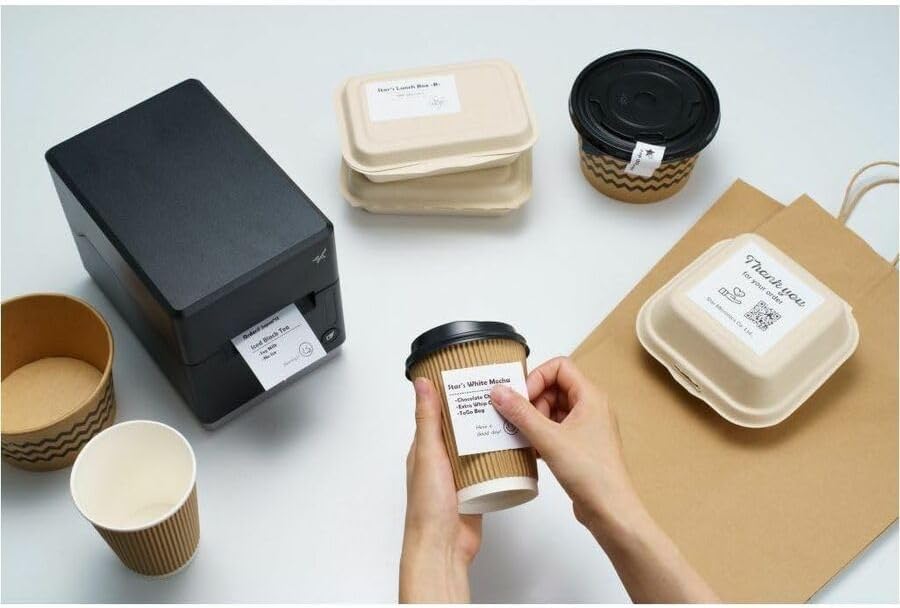
Image: A hand pressing the feed button on the mC-Label3 printer, demonstrating the printing of a 'Thank you' label.

Image: The mC-Label3 printer shown in a practical setting, printing labels for food containers and coffee cups, illustrating its versatility.
ساتنه
1. د چاپګر پاکول
Regular cleaning ensures optimal performance and extends the life of your printer.
- د نرم، لینټ پاک ټوکر څخه کار واخلئampد چاپ سر پاکولو لپاره د ایزوپروپیل الکول سره پوښل شوی.
- د پرنټر بهرنۍ برخه د نرم، وچ ټوکر سره پاک کړئ.
- د کثافاتو پاکونکو یا محلولونو کارولو څخه ډډه وکړئ.
2. Replacing Media
When the media roll is depleted, follow the media loading instructions in the Setup section to replace it.
3. Effortless Repairs
The mC-Label3 is designed for effortless, no-tools-required repairs with minimal upkeep, simplifying any necessary component replacements.
د ستونزو حل کول
دا برخه د هغو عامو ستونزو حلونه وړاندې کوي چې تاسو ورسره مخ کیدی شئ.
| ستونزه | احتمالي لامل | د حل لاره |
|---|---|---|
| پرنټر نه چالانېږي | د برېښنا کیبل نه دی وصل شوی؛ د برېښنا د رسولو ستونزه | ډاډ ترلاسه کړئ چې د بریښنا کیبل په خوندي ډول وصل دی؛ د بریښنا بل سوري هڅه وکړئ. |
| د چاپ محصول نشته | Out of media; Media loaded incorrectly; Driver issue | Load new media; Re-load media correctly; Reinstall printer drivers. |
| د چاپ کیفیت خراب دی | Dirty print head; Low quality media | Clean the print head; Use recommended thermal media. |
| د ارتباط مسلې | Incorrect cable connection; Bluetooth not paired; Network configuration | Check USB/Ethernet cables; Re-pair Bluetooth; Verify network settings. |
مشخصات
| فیچر | تفصیل |
|---|---|
| د ماډل نوم | mC-Label3 |
| د توکي ماډل شمیره | MCL32CBI |
| د چاپ ټیکنالوژي | مستقیم حرارتي |
| د چاپګر محصول | مونوکروم |
| د اعظمي چاپ سرعت مونوکروم | 23 ppm |
| د تور او سپین چاپ اعظمي ریزولوشن | ۲۰۳ ډي پي آی (۲۰۳ x ۲۰۳ ډي پي آی) |
| چاپي رسنۍ | Labels (Linerless, Die-Cut, Continuous), Thermal Receipt |
| د ارتباط ټیکنالوژي | Bluetooth, Wired (USB, Ethernet) |
| هډوتري برسیر | USB ، ایترنیټ |
| مطابقت لرونکې وسیلې | PC, Android, iOS |
| د کنټرولر ډول | iOS، Android |
| د محصول ابعاد | ۶۳" ژوروالی x ۵۵.۲" ژوروالی x ۳۰.۲۴" ژوروالی (۱۶۰ x ۱۴۰.۲ x ۷۶.۸ سانتي متره) |
| د توکي وزن | ۶ پونډه (۳ کیلو ګرامه) |
| د حافظې د ذخیره کولو ظرفیت | 64 MB |
| رنګ | تور |
| جوړونکی | STAR MICRONICS |
| د اصلي هیواد | چین |
د تضمین معلومات
The Star Micronics mC-Label3 MCL32CBI printer comes with a manufacturer's warranty. For specific terms and conditions, please refer to the warranty card included in your package or visit the official Star Micronics webسایټ
د تضمین ډول: جوړونکی
ملاتړ
For further assistance, technical support, or to download the latest drivers and firmware, please visit the official Star Micronics support webسایټ یا د دوی پیرودونکي خدمت سره اړیکه ونیسئ.
Star Micronics Official Webسایټ: www.starmicronics.com
د ملاتړ لینک: www.starmicronics.com/support
Ask a question about this manual
Ask about setup, troubleshooting, compatibility, parts, safety, or missing instructions. Manuals+ will review the question and use this page’s manual context to help answer it.