
1. محصول ختم شوview
The BN-LINK Multi Plug Outlet Extender is designed to expand your power options, providing multiple AC outlets and USB charging ports from a single wall socket. This device is ideal for home, office, or travel use, ensuring all your electronic devices can be powered and charged efficiently and safely.
- 8 AC دکانونه: Expands two wall outlets into eight, allowing simultaneous power for multiple appliances.
- 3 د USB چارج کولو بندرونه: Includes 1 USB-C port (up to 5V/3A) and 2 USB-A ports (up to 5V/2.4A per port), with a total USB output of 5V/3.4A for fast charging.
- د 800 جول سرج محافظت: Built-in surge protector safeguards your devices against voltage spikes. A 'Protected' LED indicator confirms active protection.
- باثباته ډیزاین: Features 1.77-inch wide-spaced AC outlets to accommodate larger plugs without blocking adjacent outlets. A removable stabilizing plastic prong on the back ensures secure mounting.
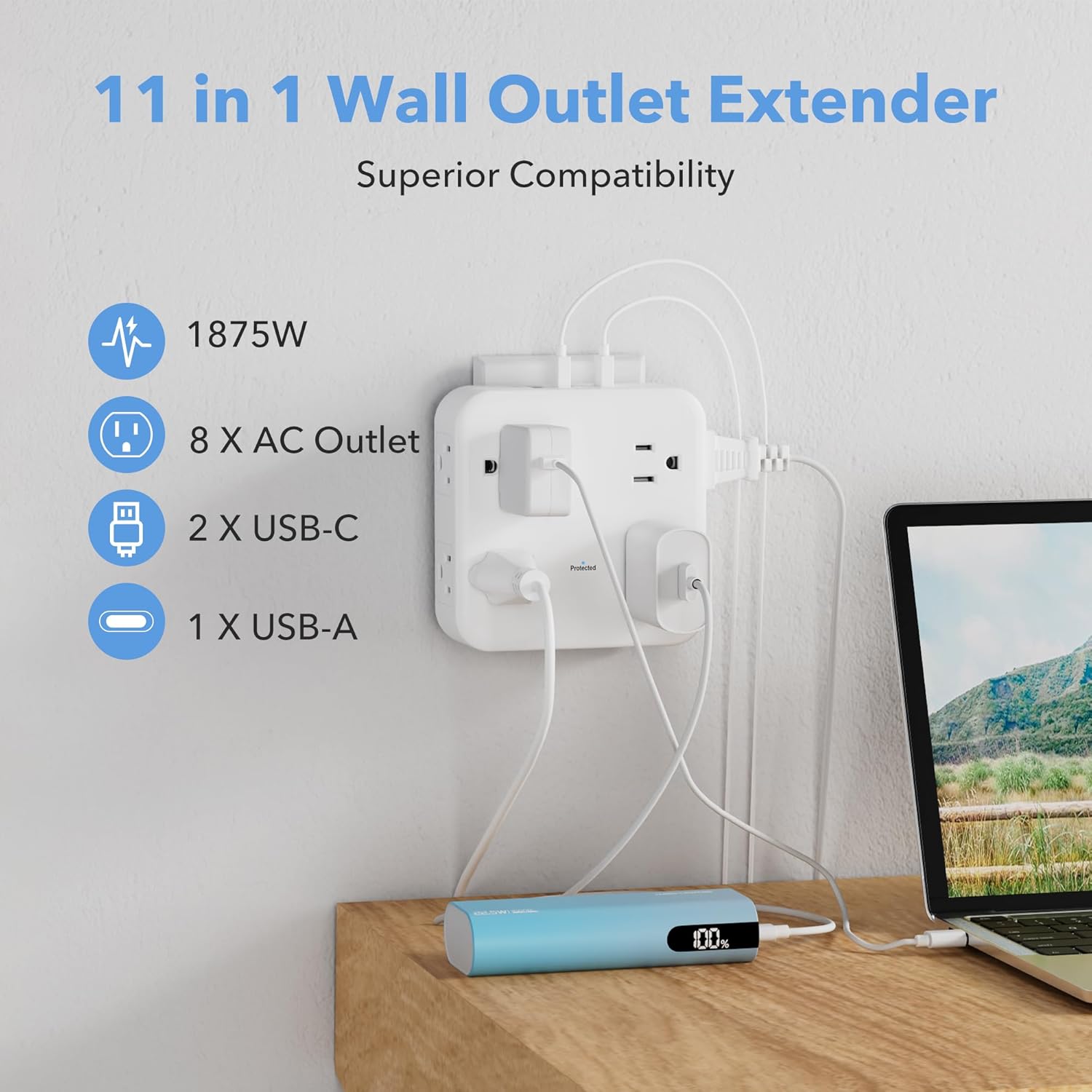
شکل ۱: محصول ختم شوview - The BN-LINK Multi Plug Outlet Extender provides 8 AC outlets and 3 USB ports, shown powering various devices including a laptop and a power bank.
2. ترتیب او نصب کول
Follow these steps to properly install and set up your BN-LINK Multi Plug Outlet Extender:
- وسیله معاینه کړئ: Before installation, ensure the extender is free from any damage.
- آوټ لیټ چمتو کړئ: Identify a standard duplex wall outlet (125V/15A) for installation.
- Stabilizing Rod (Optional): The extender features a stabilizing plastic prong on the back. For standard duplex outlets, this prong helps secure the device. If installing into a GFCI outlet or a USB receptacle, this prong can be carefully cut off to ensure a flush fit.
- نښلول: Insert the three-prong plug of the extender fully into the top receptacle of your chosen wall outlet. Ensure a snug fit.
- د خوندیتوب تصدیق: Once plugged in, the 'Protected' LED indicator light on the front of the extender will illuminate, confirming that the surge protection is active and your devices are safeguarded.

Figure 2: Stabilizing Rod - The removable stabilizing rod ensures compatibility with various outlet types, including standard, decor, USB receptacle, and GFCI outlets.
Video 1: Installation Guide - This video demonstrates the proper way to install the BN-LINK Wall Outlet Extender, including how to use or remove the stabilizing rod for different outlet types.
3. عملیاتي لارښوونې
Once installed, the BN-LINK Multi Plug Outlet Extender is ready for use. Simply plug your devices into the available AC outlets or USB ports.
د AC ساکټونو کارول:
- The extender provides 8 AC outlets (125V/15A, 1875W Max).
- The outlets are widely spaced (1.77 inches apart) to prevent larger power adapters from blocking adjacent ports.
- Plug your appliances, lamps, or other electronic devices directly into any of the 8 AC outlets.
د USB چارج کولو پورټونو کارول:
- The extender includes 3 USB ports: 1 USB-C and 2 USB-A.
- The USB-C port supports up to 5V/3A.
- Each USB-A port supports up to 5V/2.4A.
- The total combined output for all USB ports is 5V/3.4A.
- Connect your smartphones, tablets, smartwatches, wireless earbuds, and other USB-powered devices using appropriate USB cables.

Figure 3: USB Charging - The extender's USB-C and USB-A ports provide efficient charging for various mobile devices.
4. Features and Safety
The BN-LINK Multi Plug Outlet Extender is built with user convenience and safety in mind.
د زیاتوالي ساتنه:
- Equipped with an 800 Joules surge protector to shield your electronics from sudden power surges and spikes.
- The 'Protected' LED indicator light confirms that the surge protection is active. If this light goes out, the surge protection has been compromised, and the unit should be replaced.
Wide Spacing:
- The 1.77-inch spacing between AC outlets allows for the use of bulky power adapters without obstructing other outlets, maximizing usability.

Figure 4: Wide Spacing Advantage - This image illustrates how the 1.77-inch wide spacing of the BN-LINK extender's outlets prevents larger plugs from blocking adjacent ports, unlike standard designs.
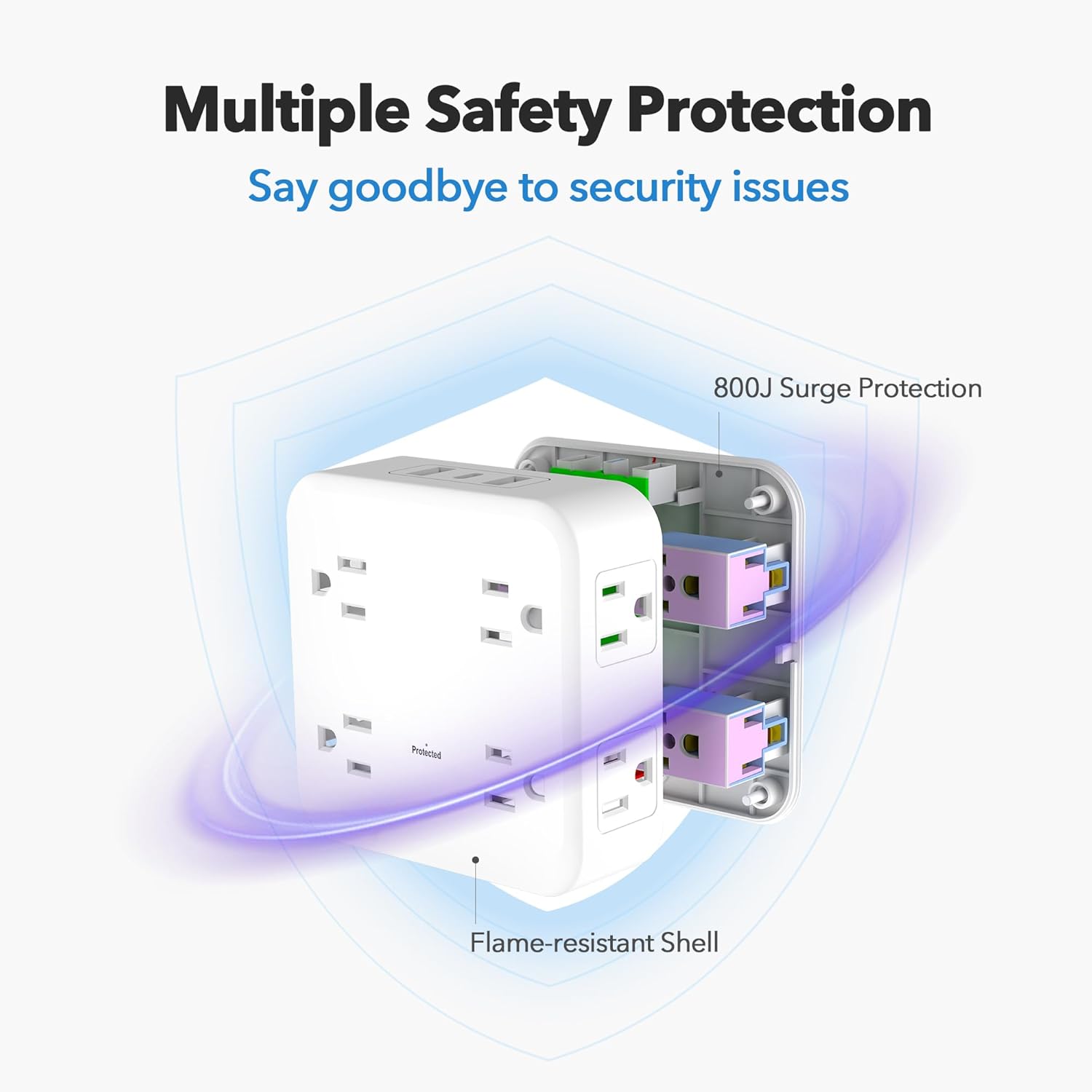
Figure 5: Safety Features - An internal view highlighting the 800 Joules surge protection and flame-resistant shell for enhanced device and user safety.
ویډیو ۶.۱: د محصول ځانګړتیاوې پای ته ورسېدېview - This video provides a comprehensive look at the features of the BN-LINK Multi Plug Outlet Extender, including its 8 outlets, 3 USB ports, and surge protection.
5. مشخصات
| صفت | ارزښت |
|---|---|
| برانډ | BN-LINK |
| ماډل | CP-C187 |
| رنګ | سپین |
| درجه بندي Voltage | 125 ولټه |
| Ampزمانه | 15 Amps |
| اعظمي بار | 1875W |
| فریکونسی | 60Hz |
| د برښنا ټول ټالونه | 8 AC آوټ لیټونه |
| USB بندرونه | ۴ USB-C، ۱ USB-A |
| د USB-C محصول | تر 5V/3A پورې |
| USB-A Output (per port) | تر 5V/2.4A پورې |
| ټول USB محصول | 5V/3.4A |
| د سرو محافظت | 800 جول |
| مواد | پولی کاربونیټ (PC) |
| د محصول ابعاد | ۴.۴"لیتر x ۲.۲"واټه |
| د بریښنا پلګ ډول | ډول B - ۳ پنونه (شمالي امریکا) |
| د کارونې چاپیریال | یوازې د داخلي او وچو ځایونو لپاره کارول کیږي. |
6. ساتنه
To ensure the longevity and safe operation of your BN-LINK Multi Plug Outlet Extender, follow these maintenance guidelines:
- پاکول: Disconnect the extender from the wall outlet before cleaning. Use a dry, soft cloth to wipe the exterior. Do not use liquid cleaners or abrasive chemicals.
- چاپیریال: Use the extender only in indoor and dry locations. Avoid exposure to moisture, high humidity, or extreme temperatures.
- معاینه: Periodically inspect the extender for any signs of damage, such as frayed cords, loose connections, or discoloration. If any damage is found, discontinue use immediately and contact customer support.
- د اوورلوډ مخنیوی: Do not exceed the maximum electrical rating of 1875W/15A. Overloading can cause damage to the unit and connected devices, and poses a fire hazard.
7. ستونزه حل کول
If you encounter issues with your BN-LINK Multi Plug Outlet Extender, refer to the following troubleshooting tips:
- وسایلو ته هیڅ ځواک نشته:
- Ensure the extender is fully and securely plugged into the wall outlet.
- Check if the 'Protected' LED indicator light is on. If it's off, the surge protection may have been tripped or damaged.
- Verify that the connected devices are properly plugged into the extender and are functioning correctly.
- Check your home's circuit breaker to ensure it hasn't tripped.
- 'Protected' LED Indicator is Off:
- If the 'Protected' light is off, the surge protection feature has absorbed a power surge and is no longer active. The extender will still provide power, but without surge protection. It is recommended to replace the unit to ensure continued protection for your devices.
- Loose Fit in Wall Outlet:
- Ensure the stabilizing plastic prong on the back is appropriate for your wall outlet type. If it's interfering with a GFCI or USB receptacle, it can be cut off.
- If the extender still feels loose, the wall outlet itself may be worn. Consider using a different outlet or consulting an electrician.
۷. تضمین او د پیرودونکو ملاتړ
BN-LINK is committed to providing high-quality products and excellent customer service.
- تضمین: دا محصول د ۱۲ میاشتو د بدیل تضمین سره راځي.
- د راستنیدو پالیسي: BN-LINK offers a 30-day return policy for your peace of mind.
- د پیرودونکو خدمت: For any questions, concerns, or warranty claims, please contact BN-LINK customer service. Refer to the product packaging or the official BN-LINK webد اړیکو معلوماتو لپاره سایټ.