
Infinity NX 10
Infinity Smartwatch User Manual
Model: NX 10
پیژندنه
Welcome to the user manual for your Infinity Smartwatch, Model NX 10. This device is designed to enhance your daily life with advanced fitness tracking, communication features, and smart notifications. Featuring a vibrant 1.43" AMOLED screen and robust IP68 water resistance, your smartwatch is built for both everyday use and active lifestyles. Please read this manual carefully to ensure proper operation and maintenance of your device.

Figure 1: Infinity Smartwatch NX 10. This image shows the smartwatch from an angled perspective, highlighting its round AMOLED display, black silicone strap, and two side buttons.
چمتو کول
۱. د بکس خلاصول او ابتدايي چارج
Upon unboxing, ensure all components are present: the Infinity Smartwatch NX 10 and the charging cable.
- د سمارټ واچ شاته د چارج کولو نقطو سره مقناطیسي چارج کیبل وصل کړئ.
- د کیبل USB پای په معیاري USB بریښنا اډاپټر (شامل نه دی) یا د کمپیوټر USB پورټ سره وصل کړئ.
- The watch display will show a charging indicator. Fully charge the device before first use, which typically takes approximately 2 hours.

Figure 2: Smartwatch charging. The image illustrates the smartwatch being charged magnetically, with a green lightning bolt icon on the screen indicating charging status and a "400mAh Battery Capacity" label.
۵.۲. د اپلیکیشن نصب او جوړه کول
To unlock the full potential of your Infinity Smartwatch, download and install the companion application, فټ کلاوډ پرو، ستاسو په سمارټ فون کې.
- Scan the QR code provided in the quick start guide (if available) or search for "Fit Cloud Pro" in your smartphone's app store (Google Play Store for Android, Apple App Store for iOS).
- غوښتنلیک نصب کړئ.
- Open the Fit Cloud Pro app and follow the on-screen instructions to create an account or log in.
- ډاډ ترلاسه کړئ چې ستاسو په سمارټ فون کې بلوتوټ فعال دی.
- In the app, navigate to the device pairing section and search for your smartwatch (e.g., "NX 10" or similar Bluetooth name).
- Select your smartwatch from the list to initiate pairing. Confirm the pairing request on both your phone and the smartwatch if prompted.
- Once paired, the app will synchronize data with your smartwatch, and you can customize settings.
عملیاتي لارښوونې
1. بنسټیز نیویګیشن
- ټچ سکرین: Swipe left/right to navigate between main screens (e.g., activity, heart rate, weather). Swipe up/down to access quick settings or notifications. Tap to select an option.
- د غاړې تڼۍ: The top button typically acts as a power button (long press) or a back/home button (short press). The bottom button may be customizable or provide quick access to sports modes.

Figure 3: 1.43" AMOLED Screen. This image highlights the vibrant display of the smartwatch, showing a detailed watch face with various data points like time, date, steps, and heart rate.
۵.۱. زنګونه وهل او ځواب ورکول
Your Infinity Smartwatch supports Bluetooth calling, allowing you to make and receive calls directly from your wrist when connected to your smartphone.
- د تلیفون کولو لپاره: Access the dialer or contacts list on your smartwatch. You can dial a number directly or select a contact to call.
- زنګ ته ځواب ویل: When a call comes in, the smartwatch will display the caller ID. Tap the green answer icon to accept the call or the red icon to decline.

Figure 4: Stay Connected On The Go. This image shows a user interacting with the smartwatch to make a call, illustrating the microphone, dialing, call records, and contacts features.
۵.۳. د فټنس او روغتیا تعقیب
The smartwatch is equipped with multiple sensors to monitor your health and fitness activities.
- پیډومر: Automatically tracks your steps, distance, and calories burned throughout the day.
- د زړه ضربان څارنه: Provides real-time heart rate data. Access this feature from the main menu or set up continuous monitoring in the app.
- د وینې فشار څارنه: Offers blood pressure readings. For accurate results, ensure the watch is worn correctly and remain still during measurement. یادونه: دا ځانګړتیا یوازې د حوالې لپاره ده او باید د طبي تشخیص لپاره ونه کارول شي.
- د خوب څارنه: ستاسو د خوب نمونې تعقیبوي، په شمول د ژور خوب، سپک خوب، او د ویښیدو وختونه. View detailed analysis in the Fit Cloud Pro app.
- د سپورت طریقې: Supports over 100 sports modes, including running, cycling, swimming, and more. Select your desired activity to track specific metrics.

Figure 5: Track Every Move. This image displays the smartwatch tracking a swimming activity, with additional visuals of rock climbing and cycling, indicating its multi-sport tracking capabilities.

Figure 6: More than 110 sports modes. This image shows a variety of colorful icons representing different sports activities supported by the smartwatch, overlaid on a background of a person cycling.
4. اصلاح کول
Personalize your smartwatch experience through the Fit Cloud Pro app.
- مخونه وګورئ: Choose from a wide range of pre-installed watch faces or download new ones via the app. You can also create custom watch faces using your own photos.
- خبرتیاوې: Configure which app notifications you wish to receive on your smartwatch (e.g., calls, SMS, social media alerts).
- الارمونه او یادونې: Set alarms, sedentary reminders, and hydration reminders through the app.
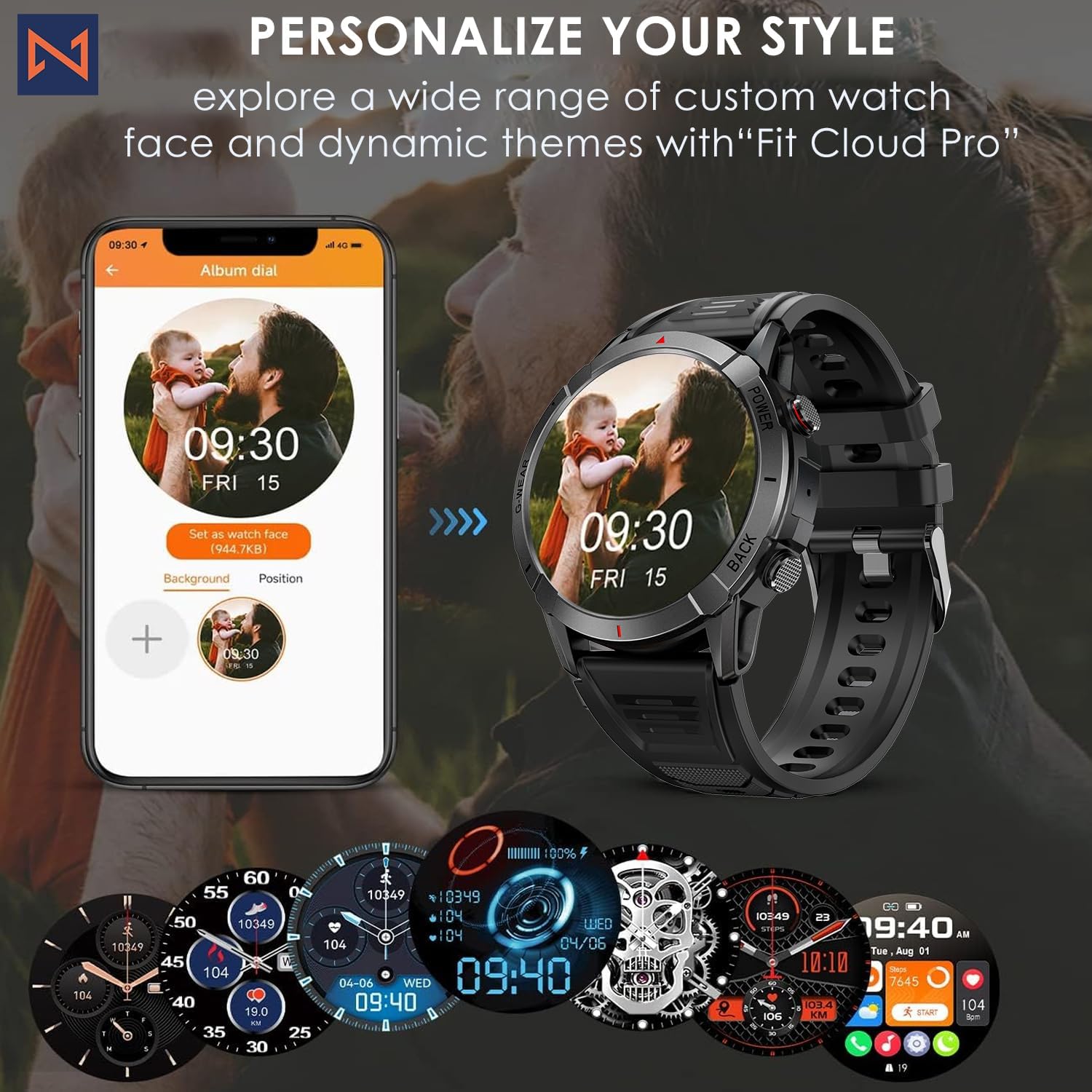
Figure 7: Personalize Your Style. This image demonstrates how to customize watch faces using the "Fit Cloud Pro" app, showing various digital and analog watch face options.
ساتنه
۵.۱. ستاسو د سمارټ واچ پاکول
منظم پاکول ستاسو د وسیلې بڼه او فعالیت ساتلو کې مرسته کوي.
- سکرین او بدن د نرم، لینټ نه پاک ټوکر سره پاک کړئ.
- د سختو داغونو لپاره، دampټوکر په اوبو سره لږ څه ومینځئ. د سختو کیمیاوي موادو یا خړوبونکو موادو کارولو څخه ډډه وکړئ.
- Clean the charging contacts periodically to ensure proper connection.
۹. د اوبو مقاومت (IP68)
Your Infinity Smartwatch is rated IP68, meaning it is resistant to dust and can withstand immersion in water up to 1.5 meters for up to 30 minutes.
- دا د ورځني کارونې، لاس مینځلو، او سپک باران لپاره مناسب دی.
- Avoid prolonged immersion, hot water, steam, or high-pressure water jets (e.g., showering, sauna, diving).
- If the watch gets wet, dry it thoroughly before charging or operating buttons.

Figure 8: Engineered for Adventure. This image highlights the smartwatch's durability features, including waterproof, dustproof, anti-magnetic, and shockproof capabilities, with corresponding icons.
3. د بیټرۍ پاملرنه
- د بیټرۍ د ژوند اوږدولو لپاره، د سختې تودوخې څخه ډډه وکړئ.
- ساعت په منظم ډول چارج کړئ؛ د اوږدې مودې لپاره د بیټرۍ په بشپړه توګه وچیدو څخه ډډه وکړئ.
- یوازې چمتو شوي چارجینګ کیبل وکاروئ.
د ستونزو حل کول
| ستونزه | احتمالي حل |
|---|---|
| ساعت نه چالانېږي | ډاډ ترلاسه کړئ چې ساعت په بشپړه توګه چارج شوی دی. چارجر سره وصل شئ او د بریښنا د فعالولو هڅه کولو دمخه څو دقیقې انتظار وکړئ. |
| د سمارټ فون سره جوړه نشي کیدی |
|
| د روغتیا ناسم معلومات |
|
| خبرتیاوې ندي ترلاسه شوي |
|
| د بیټرۍ لنډ ژوند |
|
مشخصات
| فیچر | تفصیل |
|---|---|
| د ماډل شمیره | NX 10 |
| ښودل | 1.43" AMOLED Screen |
| د ښودلو ریزولوشن | 466x466 HD |
| د بیټرۍ ظرفیت | 400 mAh لیتیم پولیمر |
| د اوبو مقاومت | IP68 |
| ارتباط | بلوتوث |
| عملیاتي سیسټم | اندروید (د iOS سره مطابقت لري) |
| د پټو موادو | 22mm Silicon Belt |
| د موادو ښکاره کول | زنک الماس |
| د توکي وزن | 1.76 اونس |
| د حافظې د ذخیره کولو ظرفیت | 128 MB |
تضمین او ملاتړ
For warranty information and technical support, please refer to the documentation included with your purchase or visit the official Infinity webسایټ
Manufacturer: Infiniity
For further assistance, you may contact Infiniity customer service through the contact information provided on their official website or within the Fit Cloud Pro application.