
FLEXISPOT ET365W
FLEXISPOT E6 Essential Dual Motor Standing Desk Frame User Manual
Model: ET365W (White Frame, 3 Stage Lite Leg)
د خوندیتوب مهم معلومات
مهرباني وکړئ د راټولولو او کارولو دمخه ټولې لارښوونې ولولئ او پوه شئ. د دې لارښوونو په تعقیب کې پاتې راتلل ممکن محصول ته زیان یا زیان ورسوي.
- تل د نصبولو لارښوونې په دقت سره تعقیب کړئ ترڅو ثبات ډاډمن شي.
- د وزن له اعظمي حد څخه زیات مه کوئ ۱۱.۵۷ پونډه (۵.۲۵ کیلو ګرامه).
- Keep the desk and its electrical components away from water and other liquids.
- Always turn off and unplug the desk when not in use or when leaving the room.
- Keep the desk area clear of obstacles to prevent tripping or collision.
- Always supervise children when using the desk.
- ډاډ ترلاسه کړئ چې ټول پیچونه د کارولو دمخه په خوندي توګه ټینګ شوي.
محصول پای ته ورسیدview
The FLEXISPOT E6 Essential Dual Motor Standing Desk Frame provides a versatile and ergonomic workspace solution. Featuring a robust 3-stage lift system and quiet dual motors, it allows for seamless transitions between sitting and standing positions.
کلیدي ځانګړتیاوې:
- ۴-سtagد پورته کولو سیسټم: Offers a wide height adjustment range from 23.6 inches to 48.8 inches, accommodating various user heights.
- خاموش دوه ګونی موټرې: Operates with less than 50 dB noise level and supports a weight capacity of up to 220 lbs (100 kg).
- د پروګرام وړ کنټرولر: Features a convenient control panel with four memory presets for quick height adjustments.
- دوامدار ساختمان: Built with a strong metal base for stability and longevity.

Image: The FLEXISPOT E6 Essential Dual Motor Standing Desk Frame in white, featuring the integrated control panel.
د بسته محتويات
مهرباني وکړئ د اسمبلۍ پیل کولو دمخه تصدیق کړئ چې ټولې برخې شتون لري او زیانمنې شوې نه دي. که کومه برخه ورکه یا زیانمنه شوې وي، مهرباني وکړئ د پیرودونکي ملاتړ سره اړیکه ونیسئ.
- ۳. د غاړې قوس x2
- 2. Left beam x2
- 3. Right beam x2
- 4. کالم x2
- 5. کیپیډ x1
- 6. د بریښنا اړوونی x1
- 7. پیډسټال x2
- 8. د AC بریښنا کیبل x1
- 9. د غزولو غل x1
- 10. د کیبل کلپ x4
- 11. T-Socket Wrench x1
- 12. Adapter bracket x1

Image: All frame components laid out for inspection.
د مجلس لارښوونې
Follow these steps carefully to assemble your FLEXISPOT E6 Essential Standing Desk Frame. It is recommended to have two people for assembly.
Video: Official FLEXISPOT E6 Essential Standing Desk Installation Guide. This video provides a visual walkthrough of the assembly process.
Step 1: Assemble the Cross Beams
Connect the left and right beams (parts 2 and 3) using the provided screws (C) and the T-Socket Wrench (11). Ensure screws are aligned with square holes and pressed tightly. The length of the cross beams can be adjusted to fit a desktop of 51-59 inches (1300-1500mm).

Image: Illustration showing the connection of the left and right beams.
Step 2: Attach Columns to Cross Beams
Attach the two columns (part 4) to the assembled cross beams using screws (A) and the T-Socket Wrench (11). Pre-tighten all screws for the cross beams, then tighten them simultaneously for a secure fit. Prioritize installing diagonal screws first.

Image: Visual guide for attaching the columns to the cross beams.
Step 3: Install Pedestals
Secure the pedestals (part 7) to the bottom of the columns using screws (E) and the T-Socket Wrench (11).

Image: Diagram showing the attachment of the pedestals to the columns.
Step 4: Attach Adapter Bracket and Keypad
Mount the adapter bracket (part 12) and the keypad (part 5) to the underside of your chosen desktop. Ensure the curved edge of the keypad is flush with the edge of the table top. Use screws (F) and a drill for this step. Make sure the keypad is on the same side as the adapter bracket.

Image: Illustration of attaching the adapter bracket and keypad to the desktop.
شپږم ګام: د تار سره وصل کړئ
Connect all necessary cables: the keypad to the control box, the motors to the control box, the power adapter (part 6) to the control box, and the AC power cable (part 8) to the power adapter. Use cable clips (part 10) to manage and secure the cables neatly under the desktop.

Image: Diagram showing the proper routing and connection of all electrical cables.
عملیاتي لارښوونې
The FLEXISPOT E6 Essential features an intuitive programmable controller for easy height adjustment.

Image: The intelligent keypad with LED display and buttons for height adjustment and memory presets.
د کنټرولر دندې:
- پورته/ښکته تیرونه (▲ / ▼): Press and hold to manually adjust the desk height up or down. The LED display will show the current height.
- د حافظې پریزیسټونه (۱، ۲، ۳، ۴): کنټرولر تاسو ته اجازه درکوي چې تر څلورو غوره لوړوالي ترتیبات خوندي کړئ.
- د پورته/ښکته تیرونو په کارولو سره میز د خپلې خوښې لوړوالي سره سم تنظیم کړئ.
- Press the "M" button. The display will show "S-".
- Immediately press one of the number buttons (1, 2, 3, or 4) to save the current height to that preset.
- د خوندي شوي لوړوالي د یادولو لپاره، په ساده ډول د اړونده شمېرې تڼۍ فشار ورکړئ.
- د ټکر ضد ځانګړتیا: The desk is equipped with an anti-collision system. If the desktop encounters an obstacle while moving, it will automatically stop and reverse slightly to prevent damage.
د محصول مشخصات
| فیچر | تفصیل |
|---|---|
| د ماډل شمیره | ET365W |
| برانډ | FLEXISPOT |
| رنګ | سپین چوکاټ |
| د محصول ابعاد (چوکاټ) | 43.3"D x 23.6"W x 23.6"H (Adjustable width for desktop) |
| د لوړوالی تنظیم کولو سلسله | 23.6 inches (Minimum) to 48.8 inches (Maximum) |
| د پورته کولو میکانیزم | برقي دوه ګونی موټور، ۳-Stage Lift System |
| د اعظمي وزن ظرفیت | ۱۱.۵۷ پونډه (۵.۲۵ کیلو ګرامه) |
| د شور کچه | له 50 dB څخه کم |
| اساسی مواد | فلزي |
| شاملې برخې | د نصبولو وسایل او تار |
| UPC | 810072845221 |
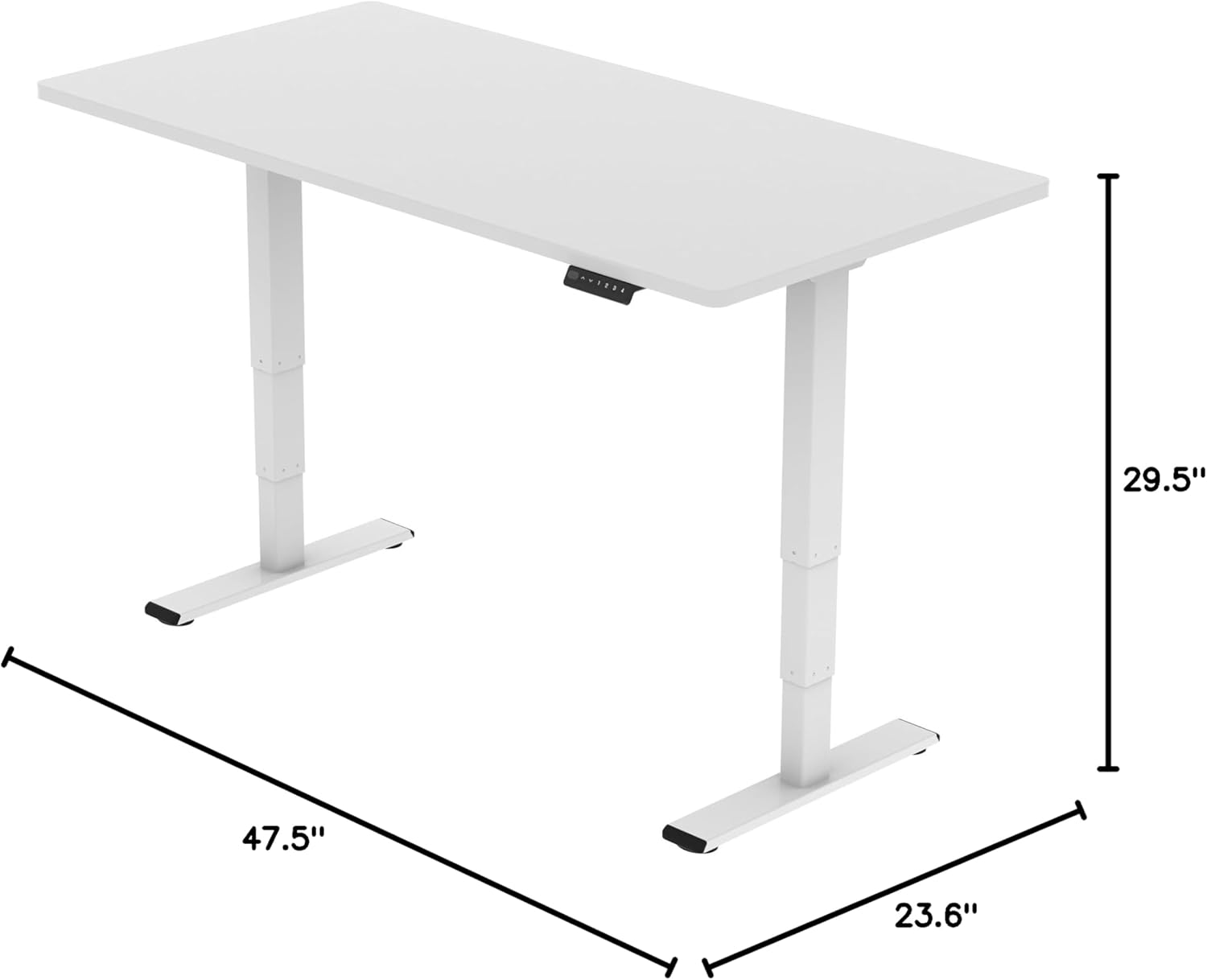
Image: Diagram illustrating the adjustable dimensions of the desk frame.
ساتنه
Regular maintenance ensures the longevity and optimal performance of your standing desk frame.
- پاکول: د میز چوکاټ د نرم، ډ سره پاک کړئamp ټوکر. د سختو کیمیاوي موادو یا خړوبونکي پاکوونکو کارولو څخه ډډه وکړئ چې کولی شي پای ته زیان ورسوي.
- د کیبل مدیریت: Periodically check that all cables are securely fastened and not pinched or tangled. Re-organize with cable clips if necessary.
- بندونکي: Occasionally check all screws and bolts to ensure they are tight. Re-tighten if any feel loose.
- د خنډونو معاینه: Ensure there are no obstructions in the path of the desk's movement, especially underneath the desktop.
د ستونزو حل کول
If you encounter any issues with your FLEXISPOT E6 Essential Standing Desk Frame, refer to the common problems and solutions below.
- Desk not moving or unresponsive:
- ټول کیبل پیوستون چیک کړئ ترڅو ډاډ ترلاسه شي چې دوی په خوندي ډول پلګ شوي دي.
- Verify that the power adapter is correctly connected to a working power outlet.
- Perform a reset: Unplug the desk from the power outlet for 10-15 seconds, then plug it back in.
- د لوړوالی غیر مساوي تنظیم کول:
- ډاډ ترلاسه کړئ چې میز په سطحه کې ځای پرځای شوی.
- Check for any obstructions under the desk that might impede one leg's movement.
- Contact customer support if the issue persists after checking connections and obstructions.
- Desk stops unexpectedly during movement:
- This may be the anti-collision feature activating. Check for any obstacles in the desk's path.
- Ensure the weight on the desk does not exceed the maximum capacity of 220 lbs.
تضمین او ملاتړ
FLEXISPOT د لوړ کیفیت محصولاتو او غوره پیرودونکو خدماتو چمتو کولو ته ژمن دی.
- د تضمین پوښښ: Enjoy peace of mind with our دوه کلن پوښښ on the desk frame and motor, and دوه کلن محافظت on the control panel and electronics.
- د پیرودونکي ملاتړ: For any questions, assistance with assembly, troubleshooting, or warranty claims, please visit the official FLEXISPOT webسایټ ته مراجعه وکړئ یا مستقیم د دوی د پیرودونکو خدماتو سره اړیکه ونیسئ.
- آنلاین سرچینې: Additional resources, including FAQs and detailed video tutorials, may be available on the د فلیکس سپاټ پلورنځی.
Video: "Welcome to FLEXISPOT'S Mega Factory" - Showcasing the manufacturing process and commitment to quality.
Ask a question about this manual
Ask about setup, troubleshooting, compatibility, parts, safety, or missing instructions. Manuals+ will review the question and use this page’s manual context to help answer it.