
پیژندنه
The Acoustic Research Portable Outdoor Wireless Speaker with LED Flickering Flame Light is designed to provide high-quality audio and ambient lighting for various indoor and outdoor settings. This rechargeable speaker features multiple light modes, including a realistic flickering flame, and is built with an IPX5 water-resistant rating, making it suitable for outdoor use. It also includes built-in nature sounds for relaxation and can be stereo-paired with another compatible AR speaker for an enhanced audio experience.
د بسته محتويات
- Acoustic Research Portable Outdoor Wireless Speaker (Model: AWSF9R)
- د USB چارج کیبل
- د کارن لارښود
د محصول ځانګړتیاوې
- 7 رڼا طریقې: Soft White, Bright White, Flicker Flame, Soft Glow, Candlelight, Aurora. Separate controls for light and speaker.
- تمدید شوی د لوبې وخت: په یوه چارج کې تر لسو ساعتونو پورې آډیو پلې بیک.
- د اوبو مقاومت: IPX5 rated for protection against splashing water.
- د طبیعت غږونه: Includes Forest, Waves, Running Stream, and Rain.
- وړ وړ ډیزاین: Attractive lantern style with a handle for easy carrying or hanging.
- د بلوتوټ ارتباط: د مطابقت لرونکو وسیلو څخه بې سیم آډیو سټریمینګ.
- سټیریو جوړه: Connect two AWSF9R speakers for true wireless stereo sound (second speaker sold separately).
کنټرولونه او شاخصونه

شکل 1: Speaker Control Panel. This image shows a close-up of the speaker's control buttons, including power, volume, track skip, light mode, and nature sound buttons, along with the DC charging port.
| تtonۍ/شاخص | فعالیت |
|---|---|
| د بریښنا تڼۍ (🏻) | Press and hold to power the speaker ON or OFF. Press briefly to Play/Pause music. |
| حجم ښکته / مخکینی لار (- / ⏮) | د حجم کمولو لپاره په لنډ ډول فشار ورکړئ. مخکینۍ ټریک ته د تګ لپاره فشار ورکړئ او ونیسئ. |
| حجم پورته / بل تعقیب (+ / ⏭) | د حجم زیاتولو لپاره په لنډ ډول فشار ورکړئ. بل ټریک ته د تګ لپاره فشار ورکړئ او ونیسئ. |
| د رڼا حالت تڼۍ (💡) | Press to cycle through 7 light modes: Soft White, Bright White, Flicker Flame, Soft Glow, Candlelight, Aurora, and OFF. |
| د طبیعت غږ تڼۍ (♫ د ♫) | Press to cycle through 4 nature sounds: Forest, Waves, Running Stream, Rain, and OFF. |
| د DC چارج کولو بندر | Connect the USB charging cable here to recharge the speaker's battery. |
| د LED شاخص | Indicates charging status and Bluetooth pairing status. |
چمتو کول
د سپیکر چارج کول
- Locate the DC charging port on the speaker's control panel.
- Connect the small end of the provided USB charging cable to the speaker's DC port.
- د USB کیبل لویه برخه د USB بریښنا اډاپټر (شامل نه ده) یا د کمپیوټر USB پورټ سره وصل کړئ.
- The LED indicator will illuminate to show charging status. Allow approximately 3-4 hours for a full charge. The indicator will change or turn off when charging is complete.
یادونه: Fully charge the speaker before first use to maximize battery life.
عملیاتي لارښوونې
بریښنا کول / بند کول
- To power ON, press and hold the 🏻 Power button for 2-3 seconds until you hear an audible prompt.
- To power OFF, press and hold the 🏻 Power button for 2-3 seconds until you hear an audible prompt.
د بلوتوث جوړې کول
- Ensure the speaker is powered ON and within 10 meters (33 feet) of your Bluetooth device (smartphone, tablet, etc.).
- The speaker will automatically enter Bluetooth pairing mode when powered on for the first time or if no device is connected. The LED indicator will flash, indicating it's ready to pair.
- On your Bluetooth device, go to the Bluetooth settings and enable Bluetooth.
- لټون available devices and select "AR Speaker" (or similar name) from the list.
- یوځل چې جوړه شي، د LED شاخص به چمکۍ ودروي او ټینګ پاتې شي، او تاسو به د تایید غږ واورئ.
- تاسو اوس کولی شئ د سپیکر له لارې له خپل وسیله څخه میوزیک غږ کړئ.
یادونه: سپیکر به په اتوماتيک ډول هڅه وکړي چې د وروستي جوړه شوي وسیلې سره بیا وصل شي کله چې بریښنا فعاله شي.
Controlling Light Modes
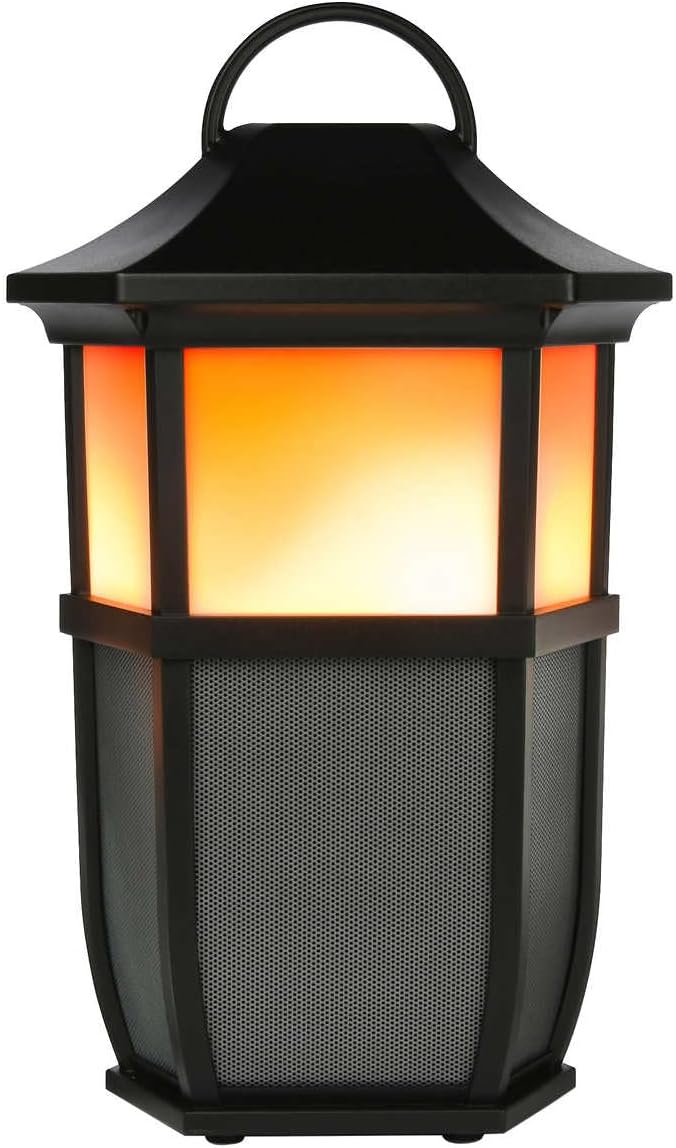

شکل 2: Speaker Light Modes. The left image shows the speaker with a warm, flickering flame light, while the right image shows it with a bright white light, demonstrating two of the available light modes.
فشار ورکړئ 💡 Light Mode button repeatedly to cycle through the 7 available light modes:
- ځلیدونکی شعله
- نرم سپین
- روښانه سپین
- نرم ګولۍ
- د شمعې رڼا
- اورورا
- رڼا بنده
Playing Nature Sounds
فشار ورکړئ ♫ د ♫ Nature Sound button repeatedly to cycle through the 4 built-in nature sounds:
- ځنګل
- څپې
- Running Stream
- باران
- Nature Sound OFF
ریښتینی بې سیم سټیریو (TWS) جوړه کول (اختیاري)
To achieve a true stereo sound experience, you can pair two Acoustic Research AWSF9R speakers together. (Second speaker sold separately).
- ډاډ ترلاسه کړئ چې دواړه سپیکرې فعالې دي او د بلوتوث وسیلې سره وصل ندي.
- په یوه سپیکر کې (دا به ستاسو لومړنی سپیکر وي)، فشار ورکړئ او ونیسئ 🏻 Power button for 5 seconds until you hear a distinct pairing tone.
- The primary speaker will now search for the second speaker.
- Once connected, you will hear a confirmation tone, and the LED indicators on both speakers will change to indicate a successful TWS connection.
- اوس، خپل بلوتوث وسیله د لومړني سپیکر سره وصل کړئ لکه څنګه چې د "بلوتوث جوړه کولو" برخه کې تشریح شوي. آډیو به د دواړو سپیکرونو له لارې په سټیریو کې غږیږي.
یادونه: TWS pairing only works with two identical AWSF9R speakers.
ساتنه
- پاکول: د سپیکر بهرنۍ برخه پاکولو لپاره نرم، وچ ټوکر وکاروئ. د کثافاتو پاکوونکي یا محلولونه مه کاروئ.
- د اوبو ښکاره کول: While IPX5 water-resistant, do not submerge the speaker in water. Ensure the charging port cover is securely closed when exposed to water.
- ذخیره کول: سپیکر په یخ او وچ ځای کې وساتئ چې د مستقیم لمر وړانګو او سختو تودوخې څخه لرې وي کله چې د اوږدې مودې لپاره نه کارول کیږي.
- د بیټرۍ پاملرنه: د بیټرۍ د ژوند اوږدولو لپاره، سپیکر لږترلږه په هرو دریو میاشتو کې یو ځل په بشپړه توګه چارج کړئ، حتی که په منظم استعمال کې نه وي.
د ستونزو حل کول
| ستونزه | احتمالي حل |
|---|---|
| سپیکر نه چالانېږي. | Ensure the battery is charged. Connect the speaker to a power source using the USB cable and allow it to charge for at least 30 minutes before attempting to power on again. |
| د بلوتوت آلې سره جوړه نشي. |
|
| غږ نشته یا ټیټ غږ. |
|
| Light modes are not working. | Press the Light Mode button repeatedly to cycle through all modes. Ensure the speaker has sufficient battery charge. |
| Nature sounds are not working. | Press the Nature Sound button repeatedly to cycle through all sounds. |
مشخصات

شکل 3: Product Dimensions. This image illustrates the height (9.76 inches), width (7.2 inches), and depth (6.54 inches) of the speaker.
| فیچر | تفصیل |
|---|---|
| د ماډل نوم | AWSF9R |
| برانډ | اکوسټیک څیړنه |
| د سپیکر ډول | بهر، د انتقال وړ |
| ارتباط | بلوتوث (بې سیم) |
| د بلوتوټ رینج | تر 10 مترو پورې (33 فوټ) |
| د اوبو مقاومت | IPX5 (د اوبو مقاومت) |
| د بریښنا تولید | 30 واټ |
| د آډیو وتلې حالت | سټیریو (د TWS جوړه کولو سره) |
| د بیټرۍ ژوند | تر 12 ساعتونو پورې |
| د بریښنا سرچینه | د بیټرۍ چلول |
| د محصول ابعاد (د x څلویښتم x څلویښتم) | ۸۳.۸" x ۵۵.۷" x ۴۴.۱" |
| د توکي وزن | 5 پونډه |
| UPC | 044476151811 |
تضمین او ملاتړ
This Acoustic Research product comes with a محدود تضمین. For detailed warranty information, technical support, or service inquiries, please refer to the warranty card included with your product or visit the official Acoustic Research webسایټ. مهرباني وکړئ د تضمین ادعاوو لپاره د پیرود ثبوت وساتئ.
For further assistance, you may contact Acoustic Research customer support through their official channels.