
1. پیژندنه
Thank you for choosing the Defender Enjoy S200 Portable Bluetooth Speaker. This manual provides essential information for setting up, operating, and maintaining your speaker to ensure optimal performance and longevity. Please read this manual thoroughly before use.
The Defender Enjoy S200 is a versatile portable speaker featuring Bluetooth 5.3 connectivity, True Wireless Stereo (TWS) pairing, an integrated FM radio, and MP3 playback capabilities via USB flash drive or microSD card. It also includes an LED light and supports hands-free calling. Designed for portability, it offers up to 9 hours of playback on a single charge and convenient USB Type-C charging.
2. محصول ختم شوview
2.1 کلیدي ځانګړتیاوې
- بلوتوث 5.3: د باثباته او موثر بېسیم آډیو سټریمینګ لپاره.
- ریښتینی بې سیم سټیریو (TWS): Connect two Enjoy S200 speakers for a stereo sound experience.
- د پلے بیک ډیری طریقې: Bluetooth, FM Radio, USB Flash Drive, MicroSD Card (up to 32GB).
- مدغم LED څراغ: Provides visual ambiance.
- د لاسونو څخه وړیا تلیفون کول: د تلیفون زنګونو لپاره مایکروفون جوړ شوی.
- د بیټرۍ اوږد ژوند: Up to 9 hours of continuous music playback.
- د USB ډول-C چارج کول: عصري او اسانه چارج کولو بندر.
- وړ وړ ډیزاین: Compact and lightweight with a carrying strap.
2.2 د بسته محتويات
- Defender Enjoy S200 Portable Bluetooth Speaker
- د ډول - سي چارج کیبل
- د چټک پیل لارښود
- د بارولو تسمه

Image: The Defender Enjoy S200 Portable Bluetooth Speaker, showcasing its compact design and front grille with an illuminated LED ring.

Image: An infographic highlighting key features such as multi-colored LED lighting, True Wireless Stereo (TWS) pairing, Bluetooth 5.3, MP3 player, FM receiver, and hands-free calling.
3. ترتیب کول
۳.۱ د سپیکر چارج کول
- Locate the Type-C charging port on the back of the speaker.
- Connect the provided Type-C charging cable to the speaker and the other end to a USB power adapter (not included) or a computer's USB port.
- د LED شاخص به د چارج کولو حالت وښيي. بشپړ چارج معمولا شاوخوا 3-4 ساعته وخت نیسي.
- کله چې بشپړ چارج شي، کیبل جلا کړئ.
3.2 بریښنا کول / بندول
- To power on, slide the ON/OFF switch located on the back of the speaker to the 'ON' position.
- To power off, slide the ON/OFF switch to the 'OFF' position.
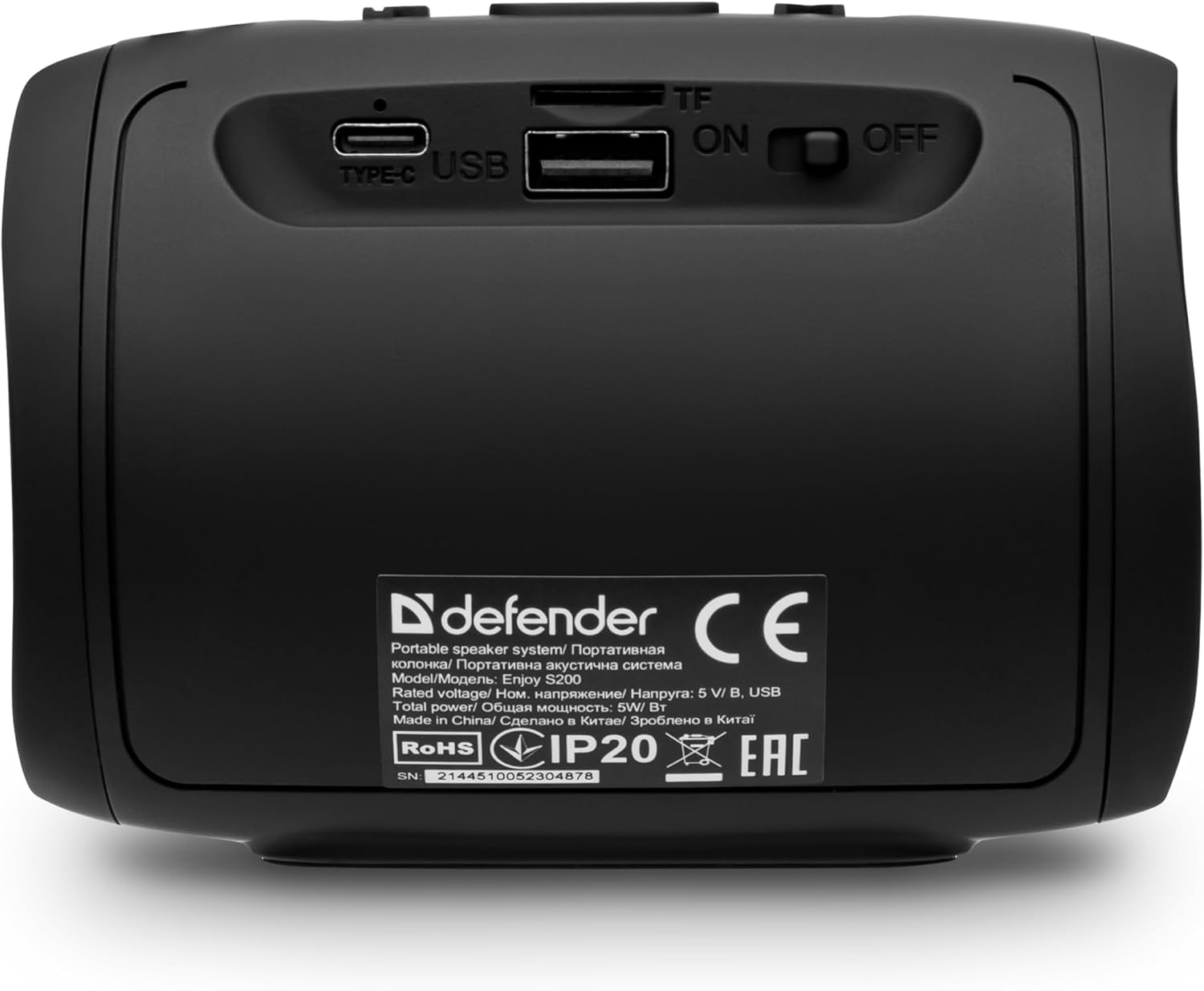
انځور: شاته view of the Defender Enjoy S200 speaker, showing the Type-C charging port, USB port, TF (microSD) card slot, and the ON/OFF power switch.
3.3 د بلوتوټ جوړه کول
- ډاډ ترلاسه کړئ چې سپیکر فعال دی او د بلوتوث جوړه کولو حالت کې دی (د چمکۍ LED لخوا ښودل شوی).
- په خپل وسیله (سمارټ فون، ټابلیټ، او نور) کې، بلوتوټ فعال کړئ او د شته وسایلو لټون وکړئ.
- Select "Defender Enjoy S200" from the list of devices.
- Once paired, the speaker will emit a confirmation sound, and the LED will stop flashing.
۶.۸ ریښتینی بې سیم سټیریو (TWS) جوړه کول
To pair two Defender Enjoy S200 speakers for stereo sound:
- ډاډ ترلاسه کړئ چې دواړه سپیکرې فعالې دي او د بلوتوث وسیلې سره وصل نه دي.
- On one speaker (this will be the primary speaker), press and hold the TWS button (often indicated by a double-arrow icon) until you hear a pairing tone.
- The two speakers will automatically search and connect to each other. A confirmation tone will sound once connected.
- اوس، خپل وسیله د بلوتوث له لارې لومړني سپیکر سره وصل کړئ لکه څنګه چې په 3.3 برخه کې تشریح شوي. آډیو به د دواړو سپیکرونو له لارې په سټیریو کې غږیږي.

Image: A visual representation of two Defender Enjoy S200 speakers pairing wirelessly to create a True Wireless Stereo system, alongside icons for Bluetooth 5.3, MP3 player, FM receiver, and hands-free calling.
4. عملیاتي لارښوونې
4.1 Button Functions (Refer to top panel controls)
- د بریښنا تڼۍ: Long press to power on/off. Short press to play/pause in music mode, or answer/end calls.
- حجم پورته (+): د حجم زیاتولو لپاره لنډ فشار ورکړئ. د راتلونکي ټریک/سټیشن لپاره اوږد فشار ورکړئ.
- حجم ښکته (-): د حجم کمولو لپاره لنډ فشار ورکړئ. د پخوانۍ ټریک/سټیشن لپاره اوږد فشار ورکړئ.
- د حالت (M) تڼۍ: Short press to switch between Bluetooth, FM Radio, USB, and MicroSD modes.
- د LED ر Lightا تtonۍ: Short press to cycle through LED light modes or turn off the LED.
4.2 بلوتوث پلې بیک
After successful Bluetooth pairing (Section 3.3), open your music application on your device and begin playback. Use the speaker's volume buttons or your device's volume controls to adjust the audio level.
4.3 FM راډیو حالت
- Press the 'M' (Mode) button until you hear the FM radio prompt.
- Long press the Play/Pause button to automatically scan and save available FM stations.
- Use the Volume Up (+) and Volume Down (-) buttons (long press) to navigate between saved stations.
۴.۵ USB/مایکرو ایس ډی پلے بیک
- Insert a USB flash drive or a microSD card (up to 32GB) containing MP3 audio fileد سپیکر شاته اړونده بندر ته.
- Press the 'M' (Mode) button until the speaker automatically switches to USB or MicroSD mode and begins playback.
- Use the speaker's control buttons for play/pause, next track, and previous track.
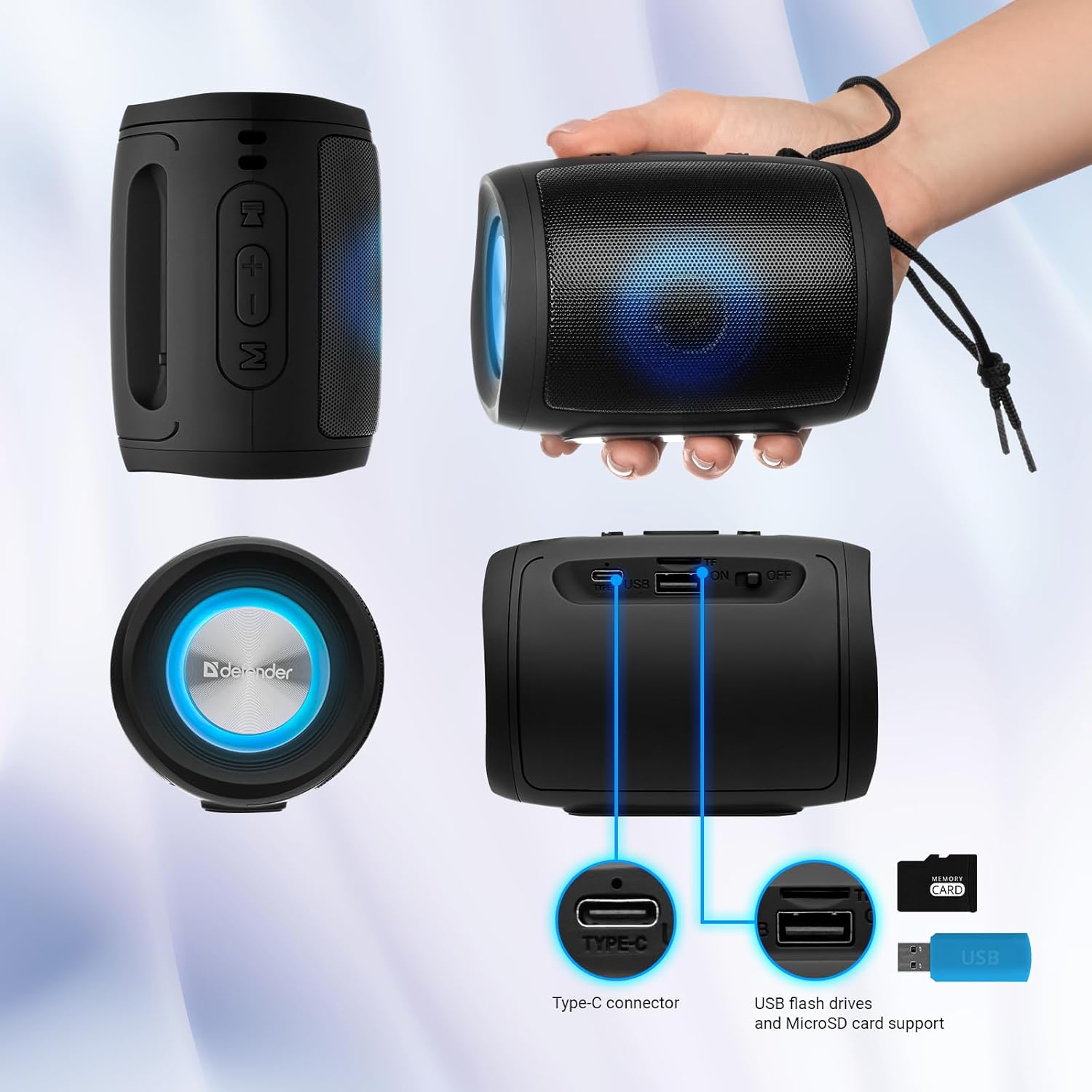
Image: A detailed diagram illustrating the Type-C connector, USB flash drive port, and MicroSD card slot on the Defender Enjoy S200 speaker.
۶.۳ د لاسونو څخه پاک زنګ وهل
When connected to your smartphone via Bluetooth, the speaker's built-in microphone allows for hands-free calls.
- زنګ ووهئ: د پلی/پاز تڼۍ لنډ فشار ورکړئ.
- ټلیفون پای: د پلی/پاز تڼۍ لنډ فشار ورکړئ.
- زنګ رد کړئ: د پلی/پاز تڼۍ اوږده فشار ورکړئ.
5. ساتنه
- پاکول: د سپیکر د سطحې د پاکولو لپاره نرم، وچ ټوکر وکاروئ. د کثافاتو پاکوونکي یا محلولونه مه کاروئ.
- ذخیره کول: سپیکر په یخ او وچ ځای کې د مستقیم لمر وړانګو او سختې تودوخې څخه لرې وساتئ.
- د اوبو مقاومت: The speaker has an IP20 rating, meaning it is protected against solid objects larger than 12.5mm but has no protection against water. Avoid exposure to rain, splashes, or immersion in water.
- د بیټرۍ پاملرنه: د بیټرۍ د ژوند اوږدولو لپاره، د لومړي ځل کارولو دمخه سپیکر په بشپړه توګه چارج کړئ او که په منظم ډول نه کارول کیږي نو لږترلږه په هرو دریو میاشتو کې یو ځل یې چارج کړئ.
6. ستونزه حل کول
- ځواک نشته: Ensure the speaker is charged. Connect the Type-C cable and allow it to charge for a few minutes before attempting to power on again.
- غږ نشته: Check the volume levels on both the speaker and your connected device. Ensure the speaker is in the correct mode (Bluetooth, FM, USB, MicroSD).
- د بلوتوټ جوړه کولو مسلې: Ensure the speaker is in pairing mode. Turn off Bluetooth on your device and turn it back on. Try unpairing and re-pairing the speaker. Move closer to the speaker to ensure you are within the 10-meter range.
- FM Radio Reception Poor: Ensure you are in an area with good signal. The charging cable can sometimes act as an antenna; try connecting it for improved reception.
- USB/MicroSD Not Playing: غږ ډاډمن کړئ files are in a compatible format (e.g., MP3). Check that the USB drive or microSD card is inserted correctly and is not corrupted.
7. مشخصات
| د ماډل نوم | د S200 څخه خوند واخلئ |
| د توکي ماډل شمیره | 65200 |
| برانډ | مدافع |
| د ارتباط ټیکنالوژي | بلوتوث 5.3، USB |
| د بې سیمه مخابراتو ټیکنالوژي | بلوتوث، د راډیو فریکونسي |
| د سپیکر ډول | ملټي میډیا |
| د سپیکر اندازه | ۷۸۷ انچه |
| د بریښنا تولید | 5 واټ |
| د آډیو وتلې حالت | سټیریو |
| د بریښنا سرچینه | د بیټرۍ چلول (۱ لیتیم آیون بیټرۍ پکې شامله ده) |
| ځانګړي ځانګړتیاوې | Integrated Microphone, USB Port, Portable Bluetooth, LED Light, FM Radio, MicroSD Card Support, TWS |
| د محصول ابعاد (L x W x H) | 8 x 11 x 8 سانتي متره |
| وزن | 330 ګرامه |
| اعظمي حد | 10 متره |
| د IP درجه بندي | IP20 |
8. تضمین او ملاتړ
8.1 د تضمین معلومات
د تضمین ځانګړي توضیحات معمولا ستاسو د پیرود اسنادو سره یا د تولید کونکي په رسمي سند کې چمتو کیږي website. Please refer to these resources for information regarding warranty coverage and duration.
8.2 د پیرودونکي ملاتړ
For technical assistance, troubleshooting beyond this manual, or inquiries about your Defender Enjoy S200 speaker, please contact Defender Global customer support. Contact information can usually be found on the product packaging, the manufacturer's webسایټ، یا ستاسو د پیرود رسید.