
پیژندنه
Thank you for choosing the WALI CS202N 2-Tier Floating TV Shelf. This manual provides essential information for the safe and efficient installation, operation, and maintenance of your new wall-mounted shelf. Please read these instructions thoroughly before beginning installation and retain them for future reference.
د خوندیتوب معلومات
خبرداری: Failure to follow these safety instructions may result in property damage or personal injury.
- Do not exceed the maximum weight capacity of 22 lbs (10 kg) per shelf. Overloading can cause instability and damage.
- Always follow the included instructions for proper installation and mounting to ensure safety and stability.
- Ensure the mounting surface (wall) can safely support the combined weight of the shelf and all attached equipment.
- Use appropriate tools and hardware for your specific wall type (e.g., brick, concrete, wood stud, drywall).
- د تنظیم کولو پرمهال ماشومان او څاروي د نصب کولو ساحې څخه لرې وساتئ.
- په دوره یي ډول ټول پیچونه او اړیکې وګورئ ترڅو ډاډ ترلاسه شي چې دوی کلک او خوندي پاتې دي.
د بسته محتويات
Verify that all components are present and undamaged before beginning installation. If any parts are missing or damaged, please contact WALI customer support.
- 1 x WALI Floating Shelf System (Walnut Brown)
- 2 x Reinforced Walnut Brown shelves
- د نصبولو هارډویر کټ
- ۱ x د کارونکي لارښود (دا سند)
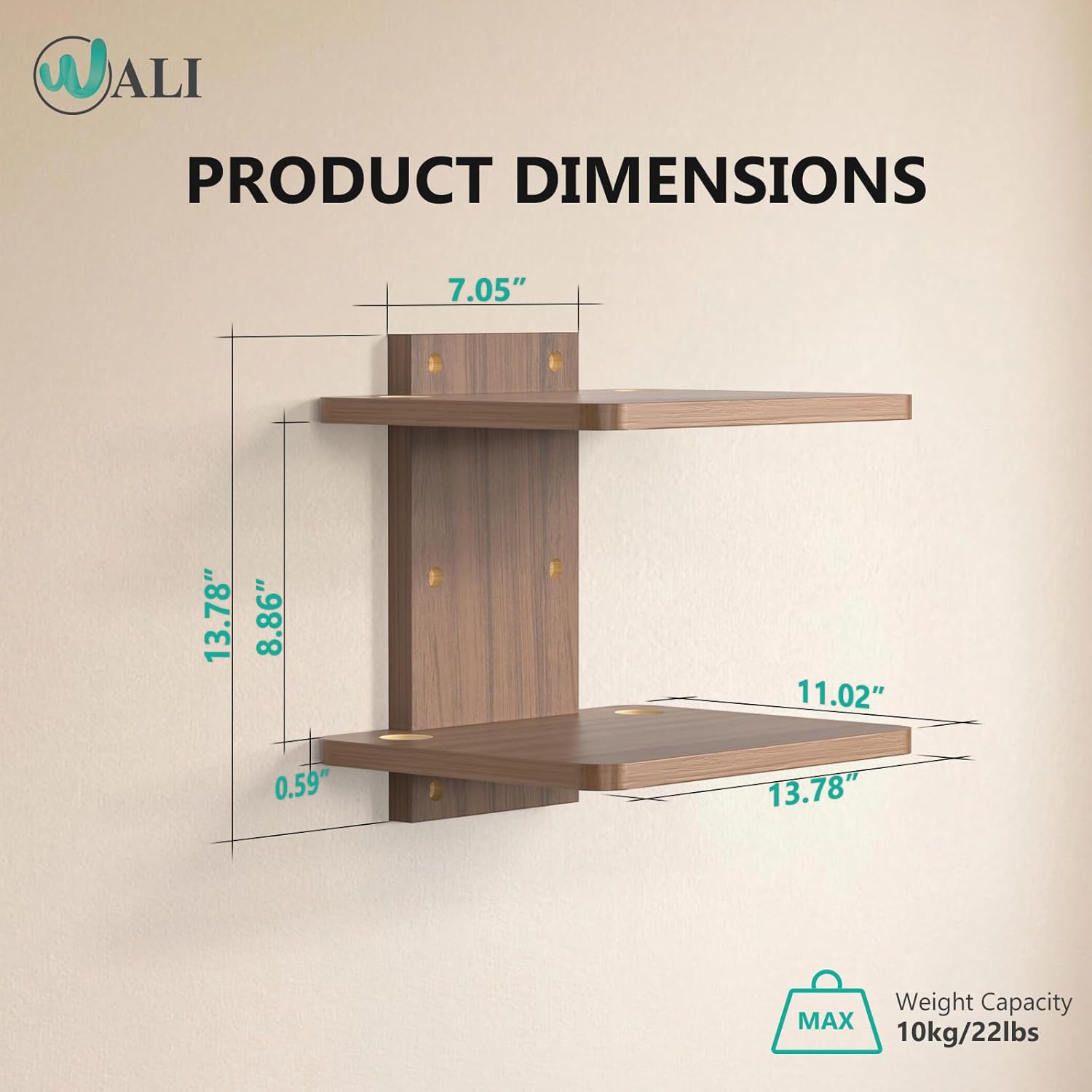
Figure 1: Product components and dimensions. The image shows the two shelves, the central mounting bracket, and key measurements.
مشخصات
| د ماډل شمیره | CS202N |
| مواد | لرګي |
| رنګ | غوزان نسواري |
| د الماریو شمیر | 2 |
| د الماریو ابعاد (هر یو) | ۹.۲۵" عرض x ۱۲" عرض x ۲.۹۴" قد (۲۳.۵ سانتي متره طول x ۳۰.۵ سانتي متره طول x ۷.۵ سانتي متره قد) |
| د محصول ټولیز ابعاد | ۱۶"د x ۲۶"وچ x ۴۷"ح |
| Maximum Weight Capacity (per shelf) | ۱۱.۵۷ پونډه (۵.۲۵ کیلو ګرامه) |
| د نصب کولو ډول | دیوال غر |
| ځانګړي ځانګړتیاوې | Space-saving design, Cable management holes, Rounded corners |

Figure 2: Detailed dimensions of the shelf unit.
تنظیم او نصب کول
Follow these steps carefully to install your WALI Floating TV Shelf.
- د شیلف واحد راټول کړئ:
Attach the two shelves to the central mounting bracket using the provided hardware. Ensure all connections are secure. The shelves are designed to fit snugly into the bracket.
Video 1: "One Shelf, Many Possibilities" - Demonstrates the assembly of the shelf components and its versatile uses.
- د نصب کولو ځای غوره کړئ:
Select a wall location that is structurally sound and can support the shelf's weight. Consider the height relative to your TV or other equipment. The shelf can be mounted on brick, concrete, wood studs, or drywall (with appropriate anchors).

Figure 3: Versatile installation options for various wall types.
- د سوراخونو نښه کول:
Hold the assembled shelf unit against the wall at the desired height and use a pencil to mark the positions for the drill holes through the central mounting bracket.
- سوري وکړئ او لنگرونه دننه کړئ:
Drill pilot holes at the marked locations. For drywall, insert the appropriate wall anchors. For wood studs, brick, or concrete, use the recommended drill bit size and anchors as per the hardware kit instructions.

Figure 4: Visual guide for marking, drilling, and installing the shelf.
- شیلف نصب کړئ:
Align the central mounting bracket with the drilled holes and secure it to the wall using the provided screws. Ensure the shelf is level and firmly attached.
Video 2: "How to Install and Use a Floating TV Shelf" - Provides a visual walkthrough of the installation process and practical usage.
Video 3: "How to Installed your shelves" - A concise guide on mounting the shelves securely.
د کار لارښوونې (کارول)
The WALI CS202N Floating TV Shelf is designed for versatile use in various settings.
- د وسایلو ځای پر ځای کول: Place DVD/Blu-Ray players, satellite/cable boxes, game consoles, routers, Hi-Fi and surround speakers, or other media accessories on the shelves. Ensure the weight distribution is even and does not exceed the 22 lbs (10 kg) per shelf capacity.
- د کیبل مدیریت: Utilize the two wire holes on both sides of each shelf to route cables neatly. This helps to conceal wires, maintain an organized appearance, and prevent clutter.
- د تنظیم وړ لوړوالی: The shelf can be mounted at any desired height to suit your entertainment system setup and free up floor space.

Figure 5: Effective cable management using integrated wire holes.

شکل 6: مثالample of shelf usage in a bedroom setting.
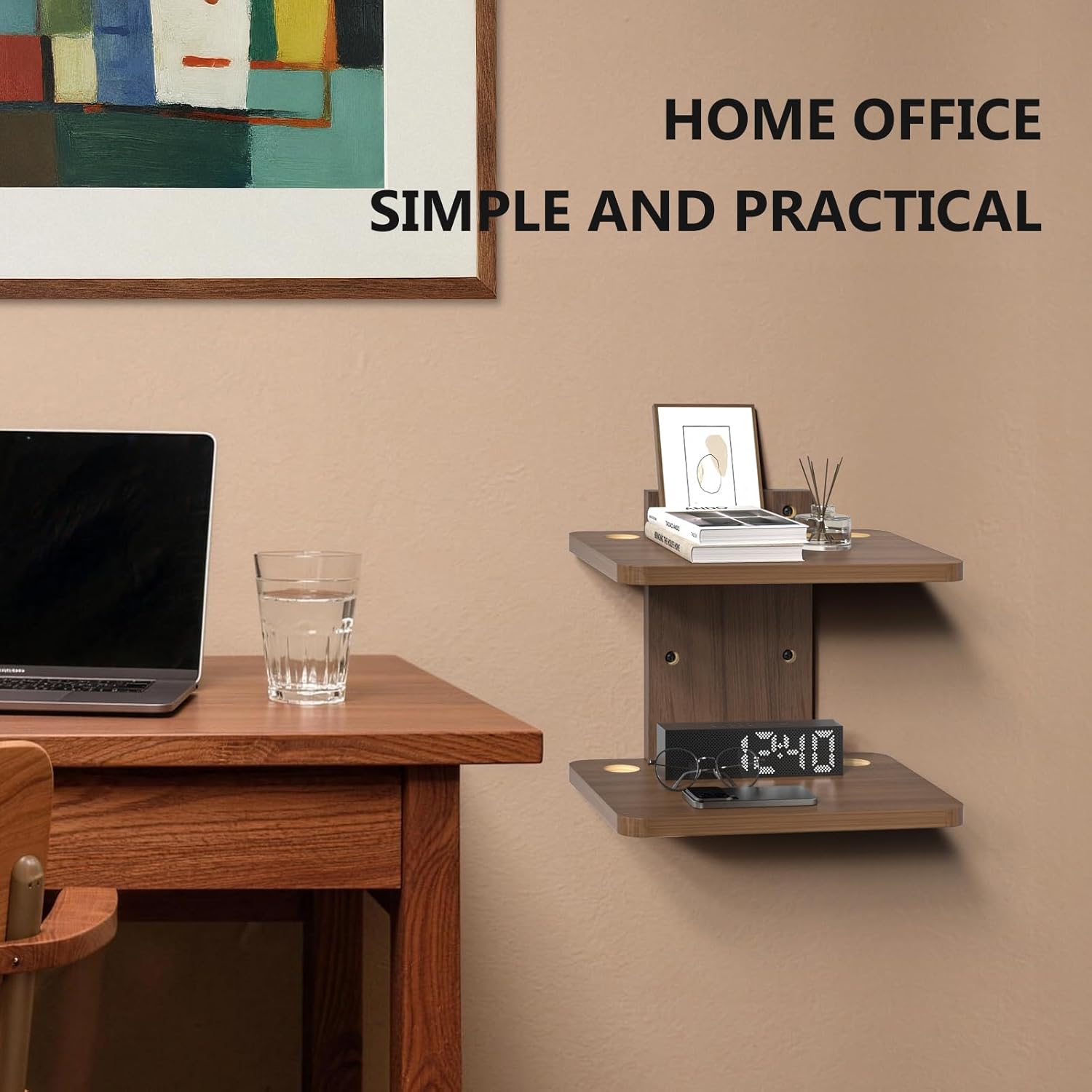
شکل 7: مثالample of shelf usage in a home office setting.
ساتنه
د خپل WALI فلوټینګ تلویزیون شیلف د اوږد عمر او ظاهري بڼې ډاډ ترلاسه کولو لپاره، د ساتنې دا ساده لارښوونې تعقیب کړئ:
- پاکول: Wipe the shelves with a dry, soft cloth to remove dust and fingerprints. Avoid using abrasive cleaners or harsh chemicals, as these may damage the wood finish.
- معاینه: Periodically inspect all mounting screws and connections to ensure they are tight. Re-tighten if necessary to maintain stability.
- د وزن حد: Always adhere to the maximum weight capacity of 22 lbs (10 kg) per shelf to prevent damage or accidents.
د ستونزو حل کول
If you encounter any issues with your WALI Floating TV Shelf, refer to the following common solutions:
- د نصبولو وروسته شیلف په ټپه ولاړ احساس کوي:
- Ensure all mounting screws are fully tightened into the wall and the shelf components.
- Verify that appropriate anchors were used for your specific wall type. Drywall anchors may require specific installation techniques to ensure maximum hold.
- Check if the wall itself is structurally sound. If mounting to drywall without a stud, ensure the anchors are rated for the weight you intend to place on the shelf.
- Cables are not neatly organized:
- Utilize the integrated cable management holes on each shelf.
- Consider using cable ties or clips (not included) to bundle and secure excess cable length behind the shelf or along the wall.
- Shelf appears to be bending or sagging:
- Immediately remove items from the shelf.
- Check if the total weight on the shelf exceeds the maximum capacity of 22 lbs (10 kg).
- Re-inspect the installation for any loose connections or signs of structural fatigue in the wall or shelf components.
تضمین او ملاتړ
WALI is committed to providing quality products and excellent customer service. While specific warranty details are not provided in this manual, WALI is a US-based company with over 5 years of experience and a dedicated support team.
If you have any questions, require assistance with installation, or encounter any issues with your product, please do not hesitate to contact WALI customer support. Our professional team is always on standby and aims to respond to emails within 12 hours to ensure you receive the best shopping experience possible.
For support, please refer to the contact information provided on the product packaging or the official WALI webسایټ