
محصول پای ته ورسیدview
The RisoPhy Gaming Mouse PC257A is a high-performance wired gaming mouse designed for precision and customization. It features a 32-bit ARM processor, 11 programmable buttons, adjustable RGB backlighting, and a tunable weight system to enhance your gaming experience. Its ergonomic design ensures comfort during extended use, and its durable construction provides a long lifespan.

Image: The RisoPhy Gaming Mouse PC257A, showcasing its ergonomic shape and the included tunable weights for personalized feel.
د تنظیم کولو لارښود
Follow these steps to set up your RisoPhy Gaming Mouse PC257A:
- ان باکس کول: Carefully remove the mouse and any accessories from the packaging. Ensure all components are present, including the mouse and the tunable weights.
- د کمپیوټر سره وصل کړئ: Plug the USB connector of the RisoPhy Gaming Mouse into an available USB port on your computer. The mouse is plug-and-play compatible with Windows and Linux operating systems.
- د موټر چلوونکي نصب کول (اختیاري مګر سپارښتنه شوې): For full customization, including programmable buttons, RGB lighting modes, and DPI settings, install the dedicated driver software. The product images indicate a "Drive Disk Included". If a physical disk is not provided, check the RisoPhy official webد سافټویر ډاونلوډ لپاره سایټ.
- د وزن تنظیم: The mouse features a tunable weight system. To adjust, locate the weight compartment on the underside of the mouse. Open the compartment and insert or remove the 2.4g weights as desired to achieve your preferred mouse feel and balance.

Image: The underside of the RisoPhy Gaming Mouse showing the compartment for the 8x 2.4g tunable weights.
عملیاتي لارښوونې
Understanding the features and functions of your RisoPhy Gaming Mouse PC257A:
ارګونومیک ډیزاین
The RisoPhy PC257A is designed for comfort during long gaming sessions, featuring a thumb rest paddle, non-slip sides, and soft rubber rollers for the scroll wheel. This ergonomic shape helps reduce hand fatigue.
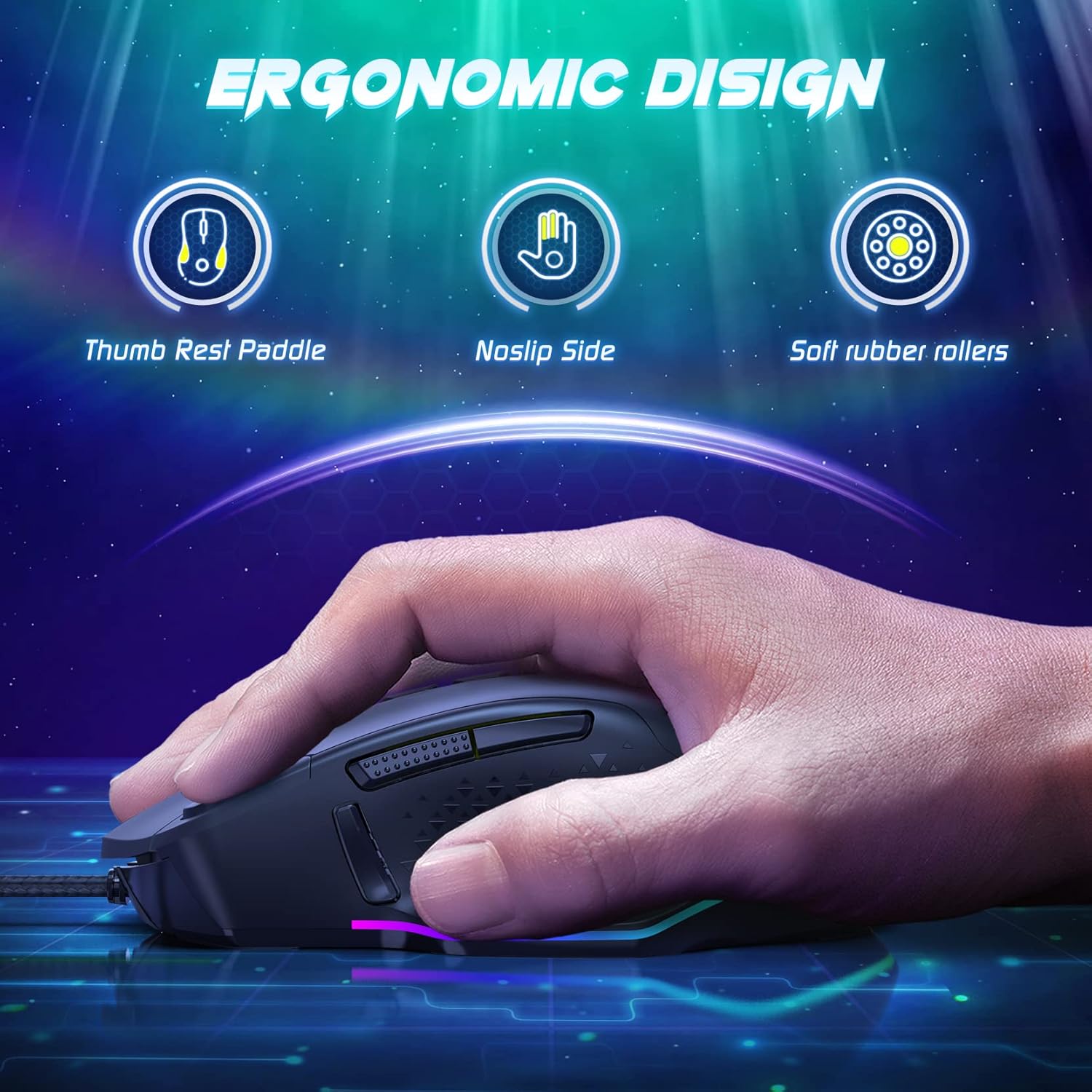
Image: A hand holding the RisoPhy Gaming Mouse, illustrating its ergonomic features including a thumb rest paddle, non-slip side, and soft rubber rollers.
DPI Settings and Adjustment
The mouse supports multiple DPI levels for precise control, up to 12000 DPI. Use the dedicated DPI adjustment buttons (usually located near the scroll wheel) to cycle through preset DPI stages. The software allows for custom DPI configuration and fine-tuning.
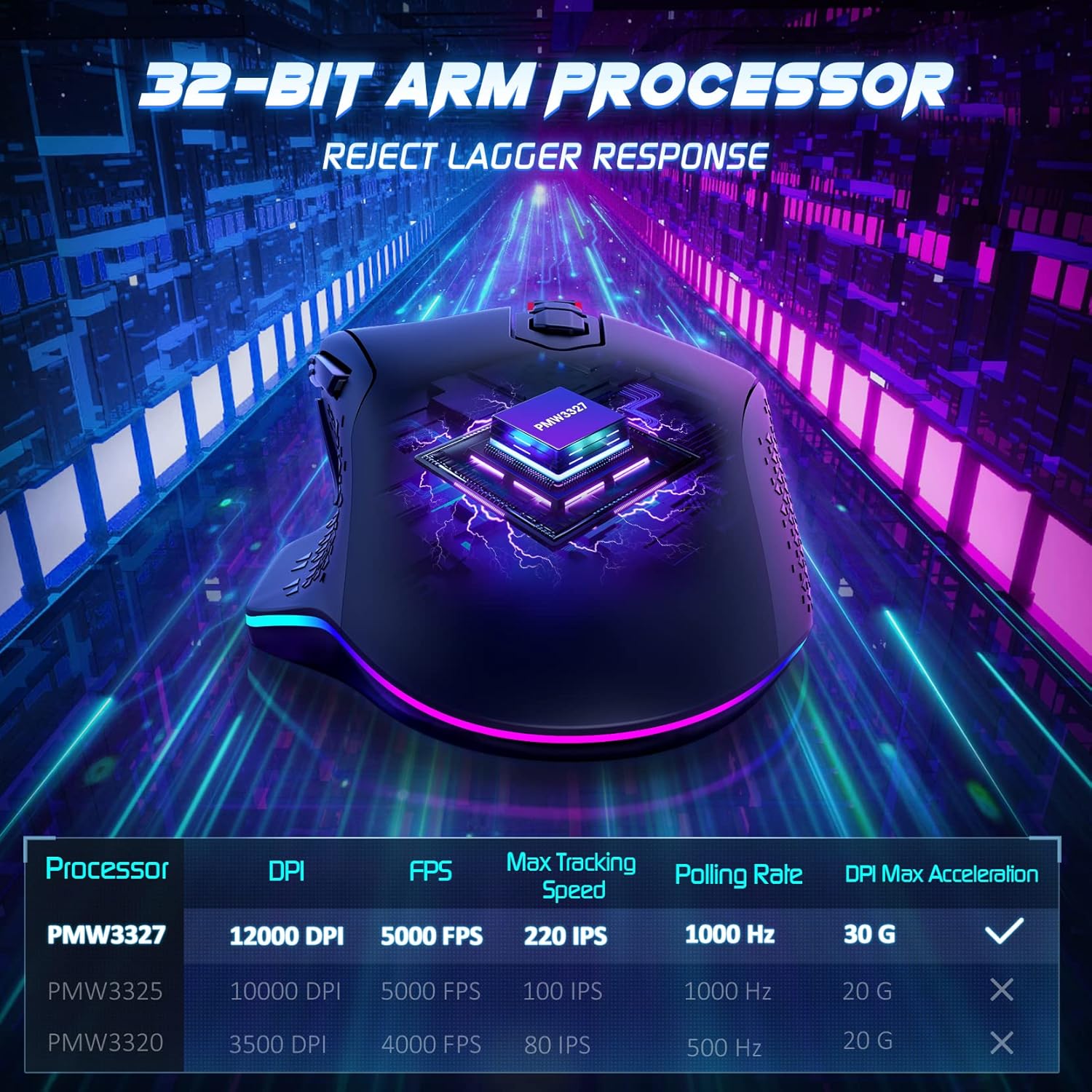
Image: Diagram illustrating the 32-bit ARM processor and a table detailing performance metrics like DPI, FPS, Max Tracking Speed, and Polling Rate.
د پروګرام وړ تڼۍ
The RisoPhy PC257A features 11 programmable buttons. These buttons can be assigned various functions, macros, or key combinations using the mouse's software. This allows for personalized control in gaming and productivity tasks.

Image: Screenshot of the RisoPhy mouse software interface, demonstrating options for lighting, DPI, macro settings, and button assignments.
د RGB بیکلاینټینګ
The mouse is equipped with brilliant RGB backlights offering 7 adjustable light modes and 16.8 million customizable colors. Use the software or dedicated buttons on the mouse to switch between lighting effects, adjust brightness, or turn the lights on/off.

Image: The RisoPhy Gaming Mouse highlighting its RGB backlighting, with icons indicating 16.8 million colors, 7 RGB lighting modes, and a light switch function.
پرمختللي ځانګړتیاوې
- آن بورډ حافظه: خپل دودیز مسلکي خوندي کړئfiles directly to the mouse's on-board memory. This allows you to use your personalized settings on any computer without needing to reinstall the software.

Image: The RisoPhy mouse software displaying options to save and manage custom profiles, indicating the presence of on-board memory.
- Triple Click Function: A dedicated button provides a triple-click function, useful in FPS games for rapid firing.

Image: The RisoPhy Gaming Mouse in a gaming context, highlighting a button labeled "Click=Triple Click" for enhanced gameplay.
- پایښت: The mouse is built for longevity, featuring switches rated for 30 million clicks, ensuring reliable performance over time.

Image: The RisoPhy Gaming Mouse with text indicating "Strong Durability" and "30 Million Times Wheel & Switch Life".
ساتنه
To ensure the longevity and optimal performance of your RisoPhy Gaming Mouse PC257A, follow these maintenance guidelines:
- پاکول: د موږک سطحه د پاکولو لپاره نرم، وچ ټوکر وکاروئ. د سختې خاورې لپاره، لږ څهampټوکر د اوبو سره ومینځئ. د سختو کیمیاوي موادو یا خړوبونکو موادو کارولو څخه ډډه وکړئ.
- د سینسر پاکول: Periodically clean the optical sensor on the underside of the mouse with a cotton swab to prevent tracking issues.
- د کیبل پاملرنه: Avoid sharp bends or excessive pulling on the mouse cable to prevent damage.
- ذخیره کول: کله چې په کارولو کې نه وي، موږک په پاک او وچ چاپیریال کې د سختې تودوخې څخه لرې وساتئ.
د ستونزو حل کول
Common issues and their solutions for the RisoPhy Gaming Mouse PC257A:
| ستونزه | احتمالي لامل | د حل لاره |
|---|---|---|
| موږک ځواب نه ورکوي | د USB اتصال خراب دی، د USB پورټ خراب دی، د موټر چلوونکي ستونزه. |
|
| Inaccurate tracking or cursor jumpiness | ناپاک نظري سینسر، د موږک پیډ نامناسب سطح. |
|
| Buttons not working or programmable features not active | Software not installed or configured correctly, corrupted profile. |
|
| د RGB څراغ کار نه کوي یا بند پاتې دی | Software glitch, lighting mode selection. |
|
مشخصات
Key technical specifications for the RisoPhy Gaming Mouse PC257A:
- نښه: RisoPhy
- ماډل: PC257A
- د ارتباط ټیکنالوژي: تارونه
- د حرکت کشف ټیکنالوژي: نظري
- د تڼیو شمیر: 11
- د لاسونو لارښوونه: سمه ده
- ځانګړي ځانګړتیاوې: Ergonomic Design, Programmable Buttons, RGB Backlighting, Tunable Weights, On-board Memory
- وړاندیز شوي استعمالونه: لوبې کول
- مطابقت لرونکي وسایل: شخصي کمپیوټر
- عملیاتي سیسټمونه: Linux, Windows 7, Windows XP (and likely newer Windows versions)
- د توکي وزن: 4 grams (Note: This value from the source data seems to be for a component, not the full mouse. The mouse includes 8x 2.4g weights for customization.)
- د بار وړلو ابعاد: 14 x 10.3 x 5.1 سانتي متره
تضمین او ملاتړ
For warranty information, technical support, or further assistance with your RisoPhy Gaming Mouse PC257A, please refer to the official RisoPhy webسایټ ته مراجعه وکړئ یا د دوی د پیرودونکو خدماتو سره اړیکه ونیسئ. د تضمین ادعاوو لپاره د پیرود ثبوت په توګه د پیرود رسید وساتئ.
د عمومي پوښتنو لپاره، تاسو کولی شئ لیدنه وکړئ RisoPhy brand page on Amazon.