
پیژندنه
The Strich BT-FP2 is a wireless page turner pedal designed to enhance your musical performance or presentation by providing hands-free control over digital content. This device allows musicians, presenters, and other users to effortlessly navigate through sheet music, lyrics, chords, or presentation slides on their mobile phones, tablets, or computers via Bluetooth connectivity. By eliminating the need to use your hands for page turning, you can maintain focus on your instrument or presentation, ensuring a smooth and uninterrupted experience.
چمتو کول
د بسته محتويات
مخکې له دې چې تاسو پیل کړئ، مهرباني وکړئ ډاډ ترلاسه کړئ چې ټول توکي په کڅوړه کې شتون لري:
- Strich BT-FP2 Wireless Page Turner Pedal
- د چارج کیبل
د وسیله چارج کول
The BT-FP2 pedal features a built-in rechargeable Lithium-ion battery. For optimal performance, fully charge the device before its first use.
- Connect the provided charging cable to the charging port on the pedal.
- د چارج کولو کیبل بل پای د معیاري USB بریښنا اډاپټر (شامل نه دی) یا د کمپیوټر USB پورټ سره وصل کړئ.
- د چارج کولو شاخص څراغ به روښانه شي. کله چې په بشپړ ډول چارج شي، رڼا ممکن رنګ بدل کړي یا بنده شي، د ماډل پورې اړه لري.
- بشپړ چارج تر لسو ساعتونو پورې دوامداره کارونې ته اجازه ورکوي.
ستاسو د وسیله جوړه کول
The Strich BT-FP2 uses Bluetooth for wireless connectivity with your mobile phone, tablet, or computer. It is compatible with both Apple iOS and Android platforms.
- Ensure the BT-FP2 pedal is charged and powered on. The power switch is typically located on the central unit.
- On your mobile device or computer, navigate to the Bluetooth settings.
- بلوتوټ فعال کړئ او د شته وسایلو لټون وکړئ.
- Select "BT-FP2" from the list of discovered devices to initiate the pairing process.
- Once paired, the device's Bluetooth indicator light will confirm a successful connection. The operating range is up to 10 meters (33 feet).

شکل 1: مخکی view of the Strich BT-FP2 pedal, showing the two foot pedals and the central control panel with various buttons and indicator lights. This view is useful for identifying the power switch and pairing buttons.
عملیاتي لارښوونې
بنسټیز کارونه
The BT-FP2 pedal features two foot pedals, allowing for intuitive control of your digital content.
- کی Ped پښه: Typically used for moving backward (e.g., previous page, previous slide).
- ښی پښه: Typically used for moving forward (e.g., next page, next slide).
- د حالت تڼۍ: The central control panel includes buttons to switch between different operating modes, which may emulate various keyboard commands (e.g., page up/down, left/right arrow keys). Refer to your application's settings for optimal configuration.
د غوښتنلیک مطابقت
The pedal is compatible with a wide range of applications that support external keyboard or Bluetooth input for navigation. Supported software includes, but is not limited to, GarageBand and CAKEWALK. For other applications, check their settings for options to assign keyboard shortcuts to page turning or navigation functions.

شکل 2: The Strich BT-FP2 pedal shown in a usage scenario, connected to a device via a red cable (likely for charging or wired connection, though primarily wireless). This image illustrates the pedal's compact design and how it might appear during use.

شکل 3: یو تړلی view of a foot pressing one of the pedals on the Strich BT-FP2. This demonstrates the hands-free operation and the ergonomic design for foot control, highlighting its practical application during a performance.
ساتنه
Proper care and maintenance will extend the life of your Strich BT-FP2 pedal.
- پاکول: Use a soft, dry cloth to clean the surface of the pedal. Avoid using abrasive cleaners or solvents, as they may damage the finish.
- ذخیره کول: پیډل په یخ او وچ ځای کې د مستقیم لمر وړانګو او سختې تودوخې څخه لرې وساتئ.
- د بیټرۍ پاملرنه: د بیټرۍ روغتیا ساتلو لپاره، د بیټرۍ په مکرر ډول په بشپړه توګه چارج کولو څخه ډډه وکړئ. که چیرې د اوږدې مودې لپاره ذخیره کوئ، نو بیټرۍ په هرو څو میاشتو کې نږدې 50٪ ته چارج کړئ.
- د اوبو ښکاره کول: This device is not waterproof. Avoid exposure to liquids to prevent damage.
د ستونزو حل کول
If you encounter issues with your Strich BT-FP2 pedal, refer to the following common problems and solutions:
- وسیله نه چلیږي:
- Ensure the battery is charged. Connect the charging cable and allow it to charge for at least 30 minutes.
- ډاډ ترلاسه کړئ چې د بریښنا سویچ په 'آن' حالت کې دی.
- د بلوتوث له لارې جوړه نشي کولی:
- Make sure the pedal is powered on and within the 10-meter range of your device.
- Turn off and on Bluetooth on your mobile device or computer.
- وسیله د خپل بلوتوث ترتیباتو څخه هیر کړئ او بیا د جوړه کولو هڅه وکړئ.
- Ensure no other devices are actively connected to the pedal.
- Pedal not responding in application:
- Check if the pedal is successfully paired with your device.
- Verify the application settings to ensure it supports external input or keyboard shortcuts for navigation.
- Try switching the operating mode on the pedal using the central buttons to see if a different mode is compatible with your application.
- Restart the application and/or your mobile device.
- د بیټرۍ لنډ ژوند:
- ډاډ ترلاسه کړئ چې وسیله د کارولو دمخه په بشپړ ډول چارج شوې ده.
- د بیټرۍ ژوند د کارونې او چاپیریالي شرایطو پراساس توپیر کولی شي.
- If the issue persists, the battery may need replacement (contact support).
مشخصات
Detailed technical specifications for the Strich BT-FP2 Wireless Page Turner Pedal:
| فیچر | تفصیل |
|---|---|
| د ماډل شمیره | BT-FP2 |
| د ارتباط ټیکنالوژي | بلوتوث |
| مطابقت لرونکې وسیلې | PC, Laptop, Smartphone, Tablet |
| ملاتړ شوی سافټویر | GarageBand, CAKEWALK (and others supporting keyboard input) |
| Number of Keys/Pedals | 2 |
| د بیټرۍ ډول | ۱ لیتیم آیون (شامل دی) |
| د بیټرۍ ژوند | تر 20 ساعتونو پورې |
| د بیسیم رینج | تر 10 مترو پورې |
| د توکي وزن | 420 ګرامه |
| د کڅوړې ابعاد | 21.3 x 19.2 x 4.2 سانتي متره |
| ځانګړی ځانګړنه | کمپیکټ، د انتقال وړ |
| جوړونکی | سټریچ |
| د اصلي هیواد | چین |
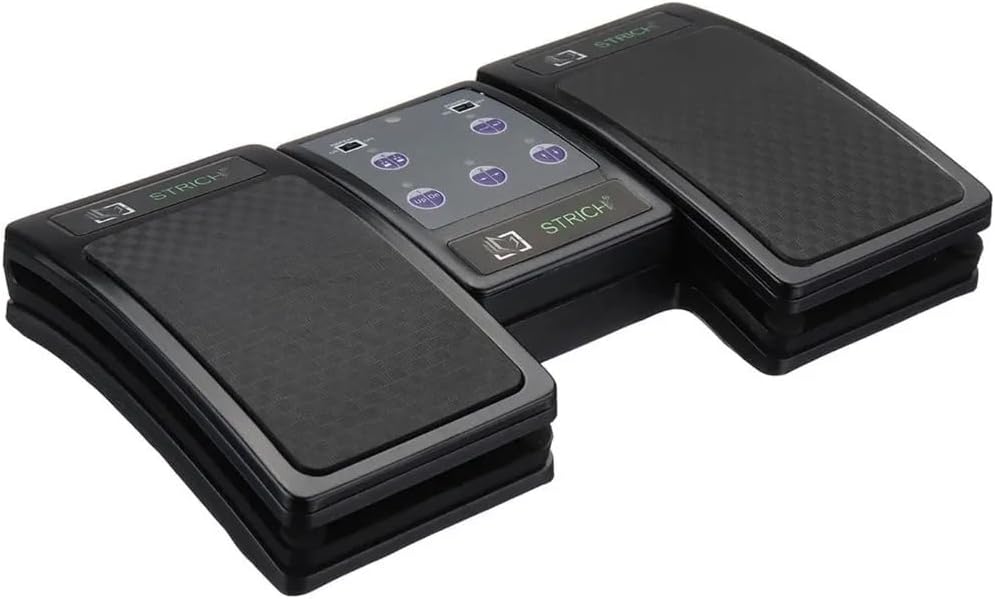
شکل 4: An angled top-down view of the Strich BT-FP2 pedal, showcasing its overall design and footprint. This image provides a comprehensive look at the product's physical characteristics.
تضمین او ملاتړ
د تضمین معلوماتو یا تخنیکي ملاتړ لپاره، مهرباني وکړئ د خپل پیرود سره چمتو شوي اسنادو ته مراجعه وکړئ یا مستقیم پرچون پلورونکي / تولیدونکي سره اړیکه ونیسئ. د هر ډول تضمین ادعا لپاره د پیرود ثبوت وساتئ.