
syitren R300
د سیټرین R300 سي ډي پلیر کارونکي لارښود
ماډل: R300
برانډ: سیټرین
1. پیژندنه
The syitren R300 is a portable desktop retro CD player designed for home use. It features Bluetooth connectivity and fiber optic output, allowing users to connect to various external audio systems. This manual provides detailed instructions for setting up, operating, maintaining, and troubleshooting your R300 CD player.

Figure 1: syitren R300 CD Player - Front View
۲. په بکس کې څه دي؟
مهرباني وکړئ د بسته بندۍ محتويات وګورئ ترڅو ډاډ ترلاسه کړئ چې ټول توکي شتون لري:
- syitren R300 CD Player
- د ډول-C بریښنا کیبل
- 1 AAA بیټرۍ (شامل)
3. ترتیب کول
۳.۲ بریښنا فعالول او چارج کول
The R300 CD player is powered via a Type-C cable. It includes a built-in 2000mAh battery, providing over 6 hours of playback on a full charge. Connect the provided Type-C power cable to the DC IN 5V port on the back of the unit and plug the other end into a compatible USB power adapter (not included).

Figure 2: Rear Ports (DC IN 5V and SPDIF)
۳.۲ د آډیو وسیلو سره نښلول
The R300 CD player does not have a built-in speaker. It requires connection to external audio devices for sound output. This design helps reduce the impact of audio vibration on the CD player, allowing users to choose their preferred speakers and power ampژوندی تجهیزات.
3.2.1 د بلوتوث اتصال
The R300 CD player can connect wirelessly to Bluetooth headphones or speakers.
- Ensure your external Bluetooth audio device is in discovery mode.
- On the R300, activate Bluetooth pairing mode by holding the designated Bluetooth button (refer to controls section for button identification).
- Once connected, a solid Bluetooth icon will appear on the R300's display.
Video 1: Demonstrates how to connect the R300 CD Player to an external stereo system using Bluetooth. The video shows activating Bluetooth on the R300 and pairing it with a separate speaker, confirming connection via the display icon.
3.2.2 Fiber Optic (SPDIF) Output
For high-quality digital audio output, connect the R300 to an audio receiver or amplifier using a fiber optic cable (not included) via the SPDIF port on the back of the unit.
۳.۶ د AUX محصول
The R300 also features an AUX output for analog audio connection to compatible devices using a 3.5mm audio cable (not included).
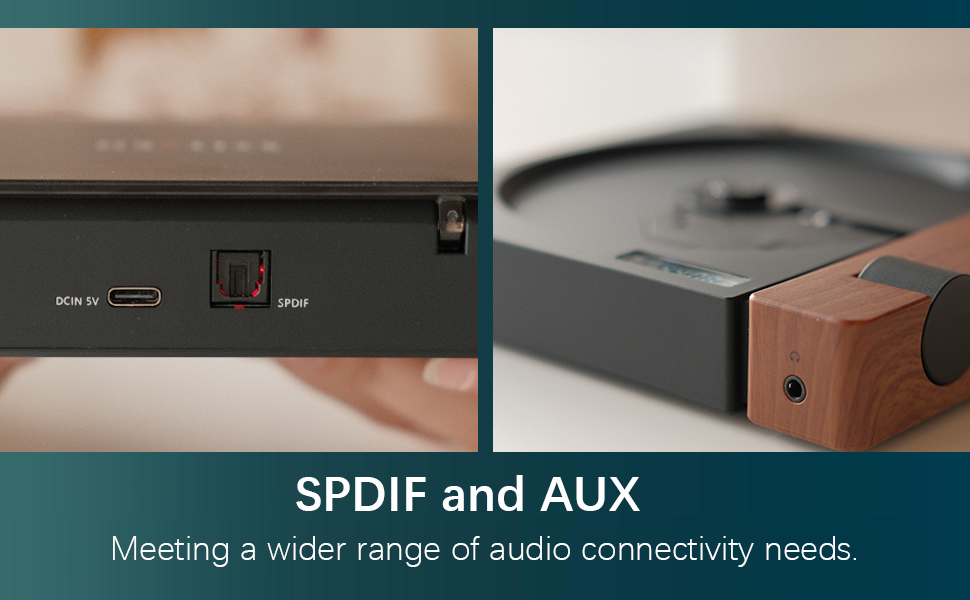
Figure 3: SPDIF and AUX Connectivity Options
4. عملیاتي لارښوونې
4.1 د سي ډي غږول
- په نرمۍ سره د ډیسک پوښ خلاص کړئ.
- یوه سي ډي په سپینډل کې کیږدئ، ډاډ ترلاسه کړئ چې دا په سمه توګه ځای پر ځای شوی دی.
- د ډیسک پوښ بند کړئ.
- Press the Play/Pause button (orange button) to begin playback.
- Use the Skip Forward and Skip Backward buttons to navigate between tracks.
- د حجم نوب په کارولو سره حجم تنظیم کړئ.

Figure 4: Opening the Disc Cover

شکل ۲: د کنټرول پینل او ښودنه
4.2 د کنټرول اوورview
The R300 features a minimalist control panel on the right side of the unit:
- د بریښنا سویچ: Located on the back/side of the unit (refer to Figure 2).
- د حجم نوب: Rotates to adjust audio output level.
- د پلی کولو/پاز بټن: Orange button to start or pause CD playback.
- د پریښودو تڼۍ: Black buttons for skipping tracks forward or backward.
- Bluetooth Activation Button: (Likely one of the black buttons, or the top one, as shown in video) Used to initiate Bluetooth pairing.
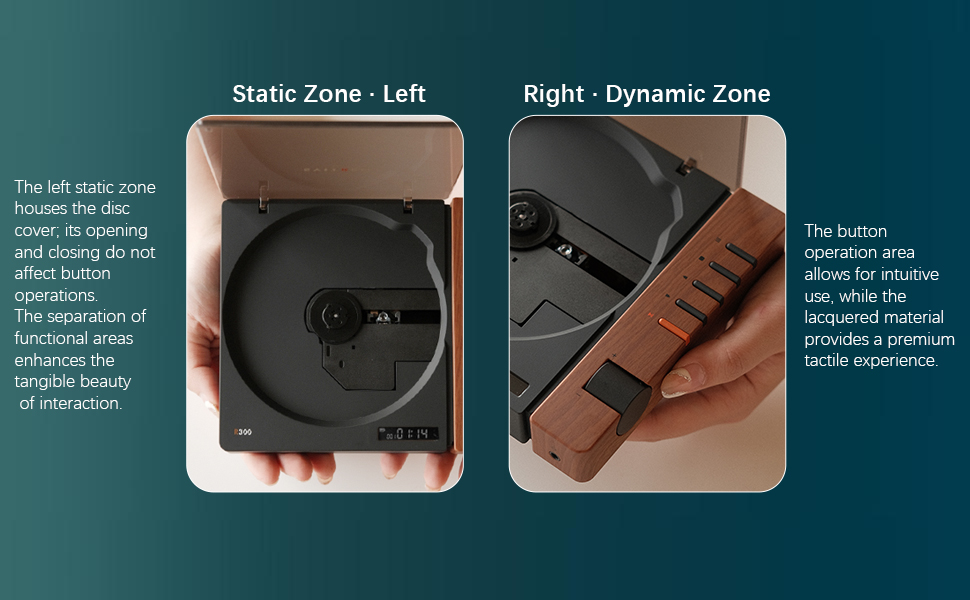
Figure 6: Functional Zones of the R300
5. ساتنه
- واحد د نرم او وچ ټوکر سره پاکولو سره پاک وساتئ. د کثافاتو پاکوونکو یا محلولونو څخه ډډه وکړئ.
- Ensure the disc tray is free of dust and debris to prevent playback issues.
- When not in use, store the CD player in a cool, dry place away from direct sunlight and extreme temperatures.
- سي ډي ګانې د هغوی له څنډو سره ونیسئ ترڅو د ګوتو نښې او سکریچونه ونه شي.
6. ستونزه حل کول
| ستونزه | احتمالي لامل | د حل لاره |
|---|---|---|
| لوبغاړی نه چالانېږي. | بیټرۍ ختمه شوې ده یا د بریښنا کیبل نه دی وصل شوی. | Charge the unit using the Type-C power cable. Ensure the power cable is securely connected. |
| "NO CD" message displayed. | No CD inserted, CD is dirty/scratched, or CD is not properly seated. | Insert a CD. Clean the CD with a soft cloth. Ensure the CD is placed correctly on the spindle. |
| د غږ تولید نشته. | No external speaker connected, volume too low, or incorrect output mode selected. | Connect an external speaker via Bluetooth, SPDIF, or AUX. Increase the volume. Ensure the external device is properly configured for input. |
| د بلوتوث اتصال ستونزې. | Device not in pairing mode, out of range, or interference. | ډاډ ترلاسه کړئ چې دواړه وسایل د جوړې کولو حالت کې دي. وسایل نږدې کړئ. د نورو بېسیم وسیلو مداخله کمه کړئ. |
| Player randomly shuts off. | د بیټرۍ ټیټه کچه یا داخلي خرابوالی. | ډاډ ترلاسه کړئ چې بیټرۍ په بشپړ ډول چارج شوې ده. که ستونزه دوام ومومي، د پیرودونکي ملاتړ سره اړیکه ونیسئ. |
7. مشخصات
- د موډل نوم: R300
- نښه: سایترین
- د محصول ابعاد: 6.38 x 5.79 x 1.28 انچه
- د توکي وزن: 14.1 اونس
- بیټرۍ: 1 AAA بیټرۍ اړین دي (شامل دي)
- د ارتباط ټیکنالوژي: Bluetooth, SPDIF, AUX
- ځانګړې ځانګړنه: د پورټ وړ
- جوړونکی: syitren/Guangdong Kaiping Electronics Co., Ltd
- د بیټرۍ ظرفیت: Built-in 2000mAh (more than 6 hours playback)
8. تضمین او ملاتړ
For warranty information and customer support, please refer to the product's official Amazon listing page or visit the syitren official webسایټ. د هر ډول تضمین ادعا لپاره خپل د پیرود رسید وساتئ.
جوړونکی: syitren/Guangdong Kaiping Electronics Co., Ltd
د برانډ پلورنځی: Visit the syitren Store on Amazon
Ask a question about this manual
Ask about setup, troubleshooting, compatibility, parts, safety, or missing instructions. Manuals+ will review the question and use this page’s manual context to help answer it.