
1. پیژندنه
The Cleyver HC95 is a wired headset designed for professional communication, offering clear audio and a noise-cancelling microphone. It features an integrated Busylight to indicate user availability and is optimized for various communication platforms, ensuring efficient and focused conversations.
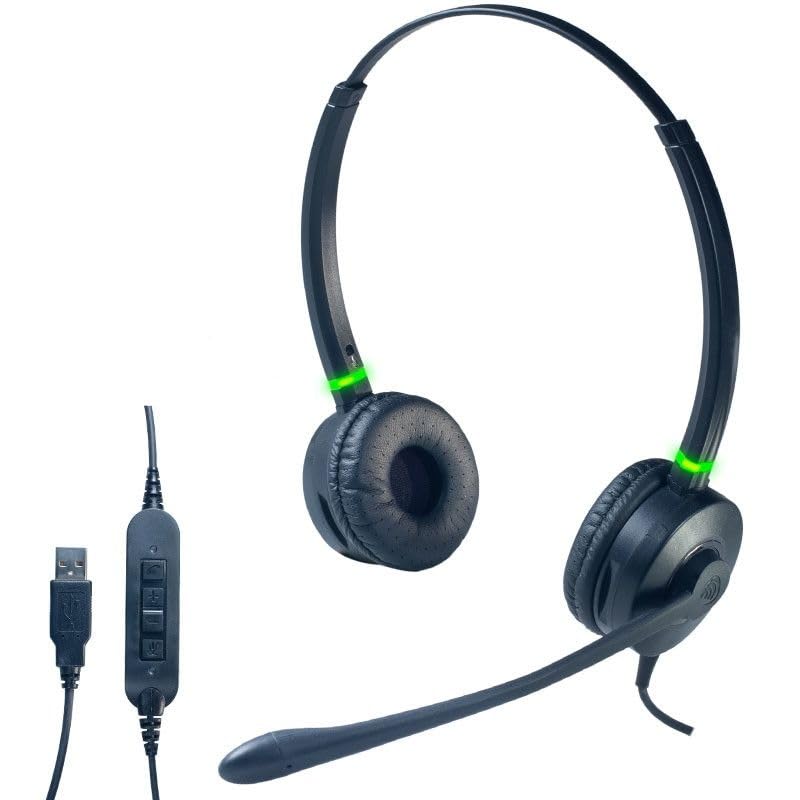
یو مخ view of the Cleyver HC95 wired headset, highlighting its over-ear design and microphone boom.
2. د بسته محتويات
مهرباني وکړئ د لاندې توکو لپاره بکس وګورئ:
- Cleyver HC95 Wired Headset (with integrated USB-A cable)
- د کارونکي لارښود (دا لاسوند)
3. ترتیب کول
- هیډسیټ وصل کړئ: Plug the USB-A connector of the Cleyver HC95 headset into an available USB port on your computer.
- اتوماتیک نصب کول: Your operating system (Windows, macOS, Linux) should automatically detect and install the necessary drivers. This may take a few moments.
- د ډیفالټ وسیله په توګه غوره کړئ: Once installed, navigate to your computer's sound settings and select the Cleyver HC95 as your default audio input (microphone) and output (speaker) device for calls and media.
- د سافټویر ترتیب: For optimal performance with communication software (e.g., Microsoft Teams, Skype for Business, Zoom), ensure the Cleyver HC95 is selected as the audio device within the application's settings.

The inline control unit for the Cleyver HC95 headset, featuring buttons for call management, volume adjustment, and microphone mute, along with the USB-A connector.
4. عملیاتي لارښوونې
۶ د هیډسیټ اغوستل
- Adjust the headband for a comfortable fit over your head.
- Position the earcups over your ears. The HC95 features an over-ear design for comfort during extended use.
- Rotate the microphone boom arm to position the microphone approximately 2-3 cm (1 inch) from the corner of your mouth for optimal voice pickup.
4.2 Inline Control Functions
The inline control unit provides easy access to essential call management features:
- د تلیفون تڼۍ: د ځواب ویلو یا پای ته رسیدو لپاره فشار ورکړئ.
- حجم پورته (+): د اوریدلو حجم زیاتولو لپاره فشار ورکړئ.
- حجم ښکته (-): د اوریدلو حجم کمولو لپاره فشار ورکړئ.
- تteۍ غږول: Press to mute or unmute the microphone. An LED indicator on the control unit may show the mute status.
۴.۲ د مصروفې رڼا فعالیت
The integrated Busylight on the earcups provides a visual indication of your call status to those around you.
- شنه رڼا: Indicates you are available or on a call.
- سور څراغ: Indicates you are busy or in a meeting.

Headset with green Busylight, indicating availability.

Headset with red Busylight, indicating busy status.
5. ځانګړتیاوې
- Extreme Comfort: The lightweight design ensures a comfortable, pressure-free wearing experience, even during extended periods of use.
- د استثنایی غږ کیفیت: Enjoy clear and crisp conversations thanks to wideband audio technology.
- Advanced Noise-Cancelling Microphone: The long boom microphone effectively reduces up to 80% of ambient background noise, making it ideal for use in noisy office environments.
- Acoustic Protection and Busylight Indicators: Built-in acoustic protection safeguards your hearing. Integrated luminous indicators on the earcups signal your availability to colleagues, minimizing interruptions.
- Optimized for Communication Software: The headset is pre-configured for efficient communication with platforms like Microsoft Skype for Business and Microsoft Teams. It also offers extended compatibility with various other softphones and operating systems.
6. ساتنه او پالنه
- پاکول: د هیډسیټ پاکولو لپاره نرم، وچ ټوکر وکاروئ. د غوږونو کشنونو لپاره، په نرمۍ سره د لږ څه ډډ سره مسح کړئamp cloth and allow to air dry completely before use. Do not use harsh chemicals or abrasive cleaners.
- ذخیره کول: هیډسیټ په یخ او وچ ځای کې د مستقیم لمر وړانګو او سختې تودوخې څخه لرې وساتئ. د کیبل له ګډوډولو څخه ډډه وکړئ.
- د کیبل پاملرنه: Do not pull on the cable to disconnect the headset. Always grasp the USB connector. Avoid bending or twisting the cable excessively.
- د اوبو مقاومت: دا هیډسیټ د اوبو په وړاندې مقاومت نلري. د مایعاتو سره د تماس څخه ډډه وکړئ.
7. ستونزه حل کول
۷.۱ د هیډسیټ څخه غږ نشته
- Ensure the headset is securely plugged into a USB port.
- Check your computer's sound settings to confirm the Cleyver HC95 is selected as the default output device.
- Verify the volume on the inline control unit and your computer is not muted or set too low.
- Test the headset on a different USB port or another computer to rule out port issues.
۷.۲ مایکروفون کار نه کوي
- Ensure the microphone is not muted via the inline control unit or within your communication software.
- Check your computer's sound settings to confirm the Cleyver HC95 is selected as the default input device.
- Adjust the microphone gain/level in your computer's sound settings.
- Ensure the microphone boom arm is correctly positioned near your mouth.
7.3 Busylight Not Functioning
- ډاډ ترلاسه کړئ چې هیډسیټ په سمه توګه وصل شوی او ستاسو کمپیوټر یې پیژني.
- The Busylight functionality is often integrated with specific communication software (e.g., Microsoft Teams). Ensure the software is running and the headset is selected as the active device.
- Restart your communication software or computer.
8. مشخصات
| د ماډل شمیره | ODHC95USB |
| برانډ | Cleyver |
| د ارتباط ټیکنالوژي | تار لرونکی (USB-A) |
| مایکروفون | د شور منسوخی بوم مایکروفون |
| د غږ کیفیت | پراخه آډیو |
| د کنټرول طریقه | Inline Remote Control, Voice Control |
| د غوږ ځای پرځای کول | ډیر قاعده (محیط) |
| د شور کنټرول | د اکوسټیک انزوا |
| مواد | سټینلیس سټیل ، المونیم |
| رنګ | تور |
| مطابقت لرونکې وسیلې | Softphone software including Skype for Business, Microsoft Teams, Cisco, Avaya, and 3CX |
| د اوبو د مقاومت کچه | د اوبو مقاومت نلري |
9. تضمین او ملاتړ
For warranty information, technical support, or service inquiries, please refer to the documentation provided with your purchase or contact Cleyver customer support directly. Keep your proof of purchase for warranty claims.