
IPRO IPRO P1
د IPRO P1 GSM 2G ګرځنده تلیفون کارونکي لارښود
Model: IPRO P1
پیژندنه
This manual provides comprehensive instructions for the IPRO P1 GSM 2G Mobile Phone. Designed for ease of use, particularly for seniors, this phone features large buttons, a clear display, and essential functions. Please read this manual carefully before using your device to ensure proper operation and maintenance.
په بکس کې څه دي
د بکس خلاصولو پر مهال، مهرباني وکړئ تصدیق کړئ چې لاندې ټول توکي پکې شامل دي:
- 1 x IPRO P1 Mobile Phone
- 1 x Micro-USB Charger
- 1 x بیټرۍ
- 1 x د کارونکي لارښود
چمتو کول
۲. د سیم کارت او بیټرۍ داخلول
- د تلیفون شاته پوښ په احتیاط سره لرې کړئ.
- Insert your 2G GSM SIM card(s) into the designated SIM card slot(s). This phone supports Dual SIM.
- Insert the battery into the battery compartment, ensuring the gold contacts align with the phone's terminals.
- د شا پوښ بدل کړئ تر هغه چې په خوندي ډول خپل ځای ته راشي.
2. د بیټرۍ چارج کول
د لومړي ځل کارولو دمخه، د تلیفون بیټرۍ په بشپړه توګه چارج کړئ.
- Connect the Micro-USB charger cable to the charging port on the phone.
- چارجر د بریښنا په ځای کې ولګوئ.
- The charging indicator on the phone will show the charging status. Once fully charged, disconnect the charger.

شکل 1: مخکی او شاته view of the IPRO P1 mobile phone, showcasing its compact design and textured back cover.
عملیاتي لارښوونې
1. بریښنا فعال/بند
- To power on: Press and hold the Power/End Call button (usually red) until the screen lights up.
- To power off: Press and hold the Power/End Call button until the power off options appear, then select "Power off".
2. زنګ وهل
- د کیپډ په کارولو سره د تلیفون شمیره دننه کړئ.
- د زنګ وهلو لپاره د زنګ وهلو تڼۍ (معمولا شنه) کېکاږئ.
- To end a call, press the Power/End Call button.
3. Sending SMS Messages
- Navigate to the "Messages" menu from the main screen.
- "پیغام ولیکئ" یا "نوی SMS" غوره کړئ.
- د کیپډ په کارولو سره خپل پیغام دننه کړئ.
- د ترلاسه کوونکي د تلیفون شمیره دننه کړئ یا د اړیکو څخه غوره کړئ.
- "لیږل" غوره کړئ.
4. Using Key Features

شکل 2: The IPRO P1 phone with visual representations of its core functionalities, including communication, settings, multimedia, and utility features.
- ایف ایم راډیو: Plug in headphones (not included) to use as an antenna, then navigate to the FM Radio application.
- کمره: Access the camera application from the menu to take photos. The phone has a basic camera.
- بلوتوث: Enable Bluetooth in the settings menu to connect to compatible devices like headsets.
- رڼا: The phone features a powerful LED flashlight. It can usually be activated by a dedicated button or a long press of a specific key (refer to quick guide or on-screen prompts).
- د الارم ساعت: Set alarms through the "Clock" or "Alarm" application.
- Calendar & Calculator: Basic utility applications are available in the menu.

شکل 3: The IPRO P1 phone demonstrating its powerful LED flashlight feature, illuminating a dark path.
ساتنه
- پاکول: د تلیفون د سطحې د پاکولو لپاره نرم، وچ ټوکر وکاروئ. د مایع پاکوونکو یا د کثافاتو موادو څخه ډډه وکړئ.
- د بیټرۍ پاملرنه: Do not expose the battery to extreme temperatures. If the phone will not be used for an extended period, charge it periodically to maintain battery health.
- ذخیره کول: تلیفون په یخ او وچ ځای کې د مستقیم لمر وړانګو او رطوبت څخه لرې وساتئ.
- له څاڅکو ډډه وکړئ: While durable, avoid dropping the phone to prevent damage to internal components or the screen.
د ستونزو حل کول
| ستونزه | احتمالي لامل | د حل لاره |
|---|---|---|
| تلیفون نه چالانیږي | بیټرۍ ټیټه ده یا په سمه توګه نه ده داخل شوې. | بیټرۍ چارج کړئ. ډاډ ترلاسه کړئ چې بیټرۍ په سمه توګه داخل شوې ده. |
| زنګونه نشي وهلی یا ترلاسه کولی نشي | No SIM card, SIM card not active, or out of network coverage. | Ensure SIM card is inserted and active. Check network signal strength. Contact your service provider. |
| د تلیفون کیفیت خراب دی | Weak network signal or interference. | Move to an area with better signal. Avoid using near other electronic devices. |
| بیټرۍ په چټکۍ سره وچیږي | Frequent use, background applications, or old battery. | د سکرین روښانتیا کمه کړئ. هغه اپلیکېشنونه بند کړئ چې نه کارول کیږي. که بیټرۍ زوړ وي نو د هغې د بدلولو په اړه فکر وکړئ. |
| سکرین بې ځوابه دی | د سافټویر خرابوالی. | د تلیفون د بیا چالانولو لپاره بیټرۍ لرې کړئ او بیا یې دننه کړئ. |
مشخصات
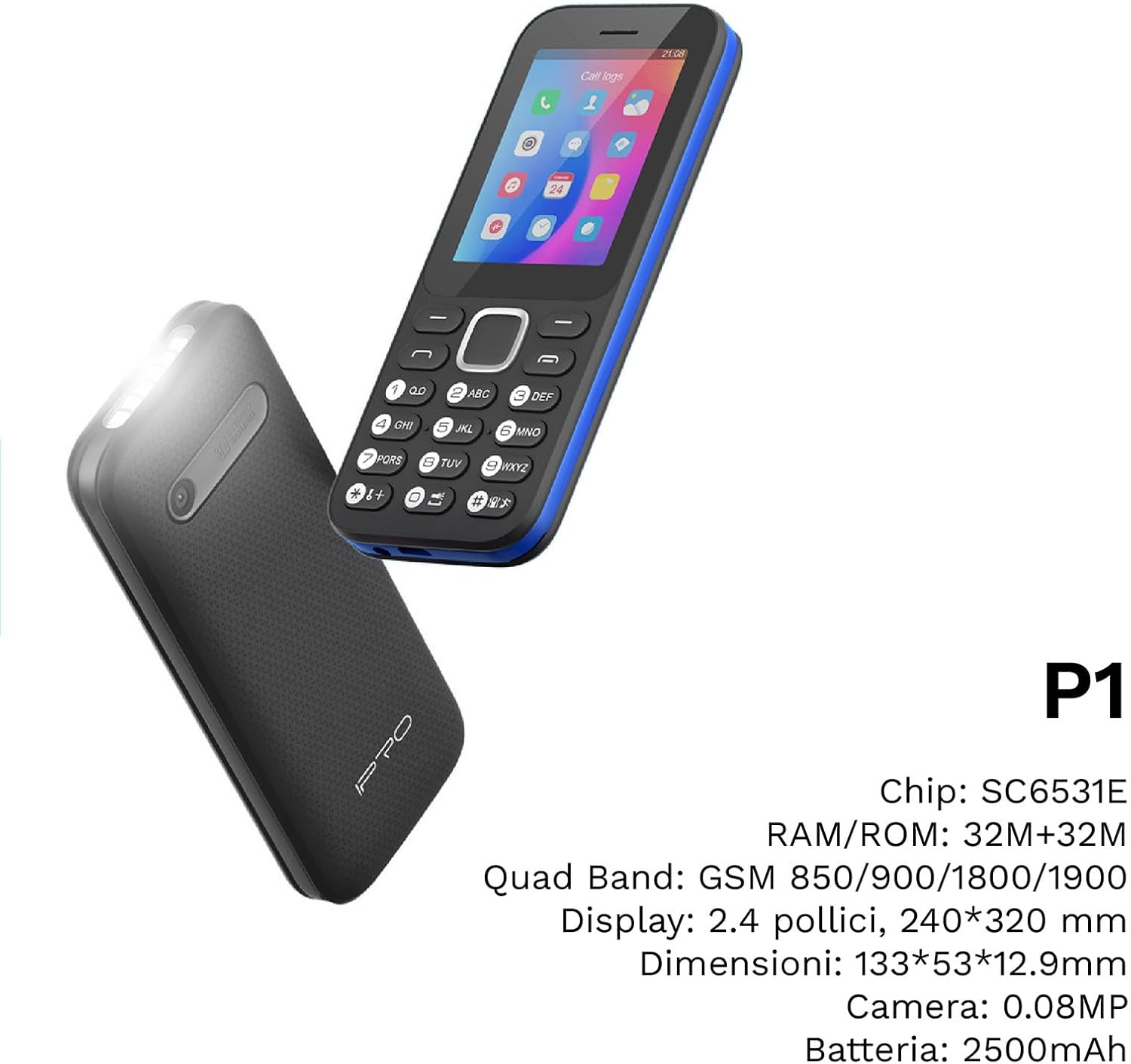
شکل 4: یو زاویه لرونکی view of the IPRO P1 phone, accompanied by a summary of its technical specifications.
- شبکه: 2G GSM Quad Band (850/900/1800/1900 MHz)
- چپ سیٹ: SC6531E
- ښکاره کول: 2.4-inch Color Display (240 x 320 resolution)
- رام: 4 MB
- ROM: 4 MB
- د پراخیدو وړ حافظه: Supports up to 16 GB (MicroSD card not included)
- سیم: دوه ګونی سیم ملاتړ
- ارتباط: بلوتوث
- ځانګړتیاوې: Camera, FM Radio, MP3, MP4, Alarm Clock, Calendar, Calculator, Integrated Games, LED Flashlight
- بیټرۍ: 2500 mAh لیتیم آیون
- ژبې: Spanish, English, French, Italian, Portuguese
- رنګ: تور
- د محصول ابعاد: 133 x 53 x 12.9 mm
- وزن: تقریبا 200 ګرامه

شکل 5: A close-up of the IPRO P1's screen, illustrating its 2.4-inch display size for clear viewing.
تضمین او ملاتړ
IPRO offers technical service and customer support for two years from the date of purchase. This warranty covers manufacturing defects but does not include artificial damage.
For support, please contact IPRO customer service through the details provided on the product packaging or the official IPRO website. When contacting support, please have your product model number (IPRO P1) and purchase details ready.

شکل 6: A visual representation of the IPRO P1 phone's target audience, showing various seniors comfortably interacting with mobile devices, highlighting its user-friendly design.

شکل 7: Display of the IPRO P1 phone in two color variants: classic black and a version with a distinctive blue trim.
Ask a question about this manual
Ask about setup, troubleshooting, compatibility, parts, safety, or missing instructions. Manuals+ will review the question and use this page’s manual context to help answer it.