
1. پیژندنه
This manual provides detailed instructions for the installation, operation, and maintenance of your darkFlash DRX70 ATX Mid-Tower Gaming PC Case. Please read this manual thoroughly before beginning assembly to ensure proper setup and safe usage. Retain this manual for future reference.
2. د خوندیتوب معلومات
- Always disconnect power from all components before installation or maintenance.
- د ماتیدو مخنیوي لپاره د تودوخې شیشې تختې په احتیاط سره اداره کړئ.
- د قضیې د لوړې تودوخې یا رطوبت سره د مخ کیدو څخه ډډه وکړئ.
- کوچنۍ برخې او پیچونه له ماشومانو لرې وساتئ.
- Ensure proper grounding for all electrical components.
3. د بسته محتويات
ډاډ ترلاسه کړئ چې ټولې برخې ستاسو په کڅوړه کې شتون لري:
- darkFlash DRX70 ATX Mid-Tower PC Case
- 3 x 120mm Fixed RGB Fans (pre-installed in front)
- د لوازمو بکس (چې پیچونه، سټینډ آفونه، کیبل اړیکې او نور لري)
- د کارن لارښود
4. محصول ختم شوview
The darkFlash DRX70 is an ATX mid-tower case designed for optimal airflow and component visibility. It features a magnetic mesh front panel for enhanced air intake and a tempered glass side panel to showcase your build.
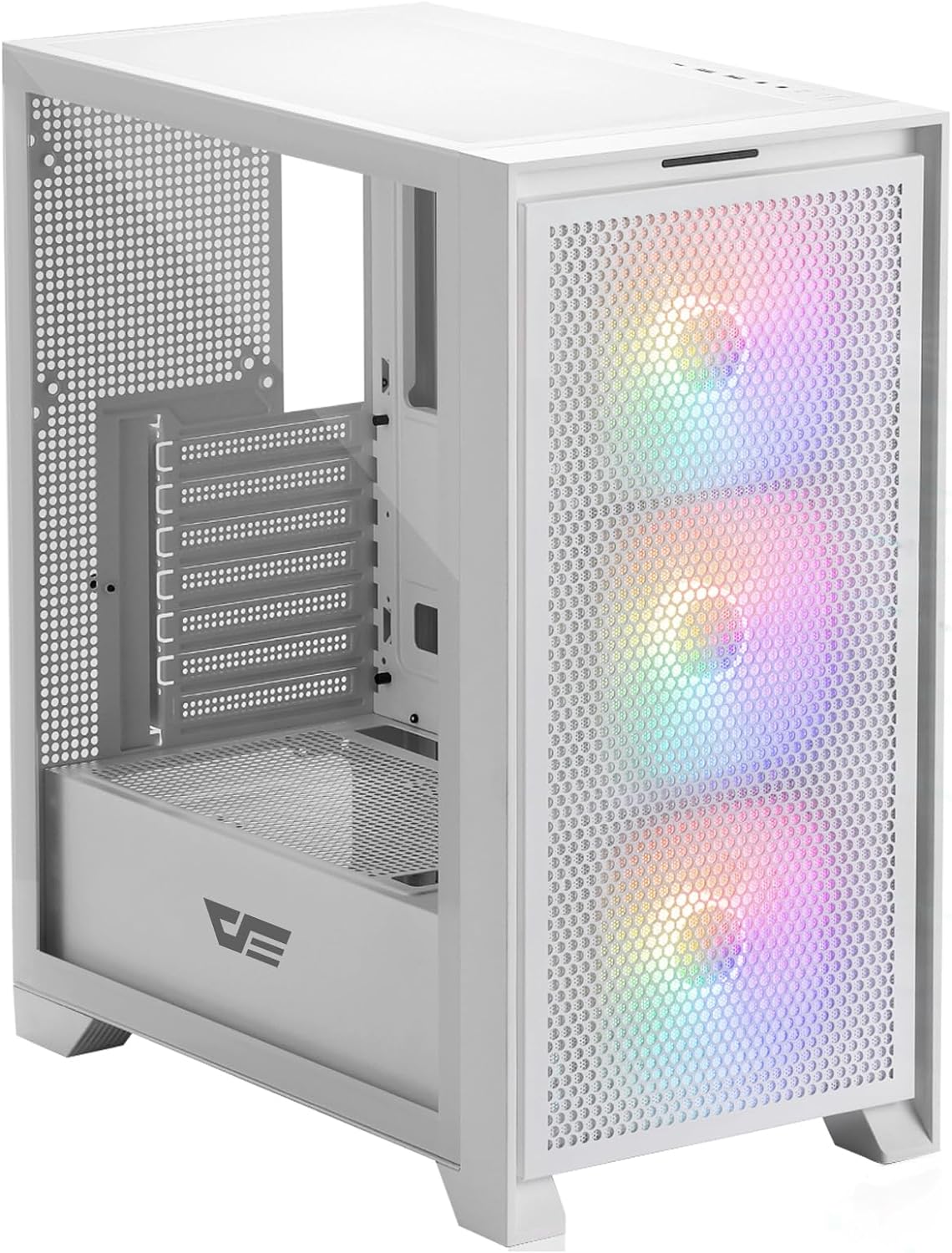
شکل ۱: مخکینۍ برخه view of the darkFlash DRX70 PC case with pre-installed RGB fans.
کلیدي ځانګړتیاوې:
- Magnetic Mesh Front Panel: Optimizes air intake and is easily removable for cleaning.
- د تودوخې شیشې اړخ پینل: روښانه وړاندې کوي view د داخلي برخو.
- Pre-installed 3x120mm Fixed RGB Fans: Enhances cooling and adds aesthetic lighting. Note: Lighting is fixed, not addressable.
- د دوړو فلټرونه: Magnetic dust filters on top and bottom for easy maintenance.
- Anti-slip Bottom Structure: په مختلفو سطحو کې ثبات ډاډمن کوي.
- USB 3.0 Ready: Convenient front I/O panel connectivity.
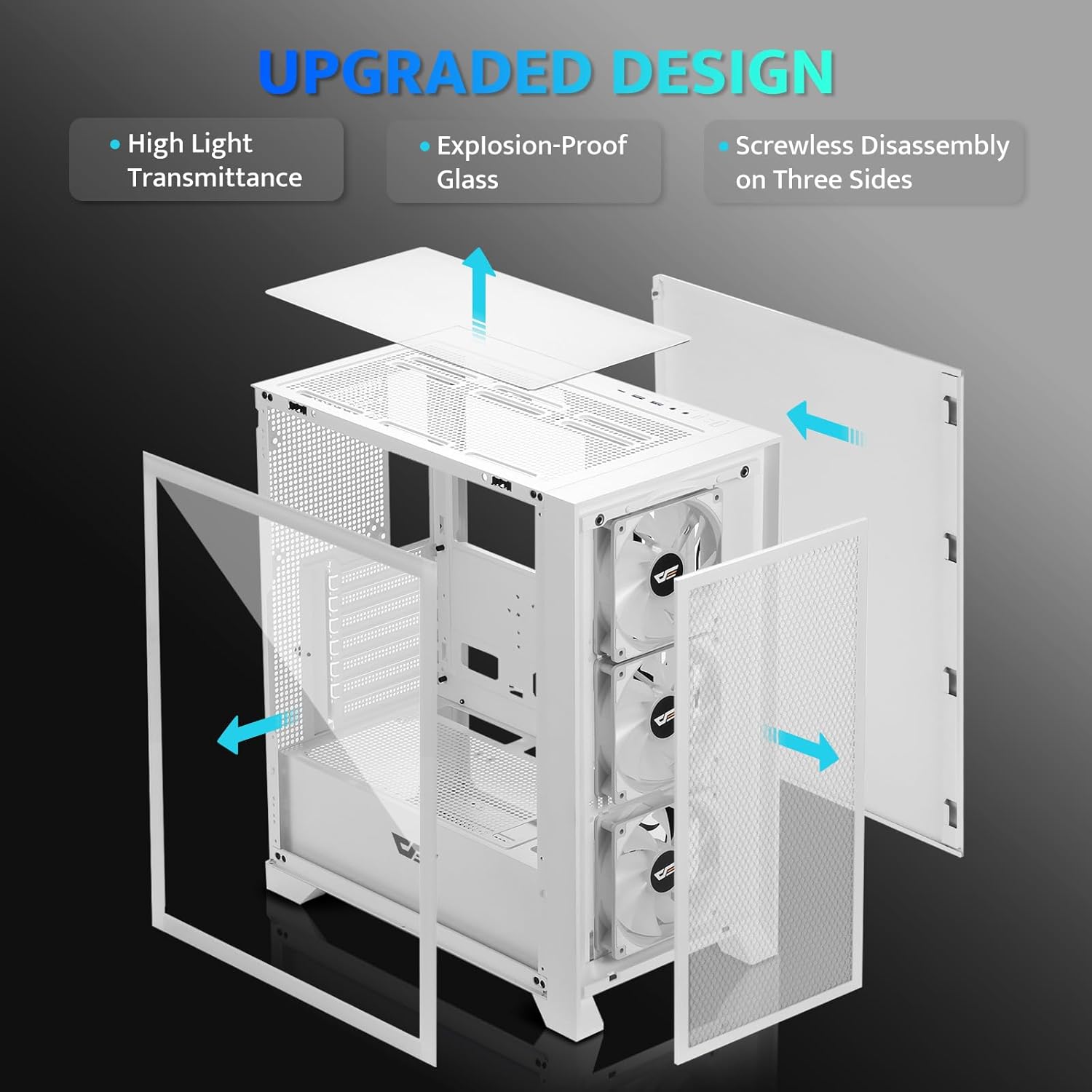
4.2 شکل: چاودلی view illustrating the removable panels for easy access and assembly.

Figure 4.3: Detail of the magnetic mesh front panel, designed for optimal airflow and easy removal.

Figure 4.4: Airflow channels within the DRX70 case, demonstrating efficient cooling paths.

Figure 4.5: The top I/O panel featuring USB 3.0, USB 2.0, HD Audio jacks, Reset, and Power buttons.
5. ترتیب او نصب کول
Follow these general steps for assembling your PC within the DRX70 case. Refer to your individual component manuals for specific installation details.
۳.۱ د قضیې چمتو کول
- قضیه په یوه مستحکم او فلیټ سطحه کې کیږدئ.
- Remove the tempered glass side panel by unscrewing the thumb screws and carefully sliding it off.
- Remove the magnetic mesh front panel by gently pulling it away from the chassis.
- Remove the rear side panel by unscrewing the thumb screws and sliding it back.
۳.۴ د اجزاو نصبول
- موربورډ: Install the necessary standoffs for your motherboard form factor (ATX, M-ATX, ITX). Carefully place the motherboard into the case and secure it with screws.
- د بریښنا رسولو واحد (PSU): Install the PSU into its designated compartment at the bottom rear of the case. Secure it with screws from the rear.
- د ذخیره کولو ډرایوونه: Install 2.5" SSDs or 3.5" HDDs into the drive bays. The case supports 1x 2.5" SSD and 2x 2.5"/3.5" HDDs.
- ګرافیک کارت (GPU): Install your graphics card into the appropriate PCIe slot on the motherboard and secure it. The case supports GPUs up to 350mm in length.
- یخ کول: The case comes with 3x 120mm fixed RGB fans pre-installed in the front. Additional fans or a 280mm radiator can be installed as per the specifications.
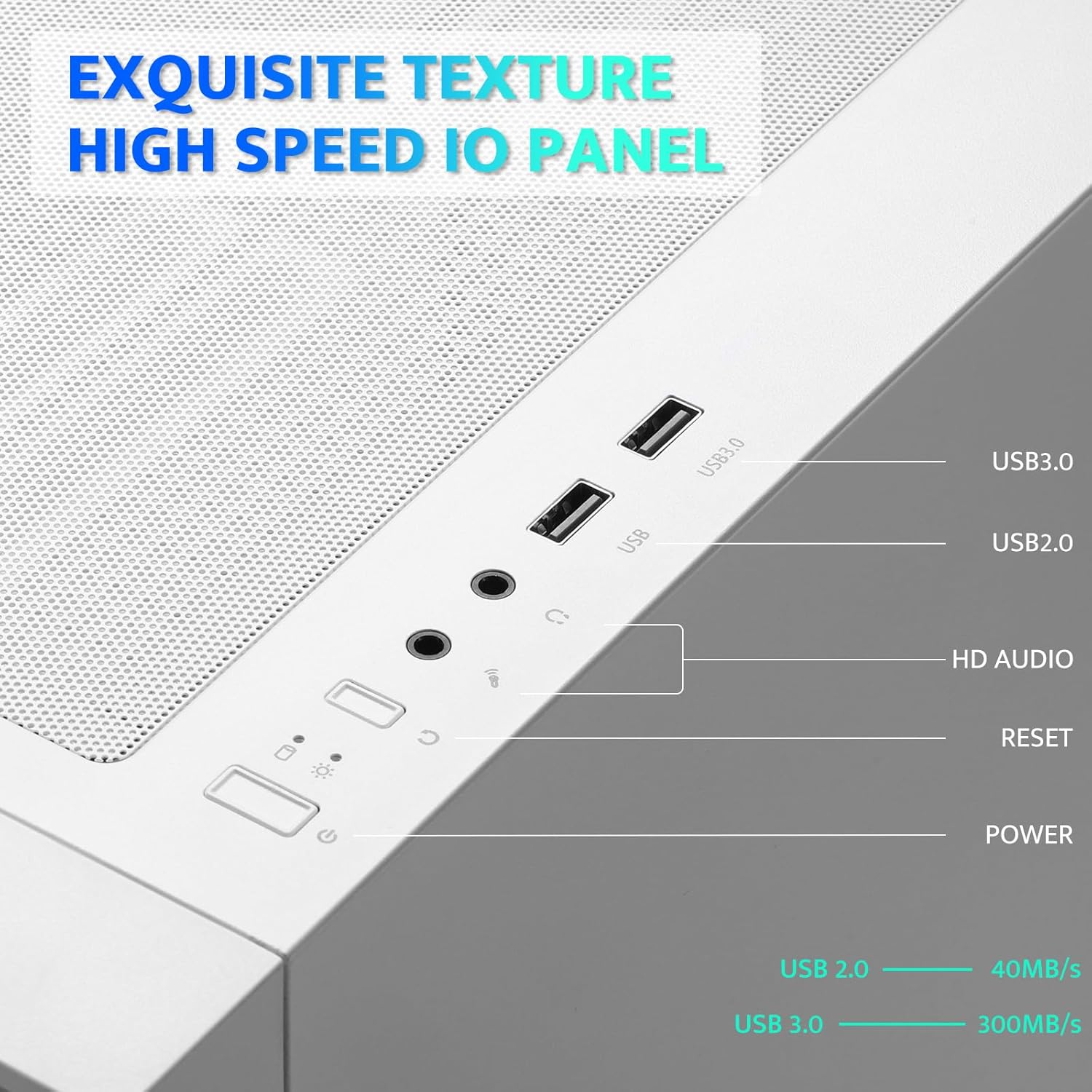
Figure 5.1: Internal layout with maximum component dimensions for CPU cooler, GPU, PSU, and radiator support.
5.3 د کیبل مدیریت
Utilize the cable routing cutouts and tie-down points behind the motherboard tray to manage cables. This improves airflow and aesthetics. The DRX70 is designed to simplify cable management by allowing most connectors to be routed to the rear of the motherboard.

Figure 5.2: Illustration of cable management optimization, showing how cables can be concealed behind the motherboard tray.
6. عملیاتي لارښوونې
کله چې ټولې برخې نصب او وصل شي، تاسو کولی شئ خپل سیسټم فعال کړئ.
6.1 بریښنا کول / بندول
- فشار ورکړئ ځواک button on the top I/O panel to turn on your PC.
- To turn off, use the operating system's shutdown function or press and hold the ځواک button for several seconds.
6.2 Front I/O Panel Functions
- د USB 3.0 پورټ: د مطابقت لرونکو وسیلو سره د لوړ سرعت ډیټا لیږد لپاره.
- د USB 2.0 پورټ: د معیاري USB وسیلو لپاره.
- د HD آډیو جیکونه: د هیډفونونو او مایکروفونونو د نښلولو لپاره.
- د بیا تنظیم تڼۍ: د سیسټم بیا پیلولو لپاره.
6.3 د فین عملیات
The pre-installed 120mm fans provide cooling and feature fixed RGB lighting. These fans operate continuously when the system is powered on. The RGB lighting pattern is not user-addressable.
7. ساتنه
منظم ساتنه ستاسو د کمپیوټر اجزاو غوره فعالیت او اوږد عمر ډاډمن کولو کې مرسته کوي.
۵.۱ د دوړو فلټرونه پاکول
The DRX70 case includes magnetic dust filters on the front and top panels, and a panel dust filter at the bottom. These should be cleaned periodically to prevent dust buildup and maintain airflow.
- Gently pull the magnetic dust filters off the chassis.
- Use a soft brush or compressed air to remove accumulated dust.
- Reattach the filters.

Figure 7.1: Magnetic dust filter for easy removal and cleaning.
7.2 عمومي پاکول
د کیس بهرنۍ برخه په نرم، دamp cloth. Avoid using harsh chemicals or abrasive materials that could damage the finish or tempered glass.
8. ستونزه حل کول
که تاسو د خپل کمپیوټر قضیې سره ستونزې سره مخ شئ، لاندې عام حلونه په پام کې ونیسئ:
- ځواک نشته: Ensure the PSU is properly connected to the wall outlet and the power switch on the PSU is in the 'ON' position. Verify all internal power cables (24-pin ATX, CPU, GPU) are securely connected. Check front panel power button connections to the motherboard.
- مينه وال چې نه ګرځېږي: Confirm that the fan power cables are correctly connected to the motherboard or fan controller.
- USB پورټونه کار نه کوي: Check that the USB headers from the front I/O panel are correctly plugged into the motherboard.
- Audio Jacks Not Working: Ensure the HD Audio cable from the front I/O panel is correctly connected to the motherboard's audio header.
For persistent issues, consult the manuals for your individual PC components or seek professional assistance.
9. مشخصات
| فیچر | مشخصات |
|---|---|
| د ماډل نوم | DRX70M ATX Computer Case |
| برانډ | تیاره فلش |
| د قضیې ډول | منځنی برج |
| د مور بورډ مطابقت | ATX، M-ATX، ITX |
| ابعاد (LxWxH) | 15 x 9 x 18.1 انچه (381 x 228.6 x 459.7 mm) |
| د توکي وزن | ۶ پونډه (۳ کیلو ګرامه) |
| مواد | Metal, Plastic, Tempered Glass |
| مخکې نصب شوي فین | 3 x 120mm Fixed RGB Fans (Front) |
| د اعظمي فین ملاتړ | تر ۹ مینه والو پورې |
| د ریډیټر ملاتړ | Up to 280mm (Top), 120mm (Rear) |
| د اعظمي CPU کولر لوړوالی | 180mm |
| اعظمي GPU اوږدوالی | 350mm |
| د ذخیره کولو خونې | 1x 2.5" SSD, 2x 2.5"/3.5" HDD |
| سامنے I / O بندرونه | ۱x USB ۳.۰، ۲x USB ۲.۰، HD آډیو، بریښنا، بیا تنظیمول |
10. تضمین او ملاتړ
darkFlash provides a 1-year assurance for computer cases. This warranty covers manufacturing defects and ensures product quality. For warranty claims or technical support, please contact darkFlash customer service through their official webسایټ یا پرچون پلورونکی چیرې چې محصول اخیستل شوی و.
مهرباني وکړئ د تضمین تصدیق لپاره د پیرود ثبوت وساتئ.