
پیژندنه
Thank you for choosing the RAZEAK Portable 60% Mechanical Gaming Keyboard. This manual provides detailed instructions for the proper setup, operation, and maintenance of your new keyboard. Please read this manual thoroughly before use to ensure optimal performance and longevity of your device.
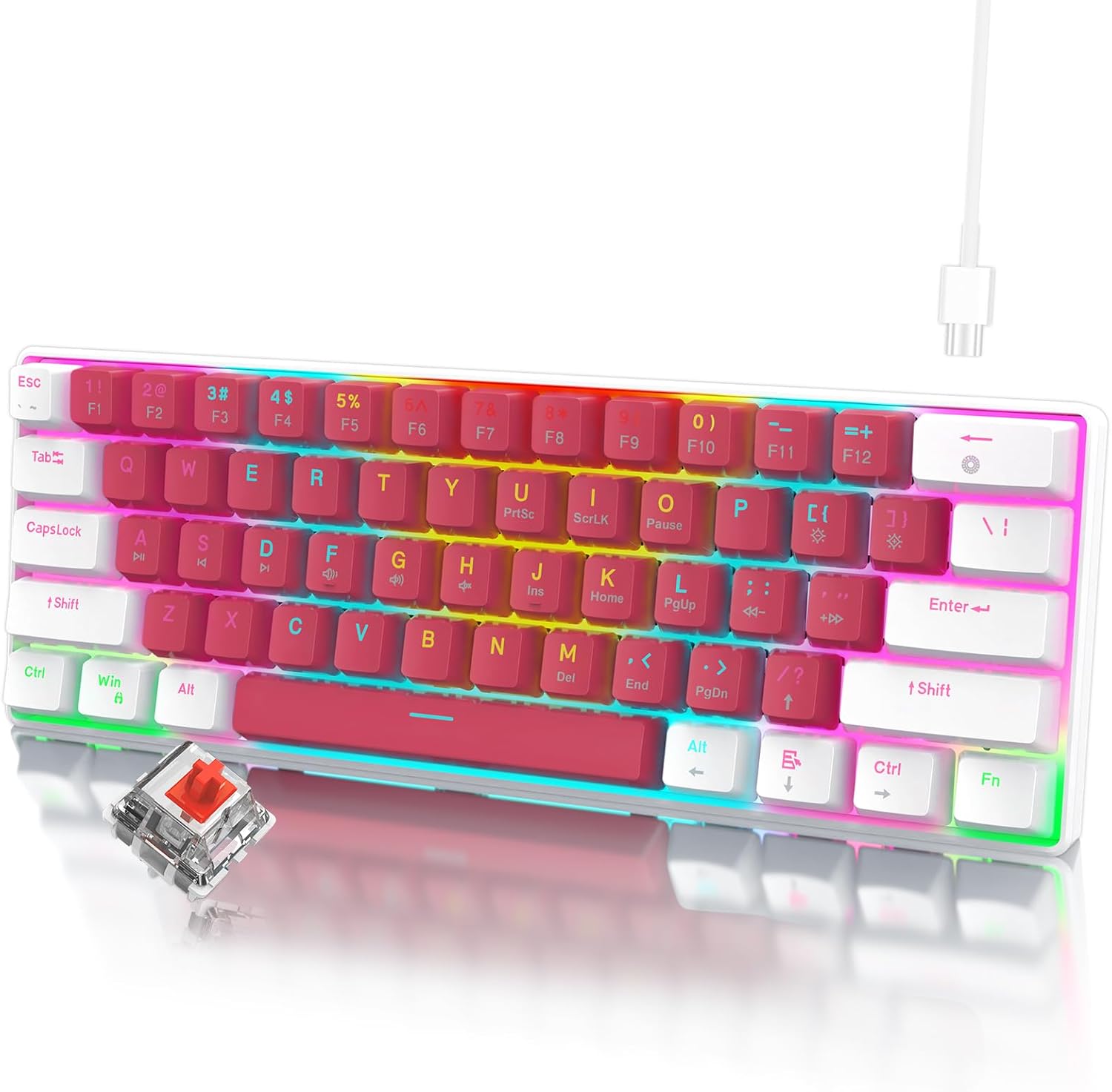
Image: The RAZEAK Portable 60% Mechanical Gaming Keyboard in Pink-White, showcasing its compact design and included USB-C cable. A single red switch is visible in the foreground.
د تنظیم کولو لارښود
1. د بسته محتويات
ډاډ ترلاسه کړئ چې ټول توکي په کڅوړه کې شتون لري:
- RAZEAK Portable 60% Mechanical Gaming Keyboard
- USB-C کیبل
2. د کیبورډ سره نښلول
- Locate the USB-C port on the back or side of the keyboard.
- د ورکړل شوي USB-C کیبل یوه پای د کیبورډ USB-C پورټ سره وصل کړئ.
- Connect the other end of the USB-C cable to an available USB port on your computer (Windows PC or Laptop).
- کیبورډ به په اتوماتيک ډول ستاسو د عملیاتي سیسټم لخوا وپیژندل شي. د اساسي فعالیت لپاره معمولا اضافي ډرایورانو ته اړتیا نشته.
عملیاتي لارښوونې
د کمپیکټ ۷۵٪ ترتیب
The RAZEAK keyboard features a compact 60% layout with 61 keys, designed to save desk space while retaining full functionality through key combinations. Many standard keys (e.g., F-keys, navigation keys) are accessed via the Function (Fn) key.

Image: A diagram illustrating the 60% ultra-compact 61-key layout of the keyboard, highlighting its space-saving design.
Key Combinations (Fn Key Functions)
To access secondary functions printed on the keycaps, press and hold the Fn key, then press the desired key.
- Fn + 1-0, -, =: Access F1-F12 keys.
- Fn + P, {, }, |, :, ", <, >, ?, /: Access various navigation and editing keys (e.g., Print Screen, Scroll Lock, Pause, Insert, Home, Page Up, Delete, End, Page Down).
- Fn + W, A, S, D: Swap arrow key functions with W, A, S, D for gaming.
- Consult the keycap legends for specific secondary functions.
N-کیلي رول اوور
The keyboard features N-Key Rollover (NKRO), meaning all 61 keys can be pressed simultaneously and registered correctly. This prevents ghosting and ensures precise input, especially beneficial for fast-paced gaming.
د شاليد رڼا کنټرول
The keyboard offers multi-colored LED backlighting with 19 different modes. Use the following key combinations to adjust the lighting:
- فېن + \ |: Cycle through 19 backlight modes.
- فېن + [ {: د شاته رڼا روښانتیا کمه کړئ.
- فېن + ] }: د شاته رڼا روښانتیا زیاته کړئ.
- Fn + ; :: Decrease backlight speed/animation.
- فېن + ' ": Increase backlight speed/animation.

انځور: نږدې انځور view of the keyboard highlighting the backlit key legends and the Red mechanical switches visible beneath the keycaps.
ارګونومیک ډیزاین
The keyboard features ergonomic curved keycaps and two adjustable height angles to suit different user preferences and promote comfortable typing during extended use.

انځور: یو اړخ پروfile of the RAZEAK keyboard demonstrating its ergonomic high and low key design and adjustable feet for varied typing angles.
ساتنه
د کیبورډ پاکول
منظم پاکول د کیبورډ بڼه او فعالیت ساتلو کې مرسته کوي.
- د پاکولو دمخه کیبورډ له خپل کمپیوټر څخه جلا کړئ.
- د نرم، لینټ پاک ټوکر څخه په روښانه توګه کار واخلئampد کیلي کیپسونو او سطحې د پاکولو لپاره د اوبو یا یو نرم پاکولو محلول سره مینځل کیږي.
- د کیلي ګانو ترمنځ د دوړو او کثافاتو لپاره، فشار شوي هوا وکاروئ.
- د سختو کیمیاوي موادو، د کثافاتو پاکوونکو، یا په مستقیم ډول په کیبورډ باندې د مایعاتو سپری کولو څخه ډډه وکړئ.
د کیلي کیپ پاملرنه
The dual-color injection molded keycaps are designed for durability and to prevent legends from fading. If you need to remove keycaps for deeper cleaning or replacement, use a keycap puller to avoid damage.
د ستونزو حل کول
If you encounter issues with your RAZEAK keyboard, refer to the following common solutions:
- کیبورډ ځواب نه ورکوي:
- ډاډ ترلاسه کړئ چې د USB-C کیبل په خوندي ډول د کیبورډ او کمپیوټر دواړو سره وصل دی.
- هڅه وکړئ چې کیبورډ په خپل کمپیوټر کې بل USB پورټ سره وصل کړئ.
- Disconnect and reconnect the USB-C cable.
- خپل کمپیوټر بیا پیل کړئ.
- Backlighting not working or incorrect:
- Check if the backlight brightness is set to maximum using فېن + ] }.
- د بیک لایټ حالتونو له لارې سایکل وکړئ په کارولو سره فېن + \ | to see if it resolves the issue.
- ځانګړي کیلي کار نه کوي:
- ډاډ ترلاسه کړئ چې د کیلي کیپ لاندې هیڅ کثافات نه وي.
- If using secondary functions, ensure you are pressing the Fn په ورته وخت کې کلیدي.
مشخصات
| د ماډل شمیره | X44-WTRD-RS_W |
| د محصول ابعاد | 11.5 x 4.02 x 1.57 انچه |
| د توکي وزن | ۲.۴۵ پونډه |
| جوړونکی | WINSTAR TECHNOLOGY INDUSTRIAL LIMITED |
| مطابقت لرونکې وسیلې | د وینډوز وسایل |
| د ارتباط ټیکنالوژي | USB-C |
| د کیبورډ توضیحات | لوبې کول، میخانیکي |
| ځانګړی ځانګړنه | Portable, Backlit |
| رنګ | ګلابي - سپین |
| د شاته رڼا رنګ ملاتړ | RGB |
| مواد | پلاستیک |
| شاملې برخې | USB کیبل |
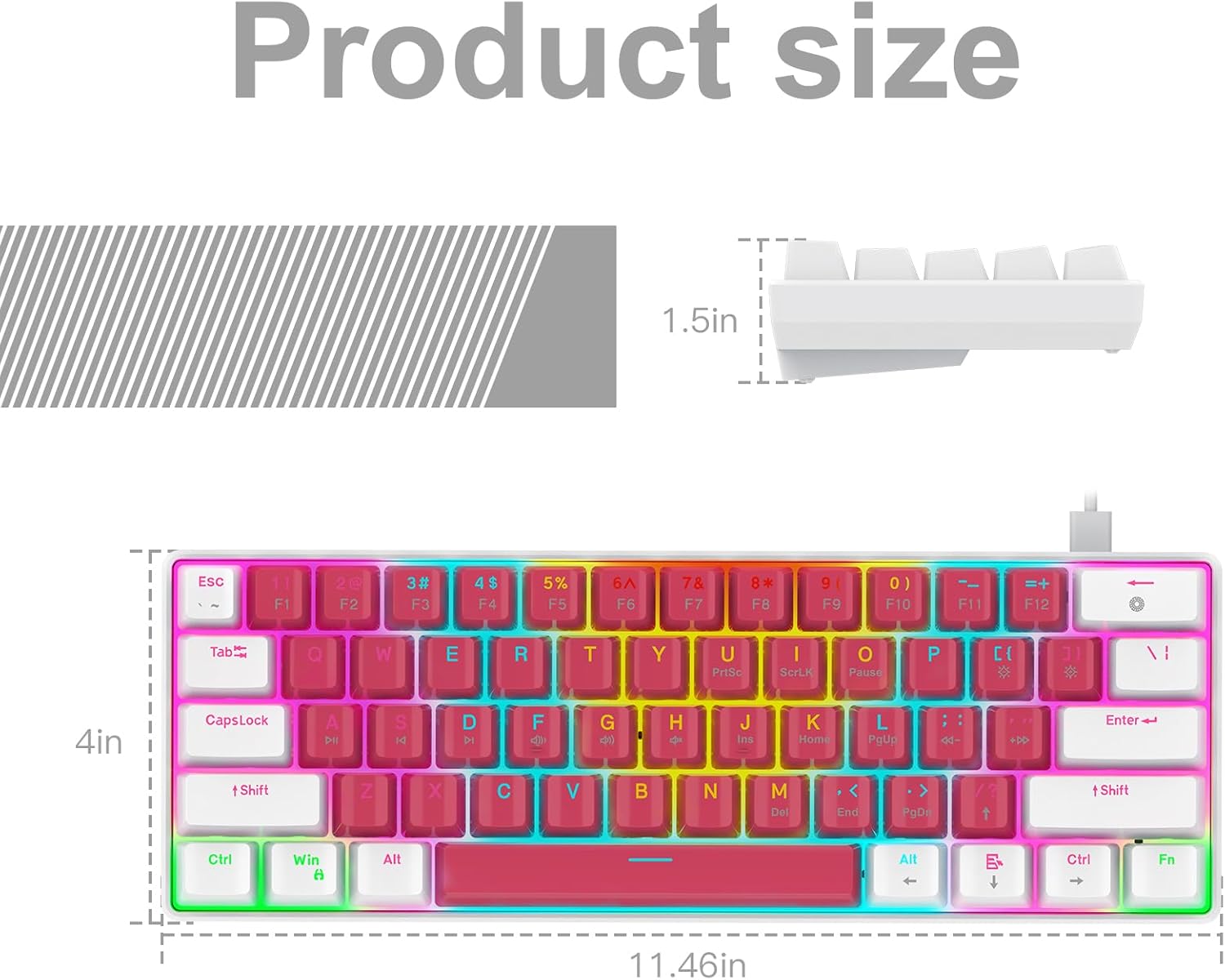
Image: A technical diagram illustrating the product dimensions (length, width, height) of the RAZEAK Portable 60% Mechanical Gaming Keyboard.
د تضمین معلومات
Specific warranty details for the RAZEAK Portable 60% Mechanical Gaming Keyboard are typically provided with your purchase documentation or can be found on the official RAZEAK webسایټ. مهرباني وکړئ د تضمین ادعاوو لپاره د پیرود ثبوت وساتئ.
د پیرودونکي ملاتړ
For further assistance, technical support, or inquiries regarding your RAZEAK keyboard, please visit the official RAZEAK store or contact their customer service through the details provided on their webسایټ
You can visit the RAZEAK store at: RAZEAK Store on Amazon