
1. پیژندنه
The AIOMEST TS58 is a professional digital megohmmeter tester designed for measuring insulation resistance and voltage. It features a wide measurement range, easy-to-read LCD display, and various functions for efficient electrical testing. This manual provides detailed instructions for safe and effective use of the device.
2. د خوندیتوب معلومات
Always adhere to safety precautions when operating electrical testing equipment. Failure to do so may result in electric shock, injury, or damage to the device.
- که چیرې وسیله زیانمنه ښکاري یا د ازموینې لیډونه زیانمن شوي وي نو مه کاروئ.
- Ensure proper battery installation before use.
- Do not exceed the maximum input ratings specified for the device.
- Avoid touching exposed wiring or circuit components during testing.
- Always disconnect power to the circuit under test before connecting or disconnecting test leads for insulation resistance measurements.
- مناسب شخصي محافظتي تجهیزات (PPE) واغوندئ، لکه موصل شوي دستکشې او د خوندیتوب عینکې.
- The device is designed for use in environments up to 35 degrees Celsius.
3. محصول ختم شوview
3.1 اجزا
Familiarize yourself with the various parts of your AIOMEST TS58 tester:
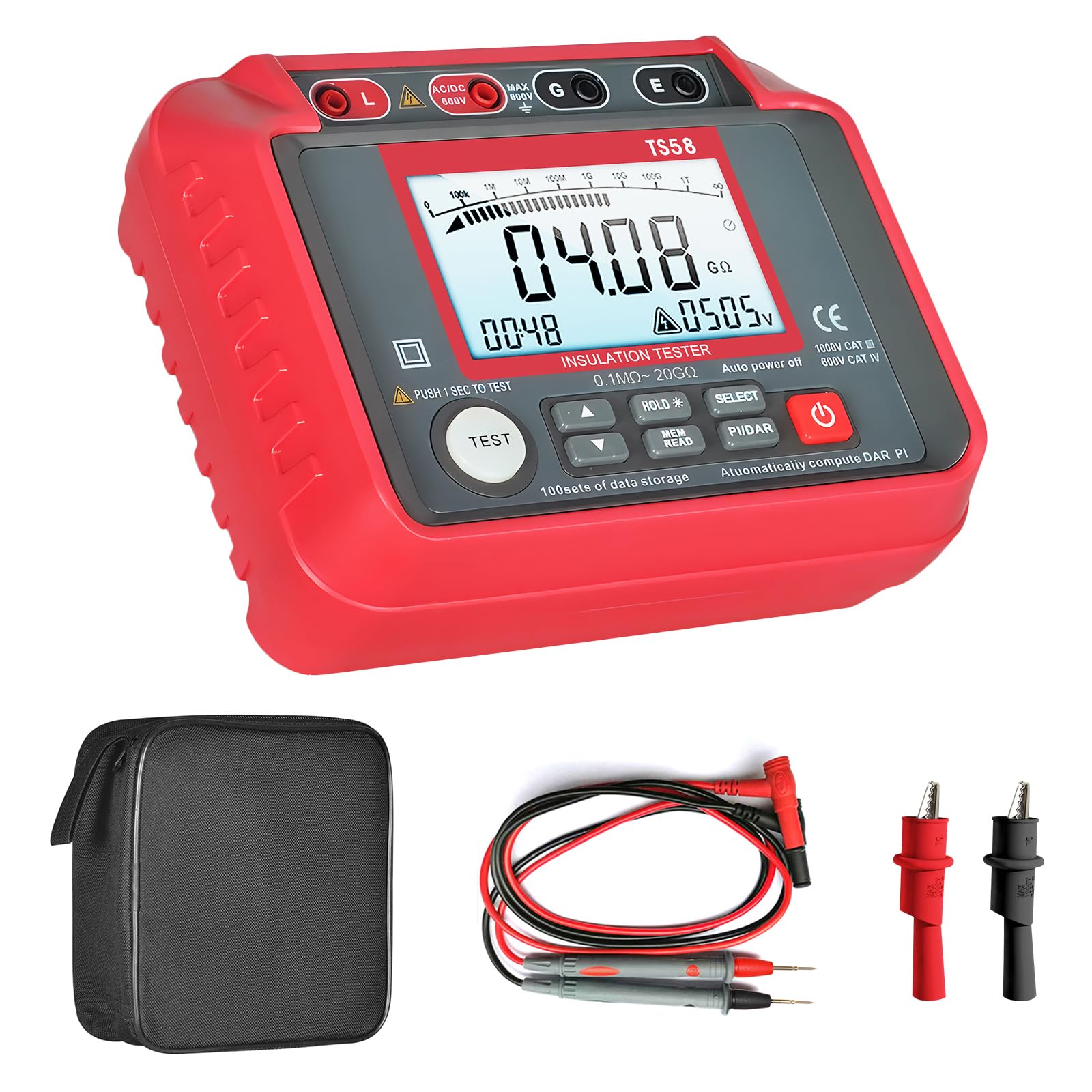
Figure 1: AIOMEST TS58 Digital Megohmmeter Tester with labeled components.
- Insulation Resistance Output (L)
- AC/DC Positive Voltage ترمینل
- والیtage Measurement Shield (G)
- Insulation Resistance Sampling (E)
- د LCD سکرین ښودنه
- لوړ والیtage پیل کړئ
- والیtage Selection Up Button
- والیtage Selection Down Button
- Data Hold/Backlight Button
- Data Read/Save Button
- Function Selection (Insulation/AC/DC Voltage)
- PI and DAR Buttons (Polarization Index and Absorption Ratio)
- د بریښنا سویچ
3.2 ځانګړتیاوې ښکاره کول
The large LCD screen provides clear readings and indicators:

شکل 2: مفصل view of the AIOMEST TS58's large LCD backlight display.
- Large LCD Backlight Display: په مختلفو رڼايي شرایطو کې د اسانه لوستلو وړتیا ډاډمن کوي.
- د موټرو لړۍ: په اتوماتيک ډول د اندازه کولو مناسب حد غوره کوي.
- د معلوماتو ساتل (HOLD): په ښودنه کې اوسنی اندازه کول کنګل کوي.
- Data Storage (REC): Supports storing up to 100 sets of measurement data.
- د ټیټ بیټرۍ نښې: An icon appears when battery power is low.
- والیtagاندازه کول: Displays AC/DC voltage.
- Polarization Index (PI) and Absorption Ratio (DAR): For advanced insulation testing.

Figure 3: Low Battery Warning indicator on the display.
4. ترتیب کول
4.1 د بیټرۍ نصب کول
The AIOMEST TS58 requires 8 x 1.5V AA batteries for operation.
- ډاډ ترلاسه کړئ چې وسیله بنده ده.
- Locate the battery compartment on the back of the tester.
- د بیټرۍ کمپارټ پوښ خلاصولو لپاره سکرو ډرایور وکاروئ.
- Insert 8 x 1.5V AA batteries, observing the correct polarity (+/-).
- د بیټرۍ کمپارټ پوښ بدل کړئ او د سکرو سره یې خوندي کړئ.

Figure 4: Battery compartment location on the AIOMEST TS58.
۶.۲ د ټیسټ لیډونو نښلول
Connect the test leads to the appropriate terminals on the tester.
- For insulation resistance measurements, connect the red test lead to the 'L' (Insulation Resistance Output) terminal and the black test lead to the 'E' (Insulation Resistance Sampling) terminal.
- د AC/DC حجم لپارهtage measurements, connect the red test lead to the 'AC/DC 600V' terminal and the black test lead to the 'G' (Voltage Measurement Shield) terminal.
5. عملیاتي لارښوونې
۸ پاور آن/بند
فشار ورکړئ د بریښنا سویچ (13) to turn the device on or off. The device features an automatic shutdown function after 25 minutes of inactivity to conserve battery life.
5.2 د فعالیت انتخاب
د کارولو د فعالیت انتخاب button (11) to cycle through measurement modes: Insulation Resistance and AC/DC Voltage.
5.3 د موصلیت مقاومت اندازه کول
- Select the Insulation Resistance mode using the Function Selection button.
- د کارولو والیtage Selection Up (۷) او ښکته (8) buttons to choose the desired test voltage (د مثال په توګه، 250V، 500V، 1000V).
- Connect the test leads to the circuit under test (L and E terminals). Ensure the circuit is de-energized.
- فشار ورکړئ ټیسټ button (located near 6) to initiate the measurement. The لوړ والیtage پیل کړئ indicator (6) will illuminate.
- The insulation resistance value will be displayed on the LCD screen.
- The device has an automatic discharge design after the test is complete.

Figure 5: Automatic discharge design for safety after testing.
5.4 AC/DC Voltage اندازه کول
- Select the AC/DC Voltage mode using the Function Selection button.
- Connect the test leads to the circuit where voltage needs to be measured (AC/DC 600V and G terminals).
- ټوکtagد e ارزښت به په LCD سکرین کې ښکاره شي.
۵.۵ د معلوماتو ساتل او ذخیره کول
- فشار ورکړئ هوډ button (9) to freeze the current reading on the display. Press again to release.
- To save data, press the REC (Data Read/Save) button (10). The device supports storing up to 100 sets of data.
- To recall saved data, press the REC تڼۍ په مکرر ډول.

Figure 6: Display indicating data storage functionality.
5.6 PI and DAR Measurement
The TS58 can calculate Polarization Index (PI) and Absorption Ratio (DAR) for comprehensive insulation analysis. Refer to advanced electrical testing guides for detailed procedures on using these functions.
- فشار ورکړئ PI/DAR button (12) to initiate these measurements.
6. ساتنه
6.1 پاکول
وسیله په وچ، نرم ټوکر سره پاک کړئ. د کثافاتو پاکوونکي یا محلولونه مه کاروئ.
6.2 د بیټرۍ بدلول
کله چې د ټیټ بیټرۍ شاخص په ښودنه کې څرګند شي نو بیټرۍ بدل کړئ. په 4.1 برخه کې د بیټرۍ نصبولو مرحلې تعقیب کړئ.
6.3 ذخیره کول
When not in use for extended periods, remove the batteries to prevent leakage. Store the device in a cool, dry place, preferably in its protective storage bag.

Figure 7: The included storage bag for protection and portability.
7. ستونزه حل کول
| ستونزه | احتمالي لامل | د حل لاره |
|---|---|---|
| وسیله فعاله نه ده. | مړه یا په غلط ډول نصب شوي بیټرۍ. | Check battery polarity and replace with new batteries if necessary. |
| ناسم لوستل. | Poor test lead connection, dirty terminals, or incorrect mode selection. | Ensure test leads are securely connected. Clean terminals. Verify the correct measurement mode is selected. |
| ښودنه 'OL' (اوورلوډ) ښیې. | اندازه کول د وسیلې له حد څخه ډیر دي. | Ensure the test voltage is appropriate for the expected resistance. The device has an auto-range feature, but extreme values may still exceed its limits. |
| Data cannot be saved. | حافظه ډکه ده. | Clear existing data to free up memory. (Refer to the full user manual for data clearing instructions if not covered here). |
8. مشخصات
| پیرامیټر | ارزښت |
|---|---|
| برانډ | AIOMEST |
| د ماډل شمیره | TS58 |
| د اندازه کولو ډول | Ohmmeter (Insulation Resistance) |
| د موصلیت مقاومت رینج | 0.1 MΩ to 20 GΩ |
| د محصول Voltage (Insulation Test) | 250V ، 500V ، 1000V |
| AC/DC حجمtage اندازه کول | تر 600V پورې |
| د بریښنا سرچینه | Battery-Powered (8 x 1.5V AA) |
| د توکي وزن | 800 ګرامه |
| د کڅوړې ابعاد | 20.6 x 19.2 x 8.2 سانتي متره |
| د عملیاتي حرارت درجه | تر 35 درجو سیلسیس پورې |
| موافقت | CE، RoHS |
| د معلوماتو ذخیره کول | 100 سیټونه |
9. د بسته محتويات
The AIOMEST TS58 package includes the following items:

Figure 8: Package contents of the AIOMEST TS58.
- AIOMEST TS58 Insulation Resistance Tester x 1
- Test Leads x 2
- Alligator Clips x 2
- سکریډرایور ایکس 1
- ۱.۵V AA بیټرۍ x ۱۰
- د کارن لارښود x 1
- د ذخیره کڅوړه x 1
10. تضمین او ملاتړ
For warranty information or technical support, please refer to the contact details provided in the separate warranty card or contact the seller directly. Keep your purchase receipt as proof of purchase.