
RAINPOINT ITV105
RAINPOINT Digital Sprinkler Timer
Model: ITV105 - User Manual
پیژندنه
Thank you for choosing the RAINPOINT Digital Sprinkler Timer, Model ITV105. This programmable 1-outlet automatic hose water timer is designed to provide convenient and precise control over your watering schedule, ensuring optimal moisture levels for your lawn and garden. This manual provides detailed instructions for setup, operation, maintenance, and troubleshooting to help you get the most out of your new device.
محصول پای ته ورسیدview او کلیدي ځانګړتیاوې
The RAINPOINT ITV105 Sprinkler Timer is engineered for durability and ease of use, offering a reliable solution for automated garden irrigation.
- معیاري مطابقت: Features a 3/4" inlet and outlet thread, compatible with most standard garden hoses.
- د هوا مقاومت: IP54 waterproof rating and heavy-duty weather-resistant ABS housing ensure durability for outdoor use.
- د اصلاح وړ برنامه کول: Easy-to-use interface allows customization of start time, watering frequency, and duration for automated irrigation.
- جوړ شوی فلټر: Includes a built-in metal filter to improve water quality and protect plants from debris.
- Leakage Prevention: Upgraded strong and durable ABS material and water inlet thread, paired with Teflon tape and rubber washer to prevent water leakage.
- لوی LCD سکرین: Displays detailed information such as watering time, frequency, power, and battery life for easy readability.
- د ټیټ بیټرۍ خبرتیا: Powered by 2 AAA batteries (not included), with a low battery notification and automatic valve shut-off to prevent water waste.
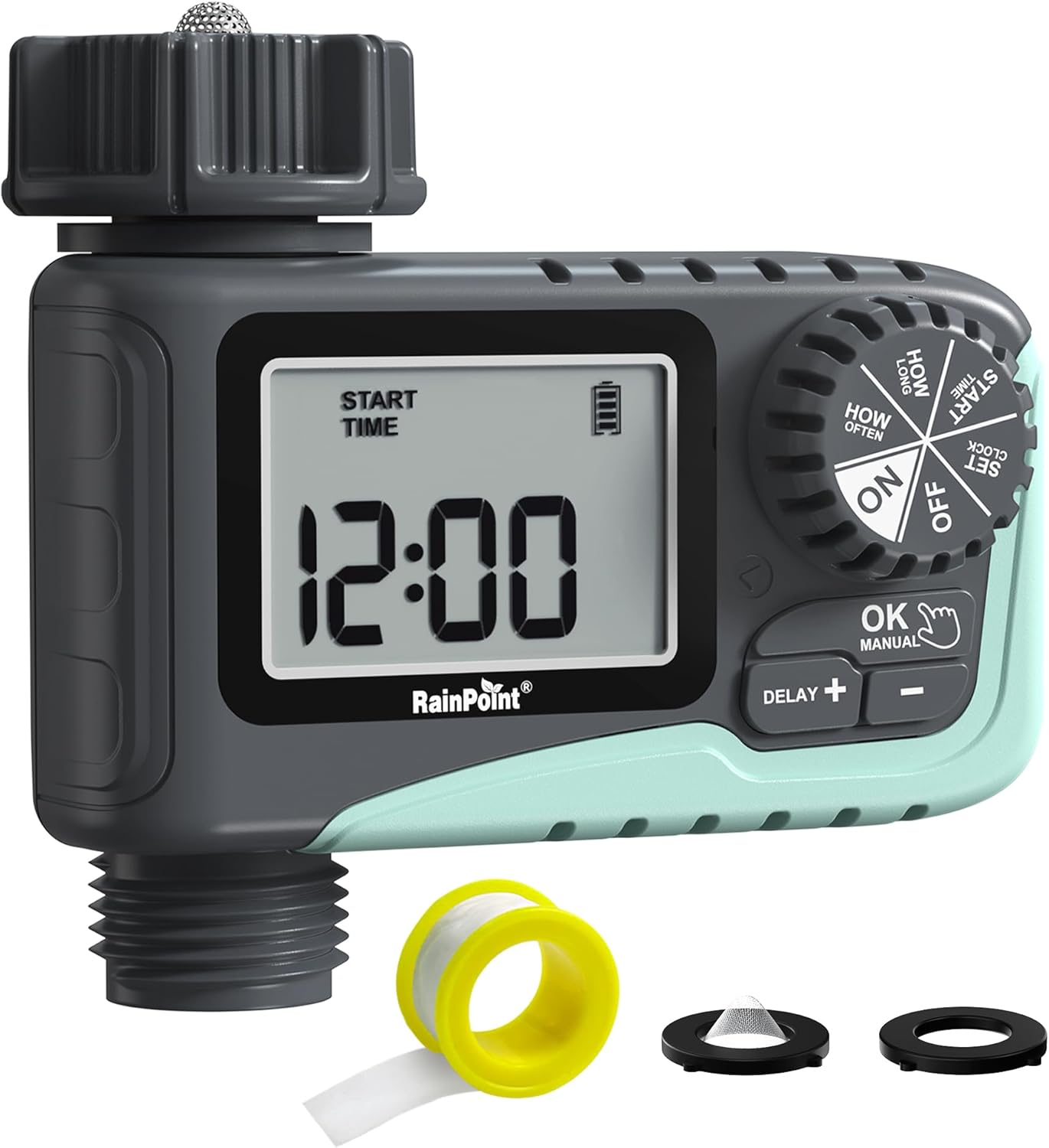
شکل 1: مخکی view of the RAINPOINT Digital Sprinkler Timer (ITV105) showing the large LCD screen, control dial, and buttons.
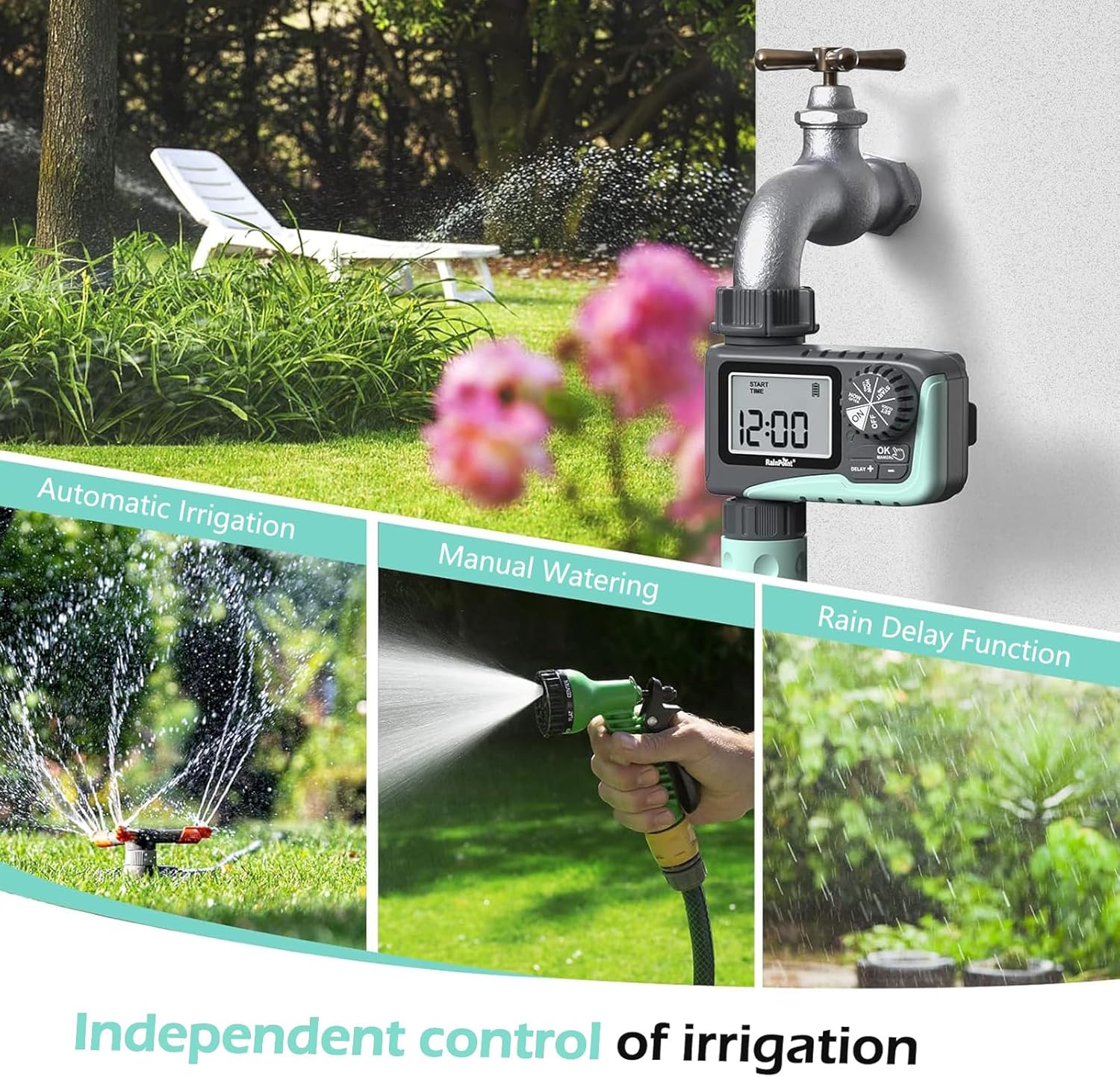
Figure 2: Illustration of the timer's three main functions: automatic irrigation, manual watering, and rain delay.
د بسته محتويات
مهرباني وکړئ د کڅوړې محتويات د خلاصولو پر مهال وګورئ ترڅو ډاډ ترلاسه کړئ چې ټول توکي شتون لري:
- 1 x RAINPOINT Digital Sprinkler Timer (ITV105)
- ۱ x د کارونکي لارښود (دا سند)
- 1 x Teflon ټیپ
- 1 x Rubber washer
- 1 x Spare filter
تنظیم او نصب کول
Follow these steps to properly set up your sprinkler timer:
- بیټرۍ نصب کړئ:
Locate the battery compartment on the back of the timer. Insert 2 new AAA (1.5V) alkaline batteries, ensuring correct polarity. Close the battery compartment securely. The LCD screen will power on.
- د نل چمتو کول:
Ensure your outdoor hose faucet is clean and free of debris. If necessary, apply the included Teflon tape to the faucet threads for a watertight seal.
- Attach Timer to Faucet:
Screw the timer's inlet (top connector) onto your 3/4" outdoor hose faucet. Hand-tighten firmly. Ensure the rubber washer is properly seated inside the timer's inlet to prevent leaks. The timer features a 360° rotating connector for easy positioning.
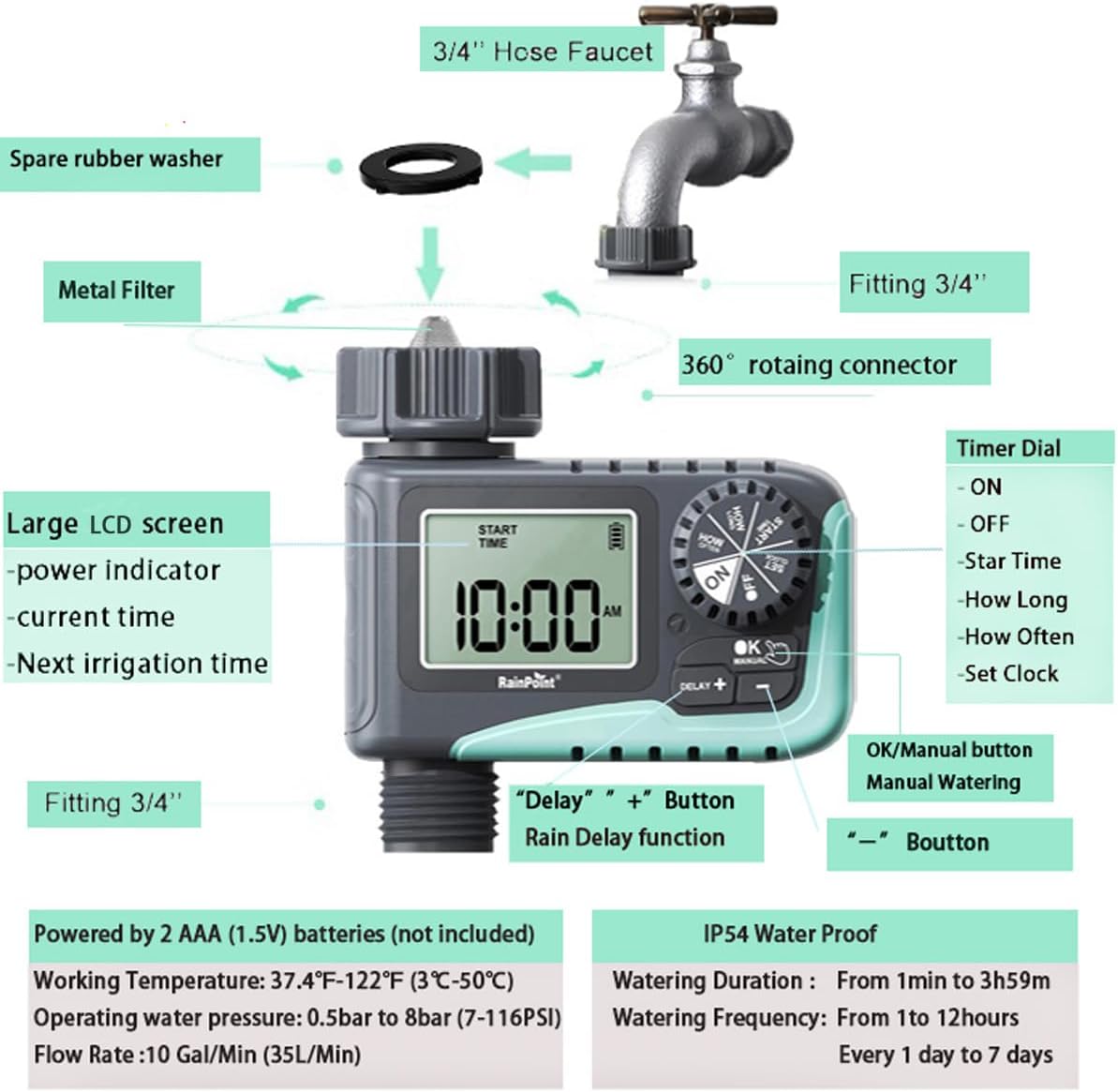
Figure 3: Diagram illustrating the components of the sprinkler timer, including the 3/4" hose faucet connection, metal filter, and LCD screen.
- نلی نښلول:
Attach your garden hose to the timer's outlet (bottom connector). Hand-tighten securely. Ensure a proper washer is in place at the hose connection point.
- Open Faucet:
Fully open your outdoor hose faucet. The timer is designed to withstand water pressure from 0.5 bar to 8 bar (7-116 PSI). The timer will control the water flow, not the faucet.
عملیاتي لارښوونې
The RAINPOINT ITV105 timer features a large dial and intuitive buttons for easy programming.
د کنټرول ډیل موقعیتونه:
- په: Activates the timer for automatic watering.
- بند: Deactivates the timer, stopping all watering.
- ساعت ټاکل: اوسنی وخت تنظیم کړئ.
- د پيل وخت: Set the desired start time for watering cycles.
- څونه وخت: Set the duration of each watering cycle.
- څو ځلې: Set the frequency of watering cycles.
تڼۍ:
- OK/MANUAL: Confirms settings or initiates manual watering.
- DELAY +: Increases values during setting or activates/adjusts rain delay.
- -: د تنظیم کولو پرمهال ارزښتونه کموي.
Setting the Current Time (SET CLOCK):
- ډایل ته وګرځوئ ساعت ترتیب کړئ.
- د کارولو + او - د ساعت تنظیمولو لپاره تڼۍ. فشار ورکړئ OK تصدیق کول.
- د کارولو + او - د دقیقې تنظیمولو لپاره تڼۍ. فشار ورکړئ OK تصدیق کول.
- ډایل ته وګرځوئ ON to save the time and return to normal operation.
Setting Automatic Watering Program:
This timer allows you to set a start time, duration, and frequency for automated watering.
- Set Start Time (START TIME):
ډایل ته وګرځوئ د پیل وخت. کارول + او - to set the desired watering start hour and minute. Press OK د هر ترتیب تایید لپاره.
- Set Watering Duration (HOW LONG):
ډایل ته وګرځوئ څومره اوږد. کارول + او - to set the watering duration from 1 minute to 3 hours and 59 minutes. Press OK تصدیق کول.

Figure 4: Screen showing settings for "HOW OFTEN" (frequency) and "HOW LONG" (duration) for automatic watering.
- Set Watering Frequency (HOW OFTEN):
ډایل ته وګرځوئ څو ځله. کارول + او - to set the frequency:
- Every 1 hour to 12 hours.
- Every 1 day to 7 days.
مطبوعاتي OK تصدیق کول.
- پروګرام فعال کړئ:
ډایل ته وګرځوئ ON. The timer will now operate according to your programmed schedule.
لاسي اوبه ورکول:
To water immediately without affecting your programmed schedule:
- ډاډ ترلاسه کړئ چې ډایل په کې دی ON موقعیت
- فشار ورکړئ سمه / لارښود button. The display will show the default manual watering duration (e.g., 10 minutes).
- د کارولو + او - buttons to adjust the manual watering duration from 1 minute to 8 hours.
- مطبوعاتي OK again to start manual watering. The timer will count down the set duration.
- To stop manual watering early, press سمه / لارښود بیا

Figure 5: Display showing the manual watering duration setting, adjustable from 1 minute to 8 hours.
د باران ځنډ فعالیت:
The rain delay function allows you to pause your watering schedule for a set period due to rain or other reasons, preventing overwatering.
- ډاډ ترلاسه کړئ چې ډایل په کې دی ON موقعیت
- فشار ورکړئ DELAY + button. The display will show a default delay time (e.g., 24H).
- مطبوعاتي DELAY + repeatedly to cycle through delay options (e.g., 24H, 48H, 72H).
- Once you select the desired delay, the timer will enter rain delay mode. The display will show the remaining delay time.
- After the delay period ends, the timer will automatically resume its programmed watering schedule.
- To cancel the rain delay, press the DELAY + button until the delay time disappears, or rotate the dial to OFF and then back to ON.

Figure 6: The timer displaying the rain delay countdown, highlighting its IP54 waterproof rating.
ساتنه
مناسب ساتنه ستاسو د RAINPOINT سپرینکلر ټایمر اوږد عمر او غوره فعالیت تضمینوي.
- پاک فلټر: Periodically check and clean the metal filter located at the timer's inlet. Remove the timer from the faucet, unscrew the filter, rinse it under running water to remove any debris, and reinsert it.
- د بیټرۍ بدلول: When the low battery indicator appears on the LCD screen, replace the 2 AAA batteries promptly. Always use new alkaline batteries.
- ژمی کول: Before the first frost, remove the timer from the faucet and store it indoors in a dry, frost-free location. Remove the batteries before storage.
- د لیکونو لپاره چیک کړئ: Regularly inspect all connections (faucet to timer, timer to hose) for any signs of leakage. Ensure all connections are hand-tightened and that rubber washers are properly seated.

Figure 7: Visual representation of the built-in metal filter and durable plastic material designed for anti-leakage and longer service life.
د ستونزو حل کول
If you encounter issues with your RAINPOINT Sprinkler Timer, refer to the following common problems and solutions:
| ستونزه | احتمالي لامل | د حل لاره |
|---|---|---|
| Timer not turning on / LCD blank. | مړه یا په غلط ډول نصب شوي بیټرۍ. | Replace with 2 new AAA alkaline batteries, ensuring correct polarity. |
| د اوبو جریان نشته. |
|
|
| د اړیکو څخه د اوبو لیکیدل. |
|
|
| Timer not following schedule. |
|
|
مشخصات
| فیچر | مشخصات |
|---|---|
| ماډل | ITV105 |
| د محصول ابعاد | 10.5 x 10.3 x 5 سانتي متره (4 x 4 x 2 انچه) |
| مواد | اکریلونایتریل بوټاډین سټیرین (ABS) |
| Watering Duration (Automatic) | له 1 دقیقو څخه تر 3 ساعتونو 59 دقیقو پورې |
| Watering Frequency (Automatic) | Every 1 hour to 12 hours, or every 1 day to 7 days |
| Watering Duration (Manual) | 1 minute to 8 hours (Default: 10 minutes) |
| د اعظمي جریان کچه | 10 Gal/Min (35 L/Min) |
| د اوبو د فشار سلسله | 0.5 bar to 8 bar (7-116 PSI) |
| د کار د حرارت درجه | 3℃-50℃ (37.4℉-122℉) |
| د بریښنا سرچینه | 2 x AAA (1.5V) batteries (not included) |
| د پنروک درجه | IP54 |
تضمین او ملاتړ
RAINPOINT products are manufactured to high-quality standards. For specific warranty details, please refer to the warranty card included with your product or visit the official RAINPOINT website. If you encounter any issues or have questions not covered in this manual, please contact RAINPOINT customer support through their official webسایټ یا پرچون پلورونکي ته چې تاسو یې محصول اخیستی.
د نورو معلوماتو او ملاتړ لپاره، تاسو کولی شئ لیدنه وکړئ په ایمیزون کې د RAINPOINT پلورنځی.
Ask a question about this manual
Ask about setup, troubleshooting, compatibility, parts, safety, or missing instructions. Manuals+ will review the question and use this page’s manual context to help answer it.