
1. د خوندیتوب مهمې لارښوونې
مهرباني وکړئ د راټولولو او کارولو دمخه ټولې لارښوونې ولولئ او پوه شئ. دا لارښود د راتلونکي حوالې لپاره وساتئ.
- د راټولولو دمخه ډاډ ترلاسه کړئ چې ټولې برخې شتون لري او زیانمن شوي ندي.
- Do not overtighten screws during assembly to prevent damage to the material.
- Place the night stand on a flat, stable surface to prevent tipping.
- Do not exceed the weight capacity of the tabletop (50 lbs) or drawers/shelf (30 lbs).
- Keep liquids away from the charging station and power outlets to prevent electrical hazards.
- Unplug the power cord from the wall outlet before cleaning or moving the unit.
- Do not attempt to modify or repair the electrical components. Contact customer support for assistance.
2. د بسته محتويات
Verify that all parts listed below are included in your package. If any parts are missing or damaged, please contact customer service.
- پورته پینل
- د غاړې تختې (2)
- شاتنۍ پینل
- د دراز مخونه (۳)
- Drawer Sides & Backs
- د دراز لاندې
- د شیلف پینل
- پښې (4)
- Charging Station Unit (pre-installed or separate)
- LED Light Strip with Human Sensor
- Hardware Kit (screws, dowels, drawer slides, handles, etc.)
- د لارښوونې لارښود
3. د مجلس لارښوونې
Follow these steps carefully for proper assembly. Each part is labeled with a number for easy identification.
- خلاص کړئ او وپیژنئ: Lay out all components on a clean, soft surface. Identify each part using the labels and the parts list.
- د چوکاټ راټولول: Attach the side panels to the bottom panel and back panel using the provided screws and dowels.
- شیلف نصب کړئ: Insert the shelf panel into the designated slots or attach with screws.
- د درازونو راټولول: Construct the two drawers by attaching the sides, back, and bottom to the drawer front. Install drawer slides.
- درازونه دننه کړئ: Carefully slide the assembled drawers into the frame.
- پورته پینل ضمیمه کړئ: پورته تخته راټول شوي چوکاټ ته وتړئ.
- پښې نصب کړئ: Attach the four legs to the bottom of the night stand.
- د بریښنا اجزا وصل کړئ: If the charging station and LED light strip are not pre-installed, follow the specific instructions provided in the hardware kit to secure them and connect the necessary wiring. Ensure all connections are firm.
- وروستی چک: Ensure all screws are tightened and the night stand is stable.

شکل 3.1: Product dimensions and weight capacities for tabletop, shelf, and drawers. Dimensions are 15.75"D x 17.72"W x 23.62"H. Tabletop capacity is 50 lbs, shelf/drawer capacity is 30 lbs.
4. عملیاتي لارښوونې
۳.۱ د LED رڼا سیسټم
The night stand features an integrated LED light strip with three color modes and a human sensor.
- پاور آن/بند: Locate the control button for the LED lights. A short press typically turns the lights on or off.
- د رنګ حالت بدل کړئ: With the lights on, short press the control button repeatedly to cycle through the three available color modes: White light, Warm light, and Cold light.
- روښانتیا تنظیم کړئ: To adjust brightness (0-100%), press and hold the control button. The brightness will cycle up or down. Release the button when the desired brightness is reached.
- Human Sensor Function: The integrated human body sensor automatically activates the LED lights when motion is detected within 2-3 meters. The lights will turn off after a period of inactivity. This feature provides convenient illumination without manual operation.
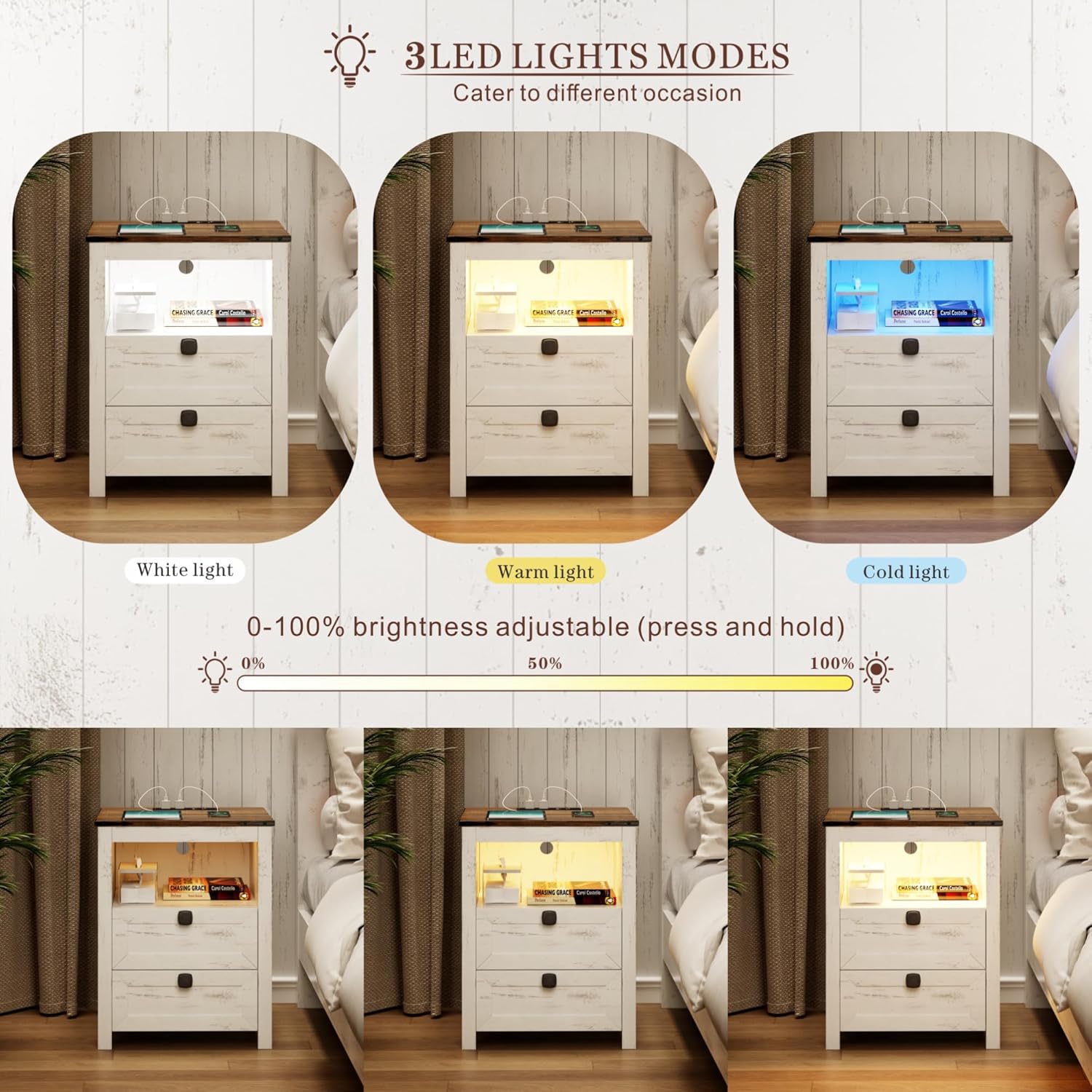
شکل 4.1: Illustration of the three LED light modes (White, Warm, Cold) and the brightness adjustment range from 0% to 100% by pressing and holding the control button.

شکل 4.2: Depiction of the human sensor's operation, showing it detects movement within a 2-3 meter range to automatically illuminate the night stand.
4.2 د چارج کولو سټیشن
د مدغم چارج کولو سټیشن ستاسو د بریښنایی وسیلو لپاره د بریښنا اسانه لاسرسی چمتو کوي.
- د بریښنا پیوستون: Ensure the night stand's main power cord is securely plugged into a standard 120V/12A wall outlet.
- USB پورټونه: Use the 1 x USB-A port (5V/2A) to charge compatible devices such as smartphones, tablets, or other USB-powered accessories.
- د ډول - سي پورټ: Use the 1 x Type-C port (5V/2A) for devices that utilize a USB-C connection.
- د AC دکانونه: The 2 x standard AC power outlets (120V/12A) can be used for larger electronics like laptops, lamps, or other appliances.
- د کیبل مدیریت: Route charging cables neatly to avoid clutter and potential hazards.

شکل 4.3: تفصيلي view of the charging station, highlighting the 1 USB port, 1 Type-C port, and 2 AC power outlets, along with their respective power specifications.
5. ساتنه
Proper care will extend the life and appearance of your night stand.
- پاکول: سطحونه په نرمۍ سره مسح کړئ، دamp ټوکر. د سختو کیمیاوي موادو یا خړوبونکو پاکوونکو څخه ډډه وکړئ، کوم چې کولی شي پای ته زیان ورسوي.
- خړوبول: Regularly dust the night stand, especially around the charging ports and LED light area, to prevent dust buildup.
- څاڅکي: Immediately wipe up any spills to prevent moisture damage to the wood and electrical components.
- برقی اجزا: Ensure the charging station and LED lights remain dry. Do not immerse in water.
- فاسټینرونه سخت کړئ: Periodically check and tighten all screws and fasteners to maintain structural integrity.
6. ستونزه حل کول
د عامو ستونزو او د هغوی د حل لارو لپاره دې برخې ته مراجعه وکړئ.
| ستونزه | احتمالي لامل | د حل لاره |
|---|---|---|
| د LED څراغونه نه خلاصیږي. | نه دی پلګ شوی؛ اړیکه پرې شوې؛ بریښنا بنده دهtage; faulty LED strip. | Ensure power cord is securely plugged into a working outlet. Check LED strip connection. Test outlet with another device. Contact customer support if faulty. |
| د چارج کولو سټیشن کار نه کوي. | Not plugged in; loose connection; device not compatible; overloaded circuit. | Verify power cord is plugged in. Check connections. Ensure device is compatible with USB/Type-C/AC specifications. Unplug some devices if overloaded. |
| Human sensor not detecting motion. | Obstruction; sensor dirty; out of range; sensor malfunction. | Ensure clear line of sight to the sensor. Clean sensor surface. Stand within 2-3 meter range. Contact customer support if malfunction persists. |
| درازونه چپکیږي یا په اسانۍ سره نه ښویېږي. | Improper assembly; debris in slides; damaged slides. | Review assembly steps for drawers and slides. Clear any debris. Contact customer support if slides are damaged. |
7. مشخصات
- نښه: فریډیز
- ماډل: Smart LED Night Stand
- د محصول ابعاد: ۱۶"د x ۲۶"وچ x ۴۷"ح
- رنګ: White (Farmhouse Style)
- د ټابلیټ ټاپ وزن ظرفیت: 50 پونډه
- Shelf/Drawer Weight Capacity: 30 پونډه
- LED څراغونه: 3 Color Modes (White, Warm, Cold), 0-100% Brightness Adjustable
- Human Sensor Range: 2-3 متره
- د چارج کولو سټیشن:
- 1 x USB Port (5V/2A)
- 1 x Type-C Port (5V/2A)
- 2 x AC Power Outlets (120V/12A)
- د بریښنا تار اوږدوالی: 4.92 FT
8. تضمین او ملاتړ
For warranty information, product support, or to report missing/damaged parts, please contact FREDEES customer service through the retailer where the product was purchased. Please have your purchase receipt and product model number (B0CSPDVKVP) available when contacting support.