
Teverun Fighter Mini I (Model: 52vi20,8 Ah_fm)
TEVERUN Fighter Mini I Electric Scooter User Manual
Model: 52vi20,8 Ah_fm
1. پیژندنه
Thank you for choosing the TEVERUN Fighter Mini I Electric Scooter. This manual provides essential information for the safe operation, maintenance, and troubleshooting of your new electric scooter. Please read this manual thoroughly before your first ride to ensure optimal performance and safety.

Figure 1.1: The TEVERUN Fighter Mini I Electric Scooter, showcasing its sleek black design and robust build.
2. د خوندیتوب معلومات
Your safety is paramount. Always wear a helmet and appropriate protective gear (knee pads, elbow pads, gloves) when riding. Adhere to local traffic laws and regulations. Avoid riding in wet conditions, on uneven terrain, or at night without proper lighting. Do not perform stunts or ride under the influence of alcohol or drugs.
- Always check brakes, tires, and battery level before each ride.
- د نورو موټرو او پیاده تګ کوونکو څخه خوندي واټن وساتئ.
- د اعظمي بار ظرفیت له 120 کیلو ګرام څخه ډیر مه کوئ.
- د خپل شاوخوا چاپیریال او احتمالي خطرونو څخه خبر اوسئ.
3. د بسته محتويات
د کڅوړې د پرانیستلو پر مهال، مهرباني وکړئ ډاډ ترلاسه کړئ چې ټول توکي شتون لري او په ښه حالت کې دي:
- TEVERUN Fighter Mini I Electric Scooter
- چارجر
- د کارونکي لارښود (دا لاسوند)
4. ترتیب کول
۴.۱ د سکوټر خلاصول
Carefully lift the handlebar stem until it locks into place. Ensure the folding mechanism is securely latched before riding.

Figure 4.1: Detail of the secure folding mechanism on the scooter's stem.
4.2 ابتدايي چارج کول
د لومړي ځل کارولو دمخه، د سکوټر بیټرۍ په بشپړه توګه چارج کړئ. چارجر د چارج کولو پورټ سره او بیا د بریښنا آوټ لیټ سره وصل کړئ. د چارج کولو شاخص به بدل شي کله چې بشپړ چارج شي.
4.3 د اپلیکیشن اتصال
Download the official TEVERUN app from your smartphone's app store. Follow the in-app instructions to pair your scooter via Bluetooth. The app allows for customized lighting, battery status monitoring, and problem diagnosis.
5. عملیاتي لارښوونې
5.1 بریښنا کول / بندول
Press and hold the power button on the handlebar display to turn the scooter on or off. The display will show speed, battery level, and trip information.
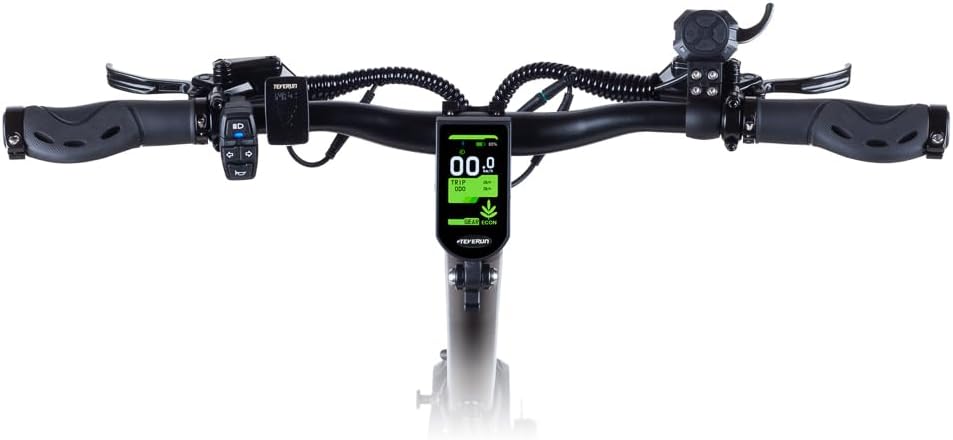
شکل ۱: پورته څخه ښکته view of the handlebar assembly, showing the central display and control buttons.
5.2 سواری
Place one foot on the deck and push off with the other. Once you gain some momentum, gently press the throttle lever to accelerate. The scooter can reach speeds of up to 25 km/h.
5.3 بریک کول
The scooter is equipped with hydraulic disc brakes on both the front and rear wheels for immediate and reliable stopping power. Gently squeeze the brake levers on the handlebars to slow down or stop.

Figure 5.2: Close-up of the rear wheel, showcasing the robust hydraulic disc brake system.
5.4 Lighting and Indicators
The scooter features integrated front and rear lights, as well as turn indicators for enhanced visibility and safety. These can be controlled via the handlebar controls or the TEVERUN app.

شکل 5.3: View of the front light and the upper part of the handlebar stem.
6. ساتنه
6.1 د ټایر فشار
Regularly check the pressure of the 10-inch tubeless tires. Proper tire pressure ensures optimal ride comfort, range, and safety. Refer to the tire sidewall for recommended pressure.
۵.۴ د بریک سیسټم چک کول
Inspect the hydraulic disc brakes periodically for wear and proper function. If you notice reduced braking performance or unusual noises, have the brakes inspected by a qualified technician.
6.3 پاکول
سکوټر د اعلان سره پاک کړئamp ټوکر. د لوړ فشار اوبو جیټونو یا سخت کیمیاوي موادو کارولو څخه ډډه وکړئ، ځکه چې دا کولی شي بریښنایی اجزاو ته زیان ورسوي.
6.4 د بیټرۍ پاملرنه
To prolong battery life, avoid fully discharging the battery frequently. Store the scooter in a cool, dry place and charge it periodically if not in use for extended periods.

6.1 شکل: تړل view of the hydraulic suspension, designed for a smooth ride over various terrains.
7. ستونزه حل کول
If you encounter issues with your scooter, refer to the following common problems and solutions. For more complex issues, use the problem diagnosis feature in the TEVERUN app or contact customer support.
| ستونزه | احتمالي لامل | د حل لاره |
|---|---|---|
| سکوټر نه چالانېږي | ټیټ بیټرۍ؛ تړلی اړیکه | Charge battery; Check all connections |
| کم شوی حد | Low tire pressure; Overload; Cold weather | Inflate tires; Reduce load; Battery performance may decrease in cold |
| بریکونه کمزوري احساس کوي | Worn brake pads; Air in hydraulic line | Inspect and replace pads; Seek professional service for bleeding |
8. مشخصات
| فیچر | مشخصات |
|---|---|
| برانډ | Teverun |
| د ماډل نوم | 52vi20,8 Ah_fm |
| د عمر سلسله | لویان |
| د بریک ډول | Rear Brake, Front Brake (Hydraulic Disc Brakes) |
| رنګ | تور |
| ابعاد (L x W x H) | 118 x 65 x 125 سانتي متره |
| وزن | 37 کیلوګرامه |
| د چوکاټ مواد | المونیم |
| د موادو ډول | فلزي، ربړ |
| ځانګړتیاوې | App-controlled lighting, Hydraulic Brakes, Dual Brake System, Integrated Lights, Battery Status Monitoring, Problem Diagnosis |
| تعلیق | Hydraulic Suspension |
| د ټایر اندازه | 10 Inch (Tubeless) |
| بیټرۍ پکې شاملې دي | هو |
| د اعظمي بار ظرفیت | 120 کیلوګرامه |
| د ویلونو شمیره | 2 |
| د څرخ مواد | ربړ |
| د دستګاه ډول | ثابت شوی |
9. تضمین او ملاتړ
For detailed warranty information, please refer to the official TEVERUN website or the warranty card included with your purchase. For technical support, spare parts, or service inquiries, please contact TEVERUN customer service through their official channels.
Ask a question about this manual
Ask about setup, troubleshooting, compatibility, parts, safety, or missing instructions. Manuals+ will review the question and use this page’s manual context to help answer it.