
VIMTAG 847
VIMTAG Light Bulb Security Camera Model 847 User Manual
د نصبولو، عملیاتو او ساتنې لپاره جامع لارښوونې.
1. پیژندنه
Thank you for choosing the VIMTAG Light Bulb Security Camera Model 847. This device is designed to provide reliable surveillance for your home, offering 2.5K/4MP high-definition video, pan/tilt functionality, night vision, two-way audio, and smart detection features. This manual will guide you through the setup, operation, and maintenance of your camera to ensure optimal performance.
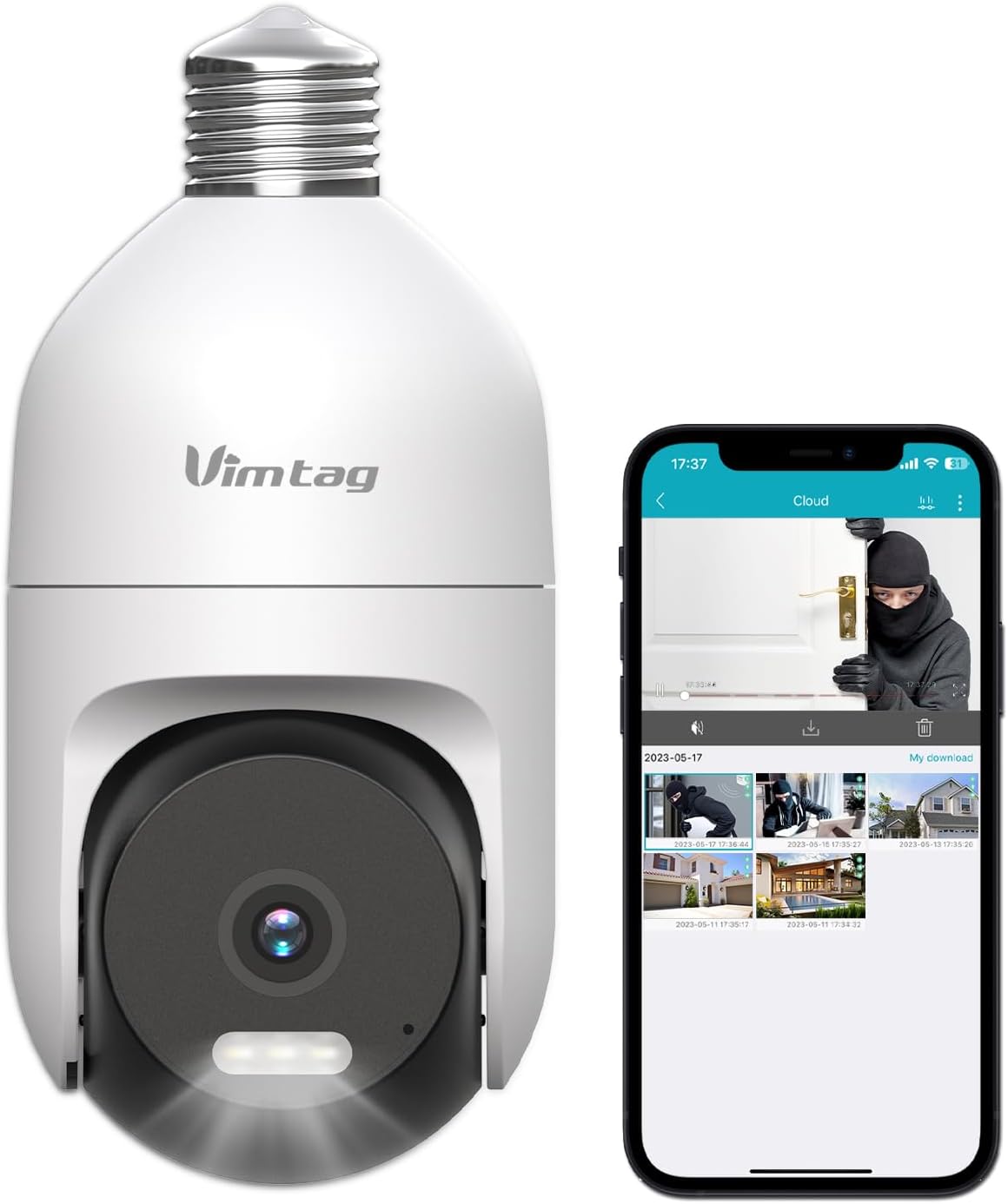
Image: The VIMTAG Light Bulb Security Camera Model 847, shown alongside a smartphone displaying its live feed.
2. د خوندیتوب معلومات
- Ensure the power is off before installing or removing the camera from a light socket.
- Install the camera in a standard E27/E26 light bulb socket.
- Do not expose the camera to extreme temperatures or humidity beyond its operating range.
- کیمره د قوي مقناطیسي ساحو څخه لرې وساتئ.
- د کیمرې د جلا کولو یا ترمیم کولو هڅه مه کوئ. د مرستې لپاره د پیرودونکو ملاتړ سره اړیکه ونیسئ.
- This camera is rated IP66 for weather resistance, suitable for outdoor use, but avoid submerging it in water.
3. د بسته محتويات
The VIMTAG Light Bulb Security Camera package includes:
- VIMTAG Light Bulb Security Camera (Model 847)
- د لارښود لارښود (دا سند)
Note: An SD card for local storage is not included and must be purchased separately if desired.
4. محصول ختم شوview
The VIMTAG Light Bulb Security Camera features a compact design that fits into a standard light bulb socket. Key components include:
- د کیمرې لینز: Captures 2.5K/4MP video.
- انفراریډ (IR) LEDs: د تور او سپین شپې لید لپاره.
- رڼا: Provides color night vision and acts as a deterrent.
- مایکروفون: For audio input during two-way talk and sound detection.
- سپیکر: For audio output during two-way talk and siren alarms.
- د مایکرو SD کارت سلاټ: د محلي ویډیو ذخیره کولو لپاره (تر 512GB پورې ملاتړ کوي).
- د بیا تنظیم تڼۍ: Used for factory reset (usually a small pinhole).
- E27/E26 Base: Standard light bulb screw-in base for power and mounting.
5. ترتیب کول
5.1 فزیکي نصب کول
- بندول: Ensure the power to the light socket is turned off at the circuit breaker before installation.
- دننه کول: Carefully screw the VIMTAG Light Bulb Camera into a standard E27/E26 light bulb socket. Ensure it is securely fastened.
- پاور آن: د رڼا ساکټ ته بریښنا بیرته ورکړئ. کیمره به فعاله شي او د پیل کولو لړۍ به پیل کړي.

Image: Illustration of screwing the camera into a light bulb socket.
۳.۲ د اپلیکیشن ډاونلوډ او د حساب جوړول
- اپلیکیشن ډاونلوډ کړئ: لټون "Vimtag" in your smartphone's app store (iOS App Store or Google Play Store) and download the official VIMTAG اپلیکیشن
- حساب ثبت کړئ: Open the app and follow the on-screen instructions to register a new account using your email address or phone number.

Image: A smartphone screen showing the VIMTAG app icon, indicating the app download step.
5.3 Camera Pairing and Wi-Fi Connection
- وسیله اضافه کړئ: In the VIMTAG app, tap the "+" icon (usually in the top right or center) to add a new device.
- د کیمرې ډول غوره کړئ: Choose "Light Bulb Camera" from the list of device types.
- د اپلیکیشن دننه لارښوونې تعقیب کړئ: The app will guide you through connecting the camera to your 2.4GHz Wi-Fi network. This typically involves scanning a QR code generated by the app with the camera lens or listening for an audio prompt.
- د پیوستون تصدیق: Once connected, the camera will indicate successful pairing (e.g., a voice prompt or LED indicator change), and its live feed will appear in the app.

Image: A smartphone screen showing the process of adding a new device, specifically selecting the light bulb camera.

Image: A smartphone displaying the live video feed from the VIMTAG camera after successful setup.
۳. د کیمرې چلول
6.1 ژوندی View او د پان/ټيلټ کنټرول
Once connected, open the VIMTAG app and select your camera to view the live feed. Use the on-screen controls to pan (horizontal 355°) and tilt (vertical 100°) the camera lens to adjust the viewing angle. The camera offers 8x digital zoom for closer inspection.

Image: Multiple devices (phone, tablet, laptop, desktop) displaying the live feed from the VIMTAG camera, illustrating multi-terminal viewing.
۴.۴ دوه اړخیزه آډیو
The camera features a built-in microphone and speaker. Tap the microphone icon in the app to speak through the camera, and listen to audio from the camera's location. This allows for real-time communication with visitors or to deter intruders.

Image: A person speaking into a phone to communicate with a delivery person at the door via the VIMTAG camera's two-way audio.
۵.۳ د شپې لید حالتونه
کیمره د شپې لید دوه حالتونه ملاتړ کوي:
- د IR شپې لید: Defaults to black and white infrared vision in low light conditions.
- Color Night Vision with Spotlight: When the spotlight mode is activated (manually or via motion detection settings), the camera will switch to full-color night vision.
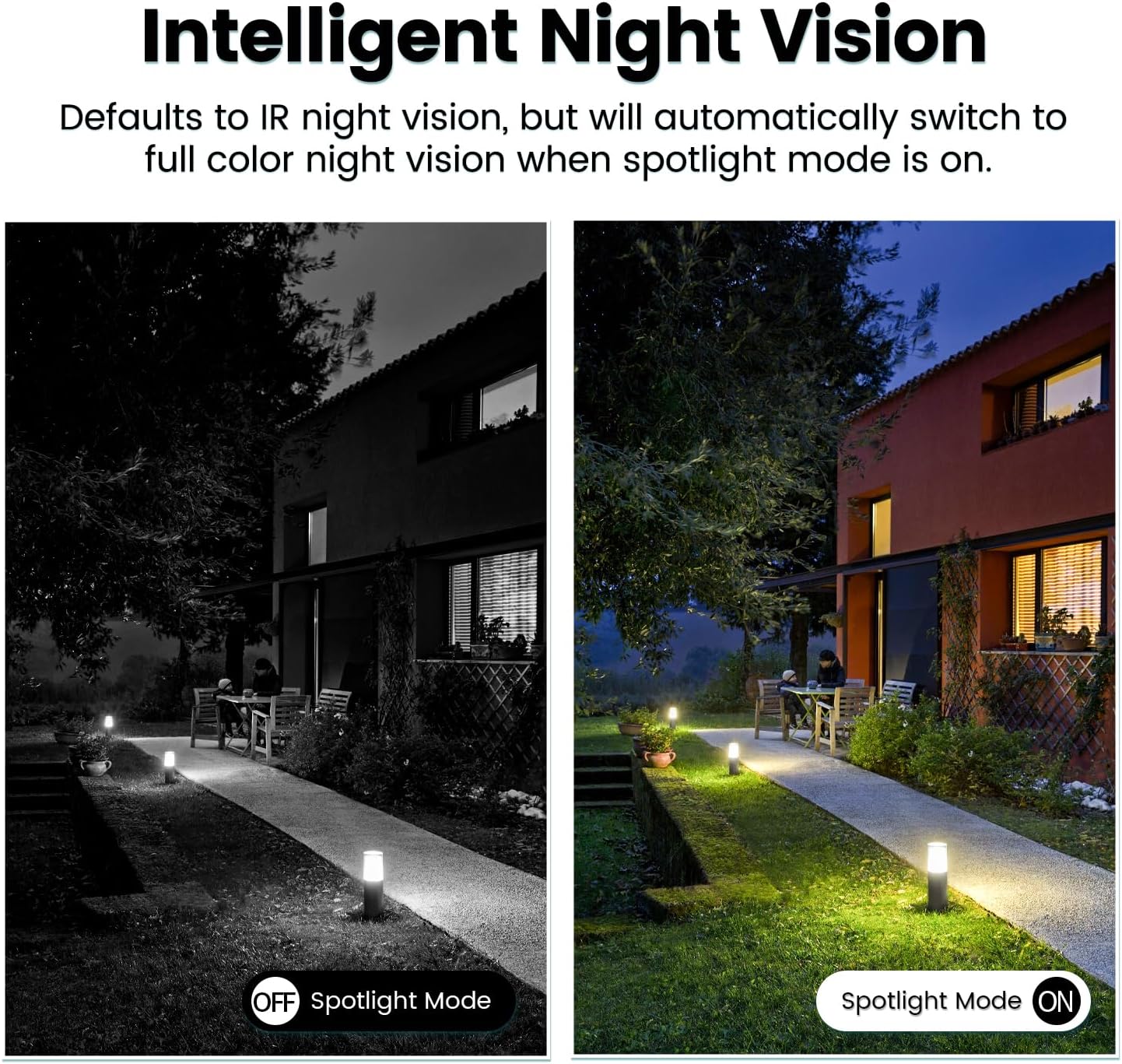
Image: Comparison of IR night vision (black and white, spotlight off) and color night vision (full color, spotlight on) from the VIMTAG کمره
6.4 AI Human/Motion/Sound Detection and Alarms
Configure detection settings in the VIMTAG app. The camera can detect human shapes, general motion, and sounds. Upon detection, you will receive notifications on your phone, and the camera can trigger a siren alarm or activate its spotlight to deter unwanted activity.

Image: An illustration of the VIMTAG camera detecting an intruder, triggering a spotlight and sending an alert to a smartphone.

Image: A smartphone displaying a "Motion Detection Alert" notification from the VIMTAG اپلیکیشن
۴.۵ د ویډیو ثبت او ذخیره کول
کیمره د ذخیره کولو دوه انتخابونه ملاتړ کوي:
- ځایی ذخیره: Insert a Micro SD card (up to 512GB, not included) into the camera's SD card slot for continuous 24/7 recording. Recorded footage can be accessed and managed through the VIMTAG اپلیکیشن
- د بادل ذخیره کول: An optional cloud storage service is available through the VIMTAG app for secure, encrypted video storage. Subscription details can be found within the app.
۵.۶ د الیکسا ادغام
The VIMTAG camera is compatible with Amazon Alexa. To integrate:
- Enable the VIMTAG skill in the Alexa app.
- Link your VIMTAG حساب
- وسایل کشف کړئ.
You can then use voice commands such as, "Alexa, show me the [camera name]" to view the live feed on compatible Alexa-enabled devices with screens (e.g., Echo Show).

Image: A person interacting with an Amazon Echo Show to view the VIMTAG camera feed using voice commands.
7. ساتنه
- پاکول: د کیمرې لینز او بدن په نرم او وچ ټوکر سره په نرمۍ سره پاک کړئ. سخت کیمیاوي مواد یا د کثافاتو پاکوونکي مه کاروئ.
- د فرم ویئر تازه معلومات: Regularly check the VIMTAG app for available firmware updates. Keeping your camera's firmware updated ensures optimal performance, security, and access to new features.
- د SD کارت مدیریت: که چیرې SD کارت کاروئ، نو په دوره یي ډول بیاview او مهم foo بیک اپ کړئtage. Format the SD card through the app if you experience recording issues or to clear old data.
8. ستونزه حل کول
| ستونزه | احتمالي لامل | د حل لاره |
|---|---|---|
| Camera fails to power on. | No power to the light socket; camera not screwed in properly. | Check the light socket's power supply; ensure the camera is securely screwed in. |
| د وائی فای سره وصل نشو. | Incorrect Wi-Fi password; camera too far from router; 5GHz Wi-Fi network used. | Verify Wi-Fi password; move camera closer to router; ensure you are connecting to a 2.4GHz Wi-Fi network. |
| د ویډیو خراب کیفیت. | Weak Wi-Fi signal; dirty lens. | Improve Wi-Fi signal strength; clean the camera lens. |
| د حرکت کشف کار نه کوي. | Detection settings disabled or sensitivity too low; camera positioned incorrectly. | Check and adjust motion detection settings in the app; ensure camera has a clear view د سیمې |
| په SD کارت کې ثبت نه کیږي. | SD card full or corrupted; incorrect recording settings. | Format the SD card via the app; check recording schedule and settings. Replace SD card if necessary. |
9. مشخصات
| فیچر | تفصیل |
|---|---|
| د ماډل نوم | 847 |
| د ویډیو حل | 2.5K / 4MP (1440p) |
| د پین / خښتو سلسله | 355° افقی، 100° عمودی |
| ډیجیټل زوم | 8x |
| د شپې لید | IR Night Vision & Color Night Vision with LED Spotlight |
| دوه طرفه آډیو | Yes (Built-in Microphone & Speaker) |
| کشف | AI Human, Motion, Sound Detection |
| ارتباط | ۲.۴GHz وای فای (IEEE ۸۰۲.۱۱b/g/n) |
| د ذخیره کولو اختیارونه | Micro SD Card (up to 512GB), Cloud Storage (optional subscription) |
| د بریښنا سرچینه | Corded Electric (E27/E26 Light Bulb Socket) |
| د کور دننه / بهر کارول | Yes (IP66 Weatherproof) |
| مطابقت لرونکې وسیلې | iOS, Android, Mac, iPad, Windows, Amazon Alexa |
| ابعاد (L x W x H) | 3.07 x 3.07 x 5.31 انچه |
| د توکي وزن | 9.1 اونس |
| د چوکاټ نرخ | په هره ثانیه کې 25 چوکاټونه |
| د ویډیو کوډ کول | H.264/H.265 |
10. تضمین او ملاتړ
VIMTAG products come with a standard manufacturer's warranty. For specific warranty terms and conditions, please refer to the warranty card included with your product or visit the official VIMTAG website. For technical support, troubleshooting assistance, or any product-related inquiries, please contact VIMTAG customer service through the VIMTAG app or their official webسایټ
آنلاین سرچینې:
- VIMTAG رسمي Webسایټ: Visit the VIMTAG په ایمیزون کې ذخیره کړئ
- In-App Support: Access support features directly within the VIMTAG د ګرځنده غوښتنلیک.
Ask a question about this manual
Ask about setup, troubleshooting, compatibility, parts, safety, or missing instructions. Manuals+ will review the question and use this page’s manual context to help answer it.