
1. پیژندنه
Thank you for choosing the Trueque Wireless Keyboard and Mouse Combo. This product is designed to provide a comfortable, efficient, and quiet computing experience with its 2.4GHz wireless technology, full-size layout, and ergonomic design. This manual will guide you through the setup, operation, maintenance, and troubleshooting of your new device.
2. ترتیب کول
۲.۱ د بسته بندۍ او محتوا خلاصول
Carefully remove all components from the packaging. Ensure you have the wireless keyboard, wireless mouse, and the USB receiver. The USB receiver is typically stored within the mouse's battery compartment for safe keeping.
2.2 د بیټرۍ نصب کول
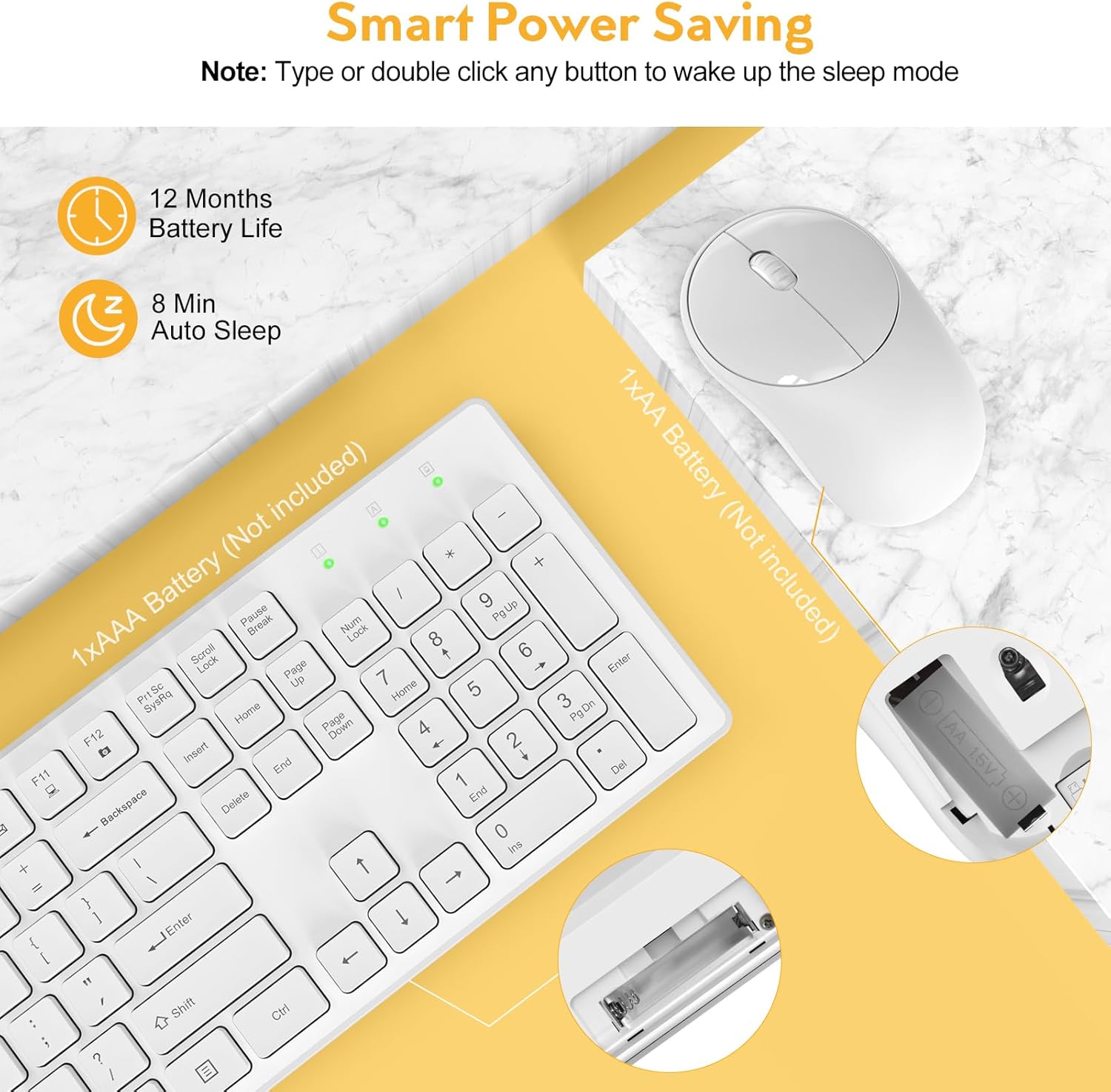
The keyboard requires one (1) AAA battery and the mouse requires one (1) AA battery (batteries are not included). Follow the steps below to install the batteries:
- د کیبورډ او موږک په ښکته برخه کې د بیټرۍ کڅوړه ومومئ.
- د بیټرۍ کمپارټ پوښ خلاص کړئ.
- بیټرۍ دننه کړئ، د سم قطبي (+/-) ډاډ ترلاسه کړئ.
- د بیټرۍ کمپارټ پوښ په خوندي ډول وتړئ.
۲.۳ ستاسو د وسیلې سره وصل کیدل
The Trueque Wireless Keyboard and Mouse Combo uses 2.4GHz wireless technology for a stable and lag-free connection. Both devices connect via a single USB receiver.
- Retrieve the USB receiver from the mouse's battery compartment.
- د USB ریسیور په خپل کمپیوټر، لیپ ټاپ، یا مناسب وسیله کې موجود USB پورټ کې ولګوئ.
- The keyboard and mouse should automatically connect within a few seconds. No additional drivers are typically required.


3. عملیاتي لارښوونې
۵.۱ اساسي استعمال
Once connected, the keyboard and mouse function like standard peripherals. The keyboard features a full 104-key U.S. QWERTY layout for familiar typing. The mouse provides precise cursor control.
۱۲ ملټي میډیا هاټ کیزونه
The keyboard includes 12 multimedia hotkeys for quick access to common functions. These keys are activated by pressing the Fn key in combination with the corresponding F-key (F1-F12). Please note that multimedia keys may not be fully supported on Mac OS.
- Fn+F1: د رسنیو پلیر
- Fn+F2: حجم ښکته
- Fn+F3: حجم پورته
- Fn+F4: خاموش
- Fn+F5: مخکینی ټریک
- Fn+F6: بله لار
- Fn+F7: پلی/ودرول
- Fn+F8: ودریږئ
- Fn+F9: کورپاڼه
- Fn+F10: ایمیل
- Fn+F11: زما کمپیوټر
- Fn+F12: د خوښې وړ

۳.۴ د ارګونومیک او ټایپ کولو تجربه
The keyboard features an ergonomic tilt angle to promote a more natural typing position, reducing wrist strain. The keys have a shorter keystroke distance, providing a responsive, smooth, and soft typing feel.
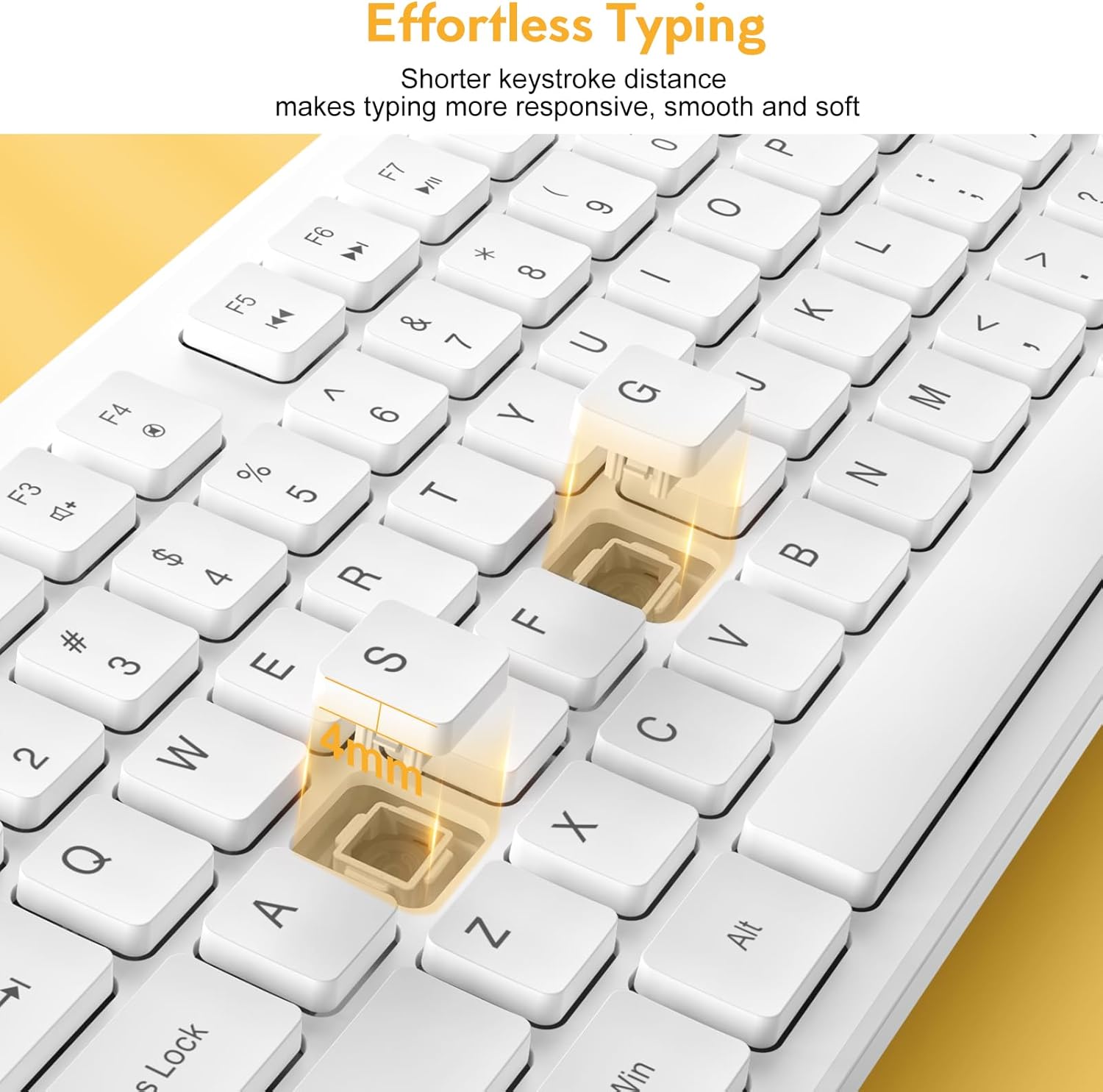

The mouse operates with 100% quiet clicks, ensuring no disruptive sounds. The keyboard is designed to be over 90% quieter than similar keyboards, allowing for a more peaceful working environment.

3.4 د شاخص څراغونه
The keyboard features indicator lights for Num Lock, Caps Lock, and Power status, located above the numeric keypad.

4. ساتنه
4.1 پاکول
To maintain the appearance and functionality of your keyboard and mouse, regularly wipe them with a soft, dry cloth. For stubborn dirt, a slightly damp cloth can be used, ensuring no liquid enters the device. Avoid harsh chemicals or abrasive cleaners.
4.2 Power Saving Features
The combo is designed with smart power-saving features to extend battery life:
- کیبورډ به د 8 دقیقو غیر فعالیت وروسته د خوب حالت ته ننوځي.
- The mouse will enter sleep mode after 1 minute of inactivity.
To wake the devices, simply press any key on the keyboard or click/move the mouse. The standby time for both devices can be up to 365 days.

4.3 Spill-Resistant Design
The keyboard features a spill-resistant design, which helps protect against accidental liquid spills. The keycap letters are also designed to be non-fading, ensuring long-term legibility.

5. ستونزه حل کول
If you encounter issues with your Trueque Wireless Keyboard and Mouse Combo, please refer to the following common troubleshooting steps:
- No Connection or Lag:
- ډاډ ترلاسه کړئ چې بیټرۍ په سمه توګه نصب شوي او کافي چارج لري. که اړتیا وي نو بدل یې کړئ.
- Re-plug the USB receiver into a different USB port on your device.
- Try the combo with another computer or laptop to determine if the issue is with the peripherals or the host device.
- Ensure the USB receiver is not too far from the keyboard and mouse (within 33ft/10m).
- موږک ځواب نه ورکوي:
- Check if the mouse is in sleep mode. Click any button or move the mouse to wake it up.
- Verify battery status.
- کیبورډ ځواب نه ورکوي:
- Check if the keyboard is in sleep mode. Press any key to wake it up.
- Verify battery status.
- USB Receiver Location:
- The single USB receiver for both devices is stored inside the mouse's battery compartment. Open the mouse's battery cover to find it.
If issues persist after following these steps, please contact Trueque customer support for further assistance.
6. مشخصات
| د محصول ابعاد | 16.9 x 4.89 x 2.6 انچه |
| د توکي وزن | ۲.۴۵ پونډه |
| د ارتباط ټیکنالوژي | ۲.۴GHz بېسیم (USB رسیور) |
| مطابقت لرونکې وسیلې | Laptop, Gaming Console, Personal Computer (Windows, Linux, Chrome OS, Mac OS) |
| ځانګړي ځانګړتیاوې | Quiet Clicks, Independent Hotkeys, Smart Power-Saving, 104-Keys Full Size, Low Profile and Compact Design |

7. تضمین او ملاتړ
Trueque is committed to providing excellent customer service and product support. Your Wireless Keyboard and Mouse Combo comes with comprehensive support:
- د پلور وروسته ملاتړ: ۵ کاله
- د محصول د ژوند موده: 18 میاشتې
- د پیرودونکو خدمت: په اونۍ کې 7 ورځې، په ورځ کې 24 ساعته
For any product-related issues, questions, or warranty claims, it is recommended to contact Trueque customer support directly. This ensures faster resolution and dedicated assistance.

