
1. پیژندنه
Welcome to the user manual for your ZOMBIES CAT Transformers TF-T06 Wireless Earbuds. This guide provides detailed instructions on how to set up, operate, maintain, and troubleshoot your new earbuds. Please read this manual carefully to ensure optimal performance and longevity of your device.
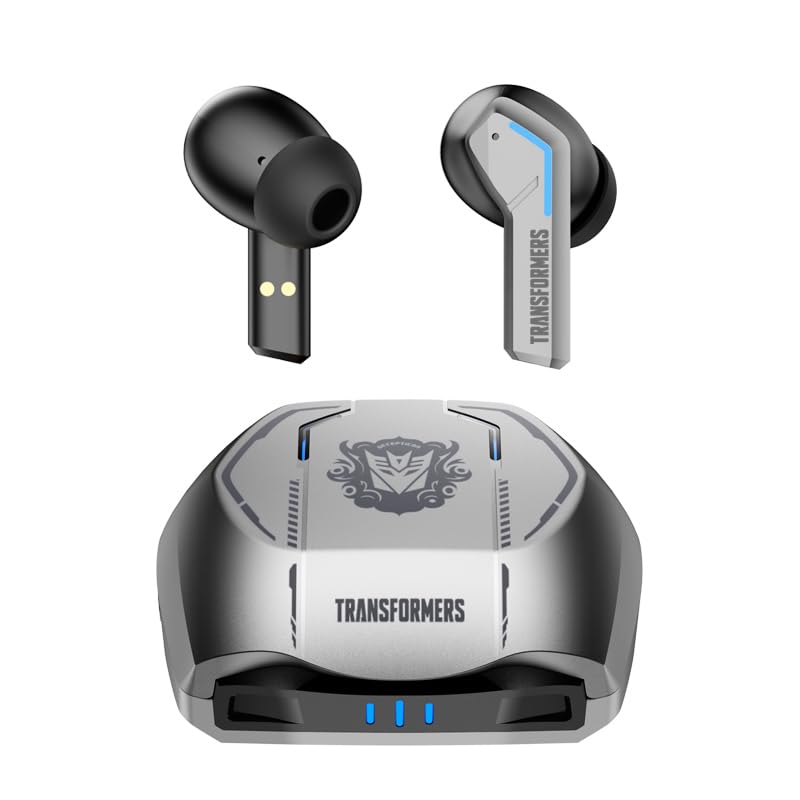
Image 1.1: The Transformers TF-T06 Wireless Earbuds and their charging case.
2. د بسته محتويات
ډاډ ترلاسه کړئ چې ټول توکي ستاسو په کڅوړه کې شتون لري:
- Transformers In-Ear Headphones (2 units)
- Earbuds Charging Case (1 unit)
- د ټایپ-سي چارج کولو کیبل (۱ واحد)
- د کارن لارښود (دا سند)

Image 2.1: The TF-T06 Earbuds, charging case, and packaging.
3. محصول ختم شوview
3.1 Earbud Design and Ergonomics
The TF-T06 earbuds are designed for a comfortable and secure fit within the ear, ensuring stability during various activities. Their lightweight and skin-friendly construction allows for extended wear without discomfort.

Image 3.1: An earbud shown in an ear, highlighting its ergonomic design for comfortable wear.
۵.۱ سمارټ ټچ کنټرولونه
Each earbud features a touch-sensitive area for controlling various functions without needing to access your connected device. The controls are intuitive and responsive.

Image 3.2: Visual representation of the smart touch control functions on the earbuds.
- پلی کول / ودرول: په دواړو غوږونو کې یو ځل کلیک وکړئ.
- بله لار: په ښي غوږۍ کې دوه ځله ټایپ کړئ.
- مخکینی لار په چپ غوږۍ کې دوه ځله ټایپ کړئ.
- حجم پورته کول: په ښي غوږۍ درې ځله ټایپ کړئ.
- کموالی: په چپ غوږۍ کې درې ځله ټایپ کړئ.
- ځواب / پای کال: د راتلوونکي زنګ یا فعال زنګ په جریان کې په هر ایربډ باندې یو ځل کلیک وکړئ.
- زنګ رد کړئ: د راتلوونکي زنګ په جریان کې د 2 ثانیو لپاره د هر غوږ بډ فشار ورکړئ او ونیسئ.
- د غږ همکار فعاله کړئ: د هر غوږ بډ د ۲ ثانیو لپاره فشار ورکړئ او ونیسئ (کله چې په زنګ نه یاست).
4. ترتیب کول
۴.۱ د ایربډز او کیس چارج کول
د لومړي ځل کارولو دمخه، د غوږ بډونه او د چارج کولو قضیه په بشپړه توګه چارج کړئ.
- Place the earbuds into the charging case. Ensure they are correctly seated; magnetic contacts will hold them in place.
- د ټایپ-سي چارج کولو کیبل د کیس د چارج کولو پورټ سره او بل پای د USB بریښنا اډاپټر سره وصل کړئ (شامل نه دی).
- The indicator lights on the charging case will illuminate to show charging status. A full charge typically takes approximately 3 hours for the case.
- Once fully charged, disconnect the charging cable. The earbuds will charge automatically when placed in the powered case.
۳.۲ د وسیلې سره لومړنۍ جوړه کول
The TF-T06 earbuds feature one-step pairing for convenience.
- د چارج کولو کیس خلاص کړئ. د غوږ بډونه به په اتوماتيک ډول فعال شي او د جوړې کولو حالت ته به ننوځي.
- په خپل سمارټ فون، ټابلیټ، یا بل بلوتوث فعال شوي وسیله کې، د بلوتوث ترتیباتو ته لاړ شئ.
- لټون available devices and select "TF-T06" from the list.
- یوځل چې وصل شو، تاسو به د اوریدلو وړ تایید واورئ، او د غوږ بډونه به د کارولو لپاره چمتو وي.

Image 4.1: The earbuds in their open charging case, indicating they are ready for Bluetooth pairing.
یادونه: After the initial pairing, the earbuds will automatically connect to the last paired device when removed from the charging case, provided Bluetooth is enabled on the device and it is within range.
5. عملیاتي لارښوونې
۸ پاور آن/بند
- پاور آن: د چارج کولو قضیه پرانیزئ، یا د دواړو غوږونو د لمس ساحه د 3 ثانیو لپاره فشار ورکړئ او ونیسئ.
- بندول: د غوږ بډونه بیرته د چارج کولو په قضیه کې ځای په ځای کړئ او پوښ یې وتړئ، یا د دواړو غوږ بډونو د لمس ساحه د 5 ثانیو لپاره فشار ورکړئ او ونیسئ.
5.2 د میوزیک غږ
Use the smart touch controls as described in Section 3.2 to manage your music.
۶.۳ د زنګ وهلو مدیریت
Handle incoming and active calls using the smart touch controls as described in Section 3.2. The built-in ENC noise-cancelling microphone ensures clear communication.
5.4 د غږ مرسته
Activate your device's voice assistant (e.g., Siri, Google Assistant) by pressing and holding the touch area on either earbud for 2 seconds (when not on a call).
۵.۲ د غږ کیفیت
The TF-T06 earbuds feature 10mm double-layer diaphragm drivers, delivering powerful bass, clear midrange, and bright treble for a high-fidelity audio experience.

Image 5.1: An illustration of the 10mm dynamic driver, responsible for the earbud's sound quality.
6. ساتنه
- پاکول: د غوږ بډونه او د چارج کولو کیس په منظم ډول د نرم، وچ، لینټ نه پاک ټوکر سره پاک کړئ. د کثافاتو پاکوونکي یا محلول مه کاروئ.
- د اوبو مقاومت: The earbuds have an IPX4 waterproof rating, meaning they are resistant to splashing water and sweat. Do not submerge them in water or expose them to heavy rain. Ensure they are dry before placing them back in the charging case.
- ذخیره کول: کله چې په کارولو کې نه وي، د غوږ غوږوالۍ د چارج کولو په قضیه کې وساتئ ترڅو دوی خوندي کړي او چارج یې وساتي. په یخ او وچ ځای کې د سخت تودوخې څخه لرې وساتئ.
- د بیټرۍ پاملرنه: د بیټرۍ د ژوند اوږدولو لپاره، د غوږونو او چارج کولو کیس په مکرر ډول په بشپړ ډول چارج کولو څخه ډډه وکړئ. په منظم ډول یې چارج کړئ، حتی که په دوامداره توګه نه وي.
7. ستونزه حل کول
If you encounter issues with your TF-T06 earbuds, refer to the following common solutions:
- د غوږونو نه جوړېږي:
- ډاډ ترلاسه کړئ چې دواړه غوږونه چارج شوي دي.
- په خپل وسیله کې بلوتوث بند کړئ او بیرته یې چالان کړئ.
- Forget "TF-T06" in your device's Bluetooth settings and attempt to pair again.
- خپل وسیله بیا پیل کړئ.
- یوازې یو غوږۍ کار کوي:
- ډاډ ترلاسه کړئ چې دواړه غوږونه چارج شوي دي.
- Place both earbuds back into the charging case, close the lid, wait a few seconds, then open the lid and remove them.
- Try resetting the earbuds (refer to specific reset instructions if available in a separate quick start guide, or try forgetting the device and re-pairing).
- بې غږه یا ټیټ غږ:
- په خپلو ایربډونو او وصل شوي وسیله دواړو کې د حجم کچه وګورئ.
- ډاډ ترلاسه کړئ چې د غوږ بډونه ستاسو وسیله سره په سمه توګه وصل دي.
- د اییربډ سپیکر میش څخه هر ډول کثافات پاک کړئ.
- د چارج کولو مسلې:
- ډاډ ترلاسه کړئ چې د چارج کولو کیبل په خوندي ډول د قضیې او بریښنا سرچینې دواړو سره وصل دی.
- د چارج کولو بل کیبل یا د بریښنا اډاپټر هڅه وکړئ.
- د ایربډونو او د قضیې دننه د چارج کولو تماسونه پاک کړئ.
8. مشخصات
| د ماډل نوم | TF-T0602 |
| برانډ | ZOMBIES CAT |
| د ارتباط ټیکنالوژي | بېسیم (بلوتوث ۵.۳) |
| بلوتوث نسخه | 5.3 |
| د آډیو ډرایور ډول | متحرک ډرایور (۱۶.۱ ملي متره) |
| د بیټرۍ ژوند (د قضیې سره ټول) | تر 30 ساعتونو پورې |
| د ایربډ د لوبې وخت (یو ځل چارج) | 3-4 ساعته |
| د چارج کولو وخت | نږدې ۲ ساعته (قضیه) |
| د کنټرول طریقه | لمس |
| د اوبو د مقاومت کچه | IPX4 (واټر پروف) |
| شور لغوه کول | ENC (Environmental Noise Cancellation) Mic |
| مطابقت لرونکې وسیلې | Most Bluetooth-enabled devices (smartphones, tablets, laptops, smartwatches) |
| اعظمي عملیاتي فاصله | 10 متره |
| د توکي وزن | 132 ګرامه |
| د محصول ابعاد | 3.3 x 2.18 x 1.83 سانتي متره |
9. تضمین او ملاتړ
د تضمین معلوماتو او د پیرودونکو ملاتړ لپاره، مهرباني وکړئ د پیرود په ځای کې چمتو شوي اسنادو ته مراجعه وکړئ یا خپل پرچون پلورونکي سره اړیکه ونیسئ. د هر ډول تضمین ادعا لپاره د پیرود ثبوت وساتئ.