
د JMDHKK K68+
د JMDHKK K68+ پټ کیمره او د بګ کشف کونکي کارونکي لارښود
Model: K68+
پیژندنه
The JMDHKK K68+ is an advanced multi-functional detector designed to enhance your privacy and security. It effectively identifies hidden cameras, listening devices, and magnetic trackers across various environments such as homes, offices, hotels, and vehicles. This device provides comprehensive protection against unauthorized surveillance, ensuring your peace of mind.
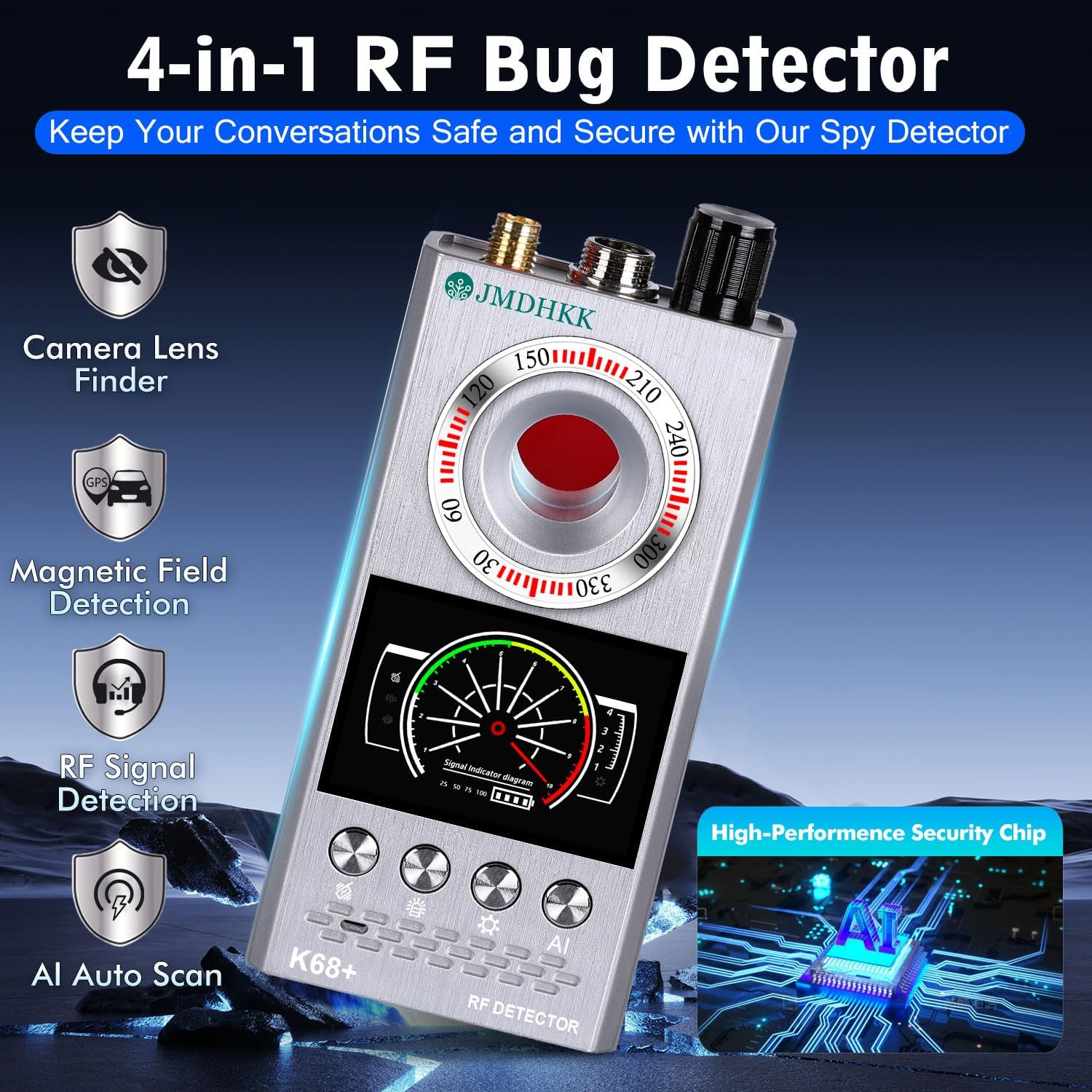
Figure 1: JMDHKK K68+ Detector highlighting its four primary detection functions.
په بکس کې څه دي
مهرباني وکړئ تصدیق کړئ چې ټولې برخې د بکس خلاصولو پر مهال شتون لري:
- اصلي واحد
- RF انتن
- GS Probe
- د چارج کیبل
- د کارن لارښود

Figure 2: The JMDHKK K68+ detector and its included accessories.
چمتو کول
- د وسیلې چارج کول: Connect the provided charging cable to the device's charging port and a compatible USB power source. The device's indicator will show charging status. Ensure the device is fully charged before first use for optimal performance.
- Attaching the RF Antenna: Screw the RF Antenna into the designated port on the top of the main unit. This antenna is crucial for wireless signal detection.
- Attaching the GS Probe: Connect the GS Probe (Magnetic Field Probe) to its dedicated port on the top of the main unit. This probe is used for detecting magnetic trackers.
عملیاتي لارښوونې
1. Wireless Signal Detection (RF Detection)
This mode detects radio frequency signals emitted by wireless cameras, listening devices, GPS trackers, and other transmitting bugs. It is ideal for sweeping rooms, offices, or vehicles for active surveillance devices.
- فعالول: Turn on the device and select the RF detection mode.
- د حساسیت سمون: Use the sensitivity control knob to adjust the detection range. Start with higher sensitivity in open areas and decrease it as you narrow down a signal source.
- سکینګ: Slowly sweep the device across the area of interest, paying close attention to walls, furniture, electronic devices, and hidden compartments. The signal strength indicator on the display will increase as you approach a signal source.
- خبرتیاوې: The device will provide visual (LED indicators) and/or audible/vibration alerts when a signal is detected.
Figure 3: Wireless Signal Detection in action, identifying various transmitting devices.
۵.۳. د مقناطیسي ساحې کشف
This function is specifically designed to locate magnetic GPS trackers and other devices that attach using magnets, commonly found on vehicles or metallic surfaces.
- فعالول: Ensure the GS Probe is attached. Select the magnetic field detection mode.
- سکینګ: Slowly move the GS Probe along surfaces where magnetic devices might be hidden, such as under car chassis, wheel wells, or metallic furniture.
- خبرتیاوې: The device will indicate the presence of a magnetic field through visual and/or audible alerts. The closer the probe is to a magnetic source, the stronger the indication.

Figure 4: Magnetic Field Detection for locating hidden GPS trackers on vehicles.
3. Hidden Camera Lens Finder (Infrared Scanning)
This mode helps identify hidden pinhole cameras, even if they are not actively transmitting, by detecting their reflective lenses using infrared light.
- فعالول: Select the camera lens finder mode. The device will emit a red infrared light.
- سکینګ: Look through the red viewing window on the device while slowly scanning the area. Pay attention to objects like smoke detectors, air vents, picture frames, electrical outlets, and small holes.
- پیژندنه: A hidden camera lens will appear as a bright, reflective red dot when viewed through the device's window.

Figure 5: Hidden Camera Lens Finder in use, revealing concealed camera lenses.
4. AI Auto Scan Mode
The AI Auto Scan mode provides an intelligent, automated scan for various threats, simplifying the detection process.
- فعالول: Select the AI Auto Scan mode. The device will automatically cycle through detection methods.
- څارنه: Place the device in an area you wish to monitor. It will continuously scan for signals and alerts you to any detected threats.
ساتنه
- پاکول: د وسیلې د پاکولو لپاره نرم، وچ ټوکر وکاروئ. د کثافاتو پاکوونکي یا محلولونه مه کاروئ.
- ذخیره کول: وسیله په یخ او وچ ځای کې د مستقیم لمر وړانګو او سختې تودوخې څخه لرې وساتئ.
- د بیټرۍ پاملرنه: د بیټرۍ د ژوند اوږدولو لپاره، د بیټرۍ په مکرر ډول د بشپړ چارج کولو څخه ډډه وکړئ. وسیله په منظم ډول چارج کړئ، حتی که په کارولو کې نه وي، د بیټرۍ روغتیا ساتلو لپاره.
- په احتیاط سره سمبالول: د وسیلې له غورځولو یا د قوي ټکانونو سره د مخ کیدو څخه ډډه وکړئ، ځکه چې دا کولی شي داخلي برخو ته زیان ورسوي.
د ستونزو حل کول
| ستونزه | احتمالي لامل | د حل لاره |
|---|---|---|
| وسیله نه ورځي. | ټیټ بیټرۍ یا هیڅ چارج نشته. | Charge the device fully using the provided charging cable. |
| Poor RF signal detection. | Antenna not properly attached or low sensitivity setting. | Ensure the RF antenna is securely attached. Increase sensitivity using the control knob. |
| Magnetic detection not working. | GS Probe not attached or damaged. | Verify the GS Probe is securely connected. If still not working, the probe may be damaged and require replacement. |
| Camera lens finder not showing red dots. | Not scanning correctly or no hidden cameras present. | Ensure you are looking through the red viewing window and slowly scanning the area. Test with a known camera (e.g., phone camera) to verify function. |
مشخصات
- ماډل: K68+
- د محصول ابعاد: 4.84 x 2.44 x 0.87 انچه
- د توکي وزن: 7.4 اونس
- بیټرۍ: 1 لیتیم آئن بیټرۍ (شامل ده)
- جوړونکی: Biznlink
- د اصلي هیواد: چین

Figure 6: Product dimensions for the JMDHKK K68+ detector.
تضمین او ملاتړ
For warranty information and technical support, please refer to the contact details provided on the product packaging or visit the official JMDHKK webسایټ د تضمین ادعاګانو لپاره خپل د پیرود رسید وساتئ.
تاسو کولی شئ اضافي سرچینې او FAQs په دې کې هم ومومئ JMDHKK Store on Amazon.
Ask a question about this manual
Ask about setup, troubleshooting, compatibility, parts, safety, or missing instructions. Manuals+ will review the question and use this page’s manual context to help answer it.