
د FLEXISPOT QS1M-1675-IE معرفي کول
د فلیکس پوټ لایټ بریښنایی ولاړ میز کارونکي لارښود
ماډل: QS1M-1675-IE
پیژندنه
Thank you for choosing the FLEXISPOT Lite Electric Standing Desk. This manual provides essential information for the safe and efficient assembly, operation, and maintenance of your new desk. Please read this manual thoroughly before use and retain it for future reference.
The FLEXISPOT Lite Electric Standing Desk is designed to promote a healthier working environment by allowing seamless transitions between sitting and standing positions. Its robust construction and intuitive controls ensure a comfortable and productive workspace.
د خوندیتوب لارښوونې
- ډاډ ترلاسه کړئ چې ټولې برخې شتون لري او د راټولولو دمخه زیانمن شوي ندي. که کومې برخې ورکې یا ماتې وي نو مه کاروئ.
- د ټپي کیدو مخنیوي لپاره د عملیاتو په جریان کې ماشومان او څاروي له میز څخه لرې وساتئ.
- Do not place hands or other objects near the moving parts of the desk frame during height adjustment.
- ډاډ ترلاسه کړئ چې د بریښنا تار په سمه توګه وصل دی او خراب شوی نه دی. میز د خراب شوي تار یا پلګ سره مه چلوئ.
- Do not overload the desk. Refer to the specifications section for maximum weight capacity.
- Only use the desk on a level surface to ensure stability.
- د پاکولو یا هر ډول ساتنې ترسره کولو دمخه بریښنا قطع کړئ.
د بسته محتويات
مهرباني وکړئ تصدیق کړئ چې لاندې ټولې برخې ستاسو په کڅوړه کې شاملې دي:
- Desktop (160 x 75 cm, White+Maple)
- Desk Legs/Frame (Alloy Steel)
- د بریښنایی موټرو او کنټرول بکس
- د تضمین اداره
- د بریښنا اډاپټر او کیبل
- کپ هولډر
- زېرمه کول
- Cable Management Accessories (Cable ties, Bundle Clamp)
- د اسمبلۍ هارډویر (سکرو، ایلن رنچونه، او نور)
- د کارن لارښود
انځور 1: اوورview of desk components, including the desktop, frame, and control panel, ready for assembly.
تنظیم او مجلس
Follow these steps to assemble your FLEXISPOT Lite Electric Standing Desk. It is recommended to have two people for assembly, especially when handling the desktop.
- اجزا خلاص کړئ: Carefully remove all parts from the packaging and lay them out on a clean, soft surface to prevent scratches. Refer to the "Package Contents" section to ensure all parts are present.
- Attach Lifting Columns to Feet: Secure the lifting columns to the desk feet using the provided screws and tools. Ensure they are firmly attached.
- Connect Crossbar: Attach the crossbar between the two lifting columns. This forms the main frame of the desk.
- د کنټرول بکس او موټور نصب کړئ: Mount the control box and motor onto the designated areas of the desk frame. Connect the motor cables to the control box.
- ډیسکټاپ ضمیمه کړئ: Carefully place the desktop upside down on a soft surface. Position the assembled frame onto the desktop, aligning the pre-drilled holes. Secure the frame to the desktop using the provided screws.
- د کنټرول پینل نصب کړئ: Mount the control panel to the underside of the desktop in an easily accessible location. Connect its cable to the control box.
- لوازم ضمیمه کړئ: Install the cup holder and storage hook to the desired locations on the desktop edge.
- د کیبل مدیریت: Use the provided cable management accessories to organize and secure all cables, including the power cord.
- د دندې میز: With assistance, carefully flip the desk upright and place it in its desired location. Ensure it is on a stable, level surface.
- بریښنا وصل کړئ: Plug the power adapter into the control box, then plug the power cord into a wall outlet.
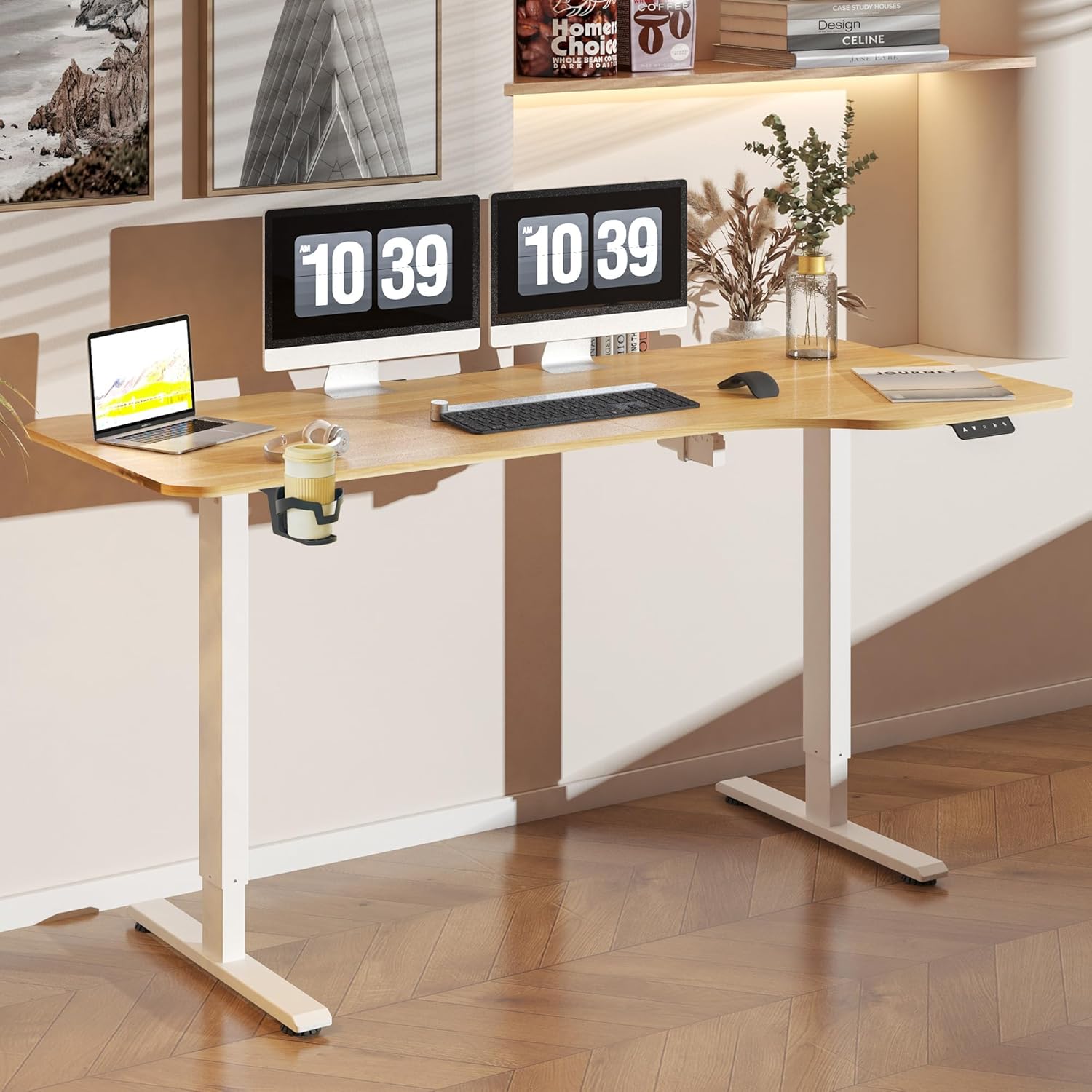
انځور 2: The FLEXISPOT Lite Electric Standing Desk fully assembled and set up in a modern home office environment.
عملیاتي لارښوونې
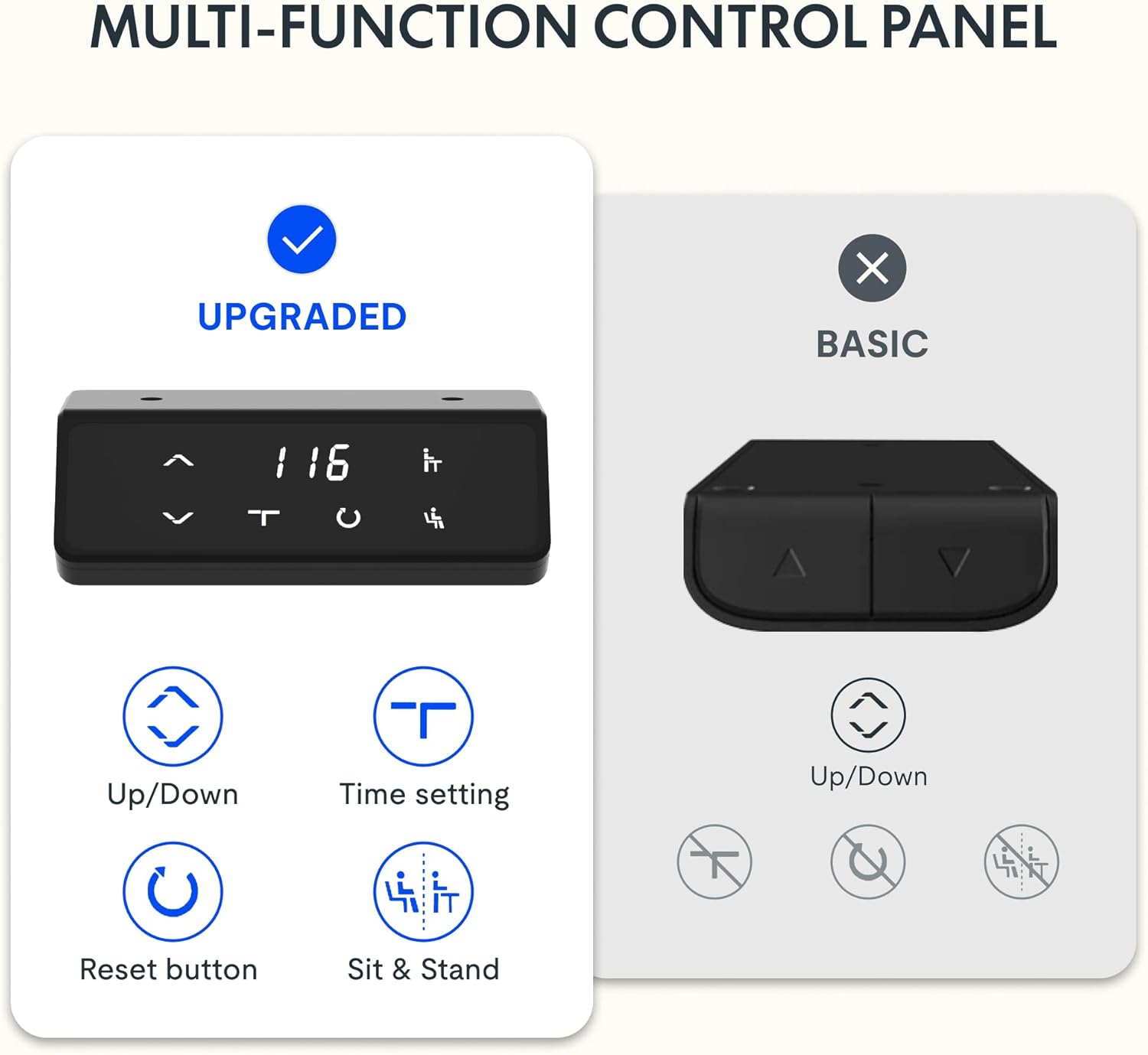
د کنټرول پینل ختم شوview

انځور 3: تفصيلي view of the desk's control panel, showing buttons for Up/Down adjustment, Time Setting, Reset, and Sit & Stand memory presets.
Your FLEXISPOT Lite Electric Standing Desk features an intuitive control panel for easy height adjustment and memory functions.
- پورته/ښکته تڼۍ (⌃ / ⌄): Press and hold these buttons to manually adjust the desk height upwards or downwards. Release the button to stop at the desired height.
- د حافظې پریزیټ: The control panel allows you to save and recall preferred height settings.
- Adjust the desk to your desired height (e.g., a comfortable sitting or standing position) using the Up/Down buttons.
- Press and hold the 'Sit & Stand' button (person icon) for approximately 3-5 seconds until the display flashes or beeps, indicating the height is saved.
- To recall a saved height, simply press the 'Sit & Stand' button. The desk will automatically move to the last saved height. (If your model supports multiple presets, consult the full product manual for specific instructions on saving and recalling each position.)
- د بیا تنظیم کولو تڼۍ (R): If the desk encounters an error or does not respond correctly, a reset may be required.
- Press and hold the 'R' button (often indicated by a circle icon or 'Reset' text).
- The desk will move to its lowest position, then slightly rise. Release the button once this sequence is complete. The desk is now reset.
- Time Setting (T): This button, often labeled with a clock icon, may be used to set a timer for sit/stand reminders, if available on your model. Consult the full product manual for detailed instructions on using this feature.

انځور 4: The FLEXISPOT Lite Electric Standing Desk in use, highlighting the accessible placement of the control panel for easy height adjustments.
ځانګړتیاوې
د لوړوالی تنظیم کولو سلسله
The desk offers a wide range of height adjustment to accommodate various user preferences and activities, from a minimum of 71 cm to a maximum of 117 cm.

انځور 5: Visual representation of the desk's height adjustment capabilities, illustrating the minimum and maximum heights.
مربوط لوازم
- کپ هولډر: A convenient cup holder is included to keep your beverages secure and prevent spills on your workspace.
- Storage Hook: A practical hook is provided for hanging headphones, bags, or other items, helping to keep your desktop clear and organized.

انځور 6: تفصيلي view of the integrated cup holder and storage hook, designed for convenience and organization.
د کیبل مدیریت
The desk includes features to help manage and organize your cables, ensuring a tidy and safe workspace.
- Cable Management Tray/Clips: Utilize the provided cable management solutions to route and secure power cords and peripheral cables.
- Bundle Clamp/Grommet: The desktop features a grommet hole and clamp for neatly passing cables through the desk surface.

انځور 7: Examples of the desk's cable management features, including a cable routing system and a desktop grommet for organized wiring.
ساتنه
- پاکول: د میز سطحه او چوکاټ د نرم، d سره پاک کړئamp ټوکر. د خړوبولو پاکوونکو یا سختو کیمیاوي موادو څخه ډډه وکړئ چې کولی شي پای ته زیان ورسوي.
- معاینه: ټول پیچونه او اړیکې په دوره یي ډول وګورئ ترڅو ډاډ ترلاسه شي چې دوی کلک دي. که اړتیا وي نو بیا یې ټینګ کړئ.
- د کیبل مدیریت: ډاډ ترلاسه کړئ چې کیبلونه نه تړل شوي یا ګډوډ شوي دي، په ځانګړي توګه د لوړوالي د تنظیم کولو پرمهال.
- د موټرو پاملرنه: The electric motor is designed for maintenance-free operation. Do not attempt to open or service the motor or control box.
د ستونزو حل کول
| ستونزه | احتمالي لامل | د حل لاره |
|---|---|---|
| مېز نه حرکت کوي. | Power cord disconnected; motor cable loose; overload. | Check power connections. Ensure motor cables are securely plugged in. Reduce weight on the desk. Perform a reset. |
| میز په نا مساوي ډول حرکت کوي یا غیر معمولي غږونه کوي. | Loose connections; obstruction; uneven load. | Check all assembly screws. Ensure no objects are obstructing the lifting columns. Distribute weight evenly on the desktop. Perform a reset. |
| د تېروتنې کوډ په کنټرول پینل کې ښودل شوی. | د ځانګړي سیسټم تېروتنه. | Refer to the specific error code in the full product manual (if available) or contact customer support. Often, a reset can resolve minor errors. |
| د حافظې مخکینۍ سیټونه کار نه کوي. | Presets not saved correctly; system glitch. | Re-save your desired height presets. Perform a reset if the issue persists. |
مشخصات
| فیچر | تفصیل |
|---|---|
| د ماډل شمیره | د QS1M-1675-IE لپاره تفتیش وسپارئ، موږ به په 24 ساعتونو کې له تاسو سره اړیکه ونیسو. |
| د ډیسټاپ اندازه | 160 x 75 سانتي متره |
| د ډیسټاپ مواد | لرګي |
| د چوکاټ مواد | د الماس فولاد |
| رنګ | سپین + میپل |
| لږ تر لږه لوړوالی | 71 سانتي متره |
| اعظمي لوړوالی | 117 سانتي متره |
| د اعظمي وزن ظرفیت | ۰.۴۵ پونډه (تقریبا ۰.۴ کیلوګرامه) |
| د موټرو شور کچه | له 50dB څخه کم |
| مجلس ته اړتیا ده | هو |
تضمین او ملاتړ
FLEXISPOT stands behind the quality of its products. Your FLEXISPOT Lite Electric Standing Desk comes with the following warranty:
- ۱ کلن تضمین: Applies to the desk frame.
- ۱ کلن تضمین: Applies to controllers and motors.
For warranty claims, technical support, or any questions regarding your product, please contact FLEXISPOT customer service. Please have your model number (QS1M-1675-IE) and proof of purchase ready.

انځور 8: Official FLEXISPOT warranty details, outlining coverage for the desk frame, controllers, and motors.
Ask a question about this manual
Ask about setup, troubleshooting, compatibility, parts, safety, or missing instructions. Manuals+ will review the question and use this page’s manual context to help answer it.