
پیژندنه
This manual provides detailed instructions for setting up and operating your Majority Frameo Snap10 WiFi Digital Picture Frame. This 10.1-inch digital frame allows you to display photos and videos shared via the Frameo app, offering a convenient way to share memories with family and friends. It features a touchscreen, 32GB of internal storage, auto-rotate functionality, and a motion sensor for efficient use.

The Majority Frameo Snap10 Digital Picture Frame, showcasing a family photo on its 10.1-inch screen.
په بکس کې څه دي
مهرباني وکړئ د بسته بندۍ محتويات وګورئ ترڅو ډاډ ترلاسه کړئ چې ټول توکي شتون لري:
- Majority Frameo Snap10 Digital Picture Frame
- Kickstand
- د بریښنا اډاپټر
- ریموټ کنټرول
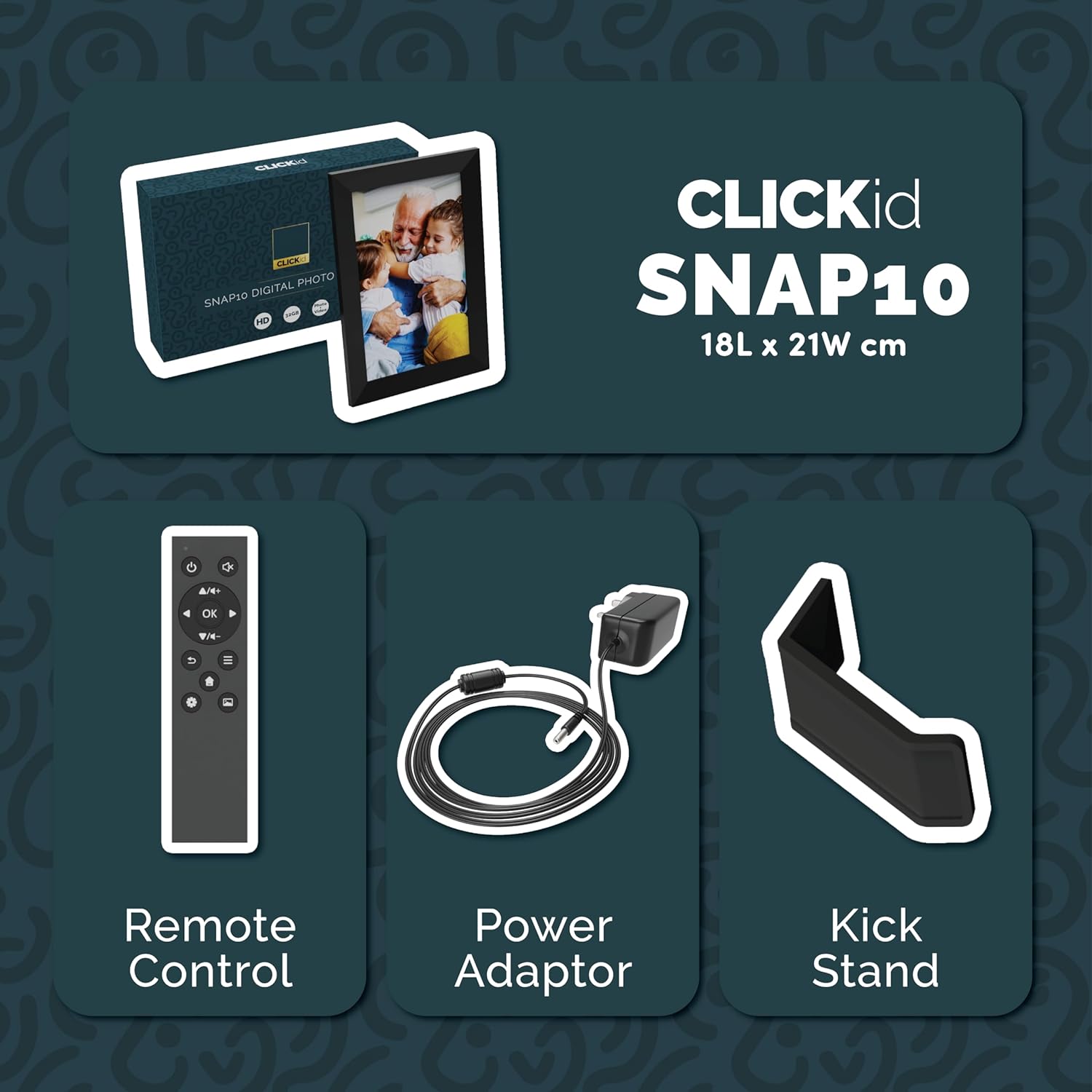
Included accessories: Remote Control, Power Adapter, and Kickstand.
د تنظیم کولو لارښود
- چوکاټ خلاص کړئ: د ډیجیټل عکس چوکاټ او ټول لوازم په احتیاط سره له بسته بندۍ څخه لرې کړئ.
- Attach the Kickstand: Insert the kickstand into the designated slot on the back of the frame. The frame supports both horizontal and vertical orientations.
- بریښنا وصل کړئ: Plug the power adapter into the DC port on the back of the frame, then connect it to a power outlet. The frame will automatically power on.
- ابتدايي ترتیب: Follow the on-screen instructions to select your language, time zone, and connect to a Wi-Fi network.
- Install Frameo App: Download the "Frameo" app from your smartphone's app store (available for iOS and Android).
- Connect Frame to App: Open the Frameo app and create an account. On your digital frame, tap "Add Friend" to get a unique code. Enter this code into the Frameo app on your smartphone to link the devices.

The back of the frame features essential ports for power, USB, and Micro SD card.
عملیاتي لارښوونې
Sending Photos and Videos
Once your frame is connected to the Frameo app, you can easily send photos and short videos from your smartphone.
- په خپل سمارټ فون کې د فریمیو ایپ خلاص کړئ.
- هغه عکسونه یا ویډیوګانې غوره کړئ چې تاسو یې لیږل غواړئ.
- Choose the connected digital frame as the recipient.
- Add a caption if desired, then tap "Send."

The Frameo app simplifies photo and video uploads from your smartphone.
د ټچ سکرین کارول
The 10.1-inch LCD touchscreen allows for intuitive navigation. Swipe left or right to browse photos, tap to view options, and pinch to zoom.
د ریموټ کنټرول دندې
The included remote control provides convenient access to various frame functions from a distance.
- نیویگیشن: Use arrow keys to move through menus and photos.
- سمه / ننوتئ: ټاکنې تصدیق کړئ.
- شاته: پخوانۍ سکرین ته بیرته راشئ.
- پلی کول / ودرول: Control slideshows or video playback.
- حجم: د ویډیوګانو لپاره آډیو تنظیم کړئ.

The included remote control for convenient operation.
د حرکت سینسر
The integrated motion sensor can be enabled to automatically turn the display on when movement is detected and off when the area is vacant, conserving energy. This setting can be adjusted in the frame's system settings.
په اتوماتيک ډول وګرځي
The frame automatically adjusts the photo orientation (portrait or landscape) based on how the frame is positioned. Ensure the auto-rotate feature is enabled in the settings for optimal display.

The auto-rotate feature adjusts display based on frame orientation.
ځانګړتیاوې ختمې شوېview
- ۵ انچه LCD ټچ سکرین: Provides a clear display and interactive control.
- ۲۵۶ جي بي داخلي ذخیره: Ample space to store thousands of photos and videos.
- د وای فای اتصال: Enables seamless photo and video sharing from anywhere via the Frameo app.
- Frameo App Integration: Manage your frame, send media, and invite friends/family to share their moments.
- د حرکت سینسر: Automatically turns the screen on/off to save energy.
- په اتوماتيک ډول ګرځول: Adjusts photo orientation automatically.
- Weather and Calendar Display: Integrated widgets provide current weather and calendar information.
- د میموري کارت سلاټ: Supports Micro SD cards for additional storage or direct media import.
ساتنه
- پاکول: Use a soft, dry cloth to clean the screen and frame. Avoid abrasive cleaners or sprays directly on the screen.
- د سافټویر تازه معلومات: The frame may receive automatic software updates via Wi-Fi. Ensure your frame is connected to the internet to receive the latest features and improvements.
- د ذخیرې مدیریت: په دوره توګه بیاview your stored photos and videos. You can delete unwanted media directly from the frame or through the Frameo app to free up space.
د ستونزو حل کول
- چوکاټ فعال نه دی:
- ډاډ ترلاسه کړئ چې د بریښنا اډاپټر په خوندي ډول د چوکاټ او کاري بریښنا سایټ دواړو سره وصل دی.
- له وائی فای سره وصل نشی
- Verify your Wi-Fi password. Ensure the frame is within range of your Wi-Fi router. Try restarting your router and the frame.
- عکسونه په چوکاټ کې نه ښکاري:
- Confirm that the frame is connected to Wi-Fi and linked to your Frameo app account. Check the Frameo app to ensure photos were successfully sent. Allow some time for photos to download, especially large batches.
- Frame is stuck on a white screen with a loading bar:
- This may indicate a software issue. Try performing a soft reset by disconnecting the power for 30 seconds and then reconnecting. If the issue persists, a factory reset might be necessary (refer to the frame's settings for this option, noting it will erase all data).
- ریموټ کنټرول کار نه کوي:
- Check if the batteries in the remote control need replacement. Ensure there are no obstructions between the remote and the frame's IR receiver.
مشخصات
| برانډ | اکثریت |
| د ماډل شمیره | Snap10 |
| رنګ | تور |
| د سکرین اندازه | ۷۸۷ انچه |
| قرارداد | 800*1280 |
| د اړخ نسبت | 2.10:1 |
| د حافظې د ذخیره کولو ظرفیت | 32 جي بي |
| د ارتباط ټیکنالوژي | وای فای |
| د کنټرول طریقه | App, Touchscreen, Remote |
| د بریښنا سرچینه | د بریښنا تار شوی |
| د توکي وزن | 491 ګرامه |
| د توکي ابعاد (L x W) | ۴.۴"لیتر x ۲.۲"واټه |
تضمین او ملاتړ
The Majority Frameo Snap10 Digital Picture Frame comes with a 2-کلن تمدید شوی تضمین. Registration is required to activate the extended warranty. Please refer to the product packaging or the manufacturer's webد خپل محصول د راجستر کولو په اړه د جزیاتو لپاره سایټ ته مراجعه وکړئ.
For technical support, troubleshooting assistance, or warranty claims, please contact Majority customer service through their official webسایټ یا ستاسو د محصول اسنادو کې چمتو شوي د اړیکو معلومات.
د محصول ویډیو
This video demonstrates the ease of sharing photos and videos with the Frameo app and viewing them on the digital picture frame, highlighting its use for connecting family members.