
VGN N75BLUE
د VGN N75 لوبو کیبورډ کارونکي لارښود
Model: N75BLUE | Brand: VGN
1. پیژندنه
Welcome to the user manual for your VGN N75 Gaming Keyboard. This manual provides essential information on setting up, operating, maintaining, and troubleshooting your new keyboard. The VGN N75 is a compact, numeric keyless mechanical keyboard designed for an optimal gaming and typing experience.

Figure 1.1: VGN N75 Gaming Keyboard with RGB lighting enabled.

شکل ۳: زاویه لرونکی view of the VGN N75 keyboard, highlighting its compact form factor.
2. د خوندیتوب معلومات
Please read the following safety guidelines carefully before using your VGN N75 keyboard:
- کیبورډ د مایعاتو او ډیر رطوبت څخه لرې وساتئ ترڅو د زیان مخه ونیول شي.
- Avoid exposing the keyboard to extreme temperatures (hot or cold).
- د کیبورډ د جلا کولو یا بدلولو هڅه مه کوئ. دا ممکن ستاسو تضمین باطل کړي او زیان ورسوي.
- Use only the provided USB-C cable for connection.
- د څاڅکو یا ټکانونو څخه د فزیکي زیان مخنیوي لپاره په احتیاط سره یې سمبال کړئ.
3. د محصول ب Featuresې
The VGN N75 keyboard is engineered with several features to enhance your typing and gaming experience:
- د ۶۰٪ کمپیکټ ترتیب: The US82 key numeric keyless design offers a space-saving solution compared to full-size keyboards, providing more desk space for mouse movement.
- Advanced Internal Construction: Features multiple buffer layers and specially tuned stabilizers for a smooth, quiet, and consistent typing experience.
- VGN "Dynamic Silver" Mechanical Switches: Equipped with VGN's original linear mechanical switches, offering a responsive feel and vibrant RGB illumination.
- ځانګړی ډیزاین: The "Caribbean Blue" model features striking keycap colors, adding a unique aesthetic to your setup.
- Integrated Metal Volume Knob: A conveniently located metal rotary knob allows for quick and precise volume adjustments, useful for both work and gaming.
- د اصلاح وړ RGB رڼا: Enjoy dynamic and customizable RGB backlight options to personalize your keyboard's appearance.

Figure 3.1: The compact 75% layout of the VGN N75, demonstrating its space-saving advantage over a traditional full-size keyboard.

Figure 3.2: Detail of the VGN N75's unique "Dynamic Silver" mechanical switches, known for their linear feel and RGB compatibility.

Figure 3.3: An exploded diagram illustrating the multiple buffer layers and components within the VGN N75 keyboard, contributing to its smooth and quiet operation.

Figure 3.4: Close-up of the metal volume knob, providing convenient audio control.
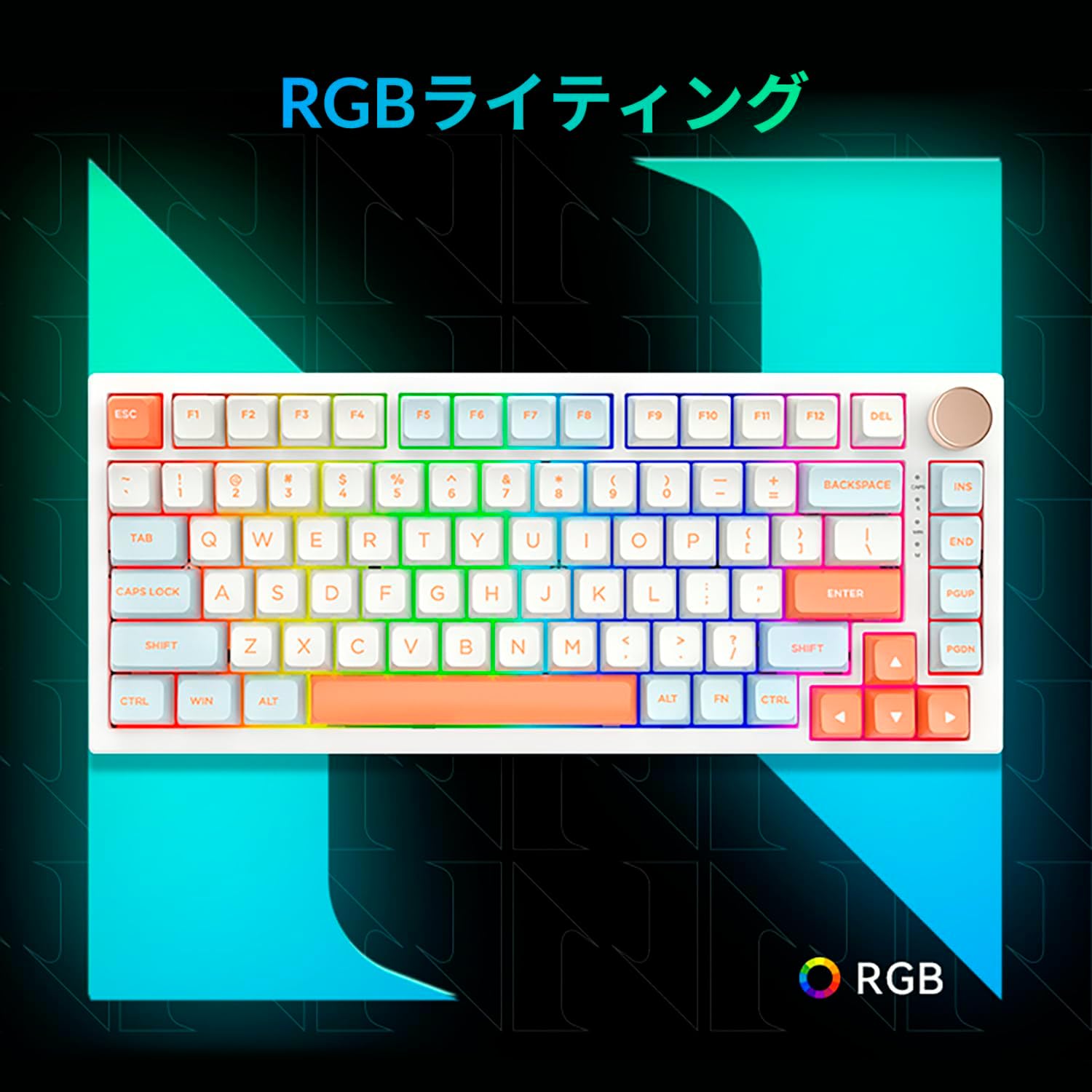
Figure 3.5: The VGN N75 keyboard displaying its customizable RGB lighting, enhancing the visual appeal.
4. د تنظیم کولو لارښود
Follow these steps to set up your VGN N75 keyboard:
- کیبورډ خلاص کړئ: Carefully remove the keyboard and all included accessories (USB cable, keycap puller, replacement key) from the packaging.
- د USB-C کیبل سره وصل کړئ: Insert one end of the provided USB-C cable into the USB-C port on the keyboard.
- خپل وسیله سره وصل کړئ: Plug the other end of the USB-C cable into an available USB port on your computer or laptop.
- د موټر چلوونکي نصب کول (اتوماتیک): کیبورډ پلګ او پلی دی. ستاسو عملیاتي سیسټم باید په اتوماتيک ډول اړین ډرایورونه کشف او نصب کړي. د ډرایورونو لاسي نصبولو ته معمولا اړتیا نشته.
- لومړنۍ ازموینه: Open a text editor or any application to test the keys and ensure all functions are working correctly.
5. عملیاتي لارښوونې
This section details the basic operation of your VGN N75 keyboard:
۴.۱. اساسي کلیدي دندې
The VGN N75 features a standard US82 key layout. All keys function as labeled. For specific key combinations or software-defined macros, refer to any accompanying software documentation (if applicable, not included in this manual).
5.2. Using the Rotary Knob
- د حجم کنټرول: د حجم زیاتولو لپاره غوټۍ د ساعت په لور وګرځوئ او د حجم کمولو لپاره د ساعت په مخالف لوري وګرځوئ.
- خاموش/غیر خاموشه: د غږ د خاموش یا غیر خاموش کولو لپاره غوټۍ فشار ورکړئ.
۱. د RGB رڼا کنټرول
The VGN N75 supports RGB lighting. While specific key combinations for lighting modes are not provided in the product description, most RGB keyboards allow cycling through effects using function key combinations (e.g., Fn + F-keys or dedicated lighting keys). Experiment with the 'Fn' key in combination with other keys (like arrow keys or Ins/Del/Home/End/PgUp/PgDn) to discover lighting controls.
6. ساتنه
مناسب ساتنه به ستاسو د کیبورډ عمر وغځوي:
- پاکول:
- د پاکولو دمخه کیبورډ له خپل کمپیوټر څخه جلا کړئ.
- د نرم، لینټ پاک ټوکر څخه لږ څه کار واخلئampد کیلي کیپس او چوکاټ د پاکولو لپاره د اوبو یا یو نرم پاکولو محلول سره مینځل.
- د کیلي ګانو ترمنځ د دوړو او کثافاتو لپاره، فشار شوي هوا وکاروئ.
- Do not spray liquid directly onto the keyboard.
- د کی کیپ او سویچ بدلول:
- The keyboard comes with a keycap puller and a replacement key.
- To remove a keycap, gently use the keycap puller to grip the keycap and pull upwards.
- د کیلي کیپ د بدلولو لپاره، دا د سویچ سټیم سره سم کړئ او په کلکه یې فشار ورکړئ تر هغه چې دا ځای ته راشي.
- یادونه: The VGN N75 features hot-swappable switches, allowing for easy replacement without soldering. To remove a switch, use a switch puller (not explicitly listed as included, but implied by "hot-swappable") to gently pry it out. Align the new switch's pins with the sockets and press firmly until it seats correctly.
7. ستونزه حل کول
If you encounter issues with your VGN N75 keyboard, try the following solutions:
- کیبورډ ځواب نه ورکوي:
- ډاډ ترلاسه کړئ چې د USB-C کیبل په خوندي ډول د کیبورډ او ستاسو کمپیوټر دواړو سره وصل دی.
- هڅه وکړئ چې کیبورډ په خپل کمپیوټر کې په بل USB پورټ کې ولګوئ.
- خپل کمپیوټر بیا پیل کړئ.
- د سیسټم پورې اړوند ستونزې د له منځه وړلو لپاره په بل کمپیوټر کې کیبورډ ازموینه وکړئ.
- هغه کیلي چې راجستر نه کیږي:
- د کیلي کیپ لاندې د هر ډول فزیکي خنډونو لپاره وګورئ.
- If a specific key is not working, consider replacing its switch if you have a switch puller and replacement switches.
- د RGB رڼا مسلې:
- ډاډ ترلاسه کړئ چې کیبورډ په سمه توګه فعال دی.
- Try cycling through lighting modes using the keyboard's function key combinations.
- Rotary Knob Not Working:
- Check for any physical obstructions around the knob.
- ډاډ ترلاسه کړئ چې کیبورډ په سمه توګه وصل دی.
8. مشخصات
| صفت | تفصیل |
|---|---|
| برانډ | VGN |
| د ماډل شمیره | N75BLUE |
| لړۍ | N75 |
| رنګ | آبي |
| د کیبورډ توضیحات | میخانیکي |
| د کلیدونو شمیر | 82 |
| د ارتباط ټیکنالوژي | USB-C |
| د ځواک سرچینې ډول | د USB ځواک |
| مطابقت لرونکې وسیلې | لپ ټاپ |
| د محصول وړاندیز شوي استعمالونه | لوبې کول |
| Keyboard Backlight Colour Support | RGB |
| مواد | پلاستیک |
| شاملې برخې | Keycap Puller, Replacement Key, USB Cable |
| د کڅوړې ابعاد | 42.1 x 18.8 x 6.5 سانتي متره؛ 1.1 کیلو ګرامه |
| نیټه لومړی شتون لري | 22 مارچ 2024 |
9. تضمین او ملاتړ
The VGN N75 Gaming Keyboard comes with a 1-year warranty from the date of purchase, as indicated in the product listing. This warranty covers manufacturing defects under normal use.
For warranty claims, technical support, or further inquiries, please contact your point of purchase or the official VGN support channels. Keep your proof of purchase for warranty validation.
یادونه: د محصول غیر مجاز جلا کول یا تعدیل ممکن تضمین باطل کړي.
Ask a question about this manual
Ask about setup, troubleshooting, compatibility, parts, safety, or missing instructions. Manuals+ will review the question and use this page’s manual context to help answer it.