
LTC GM022
LTC GM022 Ultralight 3-Mode Wireless Gaming Mouse User Manual
ماډل: GM022
1. پیژندنه
The LTC GM022 is an ultralight 3-mode wireless gaming mouse designed for precision and versatility. It features a high-performance PAW3395 sensor, multiple connectivity options, and a convenient RGB charging dock. This manual provides instructions for setting up, operating, maintaining, and troubleshooting your GM022 mouse.
د بسته محتويات
- LTC GM022 Gaming Mouse
- د RGB چارج کولو ډاک
- USB-C کیبل
- 2.4G USB Receiver (stored in mouse)

LTC GM022 Wireless Gaming Mouse with RGB Charging Dock and 2.4G USB Receiver.
2. تنظیم او ارتباط
The LTC GM022 mouse offers three connectivity modes: 2.4GHz wireless, Bluetooth 5.0, and wired USB-C. Select the mode that best suits your needs.

Diagram illustrating the three connectivity modes: 2.4GHz wireless, Bluetooth 5.1, and USB-C wired connection.
۲.۲. ۲.۴GHz بېسیم حالت
- د موږک په لاندې برخه کې په کمپارټمینټ کې زیرمه شوی 2.4G USB ریسیور ومومئ.
- د USB ریسیور په خپل کمپیوټر کې موجود USB پورټ کې ولګوئ.
- د موږک په ښکته برخه کې د موډ سویچ "2.4G" موقعیت ته سلائډ کړئ.
- موږک باید په اتوماتيک ډول ستاسو کمپیوټر سره وصل شي.
۳. بلوتوث ۵.۰ حالت
- د موږک په ښکته برخه کې د موډ سویچ د "BT" موقعیت ته سلائډ کړئ.
- په خپل کمپیوټر یا وسیله کې، د بلوتوټ ترتیبات خلاص کړئ او د نویو وسایلو لټون وکړئ.
- Select "LTC GM022" from the list of available devices to pair.
2.3. Wired USB-C Mode
- ورکړل شوی USB-C کیبل د موږک مخکینۍ پورټ سره وصل کړئ.
- د USB-C کیبل بل پای ستاسو په کمپیوټر کې موجود USB پورټ سره وصل کړئ.
- موږک به په تار لرونکي حالت کې کار وکړي او په ورته وخت کې چارج شي.

Underside of the LTC GM022 mouse with labels for mode switch, dongle storage, PTFE feet, and DPI loop button.
3. عملیاتي لارښوونې
3.1. د تڼۍ دندې
The LTC GM022 mouse features 5 programmable buttons:
- کیڼ کلیک: لومړنۍ کړنه.
- ښي کلیک: د عمل/شرایطو دوهم مینو.
- Middle Click (Scroll Wheel): Scroll up/down, click for universal scroll or other assigned function.
- د وړاندې کولو تڼۍ: مخ په وړاندې ځي web براوزرونه یا file سپړونکي
- شاته تڼۍ: شاته نیویګیټ کوي web براوزرونه یا file سپړونکي

Illustration of the LTC GM022 mouse highlighting its five programmable buttons and their default assignments.
۴.۴. د DPI سمون
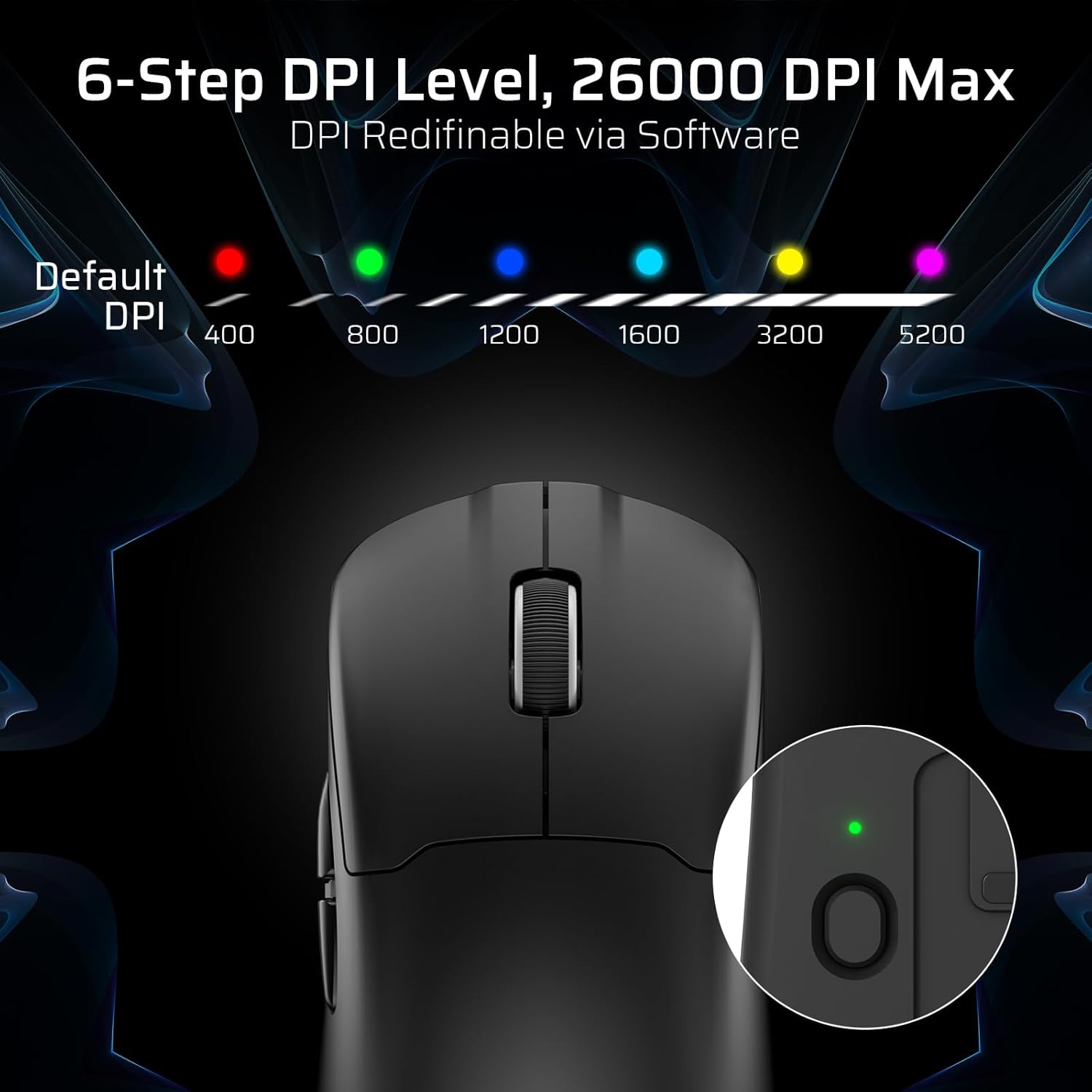
The mouse has a dedicated DPI button on its underside, allowing you to cycle through 6 preset DPI levels. Each level is indicated by a different LED color:
- ۴۰۰ DPI (سور)
- ۸۰۰ DPI (شنه)
- ۱۲۰۰ DPI (آبي)
- ۱۶۰۰ DPI (سیان)
- ۲۴۰۰ DPI (ژېړ)
- 5200 DPI (Magenta)
These DPI levels can be further customized and redefined up to 26000 DPI using the LTC software.

Visual representation of the 6-step DPI levels (400, 800, 1200, 1600, 3200, 5200) and the corresponding LED indicator colors.
۴.۴. د سافټویر اصلاح کول
Download and install the official LTC software from the manufacturer's website to unlock full customization options. The software allows you to:
- تڼیو ته میکرو وټاکئ.
- د مهمو دندو بیا نقشه کول.
- Redefine 6-step DPI levels up to 26000 DPI.
- Adjust polling rate (up to 1000Hz).
- Modify click and scroll speed.
- د بیټرۍ حالت وڅارئ.

Screenshot of the LTC software interface for customizing mouse settings, including key assignments, DPI, polling rate, and battery monitoring.
4. د موږک چارج کول
The LTC GM022 mouse is equipped with a 400mAh battery and can be charged using the included magnetic RGB charging dock or directly via the USB-C cable.
4.1. Using the Magnetic Charging Dock
- Connect the USB-C cable to the charging dock and then to a power source (e.g., computer USB port, USB wall adapter).
- Place the mouse onto the charging dock. The magnetic connection will secure it in place, and charging will begin automatically.
- The RGB lighting on the dock will indicate charging status.
4.2. Direct USB-C Charging
- Connect the USB-C cable directly to the mouse's front port.
- د USB-C کیبل بل پای د بریښنا سرچینې سره وصل کړئ.
- موږک د چارج کولو پرمهال په تار لرونکي حالت کې کارول کیدی شي.

The LTC GM022 mouse magnetically charging on its RGB illuminated dock, indicating a 400mAh battery.
5. ساتنه او پالنه
To ensure the longevity and optimal performance of your LTC GM022 mouse, follow these maintenance guidelines:
- پاکول: د موږک سطحه د پاکولو لپاره نرم، وچ ټوکر وکاروئ. د سختې خاورې لپاره، یو څه وچampټوکر د اوبو یا نرم پاکولو محلول سره ومینځئ. د سختو کیمیاوي موادو یا خړوبونکو موادو څخه ډډه وکړئ.
- د سینسر پاملرنه: د موږک په لاندې برخه کې نظري سینسر پاک او د دوړو یا کثافاتو څخه پاک وساتئ ترڅو د تعقیب دقت وساتئ.
- د PTFE پښې: The mouse comes with durable PTFE feet for smooth gliding. If they show significant wear, replacement feet may be available from the manufacturer.
- ذخیره کول: کله چې د اوږدې مودې لپاره نه کارول کیږي، موږک په پاک او وچ چاپیریال کې وساتئ.
Close-up of the mouse's underside, detailing the PTFE feet for smooth gliding and the inclusion of backup feet.
6. ستونزه حل کول
If you encounter issues with your LTC GM022 mouse, refer to the following common problems and solutions:
| ستونزه | احتمالي حل |
|---|---|
| Mouse not responding in 2.4G wireless mode | Ensure the USB receiver is securely plugged in. Check if the mouse mode switch is set to "2.4G". Try a different USB port. Ensure the mouse battery is charged. |
| Mouse not connecting via Bluetooth | Ensure the mouse mode switch is set to "BT". Make sure Bluetooth is enabled on your device. Remove previous pairings and re-pair the mouse. Ensure the mouse battery is charged. |
| موږک چارج نه کوي | Ensure the USB-C cable is properly connected to both the dock/mouse and the power source. Verify the power source is active. Clean the charging contacts on the mouse and dock. |
| ناسم تعقیب یا د کرسر ځنډ | Clean the optical sensor on the underside of the mouse. Ensure you are using the mouse on a suitable surface (e.g., a mouse pad). Check for interference in wireless modes. Adjust DPI settings. |
| تڼۍ ځواب نه ورکوي | Ensure the mouse is powered on and connected. If using software, check button assignments. Try restarting your computer. |
If the issue persists after trying these solutions, please contact LTC customer support for further assistance.
7. مشخصات
Key technical specifications for the LTC GM022 Ultralight 3-Mode Wireless Gaming Mouse:
- ماډل: GM022
- ارتباط: ۲.۴GHz بېسیم، بلوتوث ۵.۰، USB-C وایرډ
- سینسر: د PixArt PAW3395 آپټیکل سینسر
- اعظمي DPI: 26000 DPI (6-step re-definable via software)
- د رای ورکولو کچه: 1000Hz
- د تعقیب سرعت: 650IPS
- سرعت: 50G
- تڼۍ: 5 د پروګرام وړ بټن
- د عمر بدلول: 80 ملیونه کلیکونه
- بیټرۍ: 400mAh لیتیم پولیمر
- وزن: نږدې 55 ګرامه (2.01 اونس)
- ابعاد: 4.7 x 2.44 x 0.04 انچه
- ځانګړي ځانګړتیاوې: RGB Charging Dock, Ultralight Design, PTFE Feet

تفصيلي view of the PixArt PAW3395 sensor specifications including 26K DPI Max, 1000Hz Polling Rate, 650 IPS Tracking Speed, and 50G Acceleration.

Illustration highlighting the durable switches with an 80 million click lifespan.
8. تضمین او ملاتړ
LTC products are designed and manufactured to the highest quality standards. For information regarding warranty coverage, technical support, or to download the latest software and drivers, please visit the official LTC webسایټ یا د دوی د پیرودونکي خدماتو څانګې سره اړیکه ونیسئ.
د تضمین ادعاوو لپاره د پیرود ثبوت په توګه د پیرود رسید وساتئ.
Ask a question about this manual
Ask about setup, troubleshooting, compatibility, parts, safety, or missing instructions. Manuals+ will review the question and use this page’s manual context to help answer it.