
پیژندنه
Thank you for choosing the XGP Bluetooth 5.2 Motorcycle Intercom. This device is designed to enhance your riding experience by providing clear communication, music playback, and navigation audio. Please read this manual carefully to ensure proper installation and operation.

Image: The XGP Bluetooth 5.2 Motorcycle Intercom main unit, showcasing د هغې ښکلی ډیزاین.
د بسته محتويات
ډاډ ترلاسه کړئ چې ټول توکي ستاسو په کڅوړه کې شتون لري:
- XGP Intercom Main Unit
- د USB-C ډیټا کیبل
- 40mm Hi-Fi Speakers
- بوم مایکروفون
- د نرم تار مایکروفون
- Metal Clip Bracket
- Adhesive Mount Bracket
- Speaker Sponges
- د کارن لارښود
محصول پای ته ورسیدview
The XGP intercom unit is designed for ease of use and integration with most helmets. It features a lightweight and slim profile, weighing approximately 39g and measuring 15mm in thickness, ensuring minimal impact on helmet comfort.
کلیدي ځانګړتیاوې:
- د بلوتوټ 5.2 ټیکنالوژي: د باثباته او موثر بېسیم اړیکو لپاره.
- Long-Range Intercom: Up to 1200 meters for 2-person communication.
- د لوړ ظرفیت بیټرۍ: 1000mAh, offering up to 35 hours of talk time or 30 hours of music playback.
- IP67 واټر پروف: د مختلف هوا شرایطو سره مقاومت کولو لپاره ډیزاین شوی.
- CVC/DSP Noise Cancellation: Reduces engine and wind noise for clear audio.
- 40mm Hi-Fi Speakers: بډایه باس او روښانه غږ وړاندې کوي.
- د غږیز قوماندې ملاتړ: Compatible with Google Assistant and Apple Siri.
- د موسیقۍ شریکول: Share music with another XGP intercom user.
- Dual Microphone Options: Includes both boom and soft wire microphones for different helmet types.

Image: The XGP intercom highlighting its thin (0.51 inches) and light (0.08 lbs) design, improving wearing comfort.
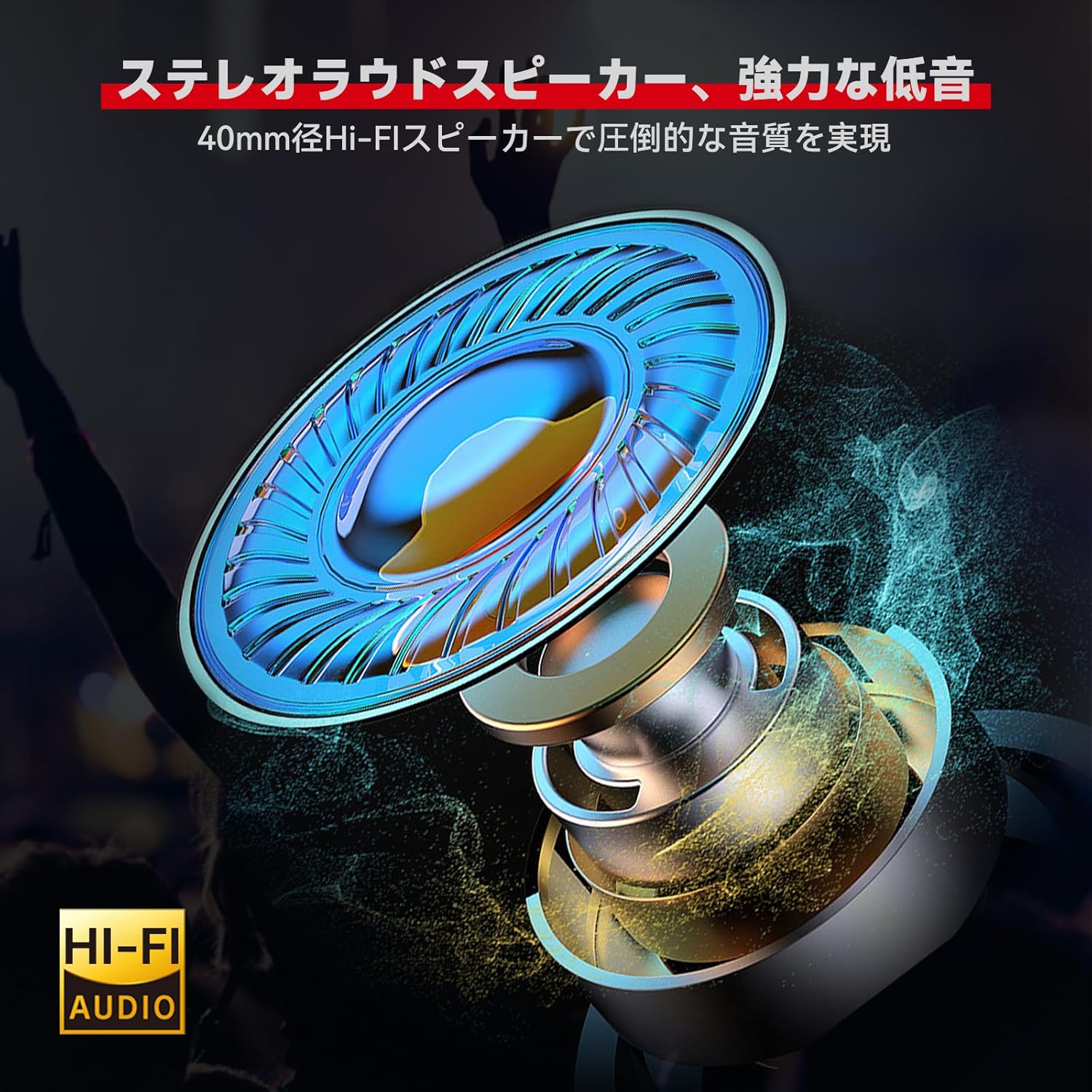
انځور: تفصیلي view of the 40mm Hi-Fi speaker, designed for high-quality audio output.

Image: Illustration of the XGP intercom's CVC/DSP noise cancellation technology reducing engine and wind noise for clear vocals.
نصب کول
The XGP intercom offers simple and secure installation without the need for complex tools. Two types of mounting brackets are provided: a metal clip bracket and an adhesive mount bracket.
1. Choosing a Mounting Location:
Select a flat surface on the side of your helmet where the intercom unit will not obstruct your vision or movement. Ensure the chosen location allows for easy access to the control buttons.
2. Attaching the Bracket:
- Metal Clip Bracket: Slide the metal clip between the helmet shell and the inner padding. Ensure it is securely fastened.
- Adhesive Mount Bracket: Clean the chosen helmet surface thoroughly. Peel off the protective film from the adhesive pad and firmly press the bracket onto the helmet for at least 30 seconds. Allow the adhesive to cure for several hours before attaching the intercom unit.
۲. د سپیکرو او مایکروفون نصب کول:
- Place the 40mm Hi-Fi speakers inside the helmet's ear pockets. Use the provided speaker sponges to adjust the distance for optimal audio quality and comfort.
- Choose between the boom microphone (for open-face helmets) or the soft wire microphone (for full-face helmets). Attach the microphone close to your mouth for clear voice pickup, ensuring it does not interfere with your helmet's visor.
- Route all cables neatly under the helmet padding to avoid discomfort and ensure they are not exposed to wind or moisture.

Image: The XGP intercom unit securely mounted on the side of a motorcycle helmet.
عملیاتي لارښوونې
1. بریښنا فعال/بند:
- پاور آن: د بریښنا تڼۍ د شاوخوا 3 ثانیو لپاره فشار ورکړئ او ونیسئ تر هغه چې د شاخص رڼا روښانه شي.
- بندول: د بریښنا تڼۍ د شاوخوا 3 ثانیو لپاره فشار ورکړئ او ونیسئ تر هغه چې د شاخص څراغ بند نشي.
2. Bluetooth Pairing with Smartphone:
The XGP intercom can connect to two smartphones simultaneously.
- Ensure the intercom is powered off.
- د بریښنا تڼۍ د نږدې 5-7 ثانیو لپاره فشار ورکړئ او ونیسئ تر هغه چې د شاخص څراغ په بدیل سره سور او نیلي روښانه شي، چې د جوړه کولو حالت په ګوته کوي.
- On your smartphone, enable Bluetooth and search for "XGP Intercom".
- Select "XGP Intercom" from the list of available devices to connect. A voice prompt will confirm successful pairing.
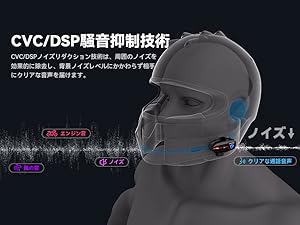
Image: The XGP intercom illustrating its ability to connect to two smartphones simultaneously for navigation, music, and calls.
3. Intercom Pairing (Rider-to-Rider):
The XGP intercom supports 2-person intercom communication up to 1200 meters.
- Ensure both XGP intercom units are powered off.
- On both units, press and hold the Intercom button (often the same as the Power button, refer to specific button layout) for approximately 5-7 seconds until the indicator lights flash red and blue alternately.
- Briefly press the Intercom button on one of the units. The units will search for each other and connect automatically. A voice prompt will confirm successful intercom connection.

Image: Two riders on motorcycles, demonstrating the simple pairing process for the XGP intercom.
4. Music Playback:
- پلی کول / ودرول: یوځل د ملټي فنکشن ت buttonۍ فشار ورکړئ.
- بله لار: Press the Volume Up button for 2 seconds.
- مخکینی لار د حجم ښکته تڼۍ د 2 ثانیو لپاره فشار ورکړئ.
- د حجم سمون: Briefly press the Volume Up or Volume Down buttons.
۵. د موسیقۍ شریکول:
With two XGP intercoms connected, you can share music. Ensure both units are paired via intercom mode.
- Start music playback on the primary intercom unit (connected to the smartphone).
- On the primary unit, press and hold the Music Sharing button (refer to button layout) for 2 seconds to initiate music sharing.
- The secondary unit will automatically receive and play the shared music.

Image: Two riders enjoying shared music through their XGP intercoms, enhancing the riding experience.
۵. د تلیفون زنګونه:
- زنګ ووهئ: یوځل د ملټي فنکشن ت buttonۍ فشار ورکړئ.
- ټلیفون پای: د زنګ وهلو په جریان کې یو ځل د ملټي فنکشن تڼۍ فشار ورکړئ.
- زنګ رد کړئ: د 2 ثانیو لپاره د ملټي فنکشن تڼۍ فشار او ونیسئ.
- وروستنۍ شمیره بیا ولیکئ: د ملټي فنکشن ت .ۍ دوه ځله فشار ورکړئ.
7. Voice Commands:
Activate your smartphone's voice assistant (Google Assistant or Apple Siri) directly from the intercom.
- د غږ همکار فعاله کړئ: Press the Voice Command button (refer to button layout) once.
- You can then issue commands such as "What's the weather today?", "Start navigation to [destination]", or "Call [contact name]".

Image: A rider using voice commands with the XGP intercom to control navigation, music, and calls.
ساتنه
1. چارج کول:
Connect the XGP intercom to a 5V/1A (5W) power adapter using the provided USB-C cable. Charging takes approximately 2 hours for a full charge. Using an adapter with higher wattage may damage the battery or shorten its lifespan.

Image: The XGP intercom connected to a USB-C charger, illustrating its 1000mAh battery capacity and charging time.

Image: An illustration showing the XGP intercom being charged via USB-C, with a note on using a 5W adapter.
2. پاکول:
Wipe the intercom unit with a soft, damp cloth. Do not use harsh chemicals or abrasive cleaners. Ensure the USB-C port cover is securely closed to maintain IP67 waterproof rating.
3. ذخیره کول:
Store the intercom in a cool, dry place when not in use. Avoid extreme temperatures and direct sunlight.
د ستونزو حل کول
| ستونزه | احتمالي لامل | د حل لاره |
|---|---|---|
| وسیله فعاله نه ده. | ټیټ بیټرۍ. | وسیله لږترلږه د 30 دقیقو لپاره چارج کړئ. |
| د سمارټ فون سره جوړه نشي کیدی. | وسیله د جوړې کولو حالت کې نه ده؛ په تلیفون کې بلوتوث بند دی. | Ensure device is in pairing mode (red/blue flashing light). Enable Bluetooth on your phone. |
| Intercom connection unstable or not connecting. | Distance too far; interference; not in intercom pairing mode. | Ensure units are within 1200M range. Re-initiate intercom pairing. Avoid obstacles. |
| د سپیکرو څخه هیڅ غږ نشته. | Volume too low; speakers disconnected; incorrect installation. | Increase volume. Check speaker connections. Verify speaker placement. |
| Voice unclear during calls/intercom. | Microphone placement; high ambient noise. | Adjust microphone closer to mouth. Ensure CVC/DSP is active. |
مشخصات
| فیچر | تفصیل |
|---|---|
| ماډل | XGP |
| بلوتوث نسخه | 5.2 (Qualcomm Chip) |
| عملیاتي فریکونسی | ۲۴۰۲ میګاهرتز - ۲۴۸۰ میګاهرتز |
| Max Intercom Range | 1200 meters (2 riders) |
| د بیټرۍ ظرفیت | 1000mAh لیتیم بیټرۍ |
| د چارج کولو وخت | نږدې 2 ساعته |
| د میوزیک غږولو وخت | تر 30 ساعتونو پورې |
| د خبرو وخت | تر 35 ساعتونو پورې |
| ولاړ وخت | تر 360 ساعتونو پورې |
| د پنروک درجه | IP67 |
| د سپیکر قطر | 40mm |
| د شور لغوه کول | CVC/DSP Technology |
| د محصول ابعاد | 8.3 x 4.2 x 1.3 سانتي متره |
| د محصول وزن | ۴۷ ګرامه (اصلي واحد) / ۴۱۵ ګرامه (بسته) |
تضمین او ملاتړ
The XGP Motorcycle Intercom comes with a 2 کلن تضمین from the date of purchase. If you encounter any issues or have questions regarding your product, please contact our customer support. We are committed to providing service until you are satisfied.

Image: A shield icon indicating a 2-year warranty for the XGP product, with text encouraging customers to contact support for any questions.
For support, please refer to the contact information provided with your purchase or visit the official XGP webسایټ