
1. پیژندنه
This manual provides essential information for the installation, operation, and maintenance of your Diyeeni LGA 1155 DDR3 Motherboard. Please read these instructions carefully before proceeding with installation to ensure proper functionality and to prevent damage.
د بسته محتويات
- 1 x Diyeeni DDR3 Motherboard
- 1 x I/O Bracket
- 1 x د Sata کیبل
- 1 x د کارونکي لارښود

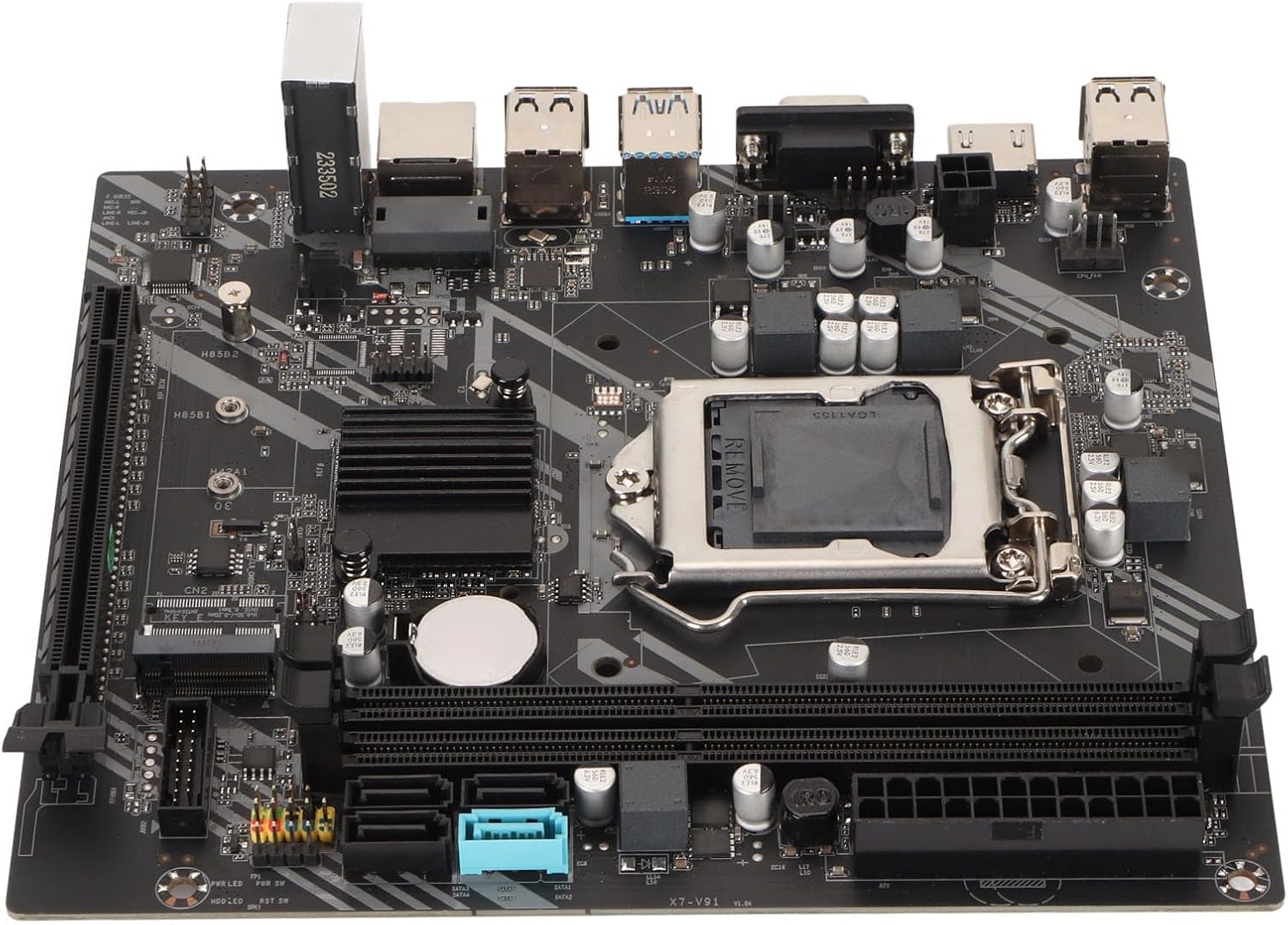
شکل ۱: پورته څخه ښکته view of the Diyeeni LGA 1155 DDR3 Motherboard.
2. ترتیب او نصب کول
Proper installation is crucial for the stability and performance of your computer system. Always handle the motherboard by its edges and avoid touching components directly to prevent electrostatic discharge (ESD) damage. It is recommended to wear an anti-static wrist strap during installation.
2.1 د CPU نصب کول
- په مور بورډ کې د LGA 1155 CPU ساکټ ومومئ.
- Gently push down the load lever and pull it to the side to open the CPU socket cover.
- Carefully align the CPU with the socket, ensuring the gold triangle on the CPU matches the indicator on the socket. Do not force the CPU into the socket.
- Lower the load plate and secure it with the load lever.
مهم: Incorrect CPU installation can bend pins, rendering the motherboard unusable. Verify CPU compatibility and alignment carefully.
2.1 شکل: تړل view of the LGA 1155 CPU socket and DDR3 memory slots.
۴.۳ د حافظې (RAM) نصب کول
- Open the clips at both ends of the DDR3 memory slots.
- Align the notch on the DDR3 memory module with the key in the memory slot.
- د حافظې ماډل په دواړو سرونو کې په کلکه فشار ورکړئ تر هغه چې کلپونه په خپل ځای کې راشي.
2.3 د ذخیره کولو وسیله نصب کول
- د SATA ډرایوونه: Connect SATA data cables from your storage devices (HDDs/SSDs) to the SATA 2.0 or SATA 3.0 interfaces on the motherboard. Connect SATA power cables from your power supply to the drives.
- د M.2 NVMe SSD: Insert the M.2 NVMe SSD into the dedicated M.2 slot (PCIe channel) and secure it with the provided screw.
2.4 Graphics Card Installation (PCIe X16)
- Locate the PCIe X16 graphics card slot.
- د خپل کمپیوټر کیس څخه د اړونده توسیع سلاټ پوښ لرې کړئ.
- Align your graphics card with the slot and press down firmly until it is seated correctly and the retention clip locks.
- د ګرافیک کارت د سکرو سره کیس ته وتړئ.
2.5 د بریښنا اتصال
- Connect the 24-pin ATX power connector from your power supply to the 24-pin power interface on the motherboard.
- Connect the 4-pin CPU power connector from your power supply to the 4-pin power socket near the CPU.
۴.۷ د مخکینۍ پینل او I/O اتصالونه
Connect the front panel headers (power button, reset button, HDD LED, power LED) and USB 2.0/3.0 headers to their respective pins on the motherboard. Refer to the motherboard's silkscreen labels for correct pin assignments.

شکل ۳: زاویه لرونکی view of the motherboard, highlighting expansion slots and connectors.
۳. ستاسو د مور بورډ چلول
Once all components are installed and connected, you can power on your system. The Diyeeni LGA 1155 DDR3 Motherboard provides a stable platform for your computing needs.
3.1 Integrated Graphics and Audio
This motherboard features an integrated graphics card and a 6-channel audio chip. For video output, connect your display to the VGA or HD Multimedia Interface (HDMI) port on the I/O panel. For audio, use the integrated audio jacks.

شکل 3.1: مفصل view of the I/O panel, including audio, LAN, and USB ports.
3.2 نښلول
- USB پورټونه: Utilize the 4 x USB 2.0 and 2 x USB 3.0 ports for connecting peripherals.
- شبکه: The integrated RJ45 port provides reliable high-speed internet connectivity.
۵.۲ د BIOS/UEFI تنظیم کول
To access the BIOS/UEFI setup utility, press the designated key (usually DEL or F2) during system startup. Here you can configure boot order, system time, and other advanced settings.
4. ساتنه
To ensure the longevity and optimal performance of your motherboard, consider the following maintenance tips:
- پاک وساتئ: Regularly clean dust from inside your PC case, especially around the motherboard and CPU cooler, using compressed air. Dust accumulation can lead to overheating.
- مناسب وینټیلیشن: Ensure your PC case has adequate airflow to dissipate heat generated by components.
- د BIOS تازه معلومات: په دوره یي ډول د تولید کونکي معاینه وکړئ website for BIOS/UEFI updates. Updates can improve compatibility, stability, and performance.
- د بیټرۍ بدلول: The motherboard uses a CR2032 button battery for the CMOS. If you experience issues with system time or BIOS settings resetting, the battery may need replacement.
5. ستونزه حل کول
که تاسو د خپل مور بورډ سره ستونزې سره مخ شئ، نو لاندې عام ستونزې حل کولو مرحلو ته مراجعه وکړئ:
- بریښنا نشته/بوټ نشته:
- Check all power connections (24-pin ATX, 4-pin CPU) are securely seated.
- ډاډ ترلاسه کړئ چې د بریښنا رسولو کار روان دی او فعال دی.
- د مخکینۍ پینل د بریښنا تڼۍ اړیکه د مور بورډ سره تایید کړئ.
- نه ښودنه:
- Ensure your monitor is connected to the correct video output (either integrated graphics or a dedicated graphics card).
- د ګرافیک کارت او RAM ماډلونه بیا تنظیم کړئ.
- یوازې د یو RAM سټیک سره بوټ کولو هڅه وکړئ.
- د سیسټم بې ثباتي/خرابی:
- Check for proper CPU cooler installation and thermal paste application.
- Ensure RAM modules are correctly seated and compatible.
- Update drivers for your components (chipset, graphics, audio).
- CPU Pin Damage: As noted by some users, incorrect CPU installation can lead to bent pins. Always align the CPU carefully with the socket's orientation marks and avoid applying excessive force. If pins are bent, professional repair may be required.
6. مشخصات
Below are the detailed technical specifications for the Diyeeni LGA 1155 DDR3 Motherboard:
| فیچر | مشخصات |
|---|---|
| د توکو ډول | د DDR3 مور بورډ |
| مواد | چاپ شوی سرکټ بورډ |
| د CPU پلیټ فارم | For Core 2nd and 3rd Gen |
| د CPU ساکټ | LGA 1155 |
| د چپسیټ ډول | Intel H77 Express (Compatible with B75) |
| د حافظې ډول | DDR3 1600/1333/1066 MHz |
| د یادونې سلاټونه | 2 x DDR3 |
| Graphics Card Slot | 1 x PCIe X16 |
| M.2 سلاټ | 1 x M.2 NVMe (PCIe Channel) |
| د SATA انٹرفیسونه | 3 x SATA 2.0, 1 x SATA 3.0 |
| د USB 2.0 بندرونه | 4 (Rear I/O) + 1 x USB 2.0 Pin (Internal) |
| د USB 3.0 بندرونه | 2 (Rear I/O) + 1 x USB 3.0 Pin (Internal) |
| د ویډیو تولید | 1 x VGA Port, 1 x HD Multimedia Interface (HDMI) |
| لین پورټ | ۱ x RJ1 پورټ |
| آډیو چپ | Integrated 6 Channel Sound Chip |
| د بریښنا ساکټونه | 1 x 4-Pin, 1 x 24-Pin |
| د بریښنا رسولو مرحله | د 3 پړاو بریښنا رسول |
| CMOS بیټرۍ | 1 x CR2032 Button Battery (240mAh) |
| ابعاد (تقریبا) | 27 x 21 x 5 سانتي متره |
| وزن (نږدې) | 528 ګرامه |
7. تضمین او ملاتړ
For warranty information, technical support, and further assistance, please refer to the retailer where you purchased this product or visit the official Diyeeni brand store.
Diyeeni Store: https://www.amazon.ca/stores/Diyeeni/page/1195A89A-7EEE-4D74-A4F7-05DAA074380B