
پیژندنه
This manual provides detailed instructions for the proper installation, operation, and maintenance of your Starsound SSA-R2-8400.4 Raptor Series 4-Channel Ampژوندی کوونکی. مهرباني وکړئ د محصول کارولو دمخه دا لارښود په بشپړ ډول ولولئ ترڅو غوره فعالیت او خوندیتوب ډاډمن کړئ.
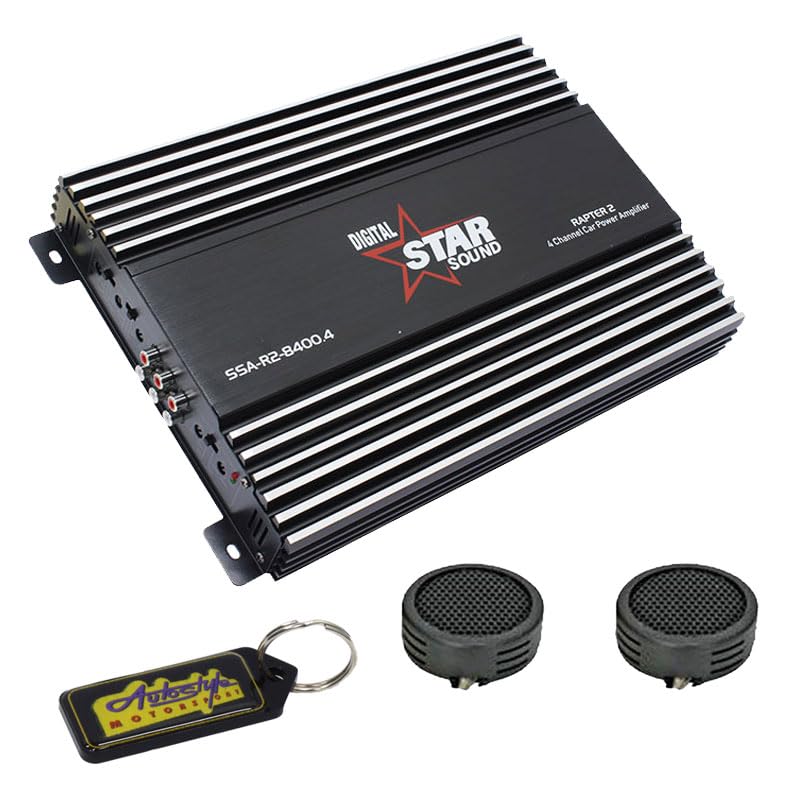
Image: Starsound SSA-R2-8400.4 Raptor Series 4-Channel Ampژوندی کوونکی. دا انځور پورته څخه ښکته ښیې view د ampژوندی کوونکی، ښودونکیasing تور دی casing with silver fins, the 'DIGITAL STAR SOUND' logo, and the model number 'SSA-R2-8400.4' clearly visible.
د خوندیتوب احتیاطونه
- Ensure the vehicle's battery is disconnected before installation to prevent electrical shorts.
- پورته کول amplifier securely in a dry, well-ventilated area, away from direct sunlight or heat sources.
- لکه څنګه چې د نصبولو برخه کې مشخص شوي، د بریښنا، ځمکې او سپیکر اتصالاتو لپاره مناسب ګیج تارونه وکاروئ.
- افشا مه کوئ ampد لندبل یا خورا تودوخې لپاره لایفیر.
- که تاسو د نصبولو د کومو مرحلو په اړه ډاډه نه یاست، مسلکي مرسته وغواړئ.
تنظیم او نصب کول
1. خلاصول
په دقت سره لرې کړئ amplifier from its packaging. Verify that all components listed in the package contents are present. The package includes: 1 x Starsound SSA-R2-8400.4 Amplifier, 1 x EvoTuning 300W Super Tweeters, 1 x Gel Key Holder.
2. د نصبولو ځای
د نصب کولو ځای غوره کړئ چې د مناسب هوا ورکولو زمینه برابره کړي amplifier's heat sinks. Avoid mounting in enclosed spaces or areas prone to vibration. Common locations include under seats, in the trunk, or behind panels.
3. د تارونو نښلول
د بریښنا پیوستون: Connect a heavy-gauge power cable (e.g., 4-gauge) from the vehicle's positive battery terminal to the amplifier's +12V terminal. Install an in-line fuse holder (not included) within 18 inches (45 cm) of the battery.
ځمکنۍ اړیکه: د بریښنا کیبل په څیر اوږدوالی لرونکی د درانه ګیج ځمکني کیبل سره وصل کړئ amplifier's GND terminal to a clean, unpainted metal surface on the vehicle chassis. Ensure a good electrical contact.
ریموټ چالان: Connect a thin wire from your head unit's remote output to the ampد ژوند کوونکي REM ټرمینل. دا تار ګرځوي ampد خپل سر واحد سره لایفیر چالان او بند کړئ.
RCA ننوت: د خپل سر واحد له مخکینۍ برخې څخه د RCA کیبلونه وصل کړئ.amp ته پایلې ampد لایفیر د RCA ان پټ جیکونه.
د سپیکر محصول: خپل سپیکرې د دې سره وصل کړئ amplifier's speaker terminals. Ensure correct polarity (+ to + and - to -) for each speaker. This is a 4-channel amplifier, allowing connection of up to four speakers or two speakers in bridged mode.
عملیاتي لارښوونې
۱. لومړنی پاور اپ
وروسته له دې چې ټولې اړیکې جوړې شي او تایید شي، د موټر بیټرۍ بیا وصل کړئ. خپل د سر واحد چالان کړئ. ampد لایفیر د بریښنا شاخص LED باید روښانه شي.
2. د سمون ترلاسه کول
سره پیل کړئ amplifier's gain control set to minimum. Play a familiar piece of music at a moderate volume on your head unit. Slowly increase the amplifier's gain until you hear distortion, then back it off slightly. This sets the ampد لایفیر د ان پټ حساسیت ستاسو د سر واحد د محصول سره سمون خوري.
۵.۴. د کراس اوور ترتیبات
The SSA-R2-8400.4 amplifier typically features built-in crossovers (High-Pass Filter, Low-Pass Filter). Adjust these settings based on the type of speakers connected:
- د بشپړ سلسلې وینا کونکي: Set to FULL or OFF.
- Tweeters/Mid-Range: Set to HPF (High-Pass Filter) and adjust the frequency to prevent low bass from reaching them.
- Subwoofers: Set to LPF (Low-Pass Filter) and adjust the frequency to only allow bass frequencies.
4. باس بوسټ
Use the bass boost control sparingly. Excessive bass boost can lead to distortion and potential speaker damage. Adjust to taste, ensuring sound clarity.
ساتنه
- پاکول: په دوره یي ډول پاک کړئ ampد لایفیر بهرنۍ برخه د نرم او وچ ټوکر سره ومینځئ. سخت کیمیاوي مواد یا د کثافاتو پاکوونکي مه کاروئ.
- وینټیلیشن: ډاډ ترلاسه کړئ چې د ampد لایفیر د یخولو پنونه د دوړو او کثافاتو څخه پاک دي ترڅو د تودوخې مناسب تحلیل وساتي.
- اړیکې: Occasionally check all wiring connections for tightness and corrosion. Loose connections can cause performance issues or damage.
د ستونزو حل کول
| ستونزه | احتمالي لامل | د حل لاره |
|---|---|---|
| برېښنا نشته / Ampلایفیر نه فعالیږي | فلج شوی فیوز، د بریښنا/ځمکې/ریموټ تار خلاص، د ریموټ د چالانولو غلط سیګنال. | Check in-line fuse, verify all power, ground, and remote connections. Test remote wire for 12V signal. |
| نه غږ | د RCA کیبلونه خلاص شوي، د ګټې ناسم تنظیمات، د سپیکر تارونه قطع شوي، ampد محافظت حالت کې لایفیر. | Check RCA connections, adjust gain, verify speaker wiring, check for protection LED (usually red). |
| تحریف شوی غږ | Gain set too high, incorrect crossover settings, faulty speakers, poor ground connection. | Reduce gain, adjust crossover frequencies, inspect speakers, ensure solid ground connection. |
| Ampد لایفیر ډیر ګرمول | Insufficient ventilation, impedance mismatch (too low), prolonged high volume use. | د شاوخوا هوا مناسب جریان ډاډمن کړئ amplifier. Check speaker impedance. Reduce volume or allow cooling time. |
مشخصات
- ماډل: SSA-R2-8400.4
- لړۍ: د Raptor لړۍ
- چینلونه: ۶-چینل
- د اعظمي بریښنا محصول: 8400 واټ
- د محصول ابعاد (L x W x H): 25L x 17W x 9H سانتي متره
- شاملې برخې: 1 x Starsound SSA-R2-8400.4 Amplifier, 1 x EvoTuning 300W Super Tweeters, 1 x Gel Key Holder
- UPC: 759649119351
د تضمین معلومات
This Starsound SSA-R2-8400.4 ampلایفیر د الف سره راځي ۶ میاشتې warranty from the date of purchase. This warranty covers manufacturing defects and faulty workmanship under normal use. It does not cover damage caused by improper installation, abuse, accidents, modifications, or unauthorized repairs. Please retain your proof of purchase for warranty claims.
د پیرودونکي ملاتړ
For technical assistance, troubleshooting, or warranty inquiries, please contact your retailer or the manufacturer's customer support. Refer to your purchase documentation for specific contact details.