پیژندنه
This manual provides essential information for the setup, operation, and maintenance of your new Tucus replacement remote control. This remote is designed to be compatible with various JVC Micro COMPACT COMPONENT Stereo Systems, including models RM-SUXQ30UW, RM-SUXQ30US, UX-Q30S, UX-Q30B, UX-Q30P, and UX-Q30W. While it is a replacement remote and not the original device's remote, common functions are expected to operate normally. Please review this guide thoroughly to ensure proper use and longevity of your remote control.
چمتو کول
1. د بیټرۍ نصب کول
The remote control requires two (2) AA batteries (not included) for operation. Follow these steps to install them:
- د ریموټ کنټرول شاته د بیټرۍ کڅوړه ومومئ.
- د بیټرۍ د برخې پوښ ښکته یا بهر ته وغورځوئ ترڅو یې خلاص کړئ.
- دوه AA بیټرۍ دننه کړئ، ډاډ ترلاسه کړئ چې مثبت (+) او منفي (-) ټرمینلونه د خونې دننه د نښانونو سره په سمه توګه سمون لري.
- د بیټرۍ پوښ بیرته خپل ځای ته وغورځوئ تر هغه چې په خوندي ډول کلیک وکړي.

Figure 1: Back of the remote control showing the battery compartment cover.
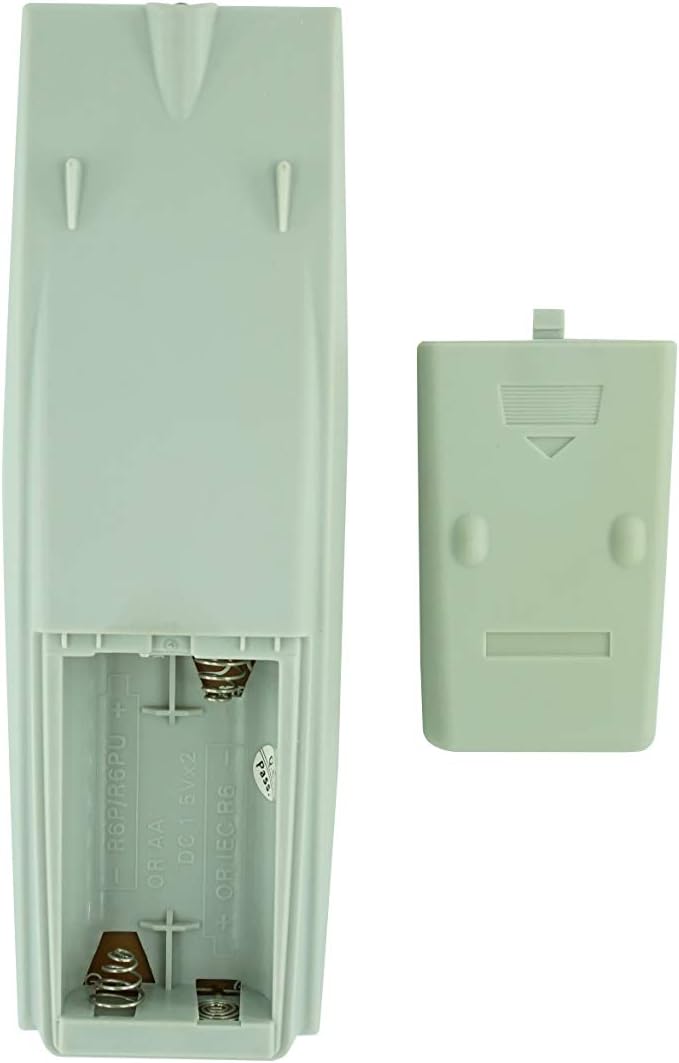
شکل ۲: د بیټرۍ کڅوړه چې پوښ یې لرې شوی، د بیټرۍ داخلولو لپاره چمتو دی.
2. ابتدايي استعمال
Once batteries are installed, the remote control is ready for use. Point the remote directly at your JVC Micro COMPACT COMPONENT Stereo System. No additional programming is typically required for this replacement remote for the listed compatible models.
عملیاتي لارښوونې
This remote control provides access to the primary functions of your JVC stereo system. Below is a general overview of common button functions. Please note that while the functionality is guaranteed, the exact button layout may differ slightly from your original remote.

شکل 3: مخکی view د تڼۍ ترتیب سره د ریموټ کنټرول.
کلیدي دندې:
- ولاړ/چاپ: Powers the stereo system on or off.
- ښودنه: Changes or shows display information.
- کلاک/ټایمر: Accesses clock and timer settings.
- خوب: Sets a sleep timer for automatic power off.
- د شمېر تڼۍ (۰-۹، +۱۰): Direct input for track numbers, radio frequencies, etc.
- باس / ټریبل: د باس او ټریبل کچه تنظیموي.
- Navigation (UP, DOWN, LEFT, RIGHT, SET): د مینو نیویګیشن او انتخاب لپاره کارول کیږي.
- Playback Controls (PLAY/PAUSE, STOP, FAST FORWARD, REWIND, SKIP): د میډیا پلے بیک کنټرولوي.
- Source Selection (CD, TAPE, FM/AM, AUX/MD): د آډیو د ننوتلو سرچینه غوره کوي.
- FM MODE / REV.MODE: Toggles FM stereo/mono or tape reverse mode.
- AUTO PRESET: Automatically scans and saves radio stations.
- PRGM / RANDOM / REPEAT: Controls program, random, and repeat playback modes.
- PTY SEARCH / PTY SELECT: For Program Type search and selection on radio.
- DISPLAY / TA/News / Info: Provides additional display information or traffic/news announcements.
- AHB PRO: د فعال هایپر-باس پرو فعال یا غیر فعالوي.
- حجم (+/-): د ماسټر حجم کچه تنظیموي.
For specific advanced functions, please refer to the original instruction manual of your JVC Micro COMPACT COMPONENT Stereo System.
ساتنه
د ریموټ کنټرول پاکول
د ریموټ کنټرول ظاهري بڼه او فعالیت ساتلو لپاره، په منظم ډول یې پاک کړئ:
- سطح د نرم، وچ ټوکر سره پاک کړئ.
- د سختې خاورې لپاره، لږ څهampټوکر د اوبو یا یو نرم، غیر خارښونکي کلینر سره ومینځئ. کلینر مستقیم په ریموټ کنټرول مه سپری کوئ.
- Avoid using harsh chemicals, solvents, or abrasive cleaning pads, as these can damage the remote's finish or internal components.
د بیټرۍ بدلول
Replace batteries when the remote's response becomes sluggish or it stops functioning. Always replace both batteries at the same time with new ones of the same type (AA). Do not mix old and new batteries, or different types of batteries.
ذخیره کول
که چیرې ریموټ کنټرول د اوږدې مودې لپاره ونه کارول شي، نو بیټرۍ لرې کړئ ترڅو د لیکیدو او ریموټ ته احتمالي زیان مخه ونیسي.
د ستونزو حل کول
- ریموټ ځواب نه ورکوي:
- وګورئ چې آیا بیټرۍ په سمه توګه د سم قطبي (+/-) سره داخل شوي دي.
- زاړه بیټرۍ د نوي سره بدل کړئ.
- Ensure there are no obstructions between the remote control and the stereo system's infrared receiver.
- ډاډ ترلاسه کړئ چې تاسو د ریموټ کنټرول مؤثر حد کې یاست.
- Some buttons not working or unexpected behavior:
- This remote is a replacement and while common functions are supported, the button layout or specific advanced functions might not perfectly match your original remote. Refer to the button layout image in the Operating Instructions section.
- Ensure the stereo system is powered on and set to the correct input source.
- Remote appears damaged:
- If the remote has been dropped or exposed to liquids, internal damage may have occurred. In such cases, replacement may be necessary.
مشخصات
| برانډ | عمومي |
| جوړونکی | TUCUS |
| د ماډل شمیره | DVT-C9F24992D65E215A7DD6011D34514A46 |
| مطابقت لرونکي ماډلونه | JVC RM-SUXQ30UW, RM-SUXQ30US, UX-Q30S, UX-Q30B, UX-Q30P, UX-Q30W Micro COMPACT COMPONENT Stereo SYSTEM |
| د موادو ډول | نور |
| د بریښنا سرچینه | 2 x AA بیټرۍ (شامل ندي) |
| ASIN | B0D79958PW |
| نیټه لومړی شتون لري | 17 جون 2024 |
د تضمین معلومات
This product comes with a 3-month warranty from the date of purchase. This warranty covers manufacturing defects and ensures the remote control functions as intended for compatible models. Please retain your proof of purchase for any warranty claims.
د پیرودونکي ملاتړ
If you have any questions regarding the compatibility or functionality of this remote control, or if your specific device model is not listed, please contact the seller directly for assistance. The seller stocks a wide range of remote controls and parts and can confirm suitability for your needs.
For general inquiries or to provide feedback, please refer to the contact information provided by your retailer or the seller.


