
پیژندنه
Thank you for choosing the Oakcastle HIFI150 Stereo System. This manual provides essential information for setting up, operating, and maintaining your device. Please read it thoroughly before use and retain it for future reference.
د خوندیتوب معلومات
د خوندي عملیاتو ډاډ ترلاسه کولو او د زیان مخنیوي لپاره، مهرباني وکړئ لاندې خوندیتوب احتیاطي تدابیر په پام کې ونیسئ:
- واحد د باران، رطوبت، یا ډیرې تودوخې سره مه مخ کوئ.
- سي مه خلاصوهasinج. ټول خدمات وړ پرسونل ته راجع کړئ.
- د واحد شاوخوا مناسب هوا ورکول ډاډمن کړئ. د هوا د بهېدو هیڅ لاره مه بندوئ.
- یوازې د بریښنا اډاپټر وکاروئ چې د واحد سره چمتو شوي.
- Keep the unit away from heat sources such as radiators, stoves, or other heat-producing appliances.
- واحد یوازې د وچې جامې سره پاک کړئ.
د بسته محتويات
مهرباني وکړئ وګورئ چې ټول توکي ستاسو په کڅوړه کې شتون لري:
- Oakcastle HIFI150 Stereo System
- ریموټ کنټرول
- د ریموټ کنټرول لپاره بیټرۍ
- د بریښنا کیبل
- د کارن لارښود
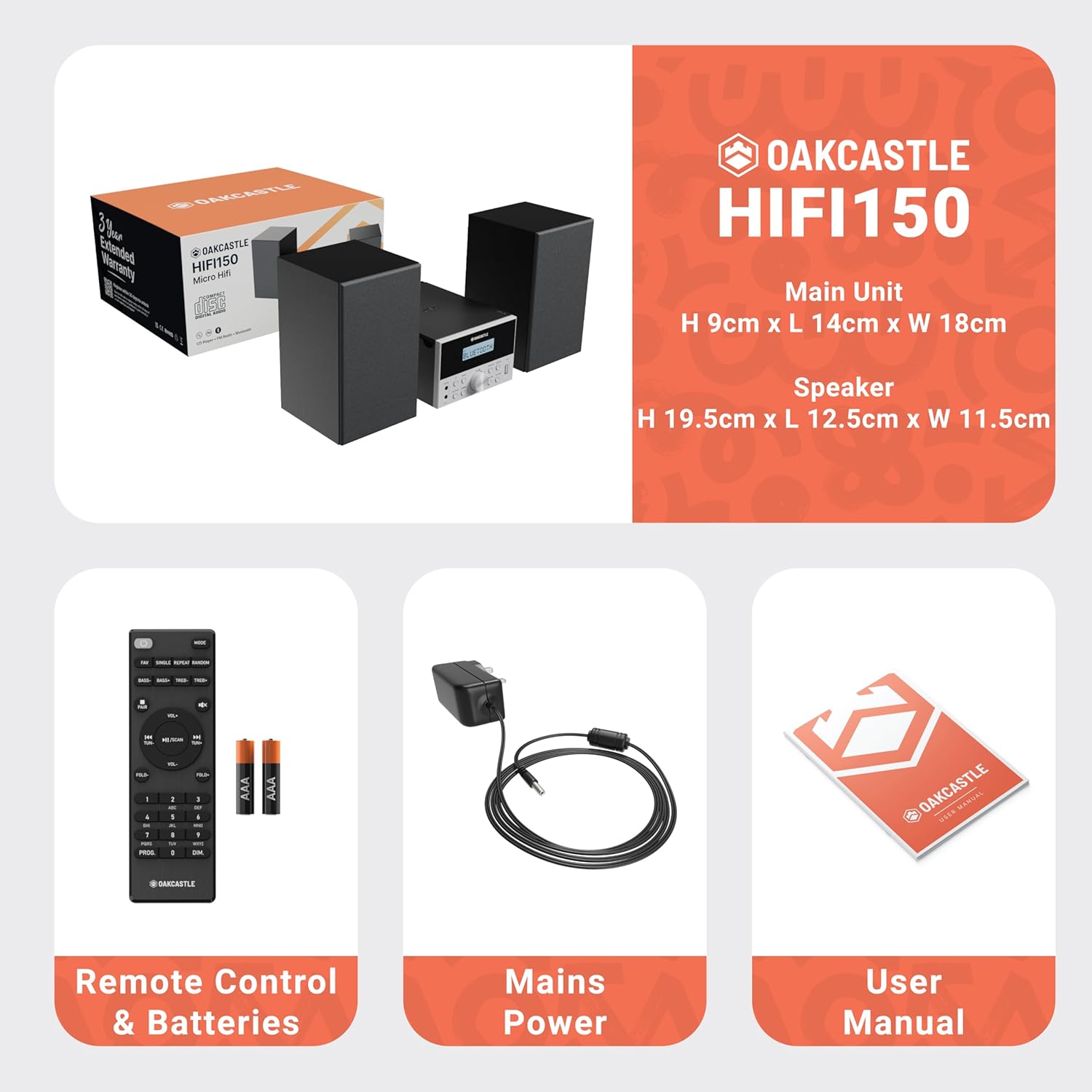
Image: The Oakcastle HIFI150 package contents, showing the main unit, two speakers, remote control with batteries, power adapter, and user manual.
محصول پای ته ورسیدview
The Oakcastle HIFI150 features a compact design with intuitive controls and multiple connectivity options.
د مخکینۍ پینل کنټرولونه او نندارې

Image: A close-up of the Oakcastle HIFI150 main unit's front panel, highlighting the digital display, central volume knob, mode selection buttons, and front-facing AUX In and USB ports. The display shows 'BLUETOOTH'.
- ښکاره کول: اوسنی حالت، د ټریک معلومات، او د راډیو فریکونسي ښیي.
- د بریښنا تڼۍ: واحد فعال یا بندوي.
- د حالت تڼۍ: Cycles through input sources (CD, FM, Bluetooth, AUX, USB).
- د حجم نوب: د ماسټر حجم تنظیموي.
- د پلی کولو/پاز بټن: د سي ډي، يو ايس بي او بلوتوث لپاره پلې بیک کنټرولوي.
- د پریښودو/ټیون کولو تڼۍ: Navigates tracks or tunes radio frequencies.
- AUX په بندر کې: د 3.5 ملي میتر کیبل له لارې د بهرني آډیو وسیلو د نښلولو لپاره.
- USB پورټ: د آډیو غږولو لپاره fileد USB ډرایو څخه.
د شا پینل پیوستون
The rear panel includes connections for speakers and power.
چمتو کول
1. د سپیکرونو نښلول
Connect the included speakers to the speaker terminals on the rear of the main unit. Ensure correct polarity (red to red, black to black) for optimal sound quality.
2. د بریښنا پیوستون
Plug the power cable into the AC inlet on the rear of the main unit, then plug the other end into a standard wall outlet.
عملیاتي لارښوونې
پاور آن/بند
فشار ورکړئ ځواک د واحد د فعالولو یا بندولو لپاره په مخکینۍ پینل یا ریموټ کنټرول کې تڼۍ.
د موډل انتخاب
فشار ورکړئ موډ button on the front panel or remote control repeatedly to cycle through the available input sources: CD, ایف ایم راډیو, بلوتوث, AUX، او USB.
د بلوتوټ عملیات
- وټاکئ بلوتوث mode using the Mode button. The display will show 'BLUETOOTH' and the unit will enter pairing mode.
- په خپل سمارټ فون یا بل بلوتوث وسیله کې، بلوتوث فعال کړئ او د شته وسایلو لټون وکړئ.
- Select 'OAKCASTLE HIFI150' from the list. Once connected, the unit will confirm the connection.
- You can now stream audio wirelessly from your device to the HIFI150.
سي ډي پلې بیک

Image: The Oakcastle HIFI150 with its top-loading CD player mechanism open, revealing a compact disc placed inside. The display shows 'CD'.
- د سي ډي کمپارټمنټ پوښ خلاص کړئ.
- Place a CD (MP3, CD, WMA, or CD-R format) onto the spindle with the label side facing up.
- د سي ډي کمپارټ پوښ وتړئ.
- وټاکئ CD mode. The unit will read the disc and begin playback automatically.
- Use the Play/Pause and Skip buttons to control playback.
د ایف ایم راډیو عملیات

Image: The Oakcastle HIFI150 main unit with its telescopic antenna extended, displaying an FM radio frequency on its screen. The unit is placed between two speakers.
- وټاکئ ایف ایم راډیو حالت
- د ښه استقبال لپاره ټیلسکوپیک انتن پراخ کړئ.
- اتومات سکین: Press and hold the Play/Pause button to automatically scan and save available FM stations (up to 30 presets).
- لاسي لارښود: Use the Skip/Tune buttons to manually adjust the frequency.
- پریزیټ یاد کړئ: Use the 'FAV/PROG' button on the remote to cycle through saved stations.
د USB پلی بیک
- په مخکیني پینل کې USB پورټ کې یو USB ډرایو دننه کړئ.
- وټاکئ USB mode. The unit will automatically detect and begin playing compatible audio files (MP3، WMA).
- Use the Play/Pause and Skip buttons to control playback.
د وکس آخذه
- یو بهرنۍ آډیو وسیله (د مثال په توګه، MP3 پلیر، سمارټ فون) سره وصل کړئ اکس ان port on the front panel using a 3.5mm audio cable (not included).
- وټاکئ AUX حالت
- د خپل وصل شوي بهرني وسیلې څخه پلے بیک کنټرول کړئ.
د حجم کنټرول
وګرځوئ د حجم نوب په مخکینۍ تخته کې یا وکاروئ VOL +/- د غږ کچه تنظیمولو لپاره په ریموټ کنټرول کې تڼۍ.
د ریموټ کنټرول کارول
The included remote control provides full functionality for the HIFI150. Ensure batteries are correctly inserted. Point the remote control towards the front panel of the main unit for optimal response.
ساتنه
پاکول
- واحد د نرم، وچ ټوکر سره پاک کړئ.
- د کثافاتو پاکوونکي، موم یا محلول مه کاروئ ځکه چې دوی ممکن پای ته زیان ورسوي.
ذخیره کول
که چیرې دا واحد د اوږدې مودې لپاره ونه کارول شي، نو د بریښنا له سایټ څخه یې وباسئ او په یخ او وچ ځای کې یې وساتئ.
د ستونزو حل کول
If you encounter issues with your HIFI150, please refer to the following common problems and solutions:
| ستونزه | احتمالي لامل | د حل لاره |
|---|---|---|
| هیڅ ځواک نشته | د برېښنا کیبل نه دی وصل شوی؛ د برېښنا رسۍ خرابه ده | ډاډ ترلاسه کړئ چې د بریښنا کیبل په خوندي ډول وصل دی؛ د بریښنا بل سوري هڅه وکړئ. |
| غږ نشته | Volume too low; Incorrect input mode; Speakers not connected | حجم زیات کړئ؛ د ان پټ سمه طریقه غوره کړئ؛ د سپیکر اتصالونه وګورئ. |
| سي ډي نه غږېږي | CD inserted incorrectly; Disc scratched/dirty; Incorrect format | Reinsert CD correctly; Clean or replace disc; Ensure disc is compatible (MP3, CD, WMA, CD-R). |
| بلوتوث نه نښلي | Bluetooth mode not selected; Device too far; Device already connected to another unit | Select Bluetooth mode; Move device closer; Disconnect from other devices and try again. |
| د FM ضعیف استقبال | انتن نه غځول کېږي؛ کمزوری سیګنال | Fully extend the telescopic antenna; Try repositioning the unit. |
مشخصات
| د ماډل شمیره | 1000002971 |
| برانډ | اوکاسټل |
| ارتباط | بلوتوث ۵.۰، USB، AUX |
| د آډیو تولید | 20W |
| د رسنیو ملاتړ | CD, MP3, WMA, CD-R, USB |
| راډیو | د ایف ایم راډیو د ۳۹ پریسیټونو سره |
| مطابقت لرونکې وسیلې | د MP3 پلیر، سمارټ فون، ټابلیټ |
| د کابینې مواد | لرګي |
| رنګ | تور |
| د توکي ابعاد (L x W x H) | 13.7 x 17.8 x 9 سانتي متره |
| د توکي وزن | 2 کیلوګرامه |
تضمین او ملاتړ
The Oakcastle HIFI150 comes with an extended 3-year warranty. Registration is required to activate the full warranty period. Please refer to the warranty card included in your package or visit the official Oakcastle website for registration details and support information.
For technical assistance or further inquiries, please contact Oakcastle customer support through their official channels.