
1. پیژندنه
This manual provides detailed instructions for the safe and effective use of your pxton 666S two-way radio. Please read this manual thoroughly before operating the device and retain it for future reference. The pxton 666S is a reliable communication device designed for various applications, featuring 16 memory channels, privacy codes, and multiple functions such as VOX, noise reduction, and a flashlight.
FCC ID: 2AX68GTR8. This device complies with Part 15 of the FCC Rules. Operation is subject to the condition that this device does not cause harmful interference.

Image 1.1: A set of ten pxton 666S two-way radios, each with its charging dock and an earphone, illustrating the complete package.
2. د بسته محتويات
ډاډ ترلاسه کړئ چې ټول توکي ستاسو په کڅوړه کې شتون لري:
- 10 x pxton 666S Two-Way Radios
- ۱۰ x د USB چارج کولو ډاکونه
- 10 x 1500mAh Lithium Batteries
- 10 x بیلټ کلپونه
- 10 ایکس اییرفونونه
- 5 x د کارن لارښود

Image 2.1: An illustration of the individual components included in the pxton 666S package: the radio unit, charging dock, battery, belt clip, earphone, and user manual.
3. محصول ختم شوview
3.1 کلیدي ځانګړتیاوې
- د 16 یاد چینلونه
- د محرمیت 165 کوډونه (50 CTCSS / 210 DCS)
- 5 Levels of VOX Sensitivity Adjustment
- د وخت ختمولو ټایمر (TOT)
- د اضطراري خطر
- د شور کمول
- اتوماتیک Squelch
- د ټیټ بیټرۍ خبرتیا
- د بریښنا خوندي کولو حالت
- د سکینګ فعالیت
- د څارنې فعالیت
- د LED فلش لائټ
- Durable PC+ABS material construction
۲.۳ د راډیو اجزا
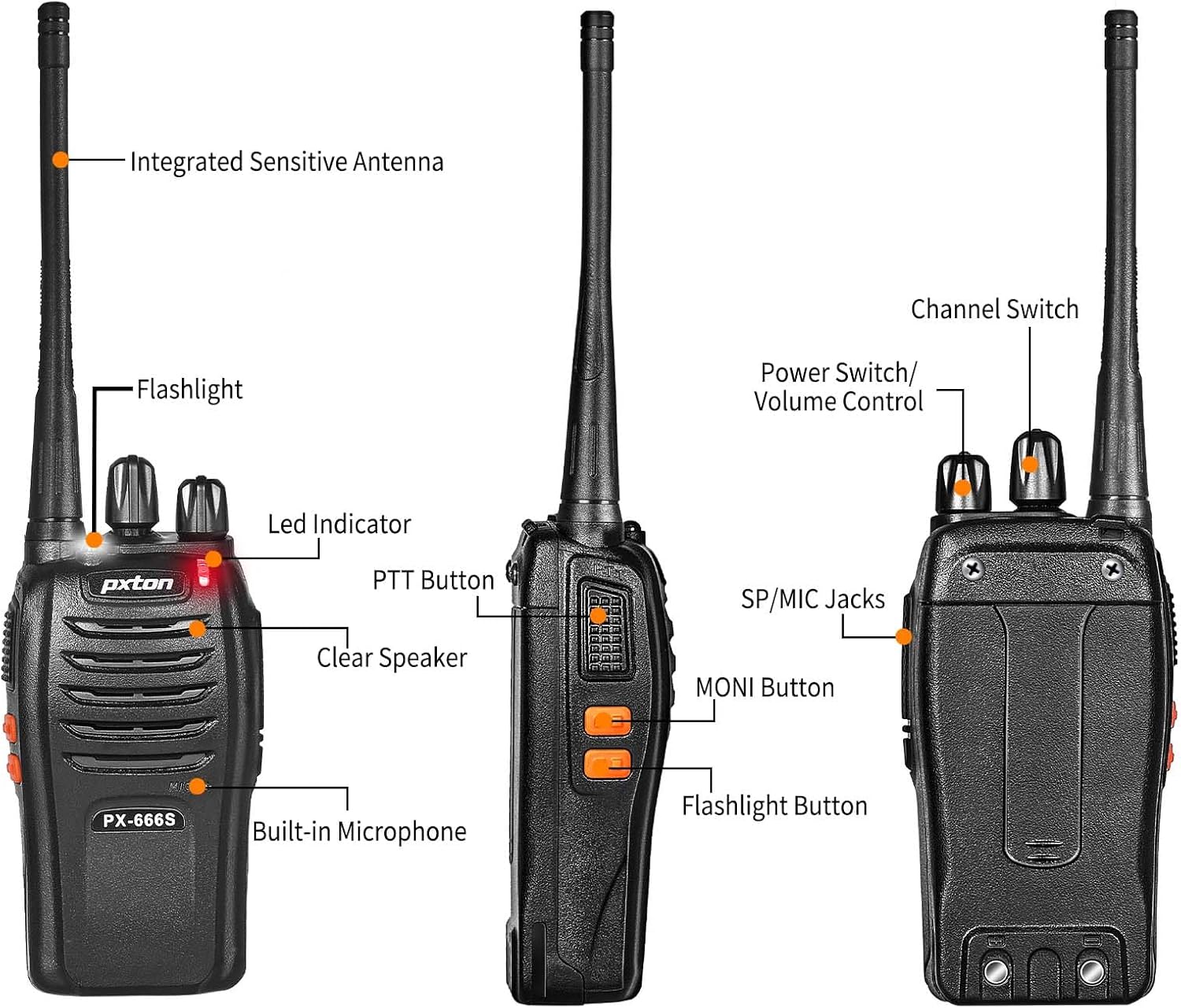
Image 3.1: Detailed diagram labeling the external components of the pxton 666S radio, including the integrated sensitive antenna, flashlight, LED indicator, PTT button, clear speaker, built-in microphone, SP/MIC jacks, MONI button, flashlight button, channel switch, and power switch/volume control.
- Integrated Sensitive Antenna: د سیګنالونو لیږدولو او ترلاسه کولو لپاره.
- رڼا: روښانتیا برابروي.
- د LED شاخص: Displays status (e.g., transmitting, receiving, low battery).
- د PTT تڼۍ (د خبرو اترو لپاره فشار): د لیږدولو لپاره فشار ورکړئ، د ترلاسه کولو لپاره خوشې کړئ.
- Clear Speaker: د آډیو تولید لپاره.
- جوړ شوی مایکروفون: د آډیو ان پټ لپاره.
- SP/MIC Jacks: For connecting external earphones or microphones.
- MONI Button (Monitor): Temporarily disables squelch to hear weak signals.
- د فلش لائټ تڼۍ: د LED فلش لائټ فعالوي.
- د چینل سویچ: Rotates to select desired communication channel.
- د بریښنا سویچ / حجم کنټرول: د راډیو د فعالولو/بندولو او حجم تنظیمولو لپاره ګرځوي.

Image 3.2: The pxton 666S radio resting on rocks, emphasizing its rugged PC+ABS durable material, anti-fall, and anti-vibration design for extended service life.
4. ترتیب کول
4.1 د بیټرۍ نصب کول
- د بیټرۍ کڅوړه د راډیو په شا کې د نالیو سره سم کړئ.
- د بیټرۍ کڅوړه پورته خوا ته وغورځوئ تر هغه چې په خپل ځای کې کلیک وکړي.
- د لرې کولو لپاره، د خوشې کولو لیچ (که شتون ولري) فشار ورکړئ او بیټرۍ ښکته خوا ته وغورځوئ.
4.2 د بیټرۍ چارج کول
The pxton 666S uses a 1500mAh Li-ion battery. A full charge takes approximately 3-4 hours.
- Connect the USB charging dock to a power source.
- Place the radio (with battery installed) into the charging dock.
- The LED indicator on the radio or charger will show charging status (e.g., red for charging, green for fully charged).

Image 4.1: Two pxton 666S radios placed in their respective charging docks, with earphones connected, demonstrating the charging setup.
4.3 د بیلټ کلپ ضمیمه کول
Secure the belt clip to the back of the radio using the provided screws for convenient carrying.
۳.۳ د غوږونو نښلول
Insert the earphone plug into the SP/MIC jacks on the side of the radio. Ensure it is fully inserted for proper audio transmission and reception.
5. عملیاتي لارښوونې
۴.۱ د بریښنا فعالول/بندول او د حجم کنټرول
- د راډیو د چالانولو لپاره، حرکت وکړئ د بریښنا سویچ / حجم کنټرول knob clockwise. You will hear a "click" and a tone.
- To turn off the radio, rotate the knob counter-clockwise until you hear a "click".
- To adjust the volume, rotate the د بریښنا سویچ / حجم کنټرول د حجم زیاتولو لپاره د ساعت په لور او د کمولو لپاره د ساعت په مخالف لوري کې ټک وکړئ.
5.2 د چینل انتخاب
وګرځوئ د چینل سویچ knob to select one of the 16 available channels. Ensure all radios in your group are set to the same channel for communication.
5.3 لیږدول او ترلاسه کول
- د لیږدولو لپاره، فشار ورکړئ او ونیسئ د PTT تtonۍ. Speak clearly into the microphone. The LED indicator will typically glow red.
- د ترلاسه کولو لپاره، خوشې کړئ د PTT تtonۍ. The LED indicator will typically glow green when receiving a signal.
۷.۷ د VOX فعالیت (د غږ له لارې لیږد)
The VOX function allows hands-free operation. When activated, the radio will automatically transmit when it detects your voice, without needing to press the PTT button. The pxton 666S offers 5 levels of VOX sensitivity adjustment.

Image 5.1: A security guard using the pxton 666S radio, illustrating the VOX/Handsfree function for clear and bright sound quality, allowing hands-free communication.
5.5 فلش لائټ
فشار ورکړئ د فلش لائټ تڼۍ to turn the LED flashlight on or off. This feature is useful in low-light conditions.

Image 5.2: The pxton 666S radio's flashlight feature in use, illuminating a campsite at night, demonstrating its utility in dark environments.
۵.۲ د څارنې دنده
فشار ورکړئ او ونیسئ MONI Button to temporarily disable the squelch function. This allows you to hear very weak signals that might otherwise be blocked by the squelch, or to check if a channel is clear before transmitting.
۵.۲ د سکین کولو فعالیت
The scanning function allows the radio to automatically scan through all programmed channels to detect activity. Refer to the full user manual (if provided separately) for specific instructions on activating and managing the scanning feature.
5.8 نورې ب Featuresې
- د شور کمول: Enhances audio clarity by reducing background noise.
- اضطراري الارم: Activates an audible alarm to signal for help.
- د وخت پای ټایمر (TOT): Prevents accidental prolonged transmissions by limiting the duration of each transmission.
- د بریښنا خوندي کولو حالت: Automatically reduces power consumption when no activity is detected, extending battery life.
- د ټیټ بیټرۍ خبرداری: Provides an audible or visual warning when the battery level is low, indicating it's time to recharge.
۸. د اړیکو لړۍ
The actual communication range of the pxton 666S can vary significantly based on environmental factors, terrain, and obstructions. General estimates are:
- Open Areas (flat terrain, mountain peaks): تر ۲۰ میله پورې.
- Suburban/Countryside Areas: Approximately 1.2 miles.
- City Limits (with buildings and obstructions): Around 0.6 miles.

Image 6.1: Visual representation of the pxton 666S communication range, indicating up to 1-3 miles in open areas, 1.2 miles in rural settings, and 0.6 miles in urban environments.
7. د بیټرۍ معلومات
The pxton 666S is powered by a rechargeable 1500mAh Lithium-Ion battery (Model: BL-1, 5.55Wh, Voltage: 3.7V).
- عادي استعمال: تر ۱۳ ساعتونو پورې دوامداره خبرې اترې.
- ولاړ وخت: Up to 120 hours (5-7 days).
- د بشپړ چارج کولو وخت: نږدې 3-4 ساعته.
Important Battery Safety Information:
- بیټرۍ مه جلا کوئ.
- په اور کې مه ورکوئ.
- یوازې ټاکل شوی چارجر وکاروئ.
- ټرمینالونه لنډ مه کوئ.
- په یخ، وچ ځای کې ذخیره کړئ.

Image 7.1: The pxton 666S radio alongside its 1500mAh Li-ion battery, detailing battery model (BL-1), capacity (1500mAh), voltage (3.7V), and safety warnings.
8. مشخصات
| فیچر | مشخصات |
|---|---|
| د ماډل شمیره | PX-666S-0004 |
| برانډ | pxton |
| د چینلونو شمیر | 16 |
| د فریکونسی رینج | UHF |
| د خبرو کولو حد اعظمي | 3 Miles (line of sight) |
| د بیټرۍ ډول | ۶۰۰۰mAh لیتیم آیون (شامل دی) |
| والیtage | 3.7 ولټه |
| د توکي وزن | ۵.۲ پونډه (د څلورو کڅوړو لپاره) |
| د محصول ابعاد | 9.9 x 11 x 6.9 انچه (د بسته ابعاد) |
| د اوبو د مقاومت کچه | د اوبو مقاومت |
| ځانګړي ځانګړتیاوې | Automatic Squelch, Battery Saver Mode, Long Range, Rechargeable, Voice Operated Transmission (VOX) |

Image 8.1: A size comparison of the pxton 666S radio next to a smartphone (iPhone 14 Pro), illustrating its compact dimensions for portability.
9. ستونزه حل کول
If you encounter issues with your pxton 666S radio, please refer to the following common problems and solutions:
| ستونزه | احتمالي لامل | د حل لاره |
|---|---|---|
| هیڅ ځواک نشته | بیټرۍ په سمه توګه نه ده نصب شوې یا خارج شوې ده. | ډاډ ترلاسه کړئ چې بیټرۍ په سمه توګه ځای پر ځای شوې ده. بیټرۍ په بشپړه توګه چارج کړئ. |
| نشي لیږدول کیدی یا ترلاسه کیدی نشي | Incorrect channel, out of range, low battery, squelch too high. | Verify all radios are on the same channel. Move closer to other radios. Recharge battery. Press MONI button to check for weak signals. |
| د غږ خراب کیفیت / جامد | Weak signal, interference, radio too far apart. | Move to an area with fewer obstructions. Adjust volume. Ensure antenna is clear. |
| VOX کار نه کوي | VOX sensitivity too low, feature disabled. | Adjust VOX sensitivity to a higher level. Ensure VOX is enabled (refer to full manual for programming). |
| د بیټرۍ ژوند لنډ دی | Frequent transmission, battery degradation, power-saving mode off. | Reduce transmission time. Ensure power-saving mode is active. Consider replacing old batteries. |
For further assistance, please contact pxton customer support.
10. ساتنه
- پاکول: یو نرم استعمال کړئ، دamp د راډیو د بهرنۍ برخې د پاکولو لپاره ټوکر. سخت کیمیاوي مواد یا د کثافاتو پاکوونکي مه کاروئ.
- ذخیره کول: When not in use for extended periods, remove the battery and store the radio in a cool, dry place.
- د بیټرۍ پاملرنه: Fully charge batteries before long-term storage and recharge them every 3-6 months to maintain optimal performance.
- انتن: Do not bend or modify the antenna, as this can affect performance.
- د اوبو مقاومت: While water-resistant, avoid submerging the radio in water. Ensure all covers (e.g., earphone jack cover) are securely closed.
11. تضمین او ملاتړ
pxton offers a 30-day no-questions-asked replacement and refund policy from the date of purchase. Additionally, the product comes with د ژوند تر پایه د خرڅلاو وروسته خدمت.
If you encounter any issues or require support, please contact pxton customer service. They are committed to assisting you with any concerns.
د مطابقت یادونه: The pxton 666S walkie talkie is compatible with PX-888S, PX-777S, and PX-888S Pro models. They can utilize the same programming tools and cables (programming cable sold separately).