
1. پیژندنه
د پیرودلو لپاره مننهasing the Xiaomi Cordless Vacuum Cleaner G20 Lite. This manual provides essential information for the safe and efficient use, maintenance, and troubleshooting of your new vacuum cleaner. Please read this manual thoroughly before first use and keep it for future reference.
2. د خوندیتوب لارښوونې
د اور لګېدو، برقي شاک یا ټپي کېدو د خطر کمولو لپاره، تل د خپل ویکیوم کلینر کارولو پر مهال د خوندیتوب اساسي احتیاطي تدابیر تعقیب کړئ:
- د وسیلې کارولو دمخه ټولې لارښوونې ولولئ.
- په لوند سطحو یا بهر کې مه کاروئ.
- اجازه مه ورکوئ چې د لوبو په توګه وکارول شي. نږدې پاملرنه اړینه ده کله چې د ماشومانو لخوا یا نږدې کارول کیږي.
- یوازې لکه څنګه چې په دې لارښود کې تشریح شوي وکاروئ. یوازې د جوړونکي وړاندیز شوي ضمیمې وکاروئ.
- د خراب شوي تار یا پلګ سره مه کاروئ. که وسیله لکه څنګه چې باید کار نه کوي، غورځول شوی، خراب شوی، په بهر کې پریښودل شوی، یا په اوبو کې غورځول شوی، د خدماتو مرکز ته یې بیرته ورکړئ.
- د تار پواسطه کش یا کیږدئ، د دستګاه په توګه تار وکاروئ، په تار باندې دروازه وتړئ، یا د تیزو څنډو یا کونجونو شاوخوا تار کش کړئ. وسیله په تار باندې مه چلوئ. تار د ګرمو سطحو څخه لرې وساتئ.
- د تار په ایستلو سره مه خلاصوئ. د خلاصولو لپاره، پلګ ونیسئ، نه تار.
- د لوند لاسونو سره پلګ یا وسایل مه اداره کوئ.
- هیڅ شی په خلاصیدو کې مه اچوئ. د هیڅ ډول خلاصیدو سره مه کاروئ؛ د دوړو، لین، ویښتو او هر هغه څه څخه پاک وساتئ چې ممکن د هوا جریان کم کړي.
- ویښتان، لوڅې جامې، ګوتې او د بدن ټولې برخې د خلاصیدو او خوځنده برخو څخه لرې وساتئ.
- هغه څه مه اخلئ چې سوځول یا سګرټ څکول وي، لکه سګرټ، ماچس، یا ګرمې.
- د سوځیدونکي یا سوځیدونکي مایعاتو د راټولولو لپاره مه کاروئ، لکه پټرول، یا په هغو سیمو کې چې ممکن شتون ولري وکاروئ.
- زهرجن مواد مه پورته کوئ، لکه کلورین بلیچ، امونیا، یا د اوبو ایستلو پاکونکی.
- په ځای کې د دوړو کپ او / یا فلټرونو پرته مه کاروئ.
- د پلګ کولو دمخه ټول کنټرولونه بند کړئ.
- په زینو کې د پاکولو پر مهال اضافي احتیاط وکاروئ.
- وسایل په کور کې وساتئ.
- په بهر کې واحد چارج مه کوئ.
- یوازې هغه چارجر وکاروئ چې د جوړونکي لخوا مشخص شوی وي.
3. محصول ختم شوview
The Xiaomi Cordless Vacuum Cleaner G20 Lite is designed for efficient cleaning with its powerful suction and versatile attachments. Key features include:
- Maximum 18,000Pa suction power for thorough cleaning.
- Integrated white LED light on the brush head to illuminate dark areas.
- پرمختللی 5-stage powerful filter system to prevent secondary pollution.
- Large capacity 2200mAh battery providing up to 45 minutes of runtime.
- One-touch dust disposal for easy and hygienic emptying.
- 2-way brush nozzle and extension rod for versatile cleaning.
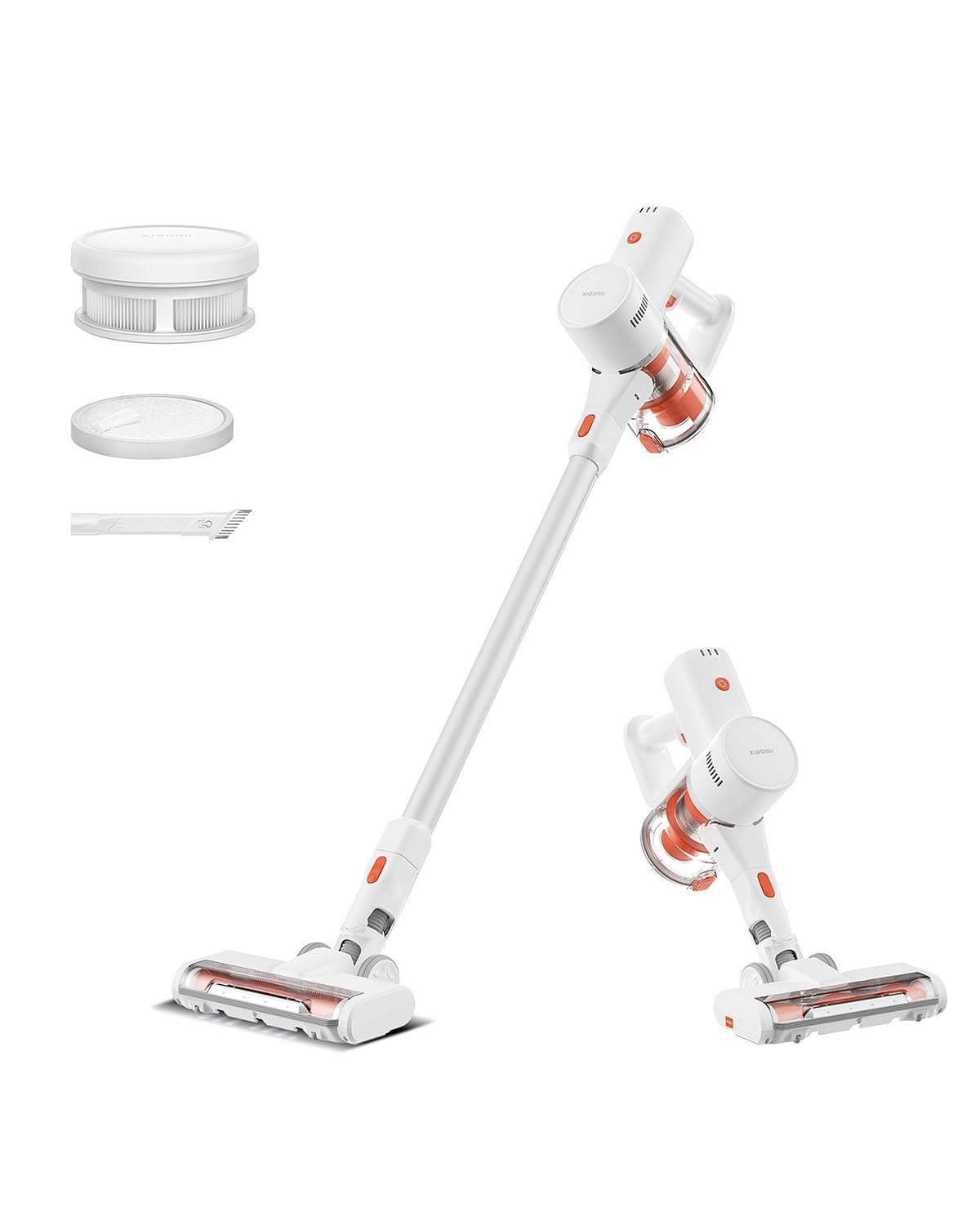
Image: Xiaomi Cordless Vacuum Cleaner G20 Lite, showing the full product assembly.

Image: Illustration of the vacuum cleaner's internal motor, highlighting its 18,000Pa suction power.
انځور: شفاف view of the vacuum cleaner's handle, showing the internal large-capacity battery cells.
4. ترتیب کول
د خپل ویکیوم کلینر راټولولو لپاره دا مرحلې تعقیب کړئ:
- اجزا خلاص کړئ: Carefully remove all parts from the packaging. Ensure all accessories (main unit, extension rod, motorized brush head, 2-way brush nozzle, crevice nozzle, adapter) are present.
- Attach Extension Rod: Connect the extension rod to the main unit until it clicks into place.
- د برش سر ضمیمه کړئ: Connect the desired brush head (motorized brush or 2-way brush nozzle) to the other end of the extension rod. For handheld use, attach the 2-way brush nozzle or crevice nozzle directly to the main unit.
- د بیټرۍ چارج کول: Before first use, fully charge the vacuum cleaner. Connect the adapter to the charging port on the main unit and plug it into a power outlet. The power indicator lights will show the charging status.

Image: The vacuum cleaner being stored on a wall-mounted charging dock, illustrating convenient storage and charging.
5. عملیاتي لارښوونې
Your Xiaomi Cordless Vacuum Cleaner G20 Lite offers versatile cleaning options:
د بریښنا آن/بند او سکشن حالتونه
Press the power button to turn the vacuum on. Press the mode button to cycle through different suction power levels (Standard, Turbo). The power indicator lights will show the current mode and battery level.
Video: A short demonstration of turning the vacuum cleaner on and cycling through its suction modes using the power and mode buttons.
د ضمیمو کارول
Select the appropriate brush head for your cleaning task:
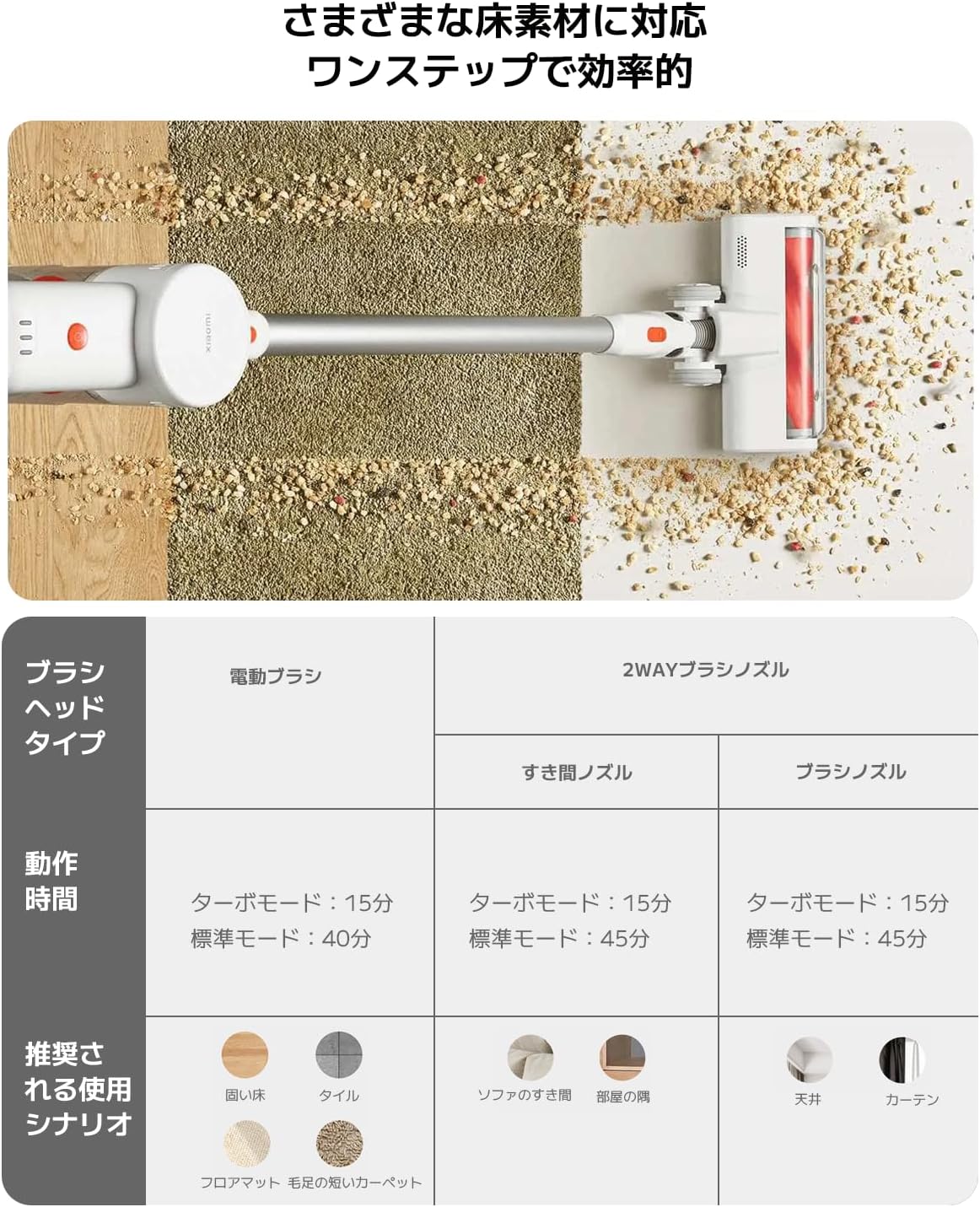
| د برش سر ډول | Operating Time (Standard/Turbo) | Recommended Use Scenario |
|---|---|---|
| موټرویز شوی برش | 40 دقیقې / 15 دقیقې | Hard Floor, Tile, Floor Mat, Short Pile Carpet |
| 2-Way Brush Nozzle (Crevice) | 45 دقیقې / 15 دقیقې | Sofa Crevices, Room Corners |
| 2-Way Brush Nozzle (Brush) | 45 دقیقې / 15 دقیقې | Ceiling, Curtains |

Image: Close-up of the vacuum cleaner's motorized brush head, showing the integrated white LED lights illuminating the floor.

Image: A person using the vacuum cleaner with the extension rod to clean high areas, and with a specialized nozzle for narrow gaps and desk surfaces.
6. ساتنه
منظم ساتنه غوره فعالیت تضمینوي او ستاسو د ویکیوم کلینر عمر اوږدوي.
د کثافاتو خالي کول
The vacuum cleaner features a one-touch dust disposal system. Simply press the release button on the dustbin to open the bottom flap and empty collected debris directly into a trash can. Empty the dustbin regularly to maintain suction power.

Image: A hand demonstrating the one-touch dust disposal mechanism, showing debris falling from the dustbin. Also visible is the power indicator light on the handle.
د فلټرونو پاکول
د 5-stage powerful filter system requires periodic cleaning. Refer to the diagram below for filter components. Remove the dustbin and separate the filter components. Tap off loose dirt and rinse washable parts under running water. Ensure all filter components are completely dry before reassembling them into the vacuum cleaner.

انځور: چاودنه وشوه view of the vacuum cleaner's main unit, illustrating the components of the 5-stage filter system.
Cleaning Brush Heads
Periodically check brush heads for tangled hair or debris. Use scissors to cut away any tangled hair and remove any obstructions to ensure smooth operation.
7. ستونزه حل کول
که تاسو د خپل ویکیوم کلینر سره ستونزې سره مخ شئ، لاندې عامې ستونزې او حل لارې وګورئ:
- ځواک نشته:
- وګورئ چې بیټرۍ چارج شوې ده که نه. که اړتیا وي نو بیا یې چارج کړئ.
- ډاډ ترلاسه کړئ چې د بریښنا تڼۍ په ټینګه فشار شوی.
- ټیټ سکشن ځواک:
- کثافات خالي کړئ.
- Clean the filters. Ensure they are dry before reinstallation.
- Check for blockages in the brush head, extension rod, or main unit.
- د برش سر نه ګرځېږي:
- Check for tangled hair or debris obstructing the brush roll.
- Ensure the brush head is correctly attached.
- غیر معمولي شور:
- Check for any foreign objects caught in the brush head or suction path.
- ډاډ ترلاسه کړئ چې ټولې برخې په خوندي توګه راټول شوي.
که ستونزه دوام ومومي، مهرباني وکړئ د پیرودونکو ملاتړ سره اړیکه ونیسئ.
8. مشخصات
| مشخصات | تفصیل |
|---|---|
| برانډ | Xiaomi |
| د ماډل شمیره | BHR8232US |
| د محصول ډول | سټیک کلینر |
| ځانګړتیاوې | بې تاره |
| د فلټر ډول | د HEPA فلټر |
| وړاندیز شوی کارول | Carpet, Hard Floors, Sofa, Curtains, Beds, Tiles, Blankets |
| د بریښنا سرچینه | Battery Powered (Charges via power cord) |
| ظرفیت | 0.55 لیتره |
| رنګ | سپین |
| د پورټ وړ | هو |
| د کور دننه / بهر کارول | دننه |
| د عملیاتو Voltage | 21.6 ولټه |
| د بیټرۍ ظرفیت | 215 Watt-hours (2200mAh) |
| د کنټرولر ډول | د لاس کنټرول |
| ارتباط | Bluetooth (for potential smart features) |
| شاملې برخې | Accessory kit, Adapter |
| د اصلي هیواد | چین |
| د محصول وزن | 2.4 کیلوګرامه |
| د توکي ابعاد (L x W x H) | 66.2 cm x 32 cm x 13.2 cm |
9. تضمین او ملاتړ
Xiaomi products are designed with quality and reliability in mind. For warranty information and customer support, please refer to the details below:
د تضمین معلومات
This product comes with a standard manufacturer's warranty. Please retain your proof of purchase for warranty claims. For specific warranty terms and conditions, refer to the documentation included with your product or visit the official Xiaomi webسایټ
د پیرودونکي ملاتړ
For technical assistance, troubleshooting, or service inquiries, please contact the Xiaomi Customer Service Center:
- تلیفون: 0120-767-378 (Reception hours: 9:00 - 18:00, excluding year-end and New Year holidays)
- بریښنالیک: service.jp@support.mi.com
Xiaomi Service Center (Akihabara Store)
For in-person support or repairs, you may visit our service center:
- پته: 4-6-7 Kanda Sakumacho, Chiyoda-ku, Tokyo
- د سوداګرۍ ساعتونه: ۱۰۰۰:۱ - ۲۰۰۰:۱
- تړل شوی: چهارشنبه
- Last Reception: 18:00