
S.M.S.L D10
S.M.S.L D10 Portable Mini Decoder Earphone Ampد لوړ کارونکي لارښود
ماډل: D10
1. پیژندنه
د پیرودلو لپاره مننهasing the S.M.S.L D10 Portable Mini Decoder Earphone Amplifier. This device is designed to enhance your audio experience by providing high-fidelity sound from your computer or mobile device. Please read this manual carefully before using the product to ensure proper operation and to maximize its performance.
2. محصول ختم شوview
The S.M.S.L D10 is a compact and powerful audio decoder and earphone amplifier. It features dual Cirrus Logic CS43131 DAC chips for superior sound quality, supporting DSD256 and PCM 32bit/384kHz high-resolution audio formats. With both 3.5mm and 4.4mm balanced headphone jacks, it offers versatile connectivity and robust output power for a wide range of headphones.

Image: S.M.S.L D10 USB Headphone Ampخلاصونکیview.
3. کلیدي ځانګړتیاوې
- High-Performance DAC Chips: Utilizes two Cirrus Logic CS43131 audio decoding chips for excellent performance and pure sound.
- د لوړ ریزولوشن آډیو ملاتړ: Supports DSD256 hardware decoding and PCM 32bit/384kHz specifications.
- د دوه ګوني هیډفون محصولات: Equipped with a 3.5mm single-ended headphone jack and a 4.4mm balanced headphone jack for broad compatibility.
- ځواکمن محصول: Delivers up to 500mW@16Ω output power, capable of driving most headphones.
- پراخه مطابقت: Connects easily to computers and mobile phones, compatible with Windows 7/8/8.1/10/11 (requires driver), Mac OS X 10.6+, Linux, Android, and iOS.
- شفاف ډیزاین: Features a transparent window and textured alloy casing, allowing visibility of internal components.
- Side Volume Control: Conveniently located volume button for easy adjustment.

Image: Visual representation of the D10's core features.
4. د بسته محتويات
ډاډ ترلاسه کړئ چې ټول توکي په کڅوړه کې شتون لري:
- S.M.S.L D10 Unit
- USB کیبل
- د لارښود لارښود (دا سند)
5. د تنظیم کولو لارښود
5.1 Connecting to a Computer (Windows/Mac/Linux)
- Connect one end of the provided USB cable to the USB input port on the S.M.S.L D10.
- د USB کیبل بل پای ستاسو په کمپیوټر کې موجود USB پورټ سره وصل کړئ.
- For Windows operating systems (7/8/8.1/10/11), a specific driver may be required for optimal performance. Please visit the official S.M.S.L website for the latest driver downloads. Mac OS X 10.6+ and Linux systems typically operate without additional drivers.
- Once connected, select the S.M.S.L D10 as your audio output device in your computer's sound settings.

Image: S.M.S.L D10 connected to a laptop.
5.2 Connecting to a Mobile Phone (Android/iOS)
- Connect one end of the provided USB cable to the USB input port on the S.M.S.L D10.
- Connect the other end of the USB cable to your mobile phone. An adapter (not included) may be required depending on your phone's port type (e.g., USB-C to USB-C, or Lightning to USB-A/C).
- The D10 is generally plug-and-play with Android and iOS devices.
- Ensure the D10 is selected as the audio output device in your phone's audio settings or music player application.
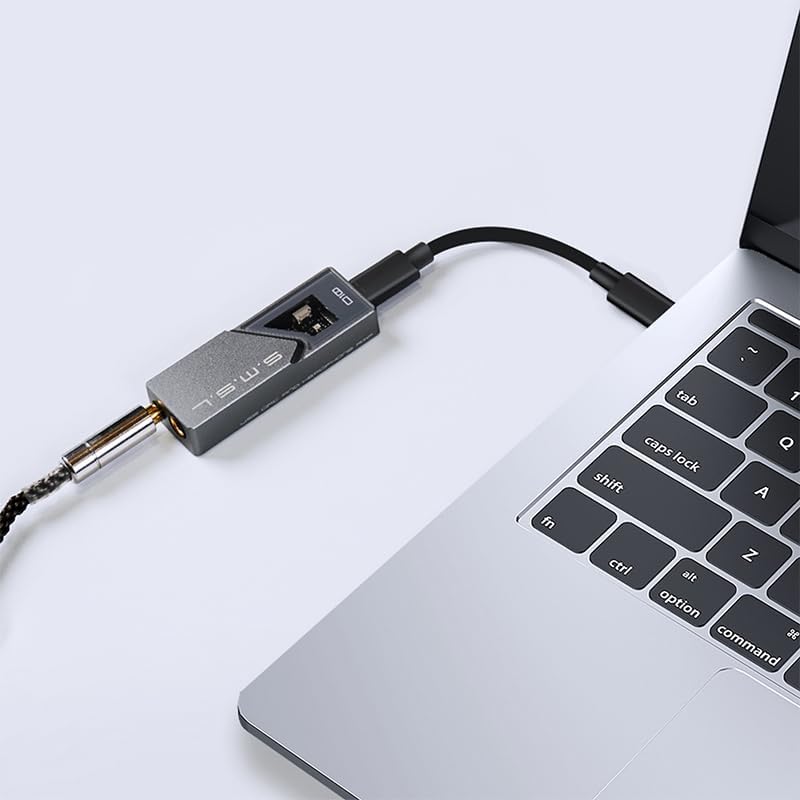
Image: S.M.S.L D10 connected to a mobile phone.
6. عملیاتي لارښوونې
6.1 د هیډفون سره نښلول
The S.M.S.L D10 offers two headphone output options:
- د 3.5mm هیډفون جیک: For standard single-ended headphones.
- 4.4mm Balanced Headphone Jack: For balanced headphones, offering improved signal separation and power.
Insert your headphone's plug firmly into the corresponding jack on the D10. Ensure you use the correct type of plug for the desired output.

انځور: پورته view of the D10 with 3.5mm and 4.4mm headphone jacks.

Image: Port diagram of the S.M.S.L D10.
6.2 د حجم کنټرول
The D10 features a physical volume button on its side. Use this button to adjust the output volume to a comfortable listening level. It is recommended to start with a lower volume and gradually increase it to prevent sudden loud sounds.

انځور: اړخ view of the D10, highlighting the volume control.
6.3 Data Status Indicator
When playing music, the data status indicator light on the D10 will illuminate, confirming active audio processing and high-resolution sound restoration.

Image: D10 connected to a phone, showing the illuminated data status indicator.
7. ساتنه
- پاکول: د وسیلې بهر پاکولو لپاره نرم او وچ ټوکر وکاروئ. د سختو کیمیاوي موادو یا خړوبونکي موادو کارولو څخه ډډه وکړئ.
- ذخیره کول: D10 په یوه سړه او وچ ځای کې وساتئ چې د مستقیم لمر وړانګو او سختې تودوخې څخه لرې وي.
- سمبالول: وسیله په احتیاط سره اداره کړئ. د غورځولو یا قوي ټکانونو سره مخ کیدو څخه ډډه وکړئ.
- ارتباط: Ensure USB and headphone cables are connected securely but without excessive force to prevent damage to ports.
8. ستونزه حل کول
| ستونزه | احتمالي لامل | د حل لاره |
|---|---|---|
| د غږ تولید نشته |
|
|
| تحریف شوی یا خراب غږ کیفیت |
|
|
| Device feels warm during operation |
|
|
9. مشخصات
| فیچر | تفصیل |
|---|---|
| ماډل | D10 |
| د DAC چپس | 2 x Cirrus Logic CS43131 |
| ملاتړ شوي آډیو فارمیټونه | DSD256, PCM 32bit/384kHz |
| د هیډفون محصولات | ۳.۵ ملي متره (یو اړخیزه)، ۴.۴ ملي متره (متوازن) |
| د اعظمي تولید بریښنا | 500mW @ 16Ω |
| مطابقت | Windows 7/8/8.1/10/11 (driver required), Mac OS X 10.6+, Linux, Android, iOS |
| د کڅوړې ابعاد | 5.47 x 2.95 x 1.22 انچه |
| د توکي وزن | ۲.۴۵ پونډه |
| جوړونکی | ایس ایم ایل |
| نیټه لومړی شتون لري | د ۲۰۲۴ کال د جولای ۹ مه |
10. تضمین او ملاتړ
S.M.S.L products are covered by a manufacturer's warranty. For specific warranty terms and conditions, please refer to the warranty card included with your product or visit the official S.M.S.L website. For technical support, troubleshooting assistance beyond this manual, or warranty claims, please contact S.M.S.L customer service through their official channels.
Official S.M.S.L Webسایټ: www.smsl-audio.com
Ask a question about this manual
Ask about setup, troubleshooting, compatibility, parts, safety, or missing instructions. Manuals+ will review the question and use this page’s manual context to help answer it.