
ALLIMITY RC45162
ALLIMITY RC45162 Voice Remote Control User Manual
Model: MME-RC45162-NP
Compatible with Panasonic TV models: TX-65MX700E, TX-65MX710E, TX-43MX700E, TX-55MX710E, TX-50MX710E, TX-55MX700E
1. پیژندنه
This manual provides instructions for the ALLIMITY RC45162 Voice Remote Control. This remote is designed to be fully compatible with various Panasonic TV models, offering a direct replacement experience without complex setup procedures. Its ergonomic design ensures comfortable handling and reliable performance for controlling your television.
2. ترتیب کول
2.1 د بیټرۍ نصب کول
The ALLIMITY RC45162 remote control requires batteries for operation. Please follow these steps to install them:
- د ریموټ کنټرول شاته د بیټرۍ کمپارټ پوښ ومومئ.
- Slide or press the latch to open the battery compartment.
- Insert the required Lithium batteries, ensuring the positive (+) and negative (-) terminals align correctly with the markings inside the compartment.
- د بیټرۍ کمپارټ پوښ په خوندي ډول وتړئ.
Note: This remote control requires no programming or complex installation. Once batteries are correctly inserted, it is ready for use with compatible Panasonic TV models.

انځور: شاته view of the remote control, highlighting the battery compartment for easy access and installation.
3. عملیاتي لارښوونې
The ALLIMITY RC45162 remote control is designed for intuitive use. Below are the primary functions:
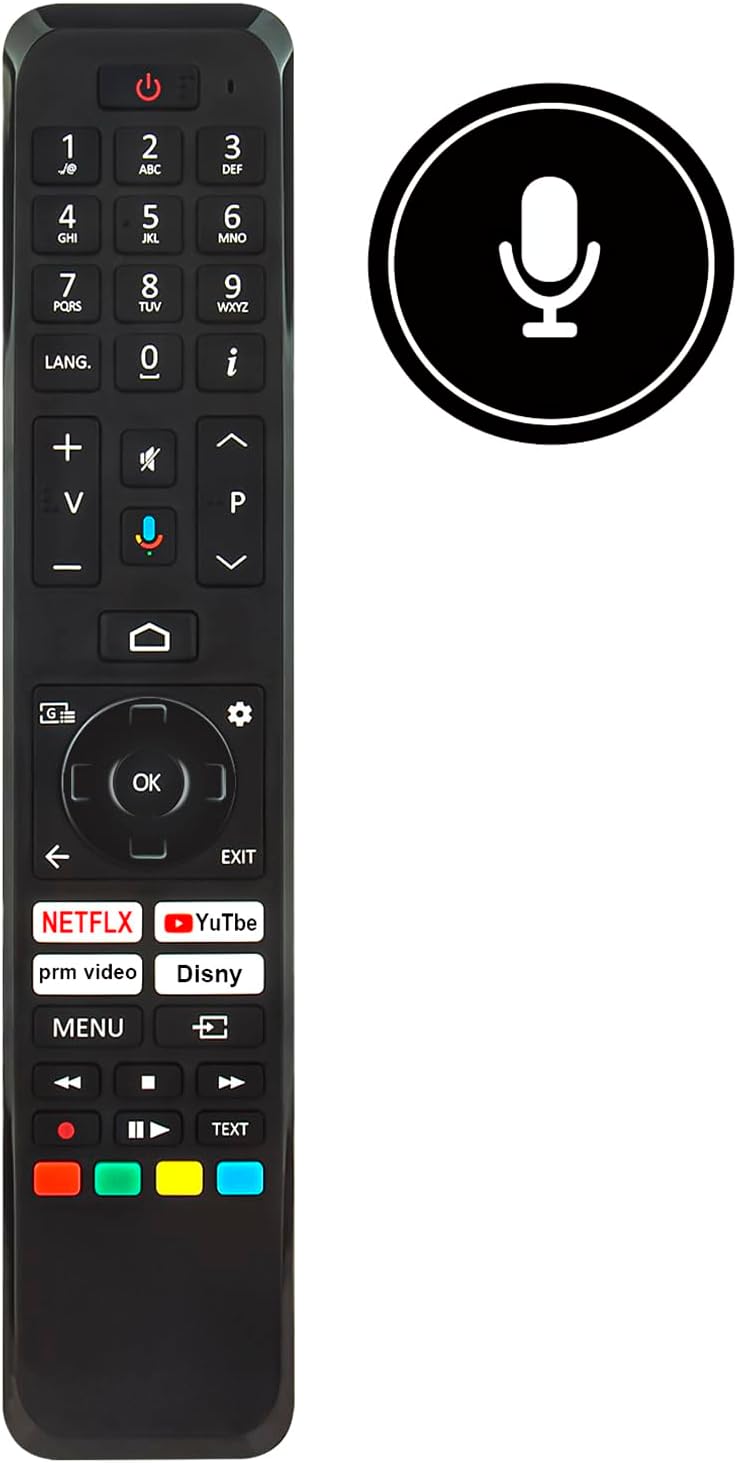
انځور: مخکینۍ برخه view of the ALLIMITY RC45162 remote control, displaying the full button layout.
3.1 اساسي دندې
- د چالانېدو تڼۍ (U): تلویزیون چالان یا بند کړئ.
- د شمېرې تڼۍ (0-9): په مستقیم ډول چینلونه غوره کړئ.
- حجم پورته / ښکته (+/-): د تلویزیون حجم تنظیموي.
- Channel Up/Down (P^/P<): د تلویزیون چینلونه بدلوي.
- تteۍ غږول: د تلویزیون غږ خاموش یا غیر خاموش کوي.
- د نیویګیشن پیډ (پورته، ښکته، کیڼ، ښي، سمه): د مینو نیویګیټ کولو او انتخابونو تاییدولو لپاره کارول کیږي.
- Back Button (<): مخکینی مینو یا سکرین ته راستنیږي.
- د وتلو تtonۍ: د اوسني مینو یا غوښتنلیک څخه وځي.
- د کور تڼۍ: د تلویزیون اصلي کور سکرین یا سمارټ تلویزیون انٹرفیس ته لاسرسی لري.
3.2 ځانګړي ځانګړتیاوې
- Voice Control Button (Microphone icon): Activates the voice control feature. Press and hold this button, then speak your command clearly into the remote. Release the button when finished.
- د چټک لاسرسي تڼۍ: Dedicated buttons for popular streaming services such as Netflix, YouTube, Prime Video, and Disney+ for direct access.
- اوږدوالی. تڼۍ: For language selection or audio track changes.
- Info Button (i): د اوسني پروګرام یا ان پټ په اړه معلومات ښکاره کوي.
- د مینو تڼۍ: د تلویزیون اصلي ترتیباتو مینو ته لاسرسی لري.
- رنګین تڼۍ (سور، شنه، ژیړ، نیلي): These buttons often correspond to specific functions within TV menus or applications, as indicated on the screen.
4. ساتنه
4.1 پاکول
د ریموټ کنټرول بڼه او فعالیت ساتلو لپاره:
- ریموټ کنټرول د نرم او وچ ټوکر سره پاک کړئ.
- د سختې خاورې لپاره، لږ څهampپه ټوکر کې د اوبو سره یا یو نرم، غیر خړوبونکی کلینر.
- Avoid using harsh chemicals, solvents, or abrasive materials, as these can damage the remote's surface or internal components.
4.2 د بیټرۍ بدلول
Replace batteries when the remote control's response becomes sluggish or stops working. Always replace all batteries at the same time with new ones of the same type. Do not mix old and new batteries or different types of batteries.
4.3 ذخیره کول
که چیرې ریموټ کنټرول د اوږدې مودې لپاره ونه کارول شي، نو بیټرۍ لرې کړئ ترڅو د لیکیدو او وسیلې ته د احتمالي زیان مخه ونیول شي.
5. ستونزه حل کول
If you encounter issues with your ALLIMITY RC45162 remote control, please refer to the following common solutions:
- ریموټ ځواب نه ورکوي:
- وګورئ چې بیټرۍ په سمه توګه داخلې شوې دي او کافي چارج لري. که اړتیا وي نو هغه بدل کړئ.
- ډاډ ترلاسه کړئ چې د ریموټ کنټرول او د تلویزیون انفراریډ سینسر ترمنځ هیڅ خنډ شتون نلري.
- ریموټ مستقیم تلویزیون ته وښایاست.
- د غږ کنټرول کار نه کوي:
- Ensure you are pressing and holding the voice control button while speaking.
- په واضح ډول او په عادي غږ خبرې وکړئ.
- Check your TV's settings to ensure voice control is enabled and configured correctly.
- محدود حد یا وقفه ای غبرګون:
- Replace the batteries. Low battery power can affect signal strength.
- Ensure the remote is within the maximum operating range (up to 10 meters).
- Minimize sources of infrared interference, such as direct sunlight or strong artificial light.
6. مشخصات

انځور: مخ او اړخ view of the remote control, illustrating its dimensions for reference.
| برانډ | ALLIMITY |
| د نمونې نوم / شمیره | MME-RC45162-NP |
| ځانګړي ځانګړتیاوې | ارګونومیک |
| رنګ | تور / سپین |
| د ملاتړ شوي وسایلو اعظمي شمیر | 10 |
| مطابقت لرونکې وسیلې | TX-65MX700E, TX-65MX710E, TX-43MX700E, TX-55MX710E, TX-50MX710E, TX-55MX700E |
| د ارتباط ټیکنالوژي | انفراریډ |
| د کنټرولر ډول | انفراریډ کنټرول |
| اعظمي حد | 10 متره |
| د بیټرۍ ډول | لیتیم |
| د توکي وزن | 59 ګرامه |
7. د تضمین معلومات
This product is typically covered by a standard manufacturer's warranty. For specific details regarding warranty duration, coverage, and claims, please refer to the documentation provided at the time of purchase or contact your retailer. Extended warranty options may be available from third-party providers.
8. ملاتړ
For further assistance or if you have questions not covered in this manual, please contact the seller or the manufacturer directly. You may find contact information on the product packaging or the retailer's webسایټ
Ask a question about this manual
Ask about setup, troubleshooting, compatibility, parts, safety, or missing instructions. Manuals+ will review the question and use this page’s manual context to help answer it.