
1. محصول ختم شوview
The ARPHA D180K-B is a keyless entry door lock designed for residential use, offering multiple unlocking methods and smart features for enhanced security and convenience. This manual provides detailed instructions for installation, operation, and maintenance.

Figure 1: ARPHA D180K-B Keyless Entry Door Lock (Matte Black)
2. د بسته محتويات
د نصبولو دمخه، ډاډ ترلاسه کړئ چې ټولې برخې شتون لري:
- Front Lock Unit
- Rear Lock Unit
- سلنډر بند کړئ
- میخانیکي کیلي (2)
- Door Knobs (2)
- د لګولو کينډۍ
- د سکرو لوازمو کڅوړه
- د عملیاتي لارښود

Figure 2: Components included in the ARPHA D180K-B package.
3. نصب کول
The ARPHA D180K-B is designed for easy installation on most US standard left and right-hand doors without additional drilling. A video guide is available to walk you through the process.
۵.۱ د دروازې مطابقت
ډاډ ترلاسه کړئ چې ستاسو دروازه لاندې مشخصات پوره کوي:
- Door Thickness: 1-3/8" to 2-1/8" (35mm to 55mm)
- Door Backset: 2-3/8" or 2-3/4" (60mm or 70mm)
- Cross Bore Diameter: 2-1/8" (54mm)

Figure 3: Door dimensions and compatibility requirements.
3.2 د نصبولو مرحلې
Follow the instructions provided in the included manual and the video guide for a smooth installation.
Video 1: Detailed installation guide for the ARPHA D180K-B Keyless Entry Door Lock.
3.3 د بیټرۍ نصب کول
The keypad door lock requires 4 AA batteries (not included). Ensure correct polarity when inserting the batteries.

Figure 4: Battery compartment and low battery alert indicator.
4. عملیاتي لارښوونې
The ARPHA D180K-B offers multiple ways to unlock and manage access.
۵.۱ د خلاصولو طریقې
The lock can be unlocked using the following methods:
- د اپلیکیشن کنټرول: Unlock remotely via the Tuya Smart App (requires optional gateway ASIN: B09YHFG933 for remote functionality).
- رمز: Enter a 6-8 digit passcode on the keypad.
- EKey: Digital key access through the app.
- میخانیکي کیلي: فزیکي کیلي د بیک اپ په توګه وکاروئ.
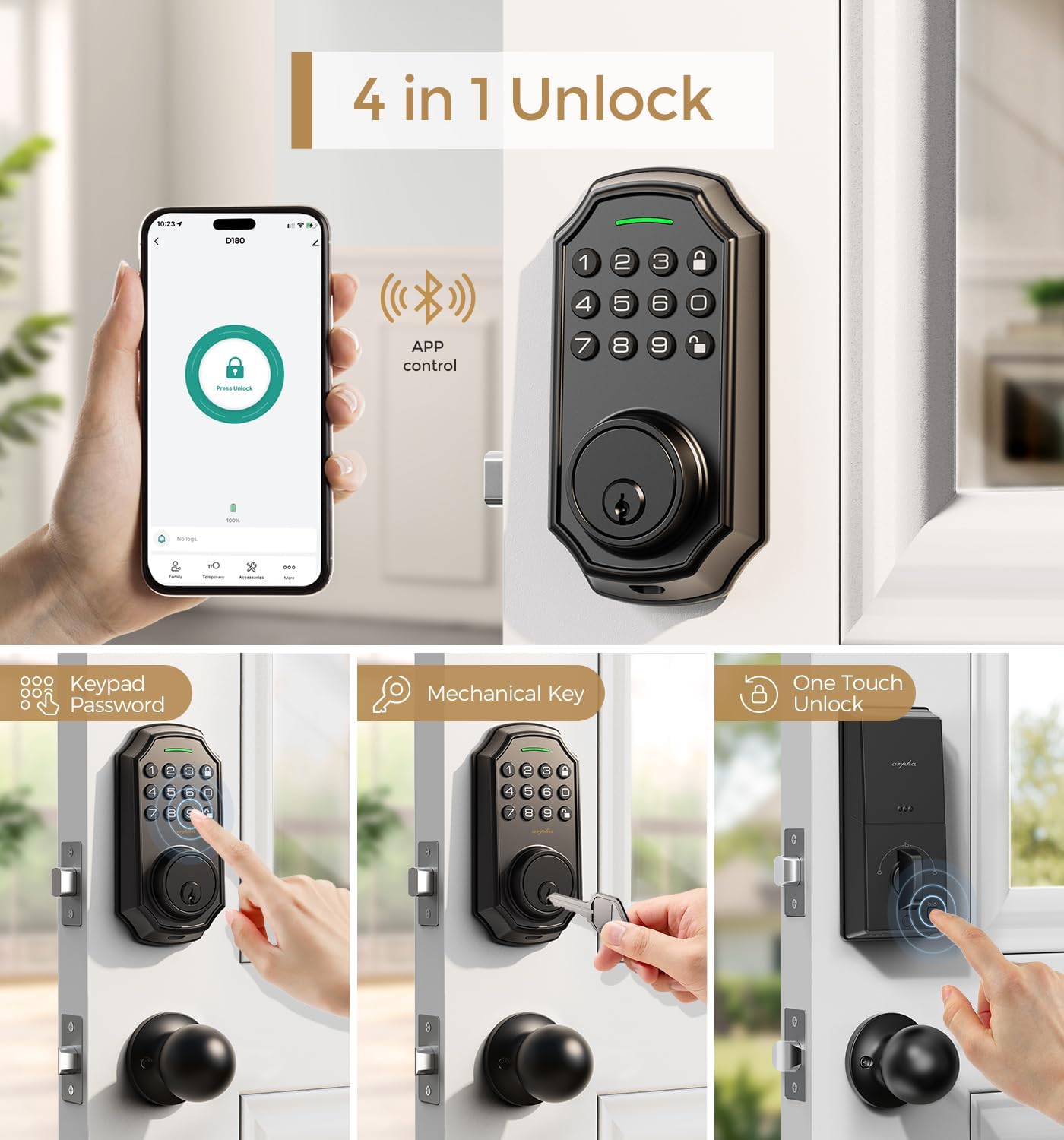
شکل 5: پایview of the four primary unlocking methods.
4.2 Anti-Peeping Password
To protect your passcode from prying eyes, you can enter up to 16 virtual digits before or after your actual 6-8 digit passcode. The lock will still recognize the correct sequence within the longer entry.

شکل 6: مثالample of using the anti-peeping password feature.
۴.۲ اتومات لاک او یو لمس لاک کول
The lock features an auto-lock function that can be set to activate between 10 seconds and 30 minutes after unlocking. Additionally, a one-touch lock feature allows for immediate locking by pressing a dedicated button.

Figure 7: Auto-lock timer setting and one-touch locking functionality.
4.4 App Connection and Management
Connect your lock to the Tuya Smart App for advanced features. Ensure Bluetooth is enabled and your network is set to 2.4G for gateway connection. The app allows you to:
- Generate and share one-time, permanent, scheduled, and recurring codes.
- Manage up to 100 user access codes (3 admin, 97 user).
- View ریکارډونو ته لاسرسی.
- Remotely unlock/lock (with optional gateway).
Video 2: Tutorial on connecting the smart door lock to a gateway for remote access.
Video 3: Guide on connecting the D180K-B to the mobile application.
Video 4: Demonstrates various app functions and operations for the D180K-B.

Figure 8: App control via Bluetooth, effective within a 10-meter range.

Figure 9: The lock supports up to 100 user codes, including 3 admin and 97 regular users.

Figure 10: Generating and sharing temporary access codes via the app.

Figure 11: Real-time unlocking records can be viewایډ په اپلیکیشن کې.

Figure 12: Setting timed passcodes with automatic expiration dates.
5. ساتنه
5.1 د بیټرۍ بدلول
The lock is powered by 4 AA batteries, which typically last around 180 days. A low battery alert will notify you when replacement is needed. Replace all four batteries simultaneously with new ones to ensure optimal performance.

Figure 13: The app displays a low battery reminder when the lock's power is low.
5.2 پاکول
د کیپډ او قلف بدن په نرم، وچ ټوکر سره پاک کړئ. د کثافاتو پاکوونکو یا محلولونو کارولو څخه ډډه وکړئ چې کولی شي پای یا بریښنایی اجزاو ته زیان ورسوي.
6. ستونزه حل کول
If you encounter issues with your ARPHA D180K-B lock, consider the following:
- قلف ځواب نه ورکوي: د بیټرۍ کچه چیک کړئ او د اړتیا په صورت کې یې بدل کړئ.
- کیپډ نه روښانه کیږي: ډاډ ترلاسه کړئ چې بیټرۍ په سمه توګه نصب شوي او چارج شوي.
- د اپلیکیشن سره وصل نشو: Verify Bluetooth is on, the gateway is powered, and your Wi-Fi network is 2.4G. Refer to the app connection video for detailed steps.
- Incorrect passcode entry: Ensure you are entering the correct 6-8 digit passcode. Remember the anti-peeping feature allows extra digits before or after.
- قلف نه ښکیل/بې برخې کول: Check for any obstructions in the door frame or latch mechanism.
د نورو مرستو لپاره، مهرباني وکړئ د پیرودونکو ملاتړ سره اړیکه ونیسئ.
7. مشخصات
| فیچر | مشخصات |
|---|---|
| برانډ | ARPHA |
| د ماډل نوم | D180K-B |
| د بند ډول | د کییډ ډیډبولټ |
| ځانګړی ځانګړنه | Passcode Unlock, App Control, Auto-Lock |
| مواد | زنک |
| رنګ | مټ تور |
| د توکي ابعاد (L x W x H) | 5.8 x 2.3 x 1.57 انچه |
| د توکي وزن | ۲.۴۵ پونډه |
| د بریښنا سرچینه | 4 AA بیټرۍ (شامل ندي) |
| د ارتباط پروتوکول | بلوتوث |
| د کارونکي ظرفیت | 3 Administrator, 97 User Passcodes |
| عملیاتي رطوبت | ۴۰٪ - ۸۰٪ |
| د عملیاتي حرارت درجه | -4°F تر +140°F (-20°C to +60°C) |
8. تضمین او ملاتړ
ARPHA offers a 30-day money-back guarantee, an 18-month assurance, and lifetime technical support for the D180K-B Keyless Entry Door Lock.
Our dedicated support team is available 24/7 via email to assist you with any questions or issues.
- د بریښنالیک ملاتړ: support@arpha.com
- د تلیفون ملاتړ: (1) 844-820-5077
Figure 14: ARPHA provides 24/7 online service and a 2-hour fast response.