
1. پیژندنه
د پیرودلو لپاره مننهasing the RCA SP550BT Portable Speaker. This manual provides important information regarding the setup, operation, and maintenance of your new speaker. Please read it thoroughly before use and keep it for future reference.
The RCA SP550BT is a versatile portable speaker featuring 50W output, Bluetooth connectivity, USB playback, FM radio, AUX input, True Wireless Stereo (TWS) function, LED lights, and a microphone input for an enhanced audio experience.
2. د بسته محتويات
مهرباني وکړئ د لاندې توکو لپاره په بسته کې وګورئ:
- RCA SP550BT Portable Speaker
- ریموټ کنټرول
- د بریښنا کیبل
- د کارونکي لارښود (دا لاسوند)
3. محصول ختم شوview
Familiarize yourself with the main components and features of your RCA SP550BT speaker.

شکل 3.1: مخکی view of the RCA SP550BT portable speaker. This image displays the speaker in an upright position, highlighting the top control panel and the three prominent speaker cones with red illumination.

شکل 3.2: اړخ view of the RCA SP550BT portable speaker. This perspective shows the depth of the speaker and the integrated handle for portability.

شکل 3.3: افقی view of the RCA SP550BT portable speaker. This image illustrates the speaker's design when placed on its side, emphasizing the speaker grille and LED lighting.
3.1 ریموٹ کنټرول
The included remote control allows for convenient operation of the speaker from a distance.
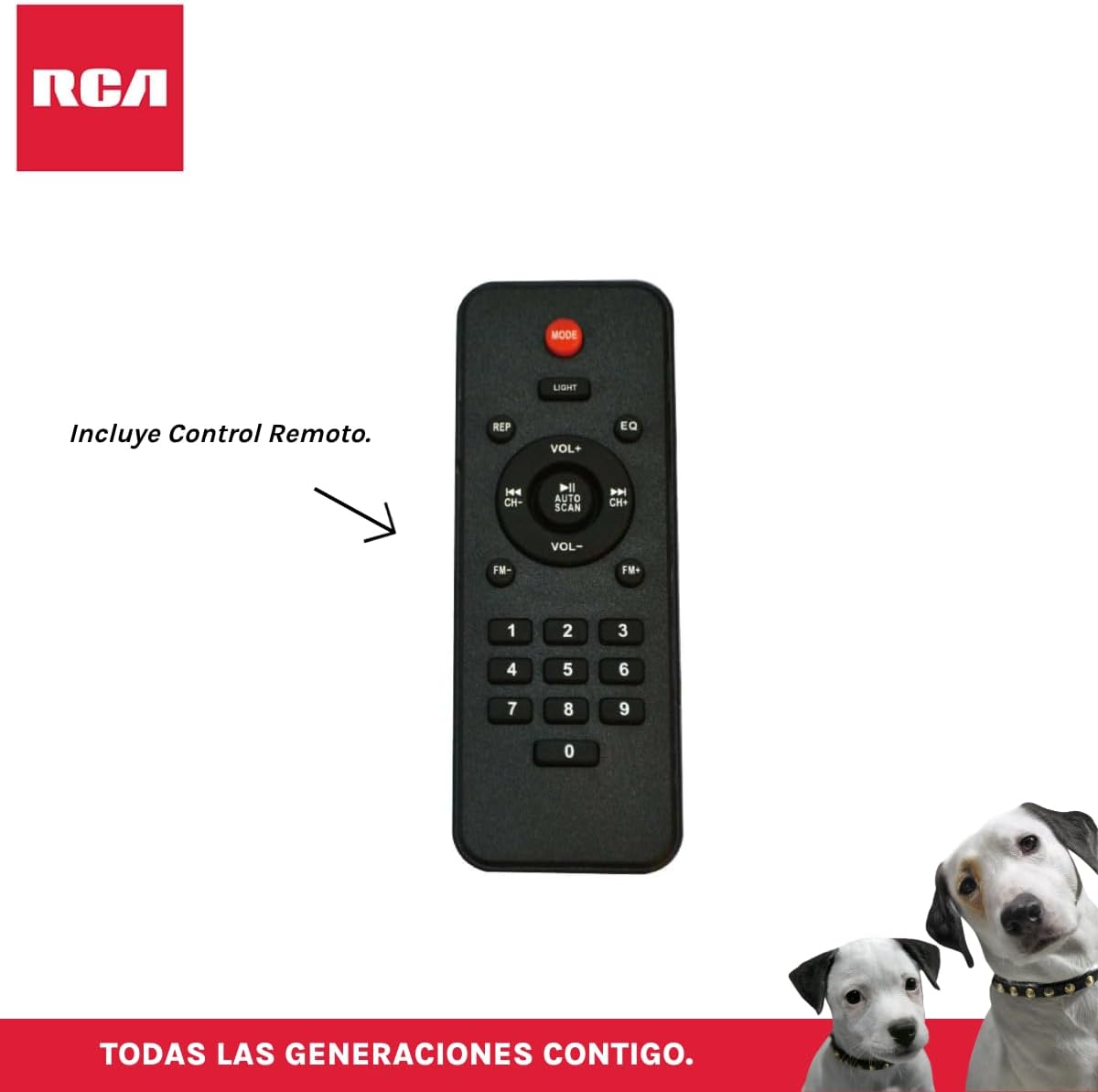
شکل 3.4: RCA SP550BT Remote Control. This image displays the full layout of the remote control, including buttons for power, mode selection, volume adjustment, track navigation, equalizer settings, and a numeric keypad.
4. ترتیب کول
4.1 د بریښنا نښلول
- Ensure the speaker is placed on a stable, flat surface.
- Connect the power cable to the speaker's power input port.
- Plug the other end of the power cable into a standard electrical outlet (AC 100-240V, 50/60Hz).
- Press the power button on the speaker or remote control to turn it on.
5. عملیاتي لارښوونې
۸ پاور آن/بند
- To turn on the speaker, press the پاور button on the control panel or the remote control.
- To turn off the speaker, press the پاور بیا تڼۍ.
5.2 د حالت انتخاب
فشار ورکړئ موډ button on the control panel or remote control to switch between Bluetooth, USB, FM, and AUX input modes.
5.3 د بلوتوټ جوړه کول
- سپیکر چالان کړئ او د بلوتوټ حالت غوره کړئ چې په کارولو سره موډ button. The display will show "BLUE" and a pairing indicator will flash.
- په خپل ګرځنده وسیله (سمارټ فون، ټابلیټ، او نور) کې بلوتوث فعال کړئ.
- لټون "RCA SP550BT" in your device's Bluetooth list and select it to pair.
- یوځل چې جوړه شي، سپیکر به د تایید غږ خپور کړي، او د بلوتوټ شاخص به چمکۍ ودروي.
- تاسو اوس کولی شئ د سپیکر له لارې له خپل وسیله څخه آډیو غږ کړئ.
۱۴ USB پلے بیک
- Insert a USB flash drive (FAT32 format, max 32GB) containing MP3 audio fileد USB پورټ ته ننوځي.
- The speaker will automatically switch to USB mode and begin playing the first track. If not, press the موډ د USB حالت غوره کولو لپاره تڼۍ.
- د کارولو پلی/پاز, پخوانۍ، او بل buttons on the control panel or remote to control playback.
5.5 ایف ایم راډیو
- Turn on the speaker and select FM mode using the موډ تڼۍ
- فشار ورکړئ او ونیسئ پلی/پاز تڼۍ (یا د آټو سکین on remote) to automatically scan and save available FM stations.
- د کارولو پخوانۍ او بل د خوندي شوي سټیشنونو له لارې د تګ راتګ لپاره تڼۍ.
5.6 AUX داخلول
- د 3.5 ملي میتر آډیو کیبل په کارولو سره د سپیکر د AUX ان پټ پورټ سره یو بهرنۍ آډیو وسیله (د مثال په توګه، MP3 پلیر، لیپ ټاپ) وصل کړئ (شامل نه دی).
- د AUX حالت غوره کړئ چې په کارولو سره موډ تڼۍ
- د خپل وصل شوي وسیلې څخه پلے بیک او حجم کنټرول کړئ.
۵.۹ TWS (ریښتینی بېسیم سټیریو) فعالیت
The TWS function allows you to connect two RCA SP550BT speakers wirelessly for a stereo sound experience.
- Ensure both SP550BT speakers are powered on and in Bluetooth mode, but not yet paired with any device.
- په یوه سپیکر کې، فشار ورکړئ او ونیسئ TWS button (if available, or a dedicated TWS pairing button) until you hear a confirmation tone. The speakers will attempt to pair with each other.
- کله چې په بریالیتوب سره جوړه شي، یو سپیکر به د ماسټر (کیڼ چینل) او بل به د غلام (ښي چینل) په توګه عمل وکړي.
- Now, pair your mobile device with the master speaker via Bluetooth as described in section 5.3.
5.8 LED څراغونه
فشار ورکړئ رڼا button on the control panel or remote control to cycle through different LED light modes or to turn them off.
۶.۴ د مایکروفون کارول
Connect a wired microphone (not included) to the microphone input port on the speaker. Adjust the microphone volume using the dedicated knob (if available) or the main volume control.
6. ساتنه
- پاکول: د سپیکر بهرنۍ برخه پاکولو لپاره نرم، وچ ټوکر وکاروئ. د کثافاتو پاکوونکي یا محلولونه مه کاروئ.
- ذخیره کول: کله چې د اوږدې مودې لپاره نه کارول کیږي، سپیکر په یخ او وچ ځای کې د مستقیم لمر وړانګو او سختې تودوخې څخه لرې وساتئ.
- د اوبو ښکاره کول: دا سپیکر د اوبو ضد نه دی. د اوبو یا ډیر رطوبت سره د مخ کیدو څخه ډډه وکړئ.
7. ستونزه حل کول
که تاسو د خپل سپیکر سره ستونزې سره مخ شئ، لاندې عامې ستونزې او حل لارې وګورئ:
| ستونزه | احتمالي لامل | د حل لاره |
|---|---|---|
| هیڅ ځواک نشته | Power cable not connected; Power outlet not working; Speaker off. | د برېښنا کیبل اتصال وګورئ؛ یو بل ساکټ هڅه وکړئ؛ د برېښنا تڼۍ فشار ورکړئ. |
| غږ نشته | غږ ډېر ټیټ دی؛ ناسم حالت غوره شوی دی؛ وسیله په سمه توګه نه ده وصل شوې. | حجم زیات کړئ؛ د ان پټ سم حالت غوره کړئ (بلوتوث، USB، AUX)؛ وسیله بیا وصل کړئ. |
| بلوتوث جوړه ناکامه ده | Speaker not in pairing mode; Device Bluetooth off; Speaker already paired. | Ensure speaker is in Bluetooth pairing mode; Turn on device Bluetooth; Disconnect from other devices. |
| د USB پلے بیک کار نه کوي | USB drive format incompatible; Corrupt files; USB drive not inserted correctly. | Ensure USB is FAT32 format; Check file integrity; Reinsert USB drive. |
| د ایف ایم راډیو کمزوری استقبال | کمزوری سیګنال؛ مداخله. | Relocate speaker; Extend antenna (if applicable). |
8. مشخصات
| فیچر | مشخصات |
|---|---|
| ماډل | SP550BT |
| برانډ | RCA |
| د سپیکر تولید ځواک | ۱۷۰۰ واټونه ( اعظمي) |
| د ارتباط ټیکنالوژي | بلوتوث، USB، AUX |
| بې سیم ټیکنالوژي | بلوتوث |
| د آډیو وتلې حالت | سټیریو |
| د سپیکر ډول | د لېږد وړ، بهر |
| د نصب کولو ډول | د میز ټاپ غر |
| د کنټرول طریقه | ریموټ کنټرول |
| د سپیکر اندازه | ۷۸۷ انچه |
| د ووفر قطر | ۷۸۷ انچه |
| د بیټرۍ ظرفیت | 4400 ملیونهamp ساعتونه |
| د بریښنا سرچینه | برقی کیبل |
| مطابقت لرونکې وسیلې | لپ ټاپ، MP3 پلیر، سمارټ فون، ټابلیټ |
| جي ټي آی اين / يو پي سي | 044476152061 |
9. تضمین او ملاتړ
This product comes with a limited warranty. Please refer to the warranty card included in your package for specific terms and conditions. For technical support or service inquiries, please contact RCA customer service through their official webسایټ یا د اړیکې معلومات ستاسو د پیرود سره چمتو شوي.
یادونه: د تضمین شرایط ممکن د سیمې له مخې توپیر ولري. د تضمین ادعاوو لپاره د پیرود ثبوت وساتئ.