
1. محصول ختم شوview
The XunFox K90 is a compact 66-key mechanical keyboard designed for efficient and responsive input. It features adjustable RGB backlighting and a durable construction. The ergonomic design aims to provide a comfortable typing experience, with keys engineered for smooth and responsive keystrokes.
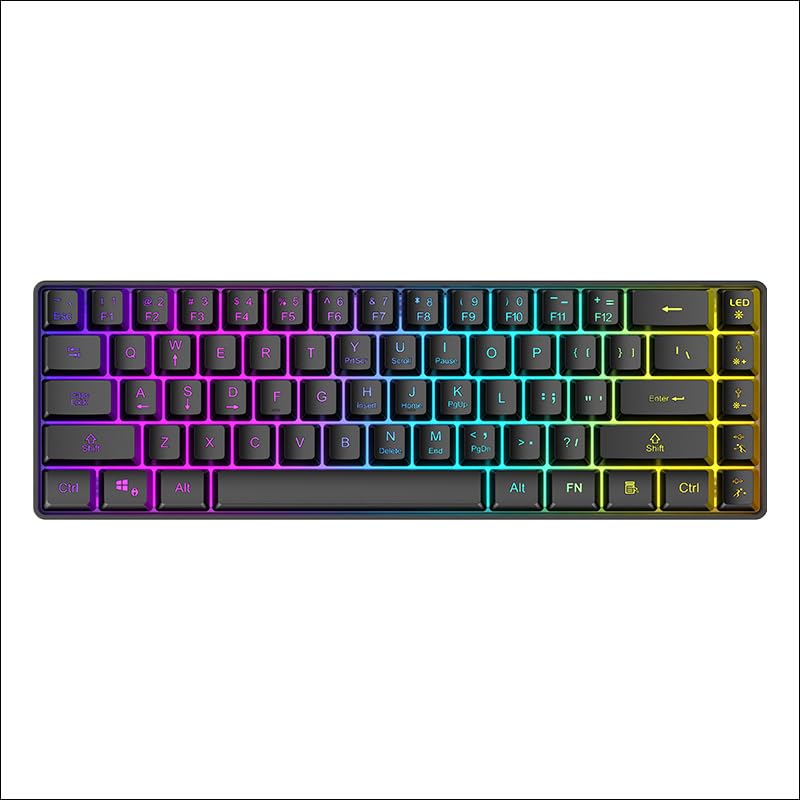
شکل 1: پورته- ښکته view of the XunFox K90 RGB Gaming Keyboard, showcasinد دې کمپیکټ ۶۱ کیلي ترتیب او متحرک RGB بیک لایټینګ.
کلیدي ځانګړتیاوې:
- Compact 66-Key Design: A minimalist layout for enhanced typing comfort and portability.
- Adjustable RGB Backlighting: Customizable lighting effects to personalize your setup.
- دوامدار ساختمان: Crafted with sturdy materials for reliable performance.
- د وایرډ USB اتصال: یو باثباته او له ځنډ څخه پاک اړیکه تضمینوي.
- څو اړخیز مطابقت: Compatible with Windows and other popular operating systems.
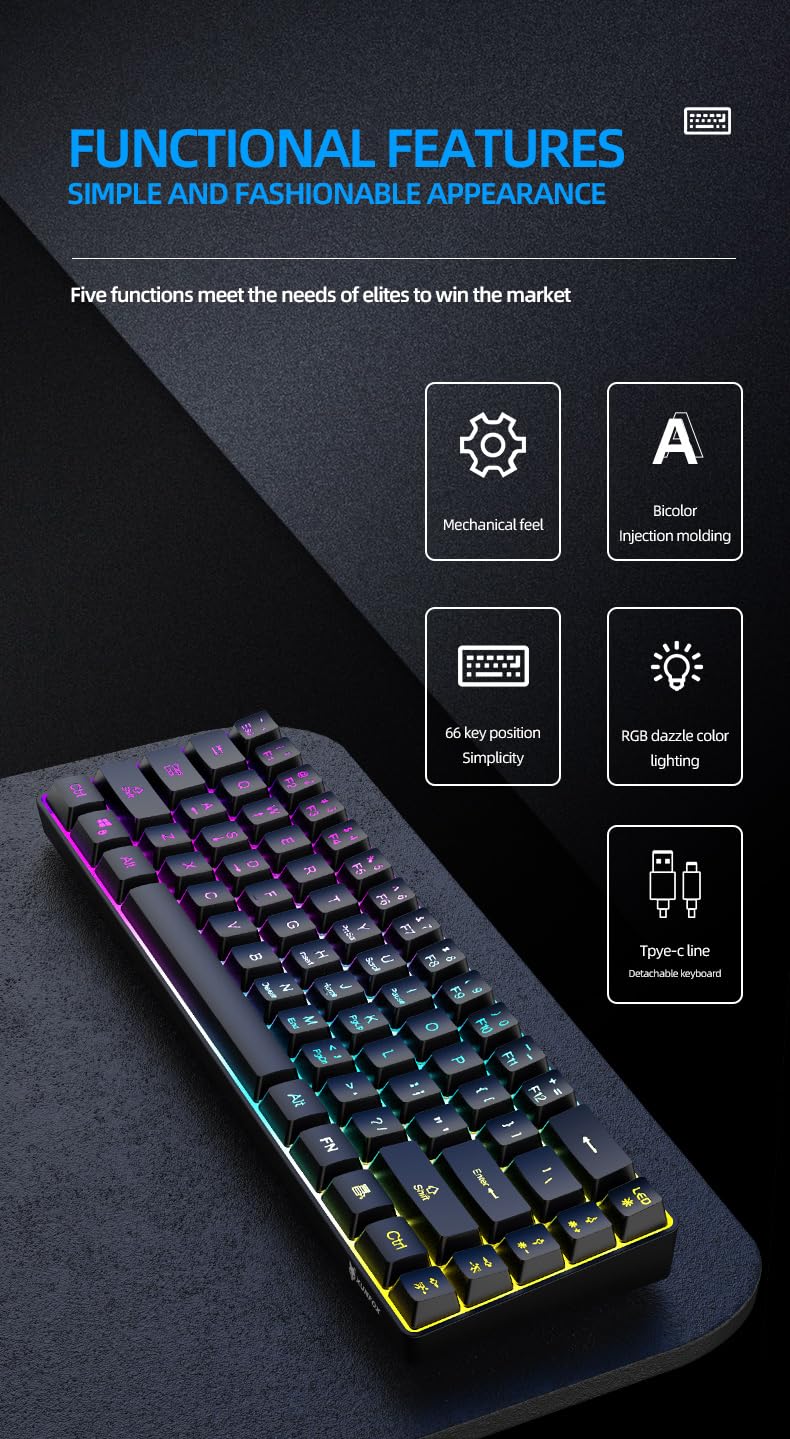
شکل 2: اوورview of the XunFox K90 keyboard's functional features, including mechanical feel, bicolor injection molding, 66-key simplicity, RGB lighting, and detachable Type-C cable.
۴. د تنظیم لارښوونې
د بسته محتويات:
- XunFox K90 RGB Gaming Keyboard
- د USB کیبل (ډول-C څخه USB-A ته)
د کیبورډ سره نښلول:
- Locate the USB Type-C port on the back or side of the XunFox K90 keyboard.
- Connect the Type-C end of the provided USB cable to the keyboard's port.
- د کیبل USB-A پای ستاسو په کمپیوټر یا لیپ ټاپ کې موجود USB پورټ سره وصل کړئ.
- The keyboard will automatically be recognized by your operating system (e.g., Windows 10). No additional drivers are typically required.

شکل 3: Image showing the detachable Type-C cable connecting to the keyboard, illustrating the wired USB connectivity.
3. عملیاتي لارښوونې
بنسټیز عملیات:
The XunFox K90 keyboard functions as a standard 66-key input device. Simply plug it into your computer, and it will be ready for use.
د RGB بیک لایټ کنټرول:
The keyboard features adjustable RGB backlighting with multiple effects. Use the FN (Function) key in combination with specific keys to control the lighting.
- FN + LED Key (usually next to F12): Cycles through various lighting modes, including endless stream, colorful horse running, circular breathing, solid comet tailing, monochrome, multicolor diffusion, and backlight color impact diffusion.
- FN + ↑ (پورته غشی): د شاته رڼا روښانتیا زیاتوي.
- FN + ↓ (ښکته غشی): د شاته رڼا روښانتیا کموي.
- FN + → (ښي غشی): Increases the speed of the lighting effect.
- FN + ← (کیڼ غشی): Decreases the speed of the lighting effect.

شکل 4: Diagram illustrating the key combinations for controlling RGB lighting modes, intensity, and speed on the XunFox K90 keyboard.
4. ساتنه
د کیبورډ پاکول:
- د پاکولو دمخه کیبورډ له خپل کمپیوټر څخه جلا کړئ.
- د نرم، لینټ پاک ټوکر څخه لږ څه کار واخلئampد کیلي کیپسونو او سطحې د پاکولو لپاره د اوبو یا یو نرم پاکولو محلول سره مینځل کیږي.
- په کیبورډ باندې مستقیم مایعات مه سپری کوئ.
- د کیلي ګانو ترمنځ د دوړو او کثافاتو لپاره، فشار شوي هوا وکاروئ.
- Do not use harsh chemicals or abrasive materials, as they may damage the finish.
ذخیره کول:
- کیبورډ په یخ او وچ ځای کې د مستقیم لمر وړانګو او سختې تودوخې څخه لرې وساتئ.
- If storing for an extended period, consider using the original packaging or a protective cover to prevent dust accumulation.
5. ستونزه حل کول
کیبورډ ځواب نه ورکوي:
- د USB اتصال وګورئ: ډاډ ترلاسه کړئ چې USB کیبل په خوندي ډول د کیبورډ او کمپیوټر دواړو سره وصل دی. یو بل USB پورټ هڅه وکړئ.
- کمپیوټر بیا پیل کړئ: ځینې وختونه د سیسټم یو ساده بیا پیل کول کولی شي د اتصال ستونزې حل کړي.
- په بل کمپیوټر کې ازموینه: If possible, test the keyboard on a different computer to determine if the issue is with the keyboard or the original computer's setup.
RGB Lights Not Working or Incorrect:
- Check FN Key Combinations: Refer to the "RGB Backlight Control" section (Section 3) to ensure you are using the correct key combinations to adjust lighting modes, brightness, and speed.
- کیبورډ بیا وصل کړئ: د USB کیبل له سره وصل او بیا وصل کړئ.
6. مشخصات
| فیچر | تفصیل |
|---|---|
| برانډ | XunFox |
| د ماډل نوم | K90 |
| د کیبورډ ډول | د میخانیکي لوبو کی بورډ |
| کلیدي ترتیب | ۸۶-کیلي تړون |
| ارتباط | Wired USB (Type-C detachable cable) |
| شاته رڼا کول | RGB with adjustable breathing lamp اغیزې |
| ځانګړي ځانګړتیاوې | Backlit, Ergonomic design |
| مطابقت لرونکي عملیاتي سیسټمونه | Windows 10 and other popular operating systems |
| مطابقت لرونکې وسیلې | لپ ټاپ، کمپیوټر |
| د محصول ابعاد (LxWxH) | 38 x 12 x 4 سانتي متره |
| د توکي وزن | 600 ګرامه |
| رنګ | تور |
7. د تضمین معلومات
The XunFox K90 RGB Gaming Keyboard comes with a 2 کلن تضمین د پیرود نیټې څخه. دا تضمین د تولید نیمګړتیاوې او د عادي استعمال څخه رامینځته شوي مسلې پوښي. دا د ناوړه ګټې اخیستنې، پیښو، غیر مجاز تعدیلاتو، یا ناسم ساتنې له امله رامینځته شوي زیان پوښښ نه کوي.
مهرباني وکړئ د تضمین ادعاګانو لپاره د پیرود ثبوت وساتئ.
8. ملاتړ
For technical assistance, warranty claims, or any other inquiries regarding your XunFox K90 RGB Gaming Keyboard, please contact customer support:
- د پیرودونکي پاملرنه: +۴۵۷۴۸۸
- واردوونکی/پیکر: NJ Infotech, India