
ښه راغلاست
Thank you for choosing the BYTECH BICONIC True Wireless Earbuds. This manual provides essential information on how to set up, operate, maintain, and troubleshoot your new earbuds. Please read this manual thoroughly before use to ensure optimal performance and longevity of your device.
د خوندیتوب مهمې لارښوونې
- د غوږ بډونه یا د چارج کولو قضیه د تودوخې، رطوبت یا مایعاتو سره مه مخ کوئ.
- د وسیلې له غورځولو، ټکولو یا جلا کولو څخه ډډه وکړئ.
- Do not use abrasive cleaners or harsh chemicals to clean the earbuds or case.
- د اورېدو د زیان د مخنیوي لپاره په منځنۍ کچه غږ واورئ. د لوړ غږونو سره اوږد مهاله تماس کولی شي د اورېدو د نه بدلیدونکي زیان لامل شي.
- د ماشومانو او څارویو د لاسرسي څخه لرې وساتئ.
- Dispose of the device responsibly according to local regulations. Do not dispose of with household waste.
څه پکې شامل دي
مهرباني وکړئ د بسته بندۍ محتويات وګورئ ترڅو ډاډ ترلاسه کړئ چې ټول توکي شتون لري:
- BYTECH BICONIC True Wireless Earbuds (Left and Right)
- د چارج کولو قضیه
- د چارج کیبل
- د کارن لارښود
محصول پای ته ورسیدview
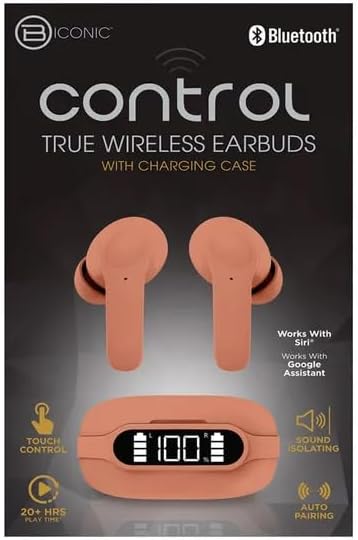
Familiarize yourself with the components of your BYTECH BICONIC True Wireless Earbuds.

پیل کول
د Earbuds او قضیه چارج کول
The BYTECH BICONIC earbuds come with a rechargeable battery in both the earbuds and the charging case. Ensure both are fully charged before first use.
- د چارج کولو په قضیه کې د غوږ بډونه ځای په ځای کړئ، ډاډ ترلاسه کړئ چې دوی په سمه توګه په خپلو اړوندو سلاټونو کې ځای پر ځای شوي دي (L د کیڼ لپاره، R د ښي لپاره).
- Connect the provided charging cable to the charging port on the case and the other end to a USB power source (e.g., computer USB port, wall adapter).
- The digital display on the charging case will show the battery level. Allow sufficient time for a full charge.
- یوځل چې په بشپړ ډول چارج شو، د چارج کیبل له مینځه یوسئ.
د بلوتوث جوړې کول
Follow these steps to pair your earbuds with your Bluetooth-enabled device:
- ډاډ ترلاسه کړئ چې د غوږ بډونه چارج شوي او د چارج کولو کیس دننه دي.
- Open the charging case. The earbuds will automatically enter pairing mode, and an indicator light on the earbuds will flash.
- په خپل وسیله (سمارټ فون، ټابلیټ، او نور) کې، د بلوتوټ ترتیباتو ته لاړ شئ او بلوتوټ فعال کړئ.
- لټون available devices. You should see "BYTECH BICONIC" or a similar name appear in the list.
- Select "BYTECH BICONIC" to connect. Once connected, a voice prompt will confirm the successful pairing, and the indicator lights on the earbuds will stop flashing.
- کله چې له قضیې څخه ایستل شي، اییربډونه به په اتوماتيک ډول د وروستي جوړه شوي وسیلې سره وصل شي، په دې شرط چې په وسیله کې بلوتوټ فعال وي.
عملیاتي لارښوونې
ټچ کنټرولونه
The BYTECH BICONIC earbuds feature intuitive touch controls for easy management of your audio and calls.
| عمل | فعالیت |
|---|---|
| یو ځل نل (کیڼ/ښي غوږۍ) | میوزیک غږول/ځنډول ، ځواب/پای زنګ |
| دوه ځله ټایپ کړئ (ښي غوږۍ) | بله لار |
| دوه ځله ټایپ کړئ (کیڼ غوږۍ) | مخکینی ټریک |
| درې ځله ټایپ (کیڼ/ښي غوږۍ) | د غږ معاون فعال کړئ (سري/ګوګل معاون) |
| اوږد فشار (کیڼ/ښي غوږۍ) | زنګ رد کړئ |
بریښنا کول او بندول
- پاور آن: اییربډونه به په اوتومات ډول فعال شي کله چې د چارج کولو قضیې څخه لرې شي.
- بندول: د غوږ بډونه بیرته د چارج کولو په بکس کې کېږدئ او پوښ یې وتړئ. دوی به په اتوماتيک ډول بریښنا بنده کړي او چارج کول به پیل کړي.
ساتنه او پالنه
Proper care will extend the life of your BYTECH BICONIC True Wireless Earbuds.
- پاکول: Use a soft, dry, lint-free cloth to clean the earbuds and charging case. Do not use liquids or aerosol cleaners.
- ذخیره کول: کله چې په کارولو کې نه وي، تل د غوږ بډونه د چارج کولو په قضیه کې وساتئ ترڅو دوی خوندي او چارج شي.
- د سختو شرایطو څخه ډډه وکړئ: Do not expose the device to extreme heat, cold, or direct sunlight.
- د اوبو مقاومت: دا غوږوالۍ د اوبو ضد نه دي. د اوبو یا ډیر رطوبت سره د تماس څخه ډډه وکړئ.
د ستونزو حل کول
If you encounter any issues with your earbuds, refer to the following common solutions:
| ستونزه | د حل لاره |
|---|---|
| Earbuds نه جوړیږي | ډاډ ترلاسه کړئ چې د غوږۍ غوږۍ چارج شوي دي. په خپل وسیله کې بلوتوث بند او فعال کړئ. وسیله د بلوتوث ترتیباتو کې هیر کړئ او بیا جوړه کړئ. |
| یوازې یو غوږ بډ کار کوي | دواړه غوږۍ د چارج کولو په بکس کې بیرته کېږدئ، سر یې وتړئ، یو څو ثانیې انتظار وکړئ، بیا یې بیا وباسئ. ډاډ ترلاسه کړئ چې دواړه چارج شوي دي. |
| غږ نشته | Check volume levels on both your device and the earbuds. Ensure earbuds are properly connected. Try playing different audio. |
| د چارج قضیه نه چارج کول | Ensure the charging cable is securely connected to both the case and the power source. Try a different USB port or power adapter. |
تخنیکي مشخصات
Detailed specifications for your BYTECH BICONIC True Wireless Earbuds:
| فیچر | تفصیل |
|---|---|
| د ماډل شمیره | BC-AU-BE-144-TN |
| د ارتباط ټیکنالوژي | بې سیم (بلوتوث) |
| د فارم فکتور | د غوږ دننه (د غوږ دننه) |
| رنګ | کیف |
| ځانګړي ځانګړتیاوې | Rechargeable Battery, Touch Control, Sound Isolating, Auto Pairing |
| شاملې برخې | کیبل |
| Estimated Play Time | ۴۵+ ساعته (د چارج کولو کیس سره) |
د تضمین معلومات او د پیرودونکو ملاتړ
BYTECH products are designed and manufactured to the highest quality standards. For information regarding warranty coverage, please refer to the warranty card included with your purchase or visit the official BYTECH webسایټ
If you require further assistance or have questions not covered in this manual, please contact BYTECH customer support through their official channels. Please have your model number (BC-AU-BE-144-TN) and purchase details ready when contacting support.