
د LTC NB981 معرفي کول
د LTC Nimbleback NB981 بې سیم میخانیکي کیبورډ کارونکي لارښود
ماډل: NB981
برانډ: LTC
پیژندنه
Welcome to the user manual for your LTC Nimbleback NB981 95% Wireless Mechanical Keyboard. This manual provides detailed instructions for setting up, operating, maintaining, and troubleshooting your new keyboard.
The NB981 keyboard offers versatile connectivity options (2.4GHz, Bluetooth, USB-C wired), a comfortable typing experience with its 3-layer silicone dampening, and extensive customization through hot-swappable switches and dynamic RGB lighting.
د بسته محتويات
مهرباني وکړئ تصدیق کړئ چې ټول توکي ستاسو په کڅوړه کې شتون لري:
- LTC Nimbleback NB981 Wireless Mechanical Keyboard
- USB-C ته USB-A کیبل
- کیکیپ پلر
- Switch Puller (often combined with keycap puller)
- اضافي سویچونه
- د کارن لارښود
د ان باکس کولو ویډیو
This video demonstrates the unboxing process and shows the contents typically included with the LTC Nimbleback NB981 keyboard.
محصول پای ته ورسیدview
The LTC Nimbleback NB981 is a high-performance mechanical keyboard designed for both gaming and everyday use. It features a 95% layout, combining functionality with a compact design.
کلیدي ځانګړتیاوې
- Flexible Tri-Mode Connectivity: Bluetooth, wired, and 2.4GHz options.
- Excellent Silicone Sound Dampening: Triple-layer silicone structure for reduced hollow sounds and quiet typing.
- Customizable Hot-Swap Design: Supports most 3-pin and 5-pin MX-style switches without soldering.
- Powerful Software Support: Key remapping, macro assignments, and personalized lighting effects for Windows, Android, iOS, and macOS.
- متحرک RGB روښانتیا: 18 vibrant backlight modes with adjustable speed and brightness.
- اوږدمهاله ۱۲۰۰۰mAh بیټرۍ: Extended usage with battery status monitoring (FN+backspace).
د کیبورډ ترتیب او اجزا
Refer to the images below for a visual guide to the keyboard's layout and internal structure.
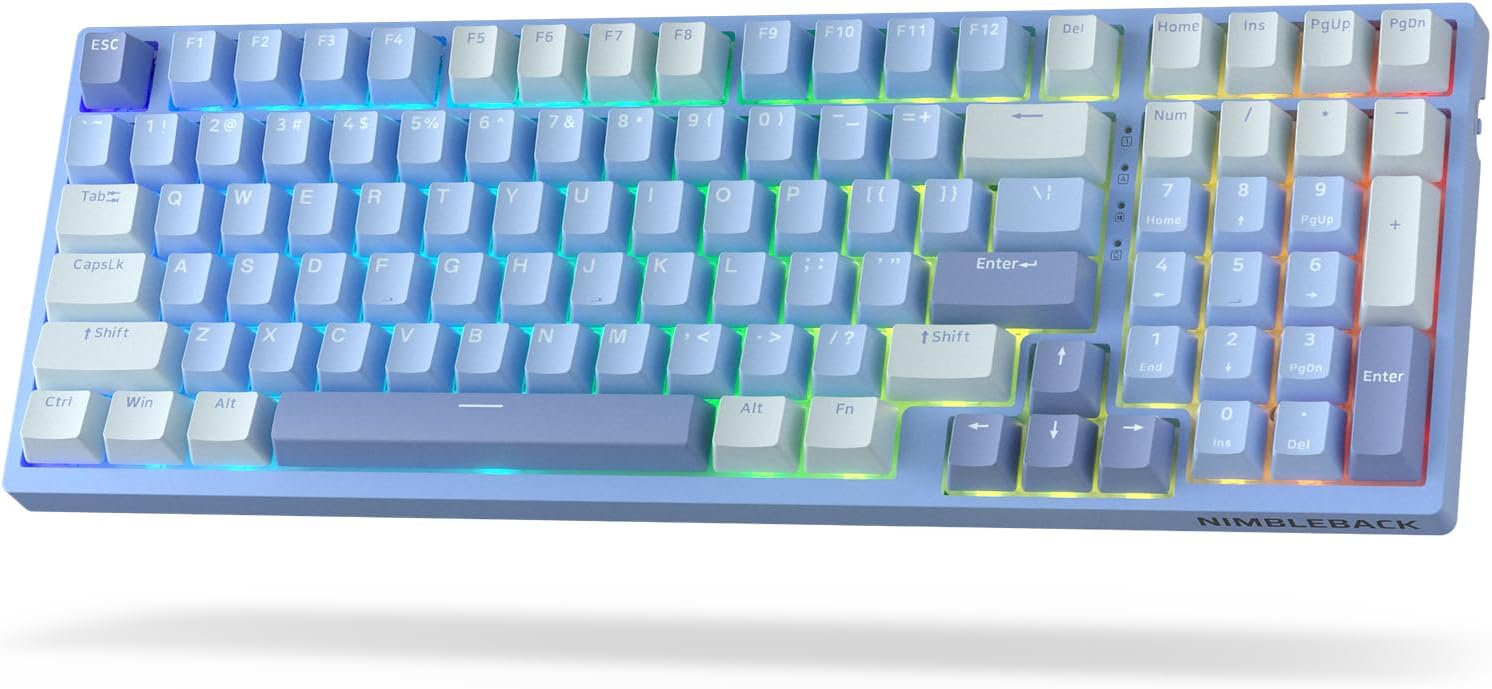
انځور: پورته-ښکته view of the LTC Nimbleback NB981 keyboard in Sky Blue, showcasing its 95% layout with RGB backlighting.

Image: Diagram highlighting key features of the NB981 keyboard, including 3-layer silicone padding, 98-key layout, tri-mode connection, 4000mAh battery, hot-swap PCB, PBT keycaps, dynamic RGB, and software support.
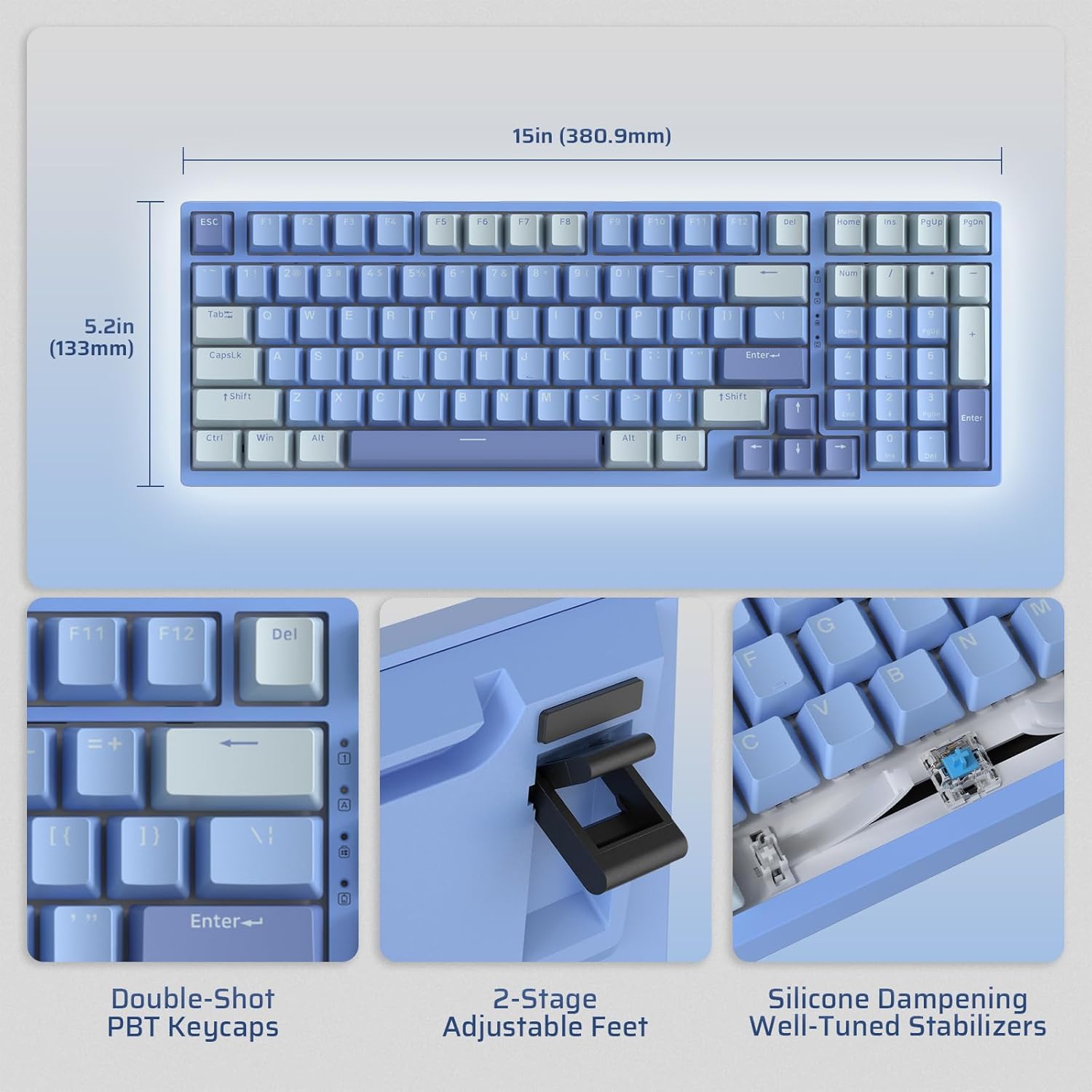
Image: Illustrates the dimensions of the keyboard (15 inches / 380.9mm length, 5.2 inches / 133mm width), double-shot PBT keycaps, 2-stage adjustable feet, and silicone dampening with well-tuned stabilizers.
چمتو کول
Before first use, it is recommended to fully charge the keyboard using the provided USB-C cable.
لومړنی پیوستون
The keyboard supports three connection modes: 2.4GHz wireless, Bluetooth, and USB-C wired.

Image: Visual representation of the tri-mode connectivity options: Bluetooth 5.0 (up to 3 devices), 2.4GHz fast-response wireless, and USB-C stable wired mode.
د ارتباط طریقې
2.4GHz بې سیم حالت
- Locate the 2.4GHz USB dongle, typically stored in a compartment on the back of the keyboard.
- ډونګل په خپل کمپیوټر کې موجود USB-A پورټ کې ولګوئ.
- Turn on the keyboard using the ON/OFF switch located on the side.
- کیبورډ باید په اتوماتيک ډول وصل شي. که نه، فشار ورکړئ fn+4 د جوړه پیل کولو لپاره د 3 ثانیو لپاره.
بلوتوث حالت
- د ON/OFF سویچ په کارولو سره کیبورډ چالان کړئ.
- مطبوعاتي fn+1, fn+2، یا fn+3 د بلوتوث چینل غوره کولو لپاره. اړونده کیلي به په چټکۍ سره فلش شي، چې د جوړه کولو حالت په ګوته کوي.
- On your device (computer, tablet, smartphone), enable Bluetooth and search for "LTC NB981".
- Select the keyboard to pair. The key will stop flashing once connected.
- You can store up to three Bluetooth devices.
USB-C Wired Mode
- ورکړل شوی USB-C کیبل د کیبورډ USB-C پورټ سره وصل کړئ.
- Connect the other end of the cable (USB-A) to your computer's USB port.
- کیبورډ به په اتوماتيک ډول تار لرونکي حالت ته لاړ شي او چارج به پیل کړي.
عملیاتي لارښوونې
د شاتنۍ رڼا کنټرول
The NB981 features dynamic RGB illumination with 18 modes.
- Fn + |: Backlight On/Off
- Fn + ↑: Backlight Modes Switch (Cycle through 18 modes)
- Fn + ↓: Backlight Colors Switch (Change color in static modes)
- Fn + ←: Backlight Speed -
- Fn + →: د شاتنۍ رڼا سرعت +
- Fn + F5: Backlight Brightness -
- Fn + F6: Backlight Brightness +
To restore factory settings for backlight, long press Fn + فضا.
Multimedia Keys (Windows System)
د کارولو Fn key in combination with the F-keys for multimedia functions:
- Fn + F1: Display Brightness -
- Fn + F2: Display Brightness +
- Fn + F3: Back to Desktop
- Fn + F4: Mission Control
- Fn + F7: Last Song
- Fn + F8: پلی / ودرول
- Fn + F9: بله سندره
- Fn + F10: خاموشه
- Fn + F11: ټوک -
- Fn + F12: حجم +
د سافټویر ملاتړ
The keyboard supports powerful software for full customization. This software allows for key remapping, macro assignments, and advanced lighting effects.
The software is compatible with Windows (7, 8, 10, 11), Android, iOS, and macOS. Please visit the official LTC webد سافټویر ډاونلوډ او تفصيلي لارښوونو لپاره سایټ.

Image: Screenshot of the LTC keyboard customization software, showing options for key remapping, macro creation, and RGB lighting control.
Hot-Swap Switch Replacement
The NB981 features a hot-swappable PCB, allowing you to change switches without soldering.
- Use the provided switch puller tool to gently remove the desired switch.
- Align the pins of the new 3-pin or 5-pin MX-style switch with the holes on the PCB.
- Press the new switch firmly into place until it clicks. Ensure the pins are straight to avoid bending.

انځور: تفصیلي view of the hot-swap PCB, illustrating pre-lubed linear switches, hot-swap sockets, and well-lubed stabilizers.
غږ پروfile
The keyboard's 3-layer silicone dampening structure significantly minimizes hollow sounds and cavity noise, providing a smooth and quiet typing experience.
This video provides a sound test of the LTC Nimbleback NB981 keyboard, demonstrating its typing acoustics with the integrated sound dampening
ساتنه
- پاکول: Use a soft, dry cloth to wipe the keyboard surface. For deeper cleaning, use the keycap puller to remove keycaps and clean dust or debris with compressed air or a small brush.
- د بیټرۍ پاملرنه: To prolong battery life, avoid fully discharging the keyboard frequently. Charge it when the battery indicator (FN+backspace) shows low power.
- ذخیره کول: کیبورډ په یخ او وچ ځای کې د مستقیم لمر وړانګو او سختې تودوخې څخه لرې وساتئ.
د ستونزو حل کول
کیبورډ ځواب نه ورکوي:
- Ensure the keyboard is turned ON.
- Check the battery level (FN+backspace). Recharge if low.
- For wired mode, ensure the USB-C cable is securely connected to both the keyboard and the computer. Try a different USB port.
- For 2.4GHz mode, ensure the dongle is properly inserted and try re-pairing (fn+4 د 3 ثانیو لپاره).
- For Bluetooth mode, ensure Bluetooth is enabled on your device and try re-pairing (Fn + 1/2/3 د 3 ثانیو لپاره).
- خپل کمپیوټر بیا پیلولو هڅه وکړئ.
هغه کیلي چې راجستر نه کیږي یا دوه ځله ټایپ کیږي:
- This could indicate a faulty switch. Use the switch puller to replace the affected switch with a spare one.
- ډاډ ترلاسه کړئ چې سویچ په بشپړ ډول په PCB کې ځای پر ځای شوی دی.
د شاليد مسلې:
- Ensure backlight is turned on (Fn + |).
- روښانتیا تنظیم کړئ (Fn + F5/F6).
- Cycle through modes (Fn + ↑) یا رنګونه (Fn + ↓).
- Reset backlight to factory settings (Long press Fn + فضا).
د بلوتوث اتصال بې ثباته:
- ډاډ ترلاسه کړئ چې نور وسایل مداخله نه کوي.
- کیبورډ خپل وسیله ته نږدې کړئ.
- Try forgetting the device on your computer's Bluetooth settings and re-pairing.
مشخصات
| فیچر | تفصیل |
|---|---|
| برانډ | LTC |
| ماډل | NB981 |
| ارتباط | Bluetooth, RF (2.4GHz), USB-C |
| د کیبورډ ډول | میخانیکي |
| د کلیدونو شمیر | 98 |
| شاته رڼا کول | RGB |
| د بیټرۍ ظرفیت | 4000mAh |
| د توکي وزن | ۲.۴۵ پونډه |
| د کڅوړې ابعاد | 16.45 x 6.93 x 2.01 انچه |
| مطابقت لرونکې وسیلې | PC (Windows, Android, iOS, macOS via software) |
| ځانګړي ځانګړتیاوې | Backlit, Hotkeys and Media Keys, Programmable Keys, Hot-Swappable |
| د اصلي هیواد | چین |
په بکس کې څه دي
- کیکیپ پلر
- USB کیبل
تضمین او ملاتړ
For warranty information and technical support, please refer to the official LTC webسایټ ته مراجعه وکړئ یا د دوی د پیرودونکو خدماتو سره اړیکه ونیسئ. د تضمین ادعاوو لپاره خپل د پیرود رسید وساتئ.
لیدنه وکړئ LTC Official Store د نورو محصولاتو او ملاتړ لپاره.
Ask a question about this manual
Ask about setup, troubleshooting, compatibility, parts, safety, or missing instructions. Manuals+ will review the question and use this page’s manual context to help answer it.