
1. پیژندنه
This manual provides detailed instructions for the safe and efficient operation of your DHRUVPRO KUAIQU SPS-C305S variable DC regulated power supply. This device is designed for laboratory and industrial applications, offering precise control over voltage and current output, along with essential protection features.
2. د خوندیتوب لارښوونې
Please read and understand all safety instructions before operating the power supply. Failure to follow these instructions may result in electric shock, fire, or damage to the unit or connected equipment.
- د ننوتلو حجم ډاډمن کړئtage matches the specified requirements (AC 220V 50Hz).
- د برېښنا رسولو کار په لوند یا وچ حالت کې مه کوئamp شرایط
- سي مه خلاصوهasing؛ دننه د کارونکي لپاره د خدمت وړ برخې نشته. د خدماتو وړاندې کول وړ پرسونل ته راجع کړئ.
- د ډیر تودوخې مخنیوي لپاره مناسب هوا ورکول ډاډمن کړئ. د وینټیلیشن خلاصون مه بندوئ.
- Always connect the ground terminal to a proper earth ground.
- د آوټ پټ ټرمینلونو سره د اتصالونو جوړولو یا بدلولو دمخه بریښنا قطع کړئ.
- Avoid short-circuiting the output terminals for extended periods, even with protection enabled.
3. محصول ختم شوview
The KUAIQU SPS-C305S is a high-precision, variable DC power supply featuring a digital display and encoder control for accurate adjustments. It includes multiple protection functions and convenient USB charging ports.
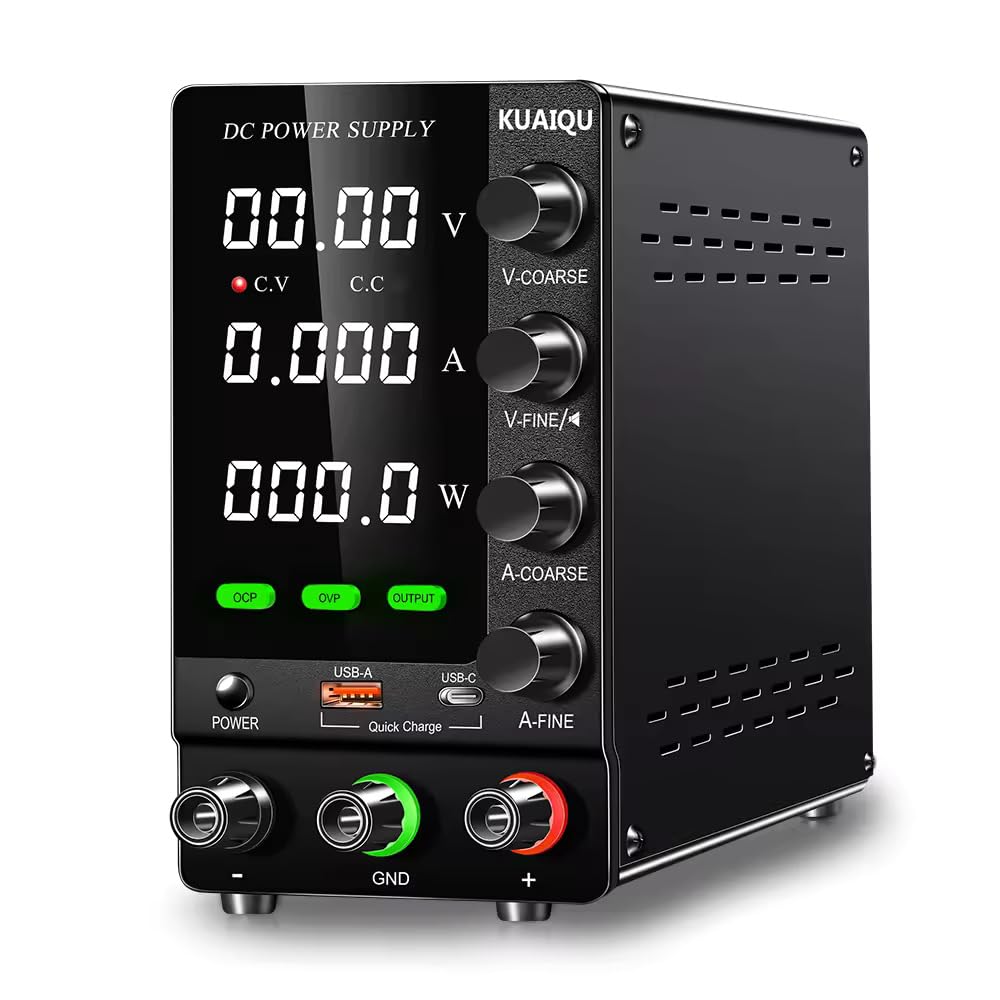
مخکی view of the KUAIQU SPS-C305S DC Power Supply, showing the digital display for voltage, current, and power, along with control knobs for voltage and current adjustment, and buttons for OCP, OVP, and Output control. USB-A and USB-C charging ports are also visible.
کلیدي ځانګړتیاوې:
- Complete operating protection functions: Over Current Protection (OCP), Over Voltage Protection (OVP), and Short Circuit Protection.
- High efficiency, low ripple, compact volume, and light weight design.
- Dual digital display for simultaneous voltage and current readings with high precision.
- Stable voltage output and precise current limiting capabilities.
- Temperature-controlled fan for efficient heat dissipation and low noise operation.
- Dual potentiometers for fine and coarse adjustment of voltage او اوسنی.
- Integrated USB-A and USB-C (Type-C) charging ports for external devices, independent of main output.
4. ترتیب کول
Follow these steps to set up your power supply:
- بسته بندي کول: Carefully remove the power supply from its packaging and inspect for any signs of damage.
- ځای په ځای کول: واحد په یوه مستحکم او هموار سطحه کې کیږدئ چې په ټولو خواوو کې مناسب هوا ورکړي. ډاډ ترلاسه کړئ چې هیڅ شی د هوا د لارې خنډ نه ګرځي.
- د بریښنا پیوستون: Connect the provided AC power cord to the power input socket on the rear of the unit, then plug the other end into a grounded AC 220V 50Hz power outlet.
- د نښلولو بار: Before turning on the power, connect your load to the output terminals. Use appropriate gauge wires for your application. Connect the positive (+) terminal of your load to the red (+) output terminal of the power supply and the negative (-) terminal of your load to the black (-) output terminal. Ensure a secure connection.
5. عملیاتي لارښوونې
5.1. بریښنا فعاله کړئ
- فشار ورکړئ "POWER" button located on the front panel to turn on the power supply. The digital display will illuminate, showing the previously set voltage او اوسني ارزښتونه.
5.2. والtage ترتیب
- وګرځوئ "VOLTAGE" encoder switch to adjust the desired output voltage.
- When adjusting, the currently selected digit on the voltage display will blink.
- Rotate clockwise to increase the value; rotate counterclockwise to decrease the value.
- Press the encoder switch to move the cursor position to adjust different digits (e.g., units, tenths, hundredths).
- The blinking will stop automatically after approximately 5 seconds of inactivity, confirming the set voltage.
5.3. Current Setting
- وګرځوئ "CURRENT" encoder switch to adjust the desired output current limit.
- Similar to voltage setting, the currently selected digit on the current display will blink during adjustment.
- Rotate clockwise to increase the value; rotate counterclockwise to decrease the value.
- Press the encoder switch to move the cursor position to adjust different digits.
- The blinking will stop automatically after approximately 5 seconds of inactivity, confirming the set current limit.
5.4. OCP (Over Current Protection) Short Circuit Protection
- فعال او غیر فعال کړئ: لنډ فشار ورکړئ "OCP" button to toggle the OCP function on or off.
- Setting OCP Value: فشار ورکړئ او ونیسئ "OCP" button for 3 seconds to enter the OCP setting state. Use the current adjustment knob to set the desired overcurrent protection value.
- عملیات: When OCP is enabled, if an external load short circuit or overcurrent condition occurs, the power supply will stop outputting and an alarm will sound, effectively protecting the external load.
- Clearing Alarm: To clear the OCP alarm and resume operation, short press the "OCP" تڼۍ
5.5. OVP (اوور حجمtage Protection) Function
- فعال او غیر فعال کړئ: لنډ فشار ورکړئ "OVP" button to toggle the OVP function on or off.
- Setting OVP Value: فشار ورکړئ او ونیسئ "OVP" button for 3 seconds to enter the OVP setting state. Use the voltage adjustment knob to set the desired overvoltagد ساتنې ارزښت.
- عملیات: When OVP is enabled, if the load voltage exceeds the set OVP value, the power supply will stop outputting and an alarm will sound, effectively protecting external loads.
- Clearing Alarm: To clear the OVP alarm and resume operation, short press the "OVP" تڼۍ
5.6. Output On/Off Control
- لنډ فشار ورکړئ "OUTPUT" button to switch the power supply output on or off. This allows you to connect or disconnect the load without powering down the unit.
۶.۲. د USB چارج کولو فعالیت
- The power supply is equipped with USB-A and USB-C (Type-C) charging ports on the front panel.
- These ports provide charging capabilities for compatible devices and operate independently of the main regulated voltage او اوسنی محصول.
- They can be used separately or simultaneously. When used separately, they support fast charging for compatible devices.
6. ساتنه
مناسب ساتنه ستاسو د بریښنا رسولو اوږد عمر او د باور وړ عملیات تضمینوي.
- پاکول: Regularly clean the exterior of the unit with a soft, dry cloth. Do not use abrasive cleaners or solvents. Ensure the unit is powered off and unplugged before cleaning.
- وینټیلیشن: د هوا د جریان د مناسبوالي او د ډیر تودوخې د مخنیوي لپاره د هوا د جریان دروازې له دوړو او کثافاتو څخه پاکې وساتئ.
- ذخیره کول: کله چې د اوږدې مودې لپاره نه کارول کیږي، د بریښنا رسولو په یخ او وچ چاپیریال کې وساتئ، د مستقیم لمر وړانګو او سخت تودوخې څخه لرې.
- معاینه: Periodically inspect the power cord and output cables for any signs of damage. Replace damaged cables immediately.
7. ستونزه حل کول
که تاسو د خپل بریښنا رسولو سره ستونزې سره مخ شئ، لاندې عامې ستونزې او حل لارې وګورئ:
- ځواک نشته:
- Check if the power cord is securely connected to both the unit and the AC outlet.
- ډاډ ترلاسه کړئ چې د AC آوټ لیټ فعال دی.
- ډاډ ترلاسه کړئ "POWER" تڼۍ فشارول کیږي.
- د تولید حجم نشتهtage/اوسنۍ:
- وګورئ که چیرې "OUTPUT" button is pressed to enable output.
- Verify that OCP or OVP protection has not been triggered. If an alarm is active, clear it by short pressing the respective OCP/OVP button.
- د حجم ډاډ ترلاسه کړئtage and current settings are not set to zero.
- Check the load connection for any open circuits or incorrect wiring.
- Unstable Output:
- Ensure the load is within the power supply's specifications.
- Check for loose connections at the output terminals.
- Verify that the power supply is adequately ventilated and not overheating.
8. مشخصات
Technical specifications for the KUAIQU SPS-C305S power supply:
| پیرامیټر | ارزښت |
|---|---|
| برانډ | DHRUVPRO |
| د ماډل شمیره | SPS-C305S |
| ننوتۍ جلدtage | AC 220V 50Hz |
| د محصول Voltage حد | 0 - 30V (continuous adjustment) |
| د محصول اوسنی سلسله | 0 - 5A (continuous adjustment) |
| د واټ محصولtage | 150 واټ |
| والیtage ریزولوشن | 0.01V |
| اوسنی حل | 0.001A |
| والیtage Regulation (Line) | <5mV |
| والیtage Regulation (Load) | <5mV |
| د بیا رغونې وخت | <500us (50% Load change, minimum load 0.5A) |
| څپې او شور | <5m Vrms, 100m Vp-p |
| د تودوخې کوفیینټ | <100ppm/°C |
| Current Regulation (Line) | <3mA |
| Current Regulation (Load) | <3mA |
| والیtage Display Precision | ±(0.5% د rdg + 2 عدد) |
| Current Display Precision | ±(0.5% د rdg + 2 عدد) |
| د عملیاتو تودوخه او رطوبت | 0~40°C, RH<80% |
| د ذخیرې د حرارت درجه او رطوبت | -10~70°C, RH<70% |
| د یخولو ډول | هوا |
| د محصول ابعاد (LxWxH) | 20 x 15 x 30 سانتي متره |
| د توکي وزن | 2 کیلو ګرامه |
| د اصلي هیواد | چین |
9. تضمین او ملاتړ
This product comes with a standard manufacturer's warranty. For warranty claims, technical support, or any inquiries, please contact the seller or manufacturer directly.
جوړونکی/پیکر: KUAIQU-S / DHRUVcom
پته: CHENNAI, TAMIL NADU, 600001, India
بریښنالیک: support@dhruvpro.in
د تلیفون شمیره: 7200470717