
1. پیژندنه
Thank you for choosing the HITRENDS Outdoor Digital Timer TE-HD01. This manual provides detailed instructions for the safe operation, setup, programming, and maintenance of your new timer. Please read this manual thoroughly before use to ensure proper functionality and to prevent damage.

Image 1.1: HITRENDS Outdoor Digital Timer TE-HD01. This image displays the main unit of the digital timer, featuring its LCD screen, control buttons, two grounded outlets, and a flexible power cord with a three-prong plug.
2. د خوندیتوب مهمې لارښوونې
د بریښنایی شاک، اور، یا ټپي کیدو خطر کمولو لپاره، تل د خوندیتوب دا اساسي احتیاطي تدابیر تعقیب کړئ:
- ټولې لارښوونې ولولئ: Familiarize yourself with the product before operation.
- یوازې بهرنی استعمال: This timer is designed for outdoor use. Ensure it is installed in a location protected from direct heavy rain or standing water.
- ځمکني ځایونه: تل ټایمر په یوه درې-پرانګ لرونکي ځای کې ولګوئ. د ځمکې لاندې پرانګ مه لرې کوئ.
- بریښنایی درجه بندي: Do not exceed the electrical rating of 15A, 1875W, 1/2 HP. Overloading can cause overheating and fire.
- خوندي نصب کول: Mount the timer securely using the integrated mounting hole to prevent it from falling or being submerged.
- ماشومان لرې وساتئ: دا یوه لوبه نه ده. د ماشومانو د لاسرسي څخه لرې وساتئ.
- د بریښنا قطع کول: Always unplug the timer from the power source before cleaning or performing any maintenance.
- د زیانونو مخنیوی: Do not use if the timer, cord, or plug is damaged. Contact customer support for assistance.
3. محصول ختم شوview
The HITRENDS Outdoor Digital Timer TE-HD01 features a clear LCD display and intuitive buttons for easy programming. It includes two grounded outlets for connecting your devices.
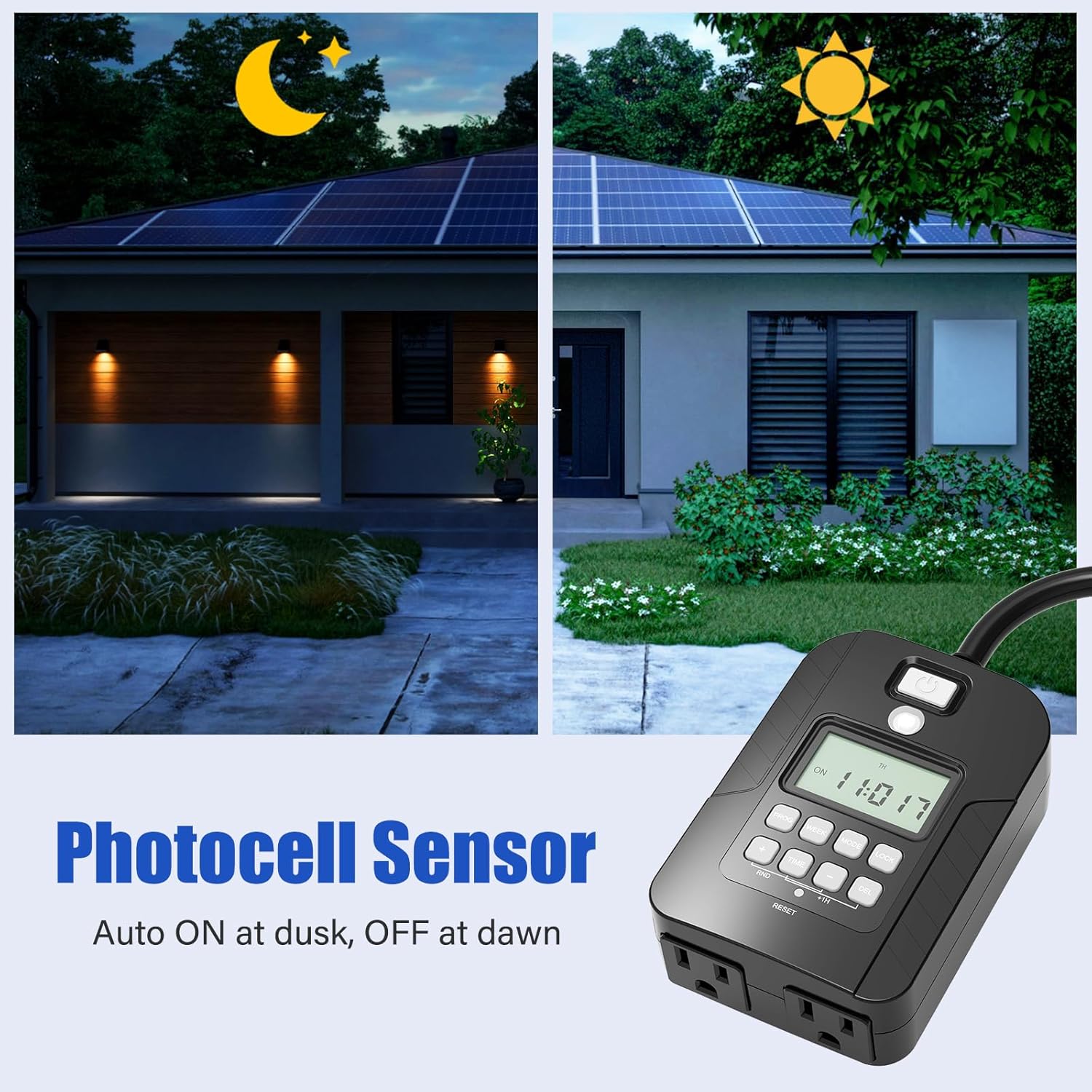
Image 3.1: Product Buttons Overview. This image highlights the various buttons and their labels on the digital timer's control panel, along with the light sensor and power button.
تڼۍ او دندې:
- د بریښنا تڼۍ: Press and hold for 3 seconds to switch between Auto, Always ON, and Always OFF modes.
- د رڼا سینسر: Automatically detects changes in ambient light levels to adjust the timer's operation accordingly (for Dusk to Dawn features).
- پروګرام (پروګرام): Press to enter the setting mode for programming schedules or to review existing schedules.
- اونۍ: Use to select specific days of the week (MO, TU, WE, TH, FR, SA, SU) for the timer's operation.
- لارښوونه: Press to switch between different operating modes (Timed Mode, Photocell + Countdown Mode, Photocell + Timed Mode).
- لاک: Press and hold for 10 seconds to lock the current settings, and press again for 10 seconds to unlock.
- وخت: Press to adjust time settings; use in combination with the [+/-] buttons to set the hour and minutes.
- +/- تڼۍ: Adjusts hours or minutes when configuring time settings.
- DEL (Delete): بیا بیاview a schedule, press PROG, then use the DEL button to delete the selected schedule.
- RND (Random): Activates or deactivates the random ON/OFF feature.
- RESET (Recessed): A small, recessed button typically requiring a pointed object (like a pen tip) to press. Resets all settings to factory defaults.
4. ځانګړتیاوې
The HITRENDS Outdoor Digital Timer TE-HD01 offers a range of features designed for convenience and energy efficiency:
- 8 ON/OFF Programs: Set up to 8 distinct ON/OFF schedules daily or weekly.
- 7-Day Programmable: Customize schedules for individual days or groups of days.
- له سهار څخه تر سهاره پورې سینسر: Automatic operation based on ambient light levels.
- تصادفي حالت: Turns lights ON/OFF randomly to simulate occupancy for security.
- ۷ ځمکني ځایونه: Connect two devices simultaneously.
- د پنروک ډیزاین: Durable construction suitable for outdoor environments.
- UL لیست شوی: د خوندیتوب او کیفیت معیارونو لپاره تصدیق شوی.
- لوی LCD نندارې: Easy-to-read screen for setting and monitoring.
- بیک اپ بیټرۍ: د بریښنا پرمهال تنظیمات ساتيtages.

Image 4.1: Key Features. This image illustrates the timer's waterproof rating, the presence of two grounded outlets, and its ETL Listed certification, indicating compliance with safety standards.

Image 4.2: Programmable Capabilities. This image highlights the timer's ability to handle 7 days and 16 groups of programmable settings, along with icons for countdown timer, waterproof, 15A/1875W capacity, and UL listing.
5. ابتدايي ترتیب
۵.۱. د اوسني وخت او ورځې ټاکل
Before programming, ensure the timer's internal clock is set correctly.
- Plug the timer into a grounded outlet. The display will illuminate.
- فشار ورکړئ او ونیسئ وخت button for 3 seconds until the hour digits flash.
- د کارولو +/- د ساعت تنظیمولو لپاره تڼۍ. د سهار/ماښام شاخصونو ته پام وکړئ.
- فشار ورکړئ وخت دقیقو ته د تګ لپاره بیا تڼۍ وکاروئ +/- د دقیقو تنظیم کولو لپاره تڼۍ.
- فشار ورکړئ وخت button again to move to the day of the week. Use the اونۍ button to select the current day (MO, TU, WE, TH, FR, SA, SU).
- فشار ورکړئ وخت button once more to confirm and exit the time setting mode.
۴.۲. د ټایمر بیا تنظیم کول
If you encounter issues or wish to clear all previous settings, use the recessed RESET button. Insert a small, pointed object (like a paperclip or pen tip) into the RESET hole and press firmly. The display will reset, and you will need to set the current time and day again.
6. عملیاتي طریقې
The timer offers multiple operating modes to suit various needs. Press the موډ د هغوی له لارې د ګرځولو لپاره تڼۍ.

Image 6.1: Display Mode Explanation. This image provides a table explaining the different display icons and their corresponding operating modes: Digital Timer, Photocell Countdown Timer, and Digital Timer + Photocell.
| د ښودلو آیکون | موډ | تشریح |
|---|---|---|
| د ساعت آیکون | ډیجیټل ټایمر | Turns ON/OFF at your exact programmed times. |
| Sun/Moon icon | د فوتو سیل د شمیرنې ټایمر | Turns ON at Dusk or ON immediately, then OFF after a set duration (1-12 hours). |
| Clock + Sun/Moon icon | Digital Timer + Photocell | Turns ON at Dusk, then OFF at your exact programmed times. |
6.1. Dusk to Dawn Functionality
The integrated photocell sensor allows the timer to automatically activate at dusk and deactivate at dawn, or to combine this with programmed schedules.

Image 6.2: Photocell Sensor. This image shows the timer unit with an overlay indicating its photocell sensor functionality, allowing automatic operation based on light conditions (dusk to dawn).

Image 6.3: Dusk to Dawn Operation. This image visually represents the timer's dusk to dawn sensor, showing how it automatically turns lights on when it gets dark and off when it gets light.
۷.۳. ناڅاپي حالت
Activate Random Mode (RND) to turn connected devices ON and OFF at irregular intervals, creating the impression that someone is home. This feature enhances security when you are away.
۴. د پروګرام کولو لارښوونې
The timer allows for up to 8 ON/OFF programs. Each program can be set for specific days or groups of days.
7.1. Creating a New Program
- فشار ورکړئ پروګ button once. The display will show "1 ON" and the time will flash. This is your first ON program.
- د کارولو +/- buttons to set the desired ON hour.
- مطبوعاتي پروګ again to set the minutes for the ON time. Use the +/- تڼۍ
- مطبوعاتي پروګ again. The display will show the days of the week. Use the اونۍ button to cycle through day options:
- MO TU WE TH FR SA SU (Every day)
- MO TU WE TH FR (Weekdays)
- SA SU (Weekends)
- MO موږ FR
- TU TH SA
- MO TU WE TH FR SA
- Individual days (MO, TU, WE, TH, FR, SA, SU)
- Once the desired days are selected, press پروګ. The display will now show "1 OFF" and the time will flash. This is your first OFF program.
- Repeat steps 2-4 to set the desired OFF time and days for this program.
- After setting the OFF time and days for Program 1, press پروګ again to move to "2 ON" (Program 2 ON time).
- Repeat the process for up to 8 ON/OFF programs.
- د ټولو مطلوبو پروګرامونو تنظیم کولو وروسته، فشار ورکړئ وخت د پروګرام کولو حالت څخه د وتلو او اوسني وخت نندارې ته د بیرته راستنیدو لپاره تڼۍ.
7.2. ریviewing and Deleting Programs
- Review: فشار ورکړئ پروګ button repeatedly to cycle through all set ON/OFF programs.
- ړنګول: په داسې حال کې viewing the specific ON or OFF program you wish to delete, press the DEL button. The program will be cleared.
8. ساتنه
To ensure the longevity and proper functioning of your HITRENDS Outdoor Digital Timer TE-HD01, follow these maintenance guidelines:
- پاکول: Disconnect the timer from the power source before cleaning. Wipe the exterior with a soft, damp ټوکر د سختو کیمیاوي موادو یا خړوبولو پاکونکو څخه کار مه اخلئ.
- ذخیره کول: If not in use for an extended period, store the timer in a cool, dry place away from direct sunlight and extreme temperatures.
- معاینه: د بریښنا تار او پلګ په دوره یي ډول د زیان نښې نښانې وګورئ. که زیان وموندل شي، نو کارول یې بند کړئ او د پیرودونکو ملاتړ سره اړیکه ونیسئ.
9. ستونزه حل کول
If you experience issues with your timer, refer to the following table for common problems and solutions.
| ستونزه | احتمالي لامل | د حل لاره |
|---|---|---|
| Display is blank or not responding. | No power; internal battery depleted. | Ensure the timer is plugged into a live, grounded outlet. Allow it to charge for a few minutes. If still blank, perform a RESET. |
| ټایمر په پروګرام شوي وختونو کې نه فعال/بند کیږي. | Incorrect current time/day; timer is not in AUTO mode; programs not set correctly; LOCK function active. | Verify current time and day are accurate. Press the Power button until "AUTO" is displayed. Review programs using the PROG button. Check if the LOCK function is active (press and hold LOCK for 10 seconds to unlock). |
| د بریښنا بندیدو وروسته ترتیبات ورک کیږيtage. | Internal backup battery is low or depleted. | The timer has a built-in backup battery. If settings are lost, the battery may need to charge. Keep the timer plugged in for several hours to fully charge the battery. |
| د ماښام څخه تر سهاره پورې ځانګړتیا کار نه کوي. | Timer not in appropriate Photocell mode; light sensor obstructed. | Press MODE until a Photocell icon is displayed. Ensure the light sensor on the timer is not covered and is exposed to ambient light. |
| Cannot set or change programs. | LOCK function is active. | فشار ورکړئ او ونیسئ لایک button for 10 seconds to unlock the timer. |
10. مشخصات
| مشخصات | تفصیل |
|---|---|
| برانډ | HITRENDS |
| د ماډل شمیره | TE-HD01 |
| مواد | پلاستیک |
| د محصول ابعاد | ۱۶"د x ۲۶"وچ x ۴۷"ح |
| د ترتیباتو شمیر | 18 (8 ON/OFF programs, plus other modes) |
| د توکي وزن | 12 اونس |
| بریښنایی کچه | 15A, 1875W, 1/2 HP |
| بهر | 2 ځمکی شوی ځایونه |
| ځانګړتیاوې | 7-Day Programmable, Dusk to Dawn Sensor, Random Mode, Waterproof, UL Listed |
۷. تضمین او د پیرودونکو ملاتړ
HITRENDS products are manufactured with quality and reliability in mind. This product comes with a standard manufacturer's warranty. For specific warranty details, technical assistance, or customer support, please refer to the contact information provided with your purchase or visit the official HITRENDS webسایټ