
1. محصول ختم شوview
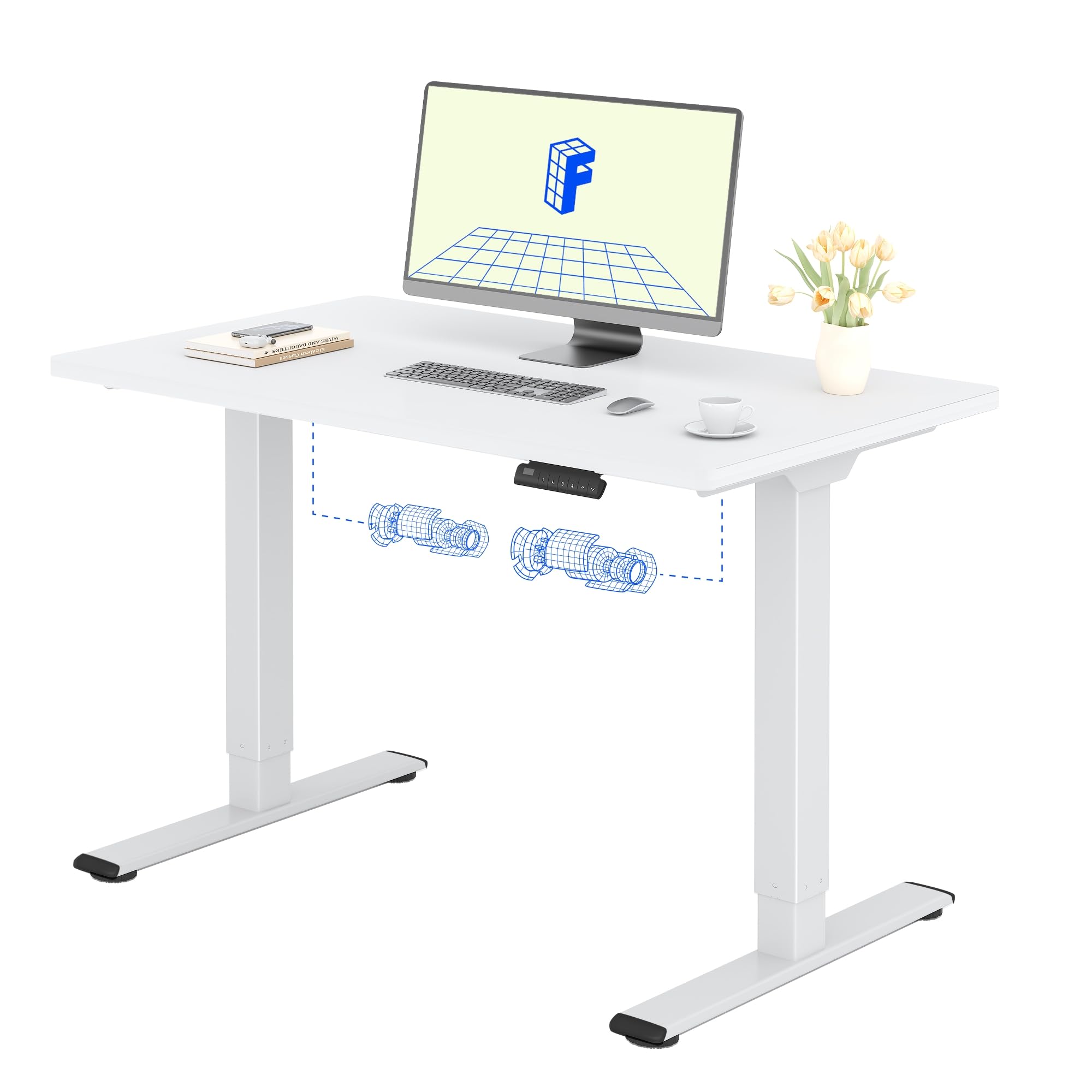
The FLEXISPOT Electric Standing Desk QB2 SET is designed to provide a stable and efficient workspace with adjustable height capabilities. This desk features a robust dual-motor system and an intelligent control panel for ease of use.
کلیدي ځانګړتیاوې:
- ځواکمن دوه ګوني موټرې: Ensures greater stability and efficiency, with a maximum speed of up to 25 mm/s.
- باثباته ملاتړ: Static load capacity of 120 kg and dynamic load capacity of 100 kg, providing secure support for various office equipment.
- د سمارټ کنټرول پینل: Features four memory functions for easy height adjustment and an anti-collision system for safety.
- د تنظیم وړ لوړوالی: The desk height can be adjusted from 70 cm to 119 cm to suit different user requirements and work preferences.
- One-Piece Tabletop: A seamless 120x60cm tabletop for a clean and modern aesthetic.

2. د خوندیتوب معلومات
مهرباني وکړئ د راټولولو دمخه د خوندیتوب ټولې لارښوونې ولولئ او پوه شئ او د محصول د ټپي کیدو یا زیان مخنیوي لپاره یې وکاروئ.
- Do not exceed the maximum allowed weight of 70 kg (moving) or 100 کیلو ګرامه (جامد). Overloading can cause instability and damage.
- Pay close attention to stability when adjusting the height. Ensure the desk is level and all items are securely placed.
- Be cautious of obstacles in the vicinity that could cause a collision during height adjustment. The desk is equipped with an anti-collision system, but manual vigilance is always recommended.
- د عملیاتو په جریان کې ماشومان او څاروي له میز څخه لرې وساتئ ترڅو د پیښو مخه ونیول شي.
- Ensure all cables are properly managed and secured to avoid entanglement or damage during movement.

3. تنظیم او مجلس
The FLEXISPOT Electric Standing Desk is designed for straightforward assembly. An instruction manual is included with your purchase. It is recommended that دوه کسان assemble the desk to ensure safety and ease.
د مجلس لارښوونې:
- لارښود ولولئ: په احتیاط سره بیاview the included assembly instructions before starting.
- وسیلې: All necessary tools are typically included. A small electric screwdriver can speed up the process, but is not essential. You may need a pencil and a wood drill bit for minor pilot holes.
- بسته بندي کول: The desk is shipped in two separate packages for maximum protection: one for the desktop and one for the frame. Ensure both packages have arrived before beginning assembly.
- وخت: Assembly typically takes around 1 hour for one person, taking their time.


4. عملیاتي لارښوونې
The FLEXISPOT Electric Standing Desk offers intuitive controls for adjusting its height and saving preferred positions.
د کنټرول پینل دندې:
- پورته/ښکته تtۍ: Use the up (▲) and down (▼) arrows to manually adjust the desk height.
- د حافظې پریزیسټونه (۱، ۲، ۳، ۴): The control panel allows you to save up to four preferred height settings. To save a height: adjust the desk to your desired height, then press and hold one of the memory buttons (1-4) until you hear a beep or see the display flash, indicating the height is saved.
- د LED ښودنه: Shows the current height of the desk in centimeters.
- د ټکر ضد سیستم: This safety feature automatically stops and slightly reverses the desk's movement if it encounters an obstacle during height adjustment.
د لوړوالی د سمون حد:
میز د لږترلږه لوړوالي څخه تنظیم کیدی شي 70 سانتي متره تر اعظمي لوړوالي پورې 119 سانتي متره.


5. ساتنه
Proper maintenance ensures the longevity and optimal performance of your FLEXISPOT Electric Standing Desk.
پاکول:
- The desk surface and frame are easy to clean. Use a dry or damp ټوکر to wipe away dust and spills.
- د سختو کیمیاوي موادو یا خړوبونکي پاکوونکو کارولو څخه ډډه وکړئ، ځکه چې دا کولی شي پای ته زیان ورسوي.
عمومي پاملرنه:
- Regularly check all screws and fasteners to ensure they are tight. Retighten if necessary.
- Keep the area around the desk clear to allow for smooth height adjustments and to prevent the anti-collision system from being triggered unnecessarily.
- Do not place excessively heavy objects on the desk, especially when moving, to avoid straining the motors.
6. ستونزه حل کول
If you encounter any issues with your FLEXISPOT Electric Standing Desk, refer to the following common troubleshooting steps.
عام مسایل او حل لارې:
- Desk Not Moving / No Power:
- وګورئ چې آیا د بریښنا کیبل په خوندي ډول د میز او دیوال دواړو سره نښلول شوی دی.
- ډاډ ترلاسه کړئ چې د دیوال آوټ لیټ د بل وسیلې په لګولو سره فعال دی.
- Desk Wobbles at High Height:
- ډاډ ترلاسه کړئ چې ټول د راټولولو پیچونه ټینګ شوي دي.
- ډاډ ترلاسه کړئ چې میز په یوه هواره سطحه دی. که اړتیا وي، د سطحې پښې تنظیم کړئ.
- وزن په مساوي ډول په ډیسټاپ وویشئ.
- په ښودنه کې د تېروتنې کوډ:
- Refer to the detailed troubleshooting section in the included physical manual for specific error codes and their solutions.
- Often, a simple reset can resolve minor errors. To perform a reset, unplug the desk for 10-15 seconds, then plug it back in.
- د ټکر ضد سیسټم ډیری وختونه محرک کوي:
- Ensure there are no obstructions under or above the desk during movement.
- Check if any cables are interfering with the desk's movement.
که دا ګامونه ستونزه حل نه کړي، مهرباني وکړئ د نورو مرستو لپاره د FLEXISPOT پیرودونکي ملاتړ سره اړیکه ونیسئ.
7. د محصول مشخصات
| فیچر | تفصیل |
|---|---|
| برانډ | FLEXISPOT |
| د ماډل شمیره | QB2 SET |
| GTIN/UPC | 840460406635 |
| د میز ډیزاین | سټینګ ډیسک |
| شکل | مستطیل |
| د محصول ابعاد (د x څلویښتم x څلویښتم) | 60P x 120l x 73H cm (60D x 120W x 73H cm) |
| د ټابلیټ اندازه | 120 x 60 سانتي متره |
| د ټابلیټ ضخامت | 1.5 سانتي متره |
| رنګ | سپین چوکاټ + سپین سر |
| سټایل | عصري |
| اساسی مواد | د الماس فولاد |
| د پورته موادو ډول | لرګي |
| د پای ډول | Laser, Powder Coated |
| ځانګړي ځانګړتیاوې | Ergonomic, Height Adjustable, Memory Presets, Anti-collision |
| د توکي وزن | 30 کیلوګرامه |
| لږ تر لږه لوړوالی | 70 سانتي متره |
| اعظمي لوړوالی | 119 سانتي متره |
| د پورته کولو میکانیزم | Electric (Dual Motor) |
| Recommended Load Capacity | 100 کیلوګرامه |
| د اسمبلۍ وړاندیز شوي غړي | 2 |
| د مجلس لارښوونې | شامل دي |
| شاملې برخې | Height adjustment mechanism, keyboard drawer (if applicable) |
| د کوټې ډول | دفتر |
| وړاندیز شوي استعمالونه | Work, Home, Office, Gaming |

8. د تضمین معلومات
FLEXISPOT provides a limited warranty for the Electric Standing Desk QB2 SET.
- ۱ کلن تضمین: Covers the frame, motors, and other mechanical components.
- ۱ کلن تضمین: کنټرولر، سویچ، او بریښنایی برخې پوښي.
For detailed warranty terms and conditions, please refer to the warranty card included with your product or visit the official FLEXISPOT webسایټ
9. د پیرودونکي ملاتړ
Should you require assistance with your FLEXISPOT Electric Standing Desk, please utilize the following resources:
- آنلاین پلورنځی: Visit the official FLEXISPOT store on Amazon for product information and FAQs: FLEXISPOT Amazon Store
- د پیرودونکي خدمت سره اړیکه ونیسئ: For technical support, warranty claims, or any other inquiries, please contact FLEXISPOT customer service directly. Contact details can typically be found on the official FLEXISPOT webسایټ یا ستاسو د محصول اسنادو کې.
- راستنیدنه: If you are not satisfied with your purchase, you may be eligible for a return within 30 days. Please refer to the return policy of your retailer or contact customer service for details.