
پیژندنه
This manual provides essential instructions for the setup, operation, and maintenance of your SLuB ZW60 Smartwatch. Please read this guide thoroughly before using your device to ensure proper function and longevity. The SLuB ZW60 features a 1.43-inch touchscreen, Bluetooth 5.3 connectivity, music player capabilities, various sports modes, IP67 dust and water resistance, and comprehensive health monitoring functions.
مهمه یادونه: The health management functions of this smartwatch are for reference only and cannot be used for medical purposes. This product is not a medical device.
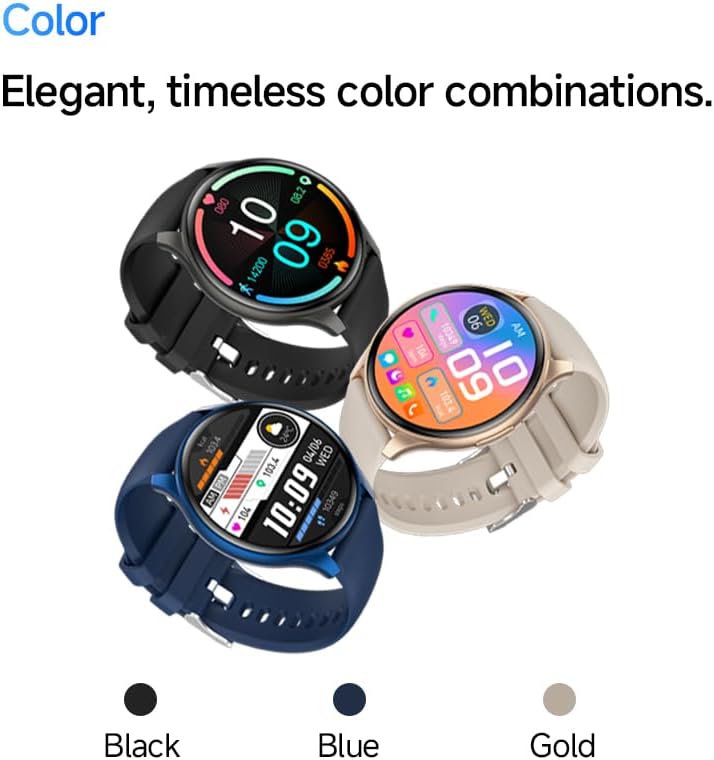
Image: The SLuB ZW60 Smartwatch in various color options (Black, Blue, Gold), highlighting its round display and overall design.
په بکس کې څه دي
د کڅوړې د پرانیستلو پر مهال، ډاډ ترلاسه کړئ چې لاندې ټول توکي شتون لري:
- SLuB ZW60 Smartwatch
- د مقناطیسي چارج کیبل
- د کارونکي لارښود (دا لاسوند)

Image: Contents of the SLuB ZW60 Smartwatch package, showing the smartwatch, its magnetic charging cable, and the printed user manual.
چمتو کول
۲.۱. د سمارټ واچ چارج کول
Before initial use, fully charge your SLuB ZW60 Smartwatch. Connect the magnetic charging cable to the charging contacts on the back of the watch and plug the USB end into a standard USB power adapter (not included) or a computer's USB port. The watch display will indicate charging status. A full charge typically takes approximately 2 hours.
2. App Installation: H Band
To unlock the full functionality of your smartwatch, download and install the dedicated "H Band" application on your smartphone. لټون "H Band" in your device's app store (Google Play Store for Android or Apple App Store for iOS).

Image: The smartwatch screen showing a grid of colorful application icons, illustrating the "H Band" app integration and multi-menu screen options.
3. د بلوتوث جوړه کول
- ډاډ ترلاسه کړئ چې ستاسو سمارټ واچ چارج شوی او فعال دی.
- په خپل سمارټ فون کې بلوتوټ فعال کړئ.
- Open the "H Band" app.
- Follow the in-app instructions to search for and connect to your SLuB ZW60 Smartwatch. The app will guide you through the pairing process.
- که غوښتنه وشي، په خپل سمارټ فون او سمارټ واچ دواړو کې د جوړه کولو غوښتنه تایید کړئ.
Once paired, the smartwatch will synchronize data with the app and enable features like call notifications and message alerts.
عملیاتي لارښوونې
بنسټیز نیویګیشن
- ټچ سکرین: Swipe left, right, up, or down to navigate through menus and screens. Tap to select an item.
- د غاړې تڼۍ: Typically used to wake the screen, return to the home screen, or access the app menu. Refer to the on-screen prompts for specific functions.
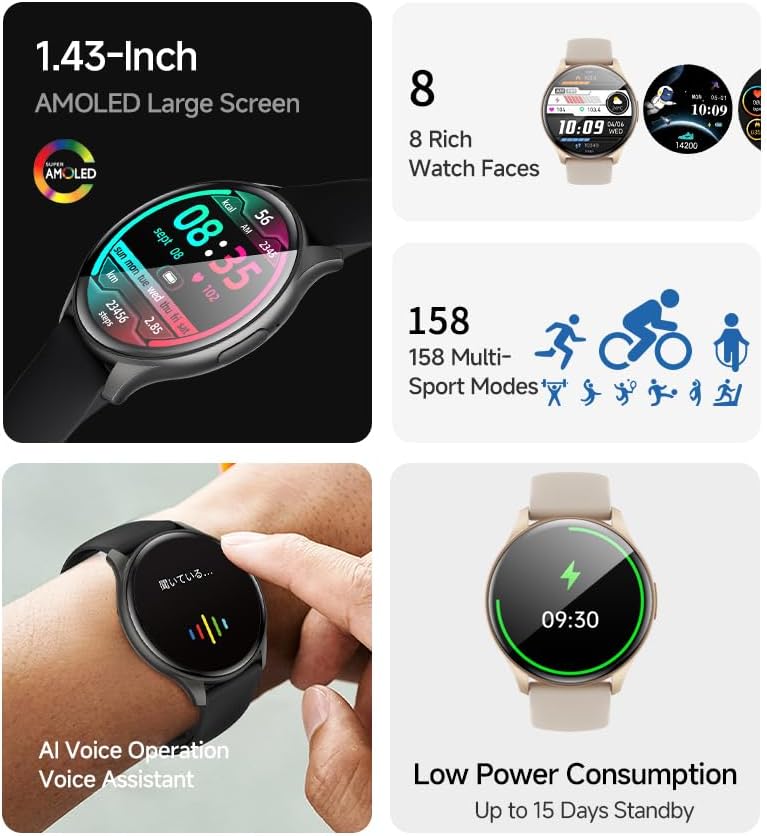
انځور: د سمارټ واچ نندارتونasing its 1.43-inch AMOLED display with a customizable watch face, and visual cues for its 158 multi-sport modes, AI voice operation, and low power consumption.
د زنګ وهلو دنده
With the smartwatch connected to your smartphone via Bluetooth, you can make and receive calls directly from your wrist. The built-in speaker and microphone allow for hands-free communication.
- زنګ وهل: د زنګ وهلو لپاره په خپل سمارټ واچ کې د ډایل پیډ یا اړیکو لیست ته لاسرسی ومومئ.
- تلیفونونه ترلاسه کول: When a call comes in, the smartwatch will display the caller ID. Tap the green icon to answer or the red icon to reject.
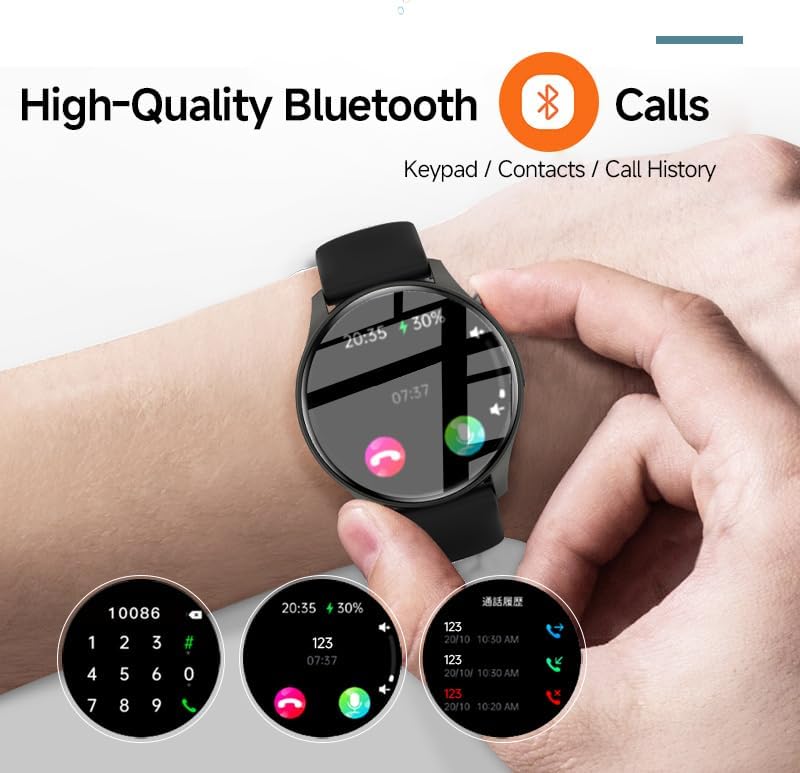
Image: The smartwatch screen showing the Bluetooth calling feature, including a numeric keypad for dialing, recent call history, and contact access.
د پیغام خبرتیاوې
Once paired with your smartphone, the smartwatch can display notifications from various apps, including emails, social media, and messaging services. This allows you to stay informed without needing to check your phone constantly.
- Ensure app notifications are enabled in your smartphone's settings and within the "H Band" app.
- د ساعت په مخ باندې ښکته سوائپ کړئ ترڅو view وروستي خبرتیاوې.

Image: The smartwatch showing a message notification, indicating its ability to sync alerts from popular communication applications like WeChat, LINE, and others.
Health Management Functions
The SLuB ZW60 Smartwatch is equipped with multiple sensors to monitor various health metrics. Access these features through the watch menu or the "H Band" app.
- د زړه ضربان څارنه: Continuously or periodically measures your heart rate.
- د خوب څارنه: ستاسو د خوب نمونې تعقیبوي، په شمول د ژور خوب، سپک خوب، او د ویښیدو وختونه.
- Calorie Consumption: Estimates calories burned based on activity levels.
- د تمرین معلومات: Records steps, distance, and other activity metrics.
Disclaimer: The data provided by these functions is for general wellness and fitness purposes only and should not be used for medical diagnosis or treatment.

Image: The smartwatch illustrating its 24-hour health management capabilities, including heart rate, body temperature, and sleep quality monitoring.
د سپورت طریقې
The smartwatch supports over 150 sports modes, allowing you to accurately track your workouts. Common modes include running, cycling, badminton, basketball, and football.
- Select your desired sport from the watch's sports menu.
- The watch will record duration, calories burned, and other relevant metrics for your activity.
- Review detailed statistics in the "H Band" app after your workout.
د میوزیک پلیر کنټرول
Control music playback on your connected smartphone directly from your smartwatch. You can play, pause, skip tracks, and adjust volume.
د AI غږ معاون
Utilize the integrated AI Voice Assistant for quick commands and information retrieval. Activate the assistant via the watch interface and speak your commands.
د اصلاح وړ لید مخونه
Choose from a variety of pre-installed watch faces or customize your own through the "H Band" app to match your style and display preferred information.
ساتنه
ستاسو د سمارټ واچ پاکول
منظم پاکول ستاسو د وسیلې بڼه او فعالیت ساتلو کې مرسته کوي.
- سکرین او بدن د نرم، لینټ نه پاک ټوکر سره پاک کړئ.
- د سختې خاورې لپاره، لږ څهampټوکر د اوبو سره ومینځئ. د سختو کیمیاوي موادو یا خړوبونکو موادو کارولو څخه ډډه وکړئ.
- ډاډ ترلاسه کړئ چې د چارج کولو اړیکې د چارج کولو دمخه پاکې او وچې دي.
د اوبو مقاومت (IP67)
The SLuB ZW60 Smartwatch is rated IP67, meaning it is dust-tight and can withstand immersion in water up to 1 meter (3.3 feet) for up to 30 minutes. This makes it suitable for daily use, such as washing hands or light rain exposure.
- مه کوئ use the watch for swimming, diving, or showering with hot water.
- ډډه وکړئ exposing the watch to high-pressure water or steam.
- که ساعت لوند شي، نو د چارج کولو یا چلولو دمخه یې په ښه توګه وچ کړئ.
د بیټرۍ ژوند لارښوونې
- د سکرین روښانتیا کمه کړئ.
- غیر ضروري خبرتیاوې غیر فعال کړئ.
- که اړتیا نه وي، د زړه د ضربان دوامداره څارنه محدوده کړئ.
- Ensure the "H Band" app is running efficiently in the background on your phone.
د ستونزو حل کول
| ستونزه | احتمالي حل |
|---|---|
| ساعت نه چالانېږي. | ډاډ ترلاسه کړئ چې ساعت په بشپړه توګه چارج شوی دی. لږترلږه د 30 دقیقو لپاره یې چارجر سره وصل کړئ. |
| د سمارټ فون سره جوړه نشي کیدی. |
|
| خبرتیاوې نه ترلاسه کیږي. |
|
| د روغتیا په اړه ناسم معلومات. |
|
| سکرین غیر ځواب ورکوونکی دی. | د ساعت د بیا پیلولو هڅه وکړئ د غاړې تڼۍ په فشارولو او نیولو سره تر هغه چې دا بند شي، بیا یې بیرته فعال کړئ. |
مشخصات
| فیچر | تفصیل |
|---|---|
| د ماډل نوم | ZW60 |
| برانډ | SLuB |
| د سکرین اندازه | ۷۸۷ انچه |
| د ښودلو ډول | AMOLED |
| ارتباط | بلوتوث 5.3 |
| د اوبو مقاومت | IP67 (د دوړو او اوبو په وړاندې مقاومت لرونکی) |
| د محصول ابعاد | 1.77 x 0.43 x 1.97 انچه |
| د توکي وزن | ۰.۹۸۶ اونس (۲۷.۹۴ ګرامه) |
| د بیټرۍ ژوند | Up to 15 Days Standby |
| متوافق ایپ | H بانډ |
| جوړونکی | SLuB |
تضمین او ملاتړ
For warranty information and technical support, please refer to the documentation included with your purchase or contact SLuB customer service. Contact details can typically be found on the manufacturer's official website or within the "H Band" application.
آنلاین سرچینې: For the latest updates, FAQs, and additional support, visit the official SLuB webسایټ