
1. پیژندنه
The Inseego MiFi X Pro M3000 is a powerful and secure mobile hotspot designed to provide reliable 5G and 4G LTE connectivity. Equipped with Wi-Fi 6 technology, it supports up to 32 Wi-Fi enabled devices, offering a virtually lag-free connected experience. This manual provides essential information for setting up, operating, and maintaining your device.
په بکس کې څه دي
- Inseego MiFi X Pro M3000 Hotspot Device
- د USB ډول - سي کیبل
- Power Adapter (if included with your specific package)
- د چټک پیل لارښود (دا سند)
2. ترتیب کول
۳.۱ د سیم کارت او بیټرۍ داخلول
- ډاډ ترلاسه کړئ چې وسیله بنده ده.
- Carefully remove the back cover of the MiFi X Pro.
- Insert your activated Nano SIM card into the designated SIM card slot. Ensure correct orientation as indicated on the device.
- Insert the battery into its compartment.
- د شا پوښ بدل کړئ، ډاډ ترلاسه کړئ چې دا په خوندي ډول په خپل ځای کې کلیک کوي.
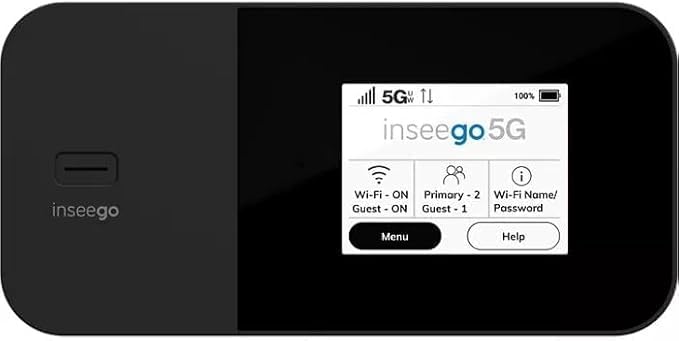
شکل 1: مخکی view of the Inseego MiFi X Pro M3000, showing the display with network status, Wi-Fi, and menu options.
۱.۱ د بریښنا فعالول او ابتدايي ترتیب
- د پاور تڼۍ (معمولا په اړخ یا پورته کې موقعیت لري) فشار ورکړئ او ونیسئ تر هغه چې سکرین روښانه شي.
- Follow the on-screen prompts to complete the initial setup, which may include setting a device password and Wi-Fi network name (SSID) and password.
- Alternatively, you can manage settings via the Inseego Mobile app or a web interface by connecting a device to the hotspot and navigating to the device's IP address (typically 192.168.1.1).
3. چلول
3.1 د نښلولو وسایل
- په خپل وای فای فعال شوي وسیله (سمارټ فون، ټابلیټ، لیپ ټاپ) کې، د شته وای فای شبکو لټون وکړئ.
- Select the Wi-Fi network name (SSID) displayed on your MiFi X Pro screen.
- Enter the Wi-Fi password displayed on your MiFi X Pro screen.
- ستاسو وسیله باید اوس له انټرنیټ سره وصل وي.
3.2 Managing Wi-Fi Networks and Connections
- The MiFi X Pro supports simultaneous dual-band Wi-Fi 6 with primary and guest networks.
- Access the device's menu (via the touchscreen or web interface) to view connected devices, monitor data usage, and configure network settings.
- Guest networks can be enabled or disabled and configured with separate passwords for enhanced security.

شکل 2: اړخ view of the Inseego MiFi X Pro M3000, highlighting the USB-C port for charging and data, and the power button.
4. ساتنه
4.1 د بیټرۍ ساتنه او چارج کول
- Charge the MiFi X Pro using the provided USB Type-C cable and power adapter.
- The device features fast-charging capabilities.
- For 24/7 operation, utilize the proprietary battery preservation mode when connected to AC power.
- Avoid exposing the device to extreme temperatures or direct sunlight for prolonged periods to preserve battery life.
4.2 وسیلې بیا تنظیم کړئ
If you experience persistent issues, a factory reset may resolve them. Refer to the device's on-screen menu or web interface for instructions on performing a factory reset. This will erase all custom settings and return the device to its default state.
5. ستونزه حل کول
- د انټرنیټ اتصال نشته:
- ډاډ ترلاسه کړئ چې ستاسو سیم کارت په سمه توګه داخل شوی او د ډیټا پلان سره فعال شوی دی.
- Check the signal strength indicator on the device screen. Move to an area with better network coverage if necessary.
- Restart the MiFi X Pro and the connected device.
- Verify that your data plan has not been exceeded.
- ورو سرعتونه:
- د وصل شویو وسیلو شمیر کم کړئ.
- Ensure you are within optimal Wi-Fi range (up to 35 feet).
- ستاسو په سیمه کې د شبکې ګڼه ګوڼه وګورئ.
- وسیله نه فعاله کیږي:
- ډاډ ترلاسه کړئ چې بیټرۍ چارج شوې ده. وسیله د بریښنا سرچینې سره وصل کړئ.
- که چیرې بیټرۍ په بشپړه توګه وچه شي، نو ممکن د چارج کولو لپاره څو دقیقې وخت ونیسي مخکې لدې چې وسیله فعاله شي.
6. مشخصات
| فیچر | تفصیل |
|---|---|
| د ماډل نوم | Inseego MiFi X Pro (M3000) |
| ارتباط | 5G, 4G LTE, Wi-Fi 6 (802.11ax) |
| د فریکونسی بانډ ټولګی | دوه ګونی بند |
| د میکس سره نښلول شوي وسایل | تر 32 پورې |
| بندرونه | 1 Gbps Ethernet port, USB-C port |
| امنیتي ځانګړتیاوې | Enterprise-grade security, Open VPN, VPN pass-through, static IP support, Wi-Fi privacy separation, WPA3 |
| ځانګړی ځانګړنه | WPS (د Wi-Fi محافظت ترتیب) |
| بیټرۍ | Long-lasting, fast-charging, proprietary battery preservation mode |
| رنګ | تور |
| د توکي وزن | 13.4 اونس |
| د کڅوړې ابعاد | 6.69 x 4.37 x 2.32 انچه |
7. تضمین او ملاتړ
For warranty information and technical support, please refer to the official Inseego website or contact your product retailer. Keep your purchase receipt for warranty claims.
This product is offered as an Amazon Renewed item, which typically includes a separate Amazon Renewed Guarantee. Please consult the Amazon Renewed Guarantee details for specific coverage and support related to your purchase.