
1. پیژندنه
This manual provides instructions for the installation, operation, and maintenance of your TOPBULL 60A MPPT Solar Charge Controller. This intelligent regulator is designed to efficiently manage power flow from solar panels to various battery types, ensuring optimal charging and system protection. Please read this manual thoroughly before installation and use.
2. کلیدي ځانګړتیاوې
- د MPPT پرمختللې ټیکنالوژي: Achieves up to 99% tracking efficiency and 98% peak conversion efficiency for maximum power harvest from solar panels.
- اتومات Voltagپیژندنه: په اتوماتيک ډول د 12V یا 24V DC سیسټم وال کشف کويtage.
- د بیټرۍ پراخه مطابقت: Supports various deep cycle battery types including Sealed, Gel, Flooded (FLD), Lithium Iron Phosphate (LiFePO4), and AGM batteries. Includes 0V Li-ion battery charging (activation) support.
- Comprehensive Electronic Protections: Built-in safeguards against reverse polarity, battery overcharge, battery overdischarge, overload, short-circuit, TVS lightning, overpower, over-temperature, and reverse current.
- بصیرت لرونکی LCD ښودنه: Provides real-time solar charging and battery operation information, customizable parameters, and error codes.
- دوه ګونی USB بندرونه: Conveniently charge electronic devices (5V, 2.4A total).
- د تودوخې مؤثره ضایع کول: Features a durable metal casing and dual high-speed intelligent fans for optimal thermal management, enhancing longevity and performance.
- د تودوخې تاوان: Automatically adjusts charging and discharging parameters based on ambient temperature to prolong battery life.
3. محصول ختم شوview
Familiarize yourself with the components and display of the solar charge controller.

شکل 3.1: مخکی view of the TOPBULL 60A MPPT Solar Charge Controller, showing the LCD display and control buttons.
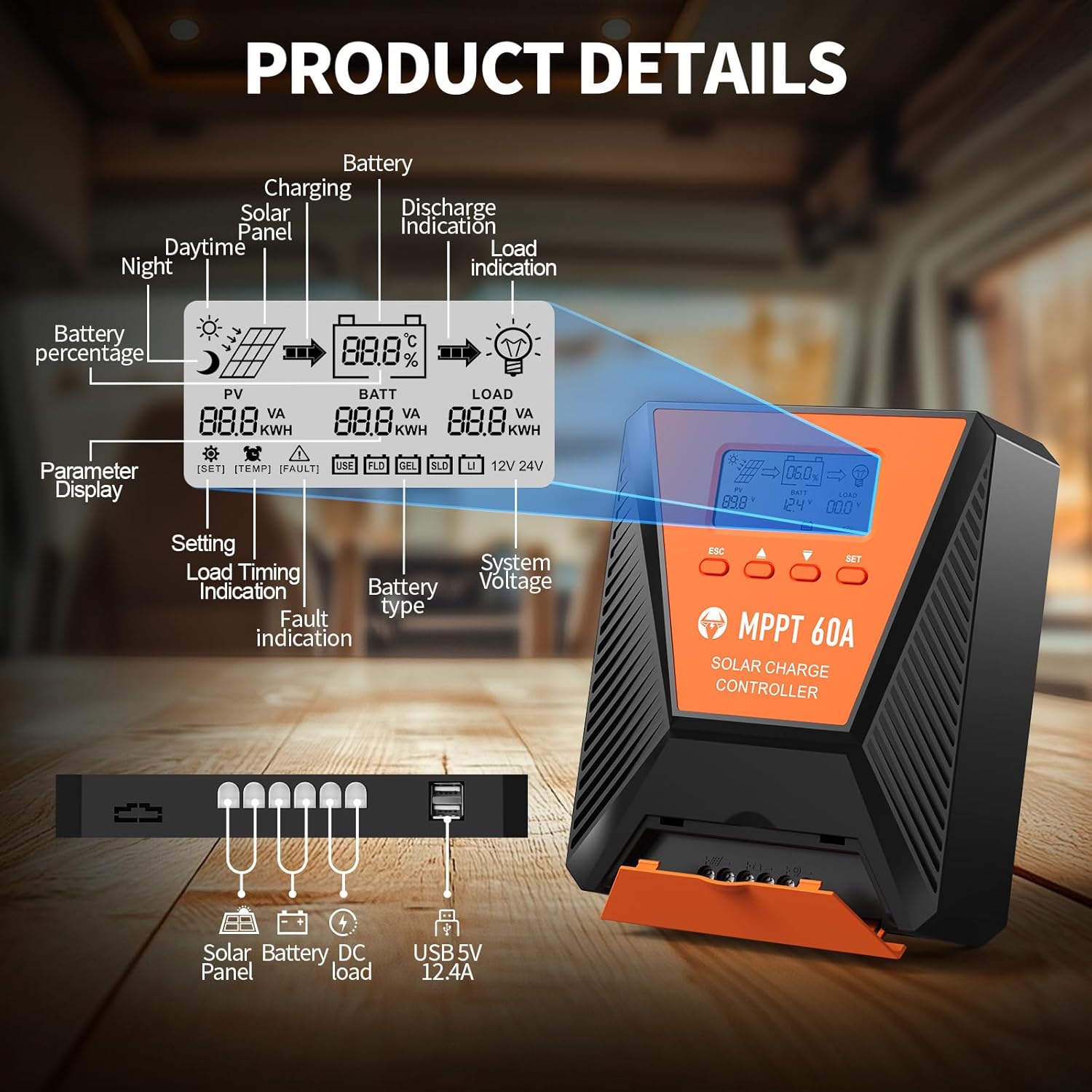
شکل 3.2: Detailed diagram illustrating the LCD display elements and the connection ports at the bottom of the controller. The display shows PV voltage، د بیټرۍ حجمtage, load status, battery percentage, and various indicators. The ports include connections for solar panel, battery, DC load, and dual USB 5V 2.4A outputs.
۴. د LCD ښودنې شاخصونه
- PV (Photovoltaic): Displays solar panel voltage او ځواک.
- BATT (بیټرۍ): د بیټرۍ حجم ښیيtage, charge status, and type.
- لوډ Indicates load status and power consumption.
- بیټرۍ پرسینtage: د بیټرۍ چارج کچې بصري استازیتوب.
- د سیسټم Voltage: Displays 12V or 24V system recognition.
- د پیرامیټر ښودنه: Shows current settings and values.
- د خطا نښه: Alerts for system errors.
3.2. د کنټرول بټن
- ESC: Used to switch load (manual switch) and exit setup menus.
- پورته غشی (▲): Navigates up through main interface pages to view parameters; increases values in setup mode.
- ښکته غشی (▼): Navigates down through main interface pages to view parameters; decreases values in setup mode.
- سیټ: Enters setting mode, confirms selections, and saves changes. If no key operation for 10 seconds, it exits setting mode automatically.
4. نصب او تنظیم کول
4.1. د خوندیتوب احتیاطي تدابیر
- د بریښنا لګولو دمخه ډاډ ترلاسه کړئ چې ټولې اړیکې سمې او خوندي دي.
- تل لومړی بیټرۍ، بیا د سولر پینل، او په پای کې بار وصل کړئ. په برعکس ترتیب کې منقطع کړئ.
- کنټرولر په ښه هوا لرونکي ځای کې نصب کړئ، د اور اخیستونکي موادو او مستقیم لمر وړانګو څخه لرې.
- د ټولو اتصالونو لپاره د مناسب تار ګیجونو څخه کار واخلئ ترڅو د ډیر تودوخې مخه ونیسئ.
۴.۱. د کنټرولر نصب کول
Mount the controller vertically on a flat, non-flammable surface using the provided mounting screws. Ensure adequate clearance around the unit for proper airflow and heat dissipation, especially for the cooling fans located on the top.

شکل 4.1: Image showing the dimensions of the controller (approximately 9.0 inches long, 7.3 inches wide, 2.8 inches high) and the included mounting screws and user manual.
4.3. د تارونو نښلول
Follow the connection order carefully to avoid damage to the controller or other components.
- بیټرۍ وصل کړئ: Connect the positive and negative terminals of your battery bank to the corresponding battery terminals on the controller. The controller will automatically detect the system voltage (12V یا 24V).
- د سولر پینل سره وصل کړئ: Connect the positive and negative leads from your solar panel array to the solar panel terminals on the controller. Ensure the maximum PV input voltage does not exceed 100VDC. For a 12V system, maximum solar input power is 720W; for a 24V system, it is 1440W.
- د DC بار سره وصل کړئ (اختیاري): Connect your DC loads to the load terminals on the controller. This allows the controller to manage load discharge and provide protection.

شکل 4.2: Wiring diagram illustrating the correct connection sequence: Battery first, then Solar Panel, then DC Load. An optional inverter for AC loads is also shown connected to the battery bank.
۶.۳. د بیټرۍ ډول انتخاب
The controller is compatible with various battery types. It is crucial to select the correct battery type for optimal charging and battery longevity. Refer to the display and settings section to adjust this parameter if needed. The controller supports FLD (Flooded), LiFePO4 (Lithium Iron Phosphate), SLD (Sealed Lead-Acid), GEL, and AGM batteries.

شکل 4.3: Illustration showing the controller connected to a battery, with icons representing compatible battery types: LI (Lithium), FLD (Flooded), GEL, SLD (Sealed), and AGM. The controller automatically identifies battery voltage and supports custom parameters, including lithium battery 0V charging.
5. عملیات
5.1. Monitoring the Display
The LCD display provides real-time information about your solar system. Use the Up (▲) and Down (▼) buttons to cycle through different display screens, showing parameters such as PV voltage، د بیټرۍ حجمtage, charging current, load current, and battery state of charge.
5.2. د پیرامیټر تنظیمات
To enter the parameter setting stage:
- Press the "SET" button to enter the setting mode. The value to be adjusted will flash.
- Use the Up (▲) or Down (▼) buttons to adjust the value.
- Press the "SET" button again to confirm and save the new value.
If no button is pressed for 10 seconds in setting mode, the controller will automatically exit without saving changes.
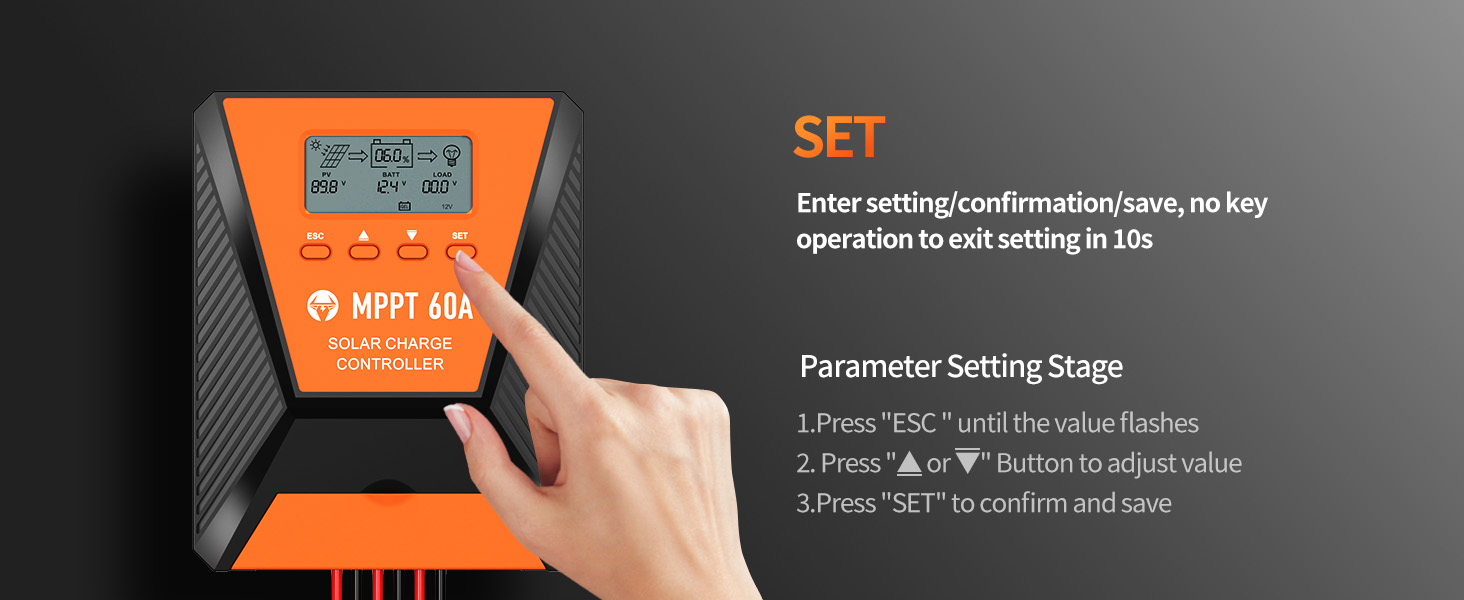
شکل 5.1: Visual guide for using the SET button to enter, adjust, and confirm parameter settings on the controller's LCD display.
5.3. Load Working Modes
The controller supports three distinct load working modes:
- Lighting Time Control Mode (1H-23H): The load automatically turns on or off based on the intensity of sunlight and a set timer.
- Normal OFF Mode (0H): The load remains off. This mode is useful for specific loads or during debugging.
- Normal ON Mode (24H): The load remains continuously on. This mode is suitable for loads requiring a 24-hour power supply.

شکل 5.2: Diagram explaining the three load working modes: Lighting time control (1H-23H), Normal OFF (0H), and Normal ON (24H).
6. ساتنه
منظم ساتنه ستاسو د لمریز چارج کنټرولر اوږد عمر او غوره فعالیت تضمینوي.
- اړیکې معاینه کړئ: Periodically check all wiring connections for tightness and corrosion. Loose connections can cause resistance and heat buildup.
- کنټرولر پاک کړئ: Keep the controller clean and free from dust and debris. Ensure the cooling fan vents are unobstructed. Use a dry cloth for cleaning.
- د څارنې فعالیت: Regularly check the LCD display for normal operation and any error codes. Compare actual performance with expected values.
- د بیټرۍ معاینه: Inspect battery terminals for corrosion and ensure proper ventilation around the batteries.
7. ستونزه حل کول
دا برخه هغه عامې ستونزې په ګوته کوي چې تاسو یې د خپل لمریز چارج کنټرولر سره مخ کیدی شئ.
| ستونزه | احتمالي لامل | د حل لاره |
|---|---|---|
| هیڅ ډسپلې/کنټرولر نه فعالیږي | بیټرۍ وصل نه ده یا ټیټ حجم لريtage; reverse polarity; loose wiring. | د بیټرۍ پیوستون او حجم چیک کړئtage. Ensure correct polarity. Tighten all wiring. |
| بیټرۍ چارج نه کوي | Solar panel not connected; insufficient sunlight; solar panel fault; incorrect battery type setting. | Verify solar panel connections. Ensure adequate sunlight. Check solar panel output. Confirm correct battery type setting. |
| بار کار نه کوي | Load disconnected; overload protection activated; incorrect load working mode. | Check load connections. Reduce load to within controller limits. Adjust load working mode settings. |
| د خطا کوډ ښکاره شو | Specific system fault (e.g., over-temperature, short-circuit). | Refer to the controller's display for the specific error code and consult the full user manual for detailed explanations and solutions. Address the underlying issue (e.g., reduce temperature, clear short-circuit). |
8. مشخصات
| پیرامیټر | ارزښت |
|---|---|
| ماډل | 60A |
| د سیسټم Voltage | 12V / 24V اتومات پیژندنه |
| اعظمي د PV ننوت Voltage | 100VDC |
| اعظمي. د لمریزې انرژۍ (۱۲ ولټه سیسټم) | 720W |
| اعظمي. د لمریزې انرژۍ (۱۲ ولټه سیسټم) | 1440W |
| د تعقیب موثریت | ≥99% |
| د تبادلې لوړ موثریت | تر 98٪ پورې |
| د بیټرۍ ډولونه ملاتړ شوي | FLD, LiFePO4, SLD, GEL, AGM |
| د USB محصول | Dual 5V, 2.4A (Total) |
| ابعاد (تقریبا) | ۷.۱۳ x ۳.۷ x ۲.۰۵ انچه (پیکج) |
| د توکي وزن | ۲.۴۵ پونډه |
| مواد | فلزي |
| د ښودلو ډول | LCD |
9. تضمین او ملاتړ
TOPBULL products are designed for reliability and performance. For warranty information or technical assistance, please contact TOPBULL customer support through the retailer where the product was purchased or visit the official TOPBULL webسایټ. مهرباني وکړئ د ملاتړ سره د تماس په وخت کې د خپل محصول ماډل شمیره او د پیرود نیټه ولرئ.
د نورو معلوماتو لپاره، تاسو کولی شئ لیدنه وکړئ TOPBULL Store on Amazon.