
1. پیژندنه
The Hello Kitty Sunrise Alarm Clock is designed to provide a gentle and natural waking experience with its sunrise simulation feature. This digital alarm clock includes multicolor lights, an LED display showing time, date, and temperature, a USB charging port, and a convenient snooze function. Its charming Cinnamoroll design adds a whimsical touch to any room.

Image 1: Hello Kitty Cinnamoroll Sunrise Alarm Clock with multicolor lighting.
2. د خوندیتوب معلومات
- وسیله د سختې تودوخې، مستقیم لمر وړانګو، یا لوړې رطوبت سره مه مخ کوئ.
- Use only the provided USB power cable or a certified equivalent.
- وسیله د اوبو یا نورو مایعاتو څخه لرې وساتئ.
- د وسیلې د جلا کولو یا ترمیم کولو هڅه مه کوئ. د وړ خدماتو پرسونل سره اړیکه ونیسئ.
- ډاډ ترلاسه کړئ چې وسیله په مستحکم، فلیټ سطح کې کیښودل شوې.
3. د بسته محتويات
مهرباني وکړئ د لاندې توکو لپاره په بسته کې وګورئ:
- Hello Kitty Sunrise Alarm Clock (Cinnamoroll design)
- د USB بریښنا کیبل
- د کارونکي لارښود (دا لاسوند)
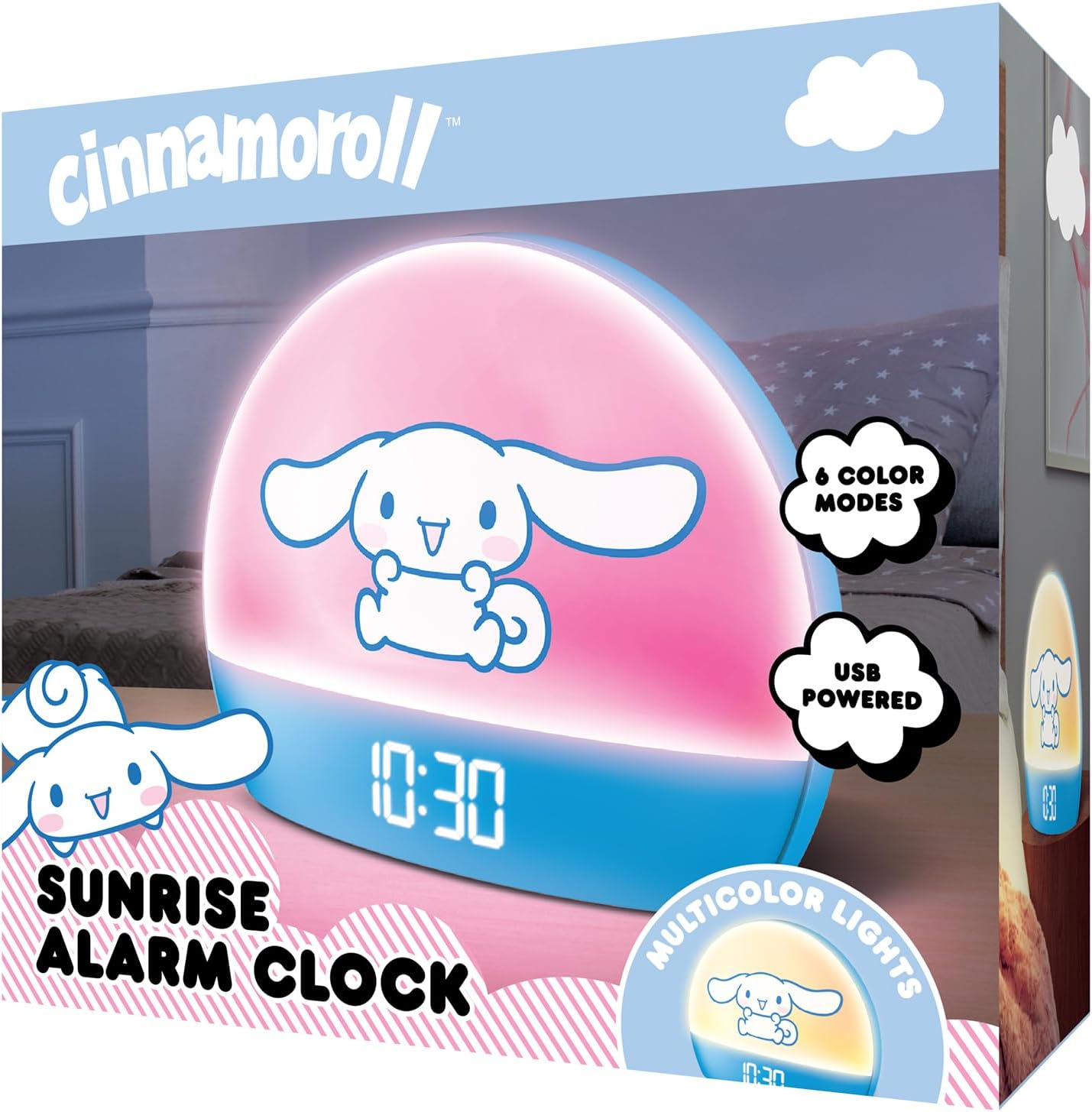
Image 2: Front packaging of the Hello Kitty Cinnamoroll Sunrise Alarm Clock.
4. محصول ختم شوview
د خپل الارم ساعت د اصلي برخو سره ځان بلد کړئ.
- د LED ښودنه: Shows time, date, and temperature.
- د رڼا تخته: Emits multicolor and sunrise simulation lights.
- د کنټرول تڼۍ: Located on the back or bottom for setting time, alarm, and light functions.
- د USB چارج بندر: For powering the device and charging external devices.
- د سنوز تڼۍ: Typically a prominent button on the top or front.

Image 3: Hello Kitty Cinnamoroll Sunrise Alarm Clock in a bedroom setting.
5. ترتیب کول
5.1 د بریښنا نښلول
- Connect the provided USB power cable to the USB port on the back of the alarm clock.
- د USB کیبل بله پای په یو مناسب USB بریښنا اډاپټر (شامل نه دی) یا په بریښنا شوي USB پورټ کې ولګوئ.
- د LED ښودنه به روښانه شي، چې دا په ګوته کوي چې وسیله فعاله ده.
5.2 د وخت او نیټې ټاکل
Specific button names are not provided, so general instructions are given. Refer to the physical device for exact button labels.
- Press the "SET" or "TIME" button to enter time setting mode.
- Use the "UP" and "DOWN" buttons to adjust the hour. Press "SET" again to confirm.
- Adjust the minute using "UP" and "DOWN" buttons. Press "SET" to confirm.
- د کال، میاشتې او ورځې د ټاکلو لپاره دې پروسې ته دوام ورکړئ.
- The clock may offer 12-hour or 24-hour format selection. Follow on-screen prompts or consult the device's specific button functions.
6. عملیاتي لارښوونې
6.1 د الارم تنظیم کول
- د الارم تنظیم کولو حالت ته د ننوتلو لپاره د "الارم" تڼۍ فشار ورکړئ.
- Use "UP" and "DOWN" buttons to set the desired alarm hour. Press "ALARM" to confirm.
- Adjust the alarm minute. Press "ALARM" to confirm.
- Some models may allow setting alarm volume or sound. Follow prompts if available.
- To activate/deactivate the alarm, look for an "ALARM ON/OFF" button or a toggle within the alarm setting menu.
۳.۱ د لمر خاته سمولیشن
The sunrise simulation feature gradually increases light intensity before your set alarm time, mimicking a natural sunrise.
- This feature is typically linked to the alarm function. When the alarm is active, the light will begin to brighten a set period (e.g., 30 minutes) before the alarm sounds.
- Consult the device's specific controls for adjusting the duration or intensity of the sunrise simulation, if applicable.
6.3 څو رنګه څراغونه
The clock offers various color modes for ambient lighting.
- Press the "LIGHT" or "COLOR" button to cycle through different color options or activate a color-changing mode.
- Press and hold the "LIGHT" button to turn off the ambient light.
- Brightness of the display and ambient light can often be adjusted using dedicated buttons or by holding the "LIGHT" button.
6.4 د سنوز فعالیت
When the alarm sounds, press the large "SNOOZE" button (usually on top) to temporarily pause the alarm. The alarm will sound again after a short interval (e.g., 5-10 minutes).
6.5 د USB چارج کولو بندر
The integrated USB port can be used to charge small electronic devices like smartphones or tablets. Simply connect your device's charging cable to the USB port on the alarm clock.
6.6 د حرارت درجه ښودنه
The LED display shows the current room temperature. No specific action is usually required to view this, as it cycles with time and date or is displayed continuously.
7. ساتنه
- ساعت د نرم او وچ ټوکر سره پاک کړئ. د کثافاتو پاکوونکي یا محلولونه مه کاروئ.
- ډاډ ترلاسه کړئ چې د USB پورټ د دوړو او کثافاتو څخه پاک دی.
- ساعت په یخ او وچ ځای کې وساتئ کله چې د اوږدې مودې لپاره نه کارول کیږي.
8. ستونزه حل کول
| ستونزه | احتمالي لامل | د حل لاره |
|---|---|---|
| ساعت نه چالانېږي. | USB cable not connected properly or power source issue. | Check USB cable connection. Try a different USB power adapter or port. Ensure the cable is securely inserted. |
| Time is incorrect or drifts. | Time not set correctly or internal clock issue. | Re-set the time following Section 5.2. If the issue persists, try disconnecting and reconnecting power. |
| الارم نه غږېږي. | الارم فعال شوی نه دی یا په غلط ډول تنظیم شوی دی. | Verify the alarm is set and activated (check for an alarm icon on the display). Ensure the volume is not set to zero if adjustable. |
| تڼۍ بې ځوابه دي. | Temporary software glitch or physical button issue. | Disconnect power for a few seconds and reconnect to reset the device. If buttons remain unresponsive, contact support. |
| د USB چارج کولو پورټ کار نه کوي. | Cable issue, device not fully powered, or port malfunction. | Ensure the clock is properly powered. Try a different USB charging cable. Check if the port is clean and free of debris. |
9. مشخصات
| برانډ | سلام |
| د ماډل شمیره | HKCLK01CR-MFN |
| رنګ | سینامورول |
| د ښودلو ډول | ډیجیټل |
| ځانګړي ځانګړتیاوې | Adjustable Brightness, Alarm, Charging Port, LED Display, Temperature Display, Sunrise Simulation, Multicolor Lights |
| د محصول ابعاد | ۱۷" څراغ x ۱۷" ح |
| د بریښنا سرچینه | بریښنایی تار (USB) |
| مواد | پلاستیک |
| د توکي وزن | 0.4 کیلوګرامه (14 اونس) |
| د ارتباط ټیکنالوژي | USB |
| جوړونکی | جنوبي مخابرات |
10. تضمین او ملاتړ
For warranty information or technical support, please refer to the contact details provided on the product packaging or visit the official Hello Kitty product support webسایټ د تضمین ادعاګانو لپاره خپل د پیرود رسید وساتئ.