
AT&T EL51503
د AT&T EL51503 DECT 6.0 بې سیمه کور تلیفون کارونکي لارښود
ماډل: EL51503
پیژندنه
Welcome to your new AT&T EL51503 DECT 6.0 Cordless Home Phone system. This manual provides comprehensive instructions for setting up, operating, and maintaining your phone system. Designed for busy households, this system offers clear, interference-free communication with advanced features.

Image: The AT&T EL51503 cordless phone system, showing the main base unit with one handset and four additional charging cradles with handsets.
کلیدي ځانګړتیاوې
Your AT&T EL51503 cordless phone system comes equipped with several features designed for convenience and clarity.
Backlit Screen & Lighted Keypad

High-contrast text on the white backlit screen ensures easy readability of incoming caller ID or call history records. The lighted handset keypad allows for effortless dialing even in low-light conditions.
اضافي لوی نندارتون

The large screen makes it easy to read information at a glance, improving user experience for all.
لوی تڼۍ

Featuring large font and extra-large backlit keys, this design is particularly helpful for users with visual impairments, ensuring comfortable and accurate dialing.
DECT 6.0 ټیکنالوژي
This cordless telephone transmits secure signals via DECT 6.0 channel, ensuring crystal clear sounds, interference-free communication, and a stable operation range up to 1000 ft outdoors.
په بکس کې څه دي
ډاډ ترلاسه کړئ چې ستاسو په کڅوړه کې لاندې ټول لیست شوي توکي شامل دي:
- 1 اساسی واحد
- 5 لاسي صنایع
- 4 Adaptors (for charging cradles)
- 5 د بیټرۍ کڅوړه
- 1 د ټیلیفون کرښه
- د چټک پیل لارښود
چمتو کول
1. د بیټرۍ نصب کول
Each handset requires a battery pack for operation. Ensure correct polarity when inserting.
- د هینډسیټ شاته د بیټرۍ کمپارټ پوښ خلاص کړئ.
- د بیټرۍ پیک نښلونکی په خوندي ډول د خونې دننه جیک سره وصل کړئ.
- د بیټرۍ کڅوړه په کڅوړه کې ځای په ځای کړئ.
- د بیټرۍ کمپارټ پوښ وتړئ.
۳.۳. د لاسي صنایعو چارج کول
For optimal performance, charge each handset for at least 16 hours before initial use.
- Place each handset face forward into its respective charging cradle or the main base unit.
- په هینډسیټ کې د چارج څراغ به روښانه شي، چې د مناسب چارج کولو ښودنه کوي.
۱.۳. د اساس واحد سره نښلول
Connect the base unit to a power outlet and your telephone line.
- د بریښنا اډاپټر لویه برخه په داسې بریښنایی سوري کې ولګوئ چې د دیوال سویچ لخوا کنټرول نه کیږي.
- Plug the small end of the power adapter into the POWER jack on the back of the base unit.
- Plug one end of the telephone line cord into the TEL LINE jack on the back of the base unit.
- د ټیلیفون لاین تار بل پای د ټیلیفون دیوال جیک سره وصل کړئ.
مهم: Use only the power adapter and telephone line cord provided with this product.
Operating Your Phone System
د زنګ وهلو او ځواب ویلو
- د زنګ وهلو لپاره: فشار ورکړئ تلیفون / فلش or سپیکر، بیا شمیره ډایل کړئ.
- د زنګ ځوابولو لپاره: فشار ورکړئ تلیفون / فلش or سپیکر کله چې تلیفون زنګیږي.
- د تلیفون پای ته رسولو لپاره: فشار ورکړئ بند / لغوه یا هینډسیټ بیرته په زنګون کې ځای په ځای کړئ.
د سپیکرفون کارول
The simulated full-duplex speakerphone allows for natural, two-way conversations.
- د تلیفون په جریان کې، فشار ورکړئ سپیکر د سپیکر فون حالت ته د بدلولو لپاره.
- مطبوعاتي سپیکر again to switch back to handset mode, or press بند / لغوه د کال پای ته رسولو لپاره.
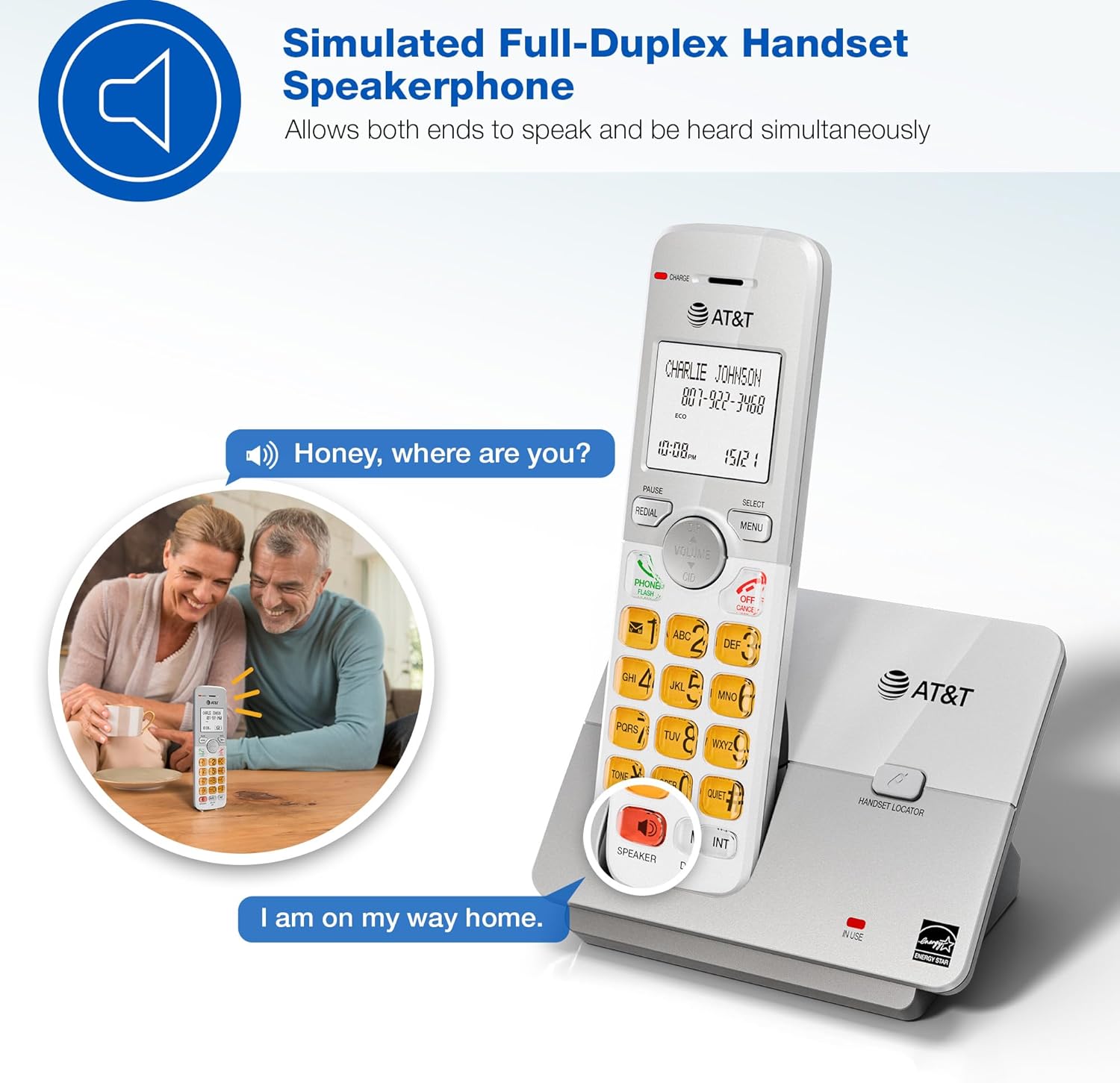
Image: A couple smiling while using the phone's speakerphone feature, demonstrating simultaneous speaking and hearing.
د تلیفون کتاب لارښود
د چټک ډایل کولو لپاره تر ۵۰ پورې نومونه او شمېرې ذخیره کړئ.
- To add an entry: Press مینو, navigate to "Phonebook", then "Add New Entry". Follow the on-screen prompts.
- To dial from phonebook: Press DIR, scroll to the desired entry, then press تلیفون / فلش or سپیکر.

Image: The phone's display showing a phonebook directory with contact names, illustrating the ability to store up to 50 names and numbers.
د زنګ وهونکي ID / د زنګ وهلو انتظار
View incoming caller information and manage multiple calls.
- Incoming calls display on the large, backlit LCD screen.
- بیا بیاview Caller ID history: Press CID (up/down arrow) to scroll through recent calls.
- To call back a number from Caller ID: Select the entry and press تلیفون / فلش.

Image: A close-up of the phone's LCD screen displaying an incoming caller's name and number, along with the current time and date.
اکو موډ
The phone system features an ECO mode to manage power consumption, extending battery life and reducing energy use.
- ECO mode is typically activated automatically when the handset is close to the base unit.
- Look for the "ECO" indicator on the handset display.
د انټرکام فعالیت
د هینډسیټونو ترمنځ د اړیکو لپاره د انټرکام ځانګړتیا وکاروئ.
- To initiate an intercom call: Press INT په هر هینډسیټ کې.
- If you have multiple handsets, you may be prompted to select which handset to call.
- To end an intercom call: Press بند / لغوه.
خاموش حالت
Temporarily silence the ringer on all handsets and the base unit for a set period.
- To activate Quiet Mode: Press مینو, navigate to "Quiet Mode", and set the desired duration.
- Incoming calls will still be logged in Caller ID history.
ساتنه
Proper care ensures the longevity of your phone system.
- پاکول: تلیفون او بیس یونټ د نرم، لږ څه ډډ سره پاک کړئamp ټوکر. د پاکولو سپرې یا سخت کیمیاوي توکي مه کاروئ.
- د بیټرۍ پاملرنه:
- Avoid overcharging by leaving handsets on the charger for extended periods after they are fully charged.
- If the phone will not be used for a long time, remove the battery from the handset.
- Replace batteries when performance degrades.
- ځای: تلیفون د تودوخې سرچینو، مستقیم لمر وړانګو او رطوبت څخه لرې وساتئ.
د ستونزو حل کول
If you experience issues with your phone system, try these common solutions:
| ستونزه | د حل لاره |
|---|---|
| د ډایل ټون نشته |
|
| هینډسیټ چارج نه کوي |
|
| د غږ ضعیف کیفیت / جامد |
|
| د زنګ وهونکي ID نه ښودل کیږي |
|
مشخصات
| فیچر | تفصیل |
|---|---|
| د ماډل شمیره | EL51503 |
| د تلیفون ډول | DECT 6.0 بې سیمه تلیفون |
| د لاسي صنایعو شمیر | 5 (د پراخیدو وړ) |
| ښودل | Backlit LCD |
| کیپډ | رڼا شوه |
| سپیکرفون | Simulated Full-Duplex Handset Speakerphone |
| د تلیفون کتاب ظرفیت | 50 نومونه او شمیرې |
| د زنګ وهونکي ID حافظه | ۳۷ زنګونه |
| اکو موډ | هو |
| انټرکام | هو |
| د بریښنا سرچینه | تار لرونکی بریښنا (اساس واحد) |
| بیټرۍ | ۴ د محصول ځانګړي بیټرۍ (شامل دي) |
| رنګ | تور |
| مواد | پلاستیک |
| جوړونکی | VTech |
| د محصول ابعاد (اساس) | 4.76 x 3.29 x 6.81 انچه (L x W x H) |
| د توکي وزن | ۲.۴۵ پونډه |
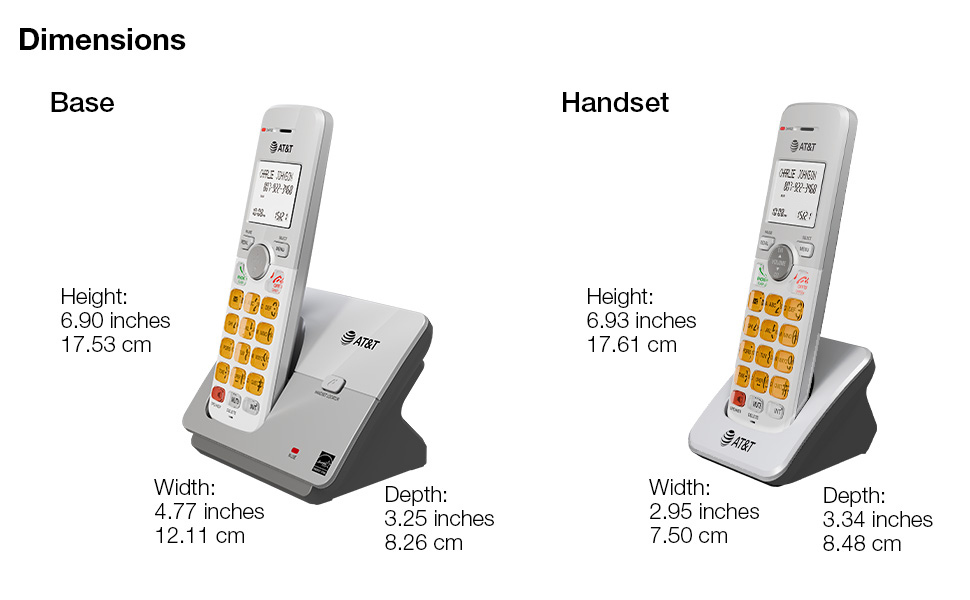
Image: A diagram illustrating the dimensions of both the base unit and a single handset, including height, width, and depth in inches and centimeters.
تضمین او ملاتړ
For warranty information and technical support, please refer to the quick start guide included in your package or visit the official AT&T support webسایټ
- جوړونکی: VTech
- نښه: AT&T
- آنلاین ملاتړ: Visit the AT&T Store on Amazon
د ساتنې پلانونه د پراخ پوښښ لپاره هم شتون لري:
- دوه کلن محافظتي پلان
- دوه کلن محافظتي پلان
- بشپړ ساتنه (میاشتنی پلان)
For details on these plans, please check the product listing or contact your retailer.
Ask a question about this manual
Ask about setup, troubleshooting, compatibility, parts, safety, or missing instructions. Manuals+ will review the question and use this page’s manual context to help answer it.