
1. پیژندنه
This instruction manual provides comprehensive guidance for the assembly, operation, and maintenance of your TRYX LUCA L70 E-ATX Mid-Tower PC Case. The LUCA L70 is designed to accommodate a wide range of components, supporting E-ATX, ATX, Micro-ATX, and Mini-ITX motherboards. It features a 270° panoramic tempered glass panel for an unobstructed view of your internal components, a modular design for flexible power supply placement, and extensive cooling capabilities. Please read this manual carefully before beginning assembly to ensure proper installation and safe use.
2. د خوندیتوب معلومات
Always observe the following safety precautions to prevent injury and damage to your components:
- جامد بریښنا: Always ground yourself before handling internal components to prevent electrostatic discharge (ESD) damage. Use an anti-static wrist strap if available.
- د بریښنا قطع کول: Ensure all power is disconnected from the power supply unit (PSU) and the wall outlet before installing or removing any components.
- تیزې څنډې: د نصبولو پرمهال د قضیې دننه د تیزو څنډو څخه محتاط اوسئ.
- وزن: The PC case, especially when fully assembled with components, can be heavy. Lift with care and seek assistance if necessary.
- وینټیلیشن: Ensure adequate airflow around the case to prevent overheating. Do not block ventilation openings.
- معتدل شیشه: Handle the tempered glass panels with extreme care. They are fragile and can shatter if dropped or subjected to impact. Avoid placing heavy objects on the glass.
3. محصول ختم شوview او ځانګړتیاوې
The TRYX LUCA L70 PC case offers a blend of aesthetic design and functional features for high-performance PC builds.
3.1 کلیدي ځانګړتیاوې
- 270° Panoramic Tempered Glass: Front and side panels feature reinforced tempered glass for an unobstructed view of your internal components.
- ماډلر ډیزاین: The power supply unit (PSU) can be positioned at the top or bottom, offering flexibility for various build configurations and improved cable management.
- Excellent Cooling Support: Supports up to nine fans and radiators up to 420mm, ensuring optimal thermal performance for demanding systems.
- پراخه داخلي: Accommodates E-ATX motherboards (up to 280mm width), graphics cards up to 460mm in length, and CPU coolers up to 170mm in height. Rear cable management space up to 65mm.
- د ذخیره کولو اختیارونه: Features nine 2.5-inch drive bays and two 3.5-inch drive bays for ampد ذخیره کولو لپاره.
- Advanced I/O Ports: Includes one USB 3.2 Gen2x2 Type-C port (20Gbps, 30W Power Delivery), two USB 3.0 Type-A ports, and one 3.5mm 4-pole TRRS audio jack.
- د دوړو فلټرونه: Equipped with dust filters on the top and bottom to maintain a clean interior.
- Vertical GPU Mount Support: Ready for vertical GPU mounting (riser cable sold separately).
۳.۳ بصري اوورview

Figure 1: Stylish Design & Superior Performance. This image highlights the internal layout of the TRYX LUCA L70 PC case, showcasing its spacious interior, fan mounting options, and the 270-degree tempered glass panels. It also indicates a 19mm ultra-slim chassis, 4mm thick tempered glass, and an X-shaped floating foot construction that elevates the case by 40mm for improved airflow.
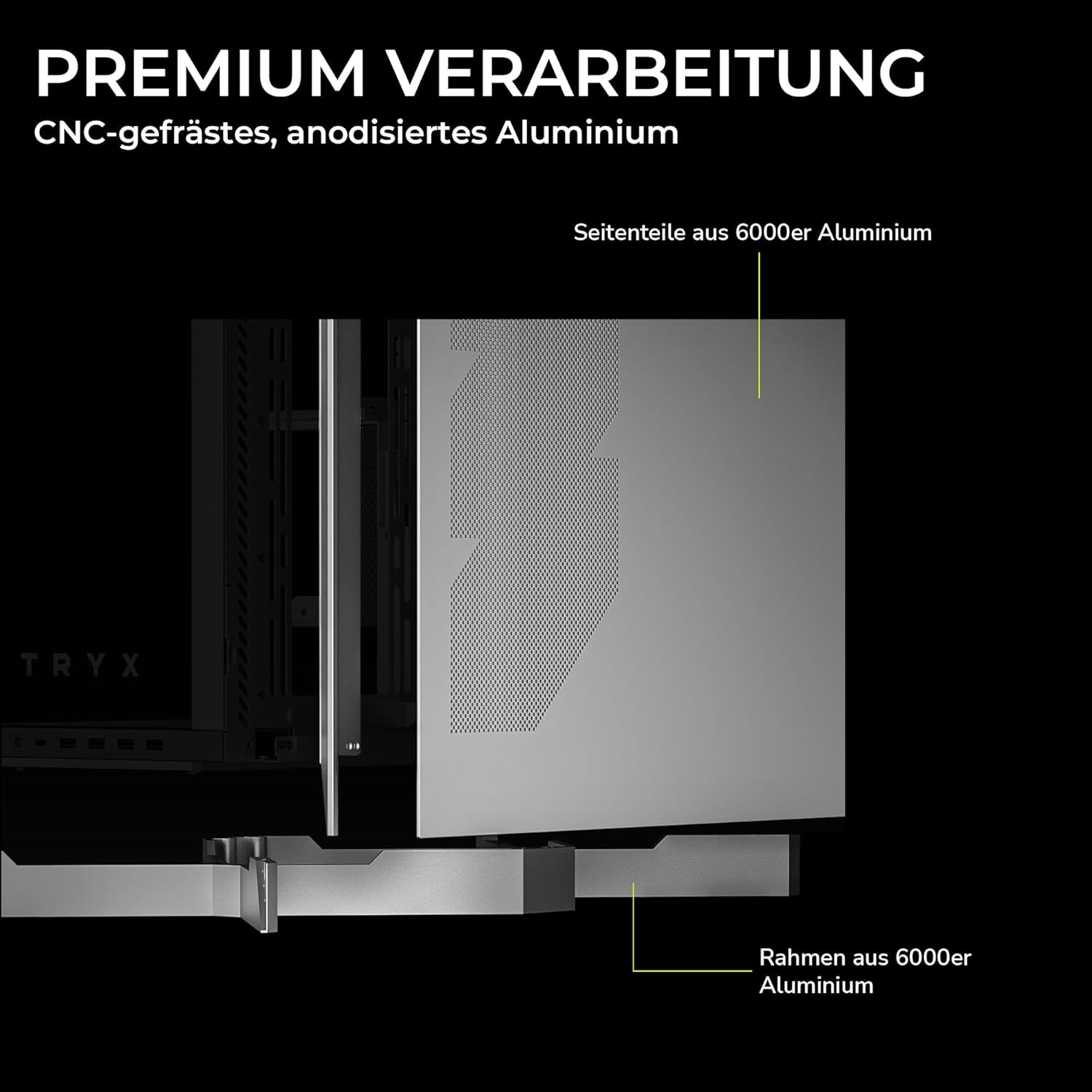
Figure 2: Premium Craftsmanship. This image details the construction materials, specifically highlighting the side panel made from 6000 series aluminum and the frame also constructed from 6000 series aluminum, emphasizing the case's durable and high-quality build.

Figure 3: Effortless Access with Swivel Front Panel. This image demonstrates the swing-out front panel feature, which allows for easy access to the front fan mounts and radiator space, simplifying installation and maintenance.

Figure 4: Modular Design. This illustration shows the flexible power supply unit (PSU) positioning (top or bottom) and the removable motherboard tray, which facilitates easier component installation and cable management. It also indicates various fan and radiator mounting points.

Figure 5: Extensive Connectivity Options. This image details the front I/O panel, including the microphone and speaker jacks, one USB-C 3.2 Gen 2x2 port (with 30W Power Delivery), and two USB-A 3.2 Gen 1 ports.

شکل ۱۴: د محصول ابعاد. This image provides a visual representation of the case's approximate dimensions: 26cm (width), 57cm (height), and 54cm (depth). Note that precise dimensions are listed in the specifications section.
4. ترتیب او نصب کول
This section outlines the general steps for installing your PC components into the TRYX LUCA L70 case. Always refer to your individual component manuals for specific installation instructions.
۳.۱ د قضیې چمتو کول
- قضیه په یوه فلیټ او مستحکم سطحه کېږدئ.
- Carefully remove the tempered glass side panel by unscrewing the thumb screws and gently pulling it away. Set it aside on a soft, non-abrasive surface.
- Remove any other panels or covers as needed for easier access to the interior.
4.2 د مادر بورډ نصب کول
- Install the CPU, CPU cooler (if air cooler), and RAM onto your motherboard before placing it in the case.
- Ensure the correct standoffs are installed for your motherboard form factor (E-ATX, ATX, Micro-ATX, Mini-ITX).
- Carefully align your motherboard with the standoffs and the I/O shield opening at the rear of the case.
- د چمتو شوي پیچونو سره مور بورډ خوندي کړئ.
4.3 د بریښنا رسولو واحد (PSU) نصب کول
- Determine your preferred PSU mounting position (top or bottom) based on your modular design preference.
- Slide the PSU into its designated bay from the rear of the case.
- د قضیې له شا څخه د پیچونو سره PSU خوندي کړئ.
- Connect the necessary power cables to your motherboard and other components.
۴.۴ د ذخیره کولو ډرایو نصب کول
- ۳.۵ انچه ډرایو: Locate the 2.5-inch drive mounts (up to 9 available). Secure SSDs or 2.5-inch HDDs using the provided screws or tool-less mechanisms.
- ۳.۵ انچه ډرایو: Locate the 3.5-inch drive bays (up to 2 available). Install HDDs into the drive cages, typically using trays or screws.
۲.۵ د ګرافیک کارت (GPU) نصب کول
- د قضیې په شا کې اړین پراخیدونکي سلاټ پوښونه لرې کړئ.
- خپل GPU په مدر بورډ کې مناسب PCIe سلاټ کې دننه کړئ.
- Secure the GPU with screws to the expansion slots.
- If using a vertical GPU mount (riser cable sold separately), follow the instructions provided with your vertical mount kit.
۴.۴ د فین او ریډیټر نصب کول
The LUCA L70 supports extensive cooling configurations:
- پورته: Up to 2x 120mm / 140mm fans or radiators up to 420mm.
- اړخ: Up to 3x 120mm / 140mm fans or radiators up to 420mm.
- لاندې: Up to 3x 120mm / 140mm fans or radiators up to 360mm.
- شاته: ۱x ۱۲۰ ملي متره فین.
Install fans and radiators using the appropriate screws, ensuring correct airflow direction.
4.7 د کیبل مدیریت
د کارولو ample cable routing cutouts and tie-down points behind the motherboard tray to manage cables neatly. This improves airflow and aesthetics. The case offers up to 65mm of space for cable management.
۴.۶ د مخکینۍ I/O اړیکې
Connect the front panel cables (USB, audio, power switch, reset switch, LED indicators) to the corresponding headers on your motherboard. Refer to your motherboard manual for header locations.
۴. ستاسو د کمپیوټر قضیه چلول
Once all components are installed and cables are connected, replace all panels, including the tempered glass side panel. Connect your peripherals (monitor, keyboard, mouse) and power cable to the PSU.
- پاور آن: Press the power button on the front I/O panel to turn on your PC.
- بندول: Shut down your operating system normally. You can also press and hold the power button for a few seconds for a forced shutdown (use only when necessary).
- بیا پیل کول: Use the reset button on the front I/O panel if available, or restart through your operating system.
6. ساتنه
منظم ساتنه ستاسو د کمپیوټر اجزاو غوره فعالیت او اوږد عمر ډاډمن کولو کې مرسته کوي.
- د دوړو فلټرونه: The top and bottom dust filters should be regularly cleaned. Gently remove them and clean with compressed air or rinse with water (ensure they are completely dry before reinstallation).
- بهرنۍ پاکوالی: بهرنۍ سطحې، په شمول د نرم شیشې تختو، په نرم، d سره پاک کړئ.amp ټوکر. د کثافاتو پاکوونکو یا محلولونو څخه ډډه وکړئ.
- د کور پاکول: Periodically open the case and use compressed air to remove dust buildup from fans, heatsinks, and other components. Ensure the PC is powered off and unplugged before cleaning the interior.
7. ستونزه حل کول
که تاسو له ستونزو سره مخ شئ، نو لاندې عام ستونزې حل کولو ګامونه په پام کې ونیسئ:
- کمپیوټر نه چالانیږي:
- وګورئ چې ایا PSU په شا کې فعال دی.
- ډاډ ترلاسه کړئ چې ټول بریښنا کیبلونه (24-pin ATX، 8-pin CPU، GPU بریښنا) په خوندي ډول وصل دي.
- تایید کړئ چې د مخکینۍ پینل بریښنا سویچ کیبل په سمه توګه د مور بورډ سرلیک سره وصل دی.
- د ښودلو محصول نشته:
- Ensure your monitor is connected to the graphics card (not the motherboard I/O, unless using integrated graphics).
- د ګرافیک کارت او RAM ماډلونه بیا تنظیم کړئ.
- ډیر ګرمول:
- Check fan connections and ensure they are spinning.
- د دوړو فلټرونه او داخلي برخې پاکې کړئ.
- Verify proper airflow direction within the case.
- USB پورټونه کار نه کوي:
- Ensure the front panel USB cables are correctly connected to the motherboard headers.
- Check your motherboard's BIOS/UEFI settings for USB port configuration.
For more complex issues, consult your motherboard or component manuals, or seek professional assistance.
8. مشخصات
| فیچر | مشخصات |
|---|---|
| برانډ | ټرېکس |
| د ماډل نوم | LUCA L70 |
| د ماډل شمیره | C-L700N-NN0H-G0W |
| د قضیې ډول | منځنی برج |
| رنګ | سپین |
| د مور بورډ مطابقت | E-ATX، ATX، Micro-ATX، Mini-ITX |
| ابعاد (چورل x لوړوالی x ژوروالی) | 261.8mm x 540.4mm x 571.85mm (Approx. 10.3 x 21.3 x 22.5 inches) |
| وزن | نږدې 16.2 کیلو ګرامه (35.7 پونډه) |
| مواد | Aluminum Alloy, SGCC Steel, Tempered Glass |
| د توسعې سلاټونه | 7 |
| اعظمي GPU اوږدوالی | 460mm |
| د اعظمي CPU کولر لوړوالی | 170mm |
| د PSU اعظمي اوږدوالی | 190mm (ATX) |
| د ډرایو خلیج | 9x 2.5-inch, 2x 3.5-inch |
| د فین ملاتړ (پورته) | 2x 120mm / 140mm |
| د فین ملاتړ (اړخ) | 3x 120mm / 140mm |
| د فین ملاتړ (لاندې) | 3x 120mm / 140mm |
| د فین ملاتړ (شاته) | 1x 120mm |
| د ریډیټر ملاتړ (پورته) | تر 420mm پورې |
| د ریډیټر ملاتړ (اړخ) | تر 420mm پورې |
| د ریډیټر ملاتړ (لاندې) | تر 360mm پورې |
| سامنے I / O بندرونه | 1x USB 3.2 Gen2x2 Type-C (20Gbps, 30W PD), 2x USB 3.0 Type-A, 1x 3.5mm 4-pole TRRS Jack |
| د دوړو فلټرونه | پورته، ښکته |
| ځانګړي ځانګړتیاوې | 270° Tempered Glass, Modular Design, Vertical GPU Mount Ready |
| GTIN | 06977029650209 |
9. تضمین او ملاتړ
9.1 د تضمین معلومات
The TRYX LUCA L70 PC Case comes with a 2 کلن تضمین from the date of purchase. This warranty covers defects in materials and workmanship under normal use. It does not cover damage caused by misuse, accident, modification, unauthorized repair, or improper installation. Please retain your proof of purchase for warranty claims.
9.2 تخنیکي ملاتړ
For technical assistance, troubleshooting, or warranty inquiries, please contact TRYX customer support. Refer to the official TRYX website or your retailer's support channels for the most up-to-date contact information. When contacting support, please have your product model (LUCA L70) and proof of purchase ready.